Overview
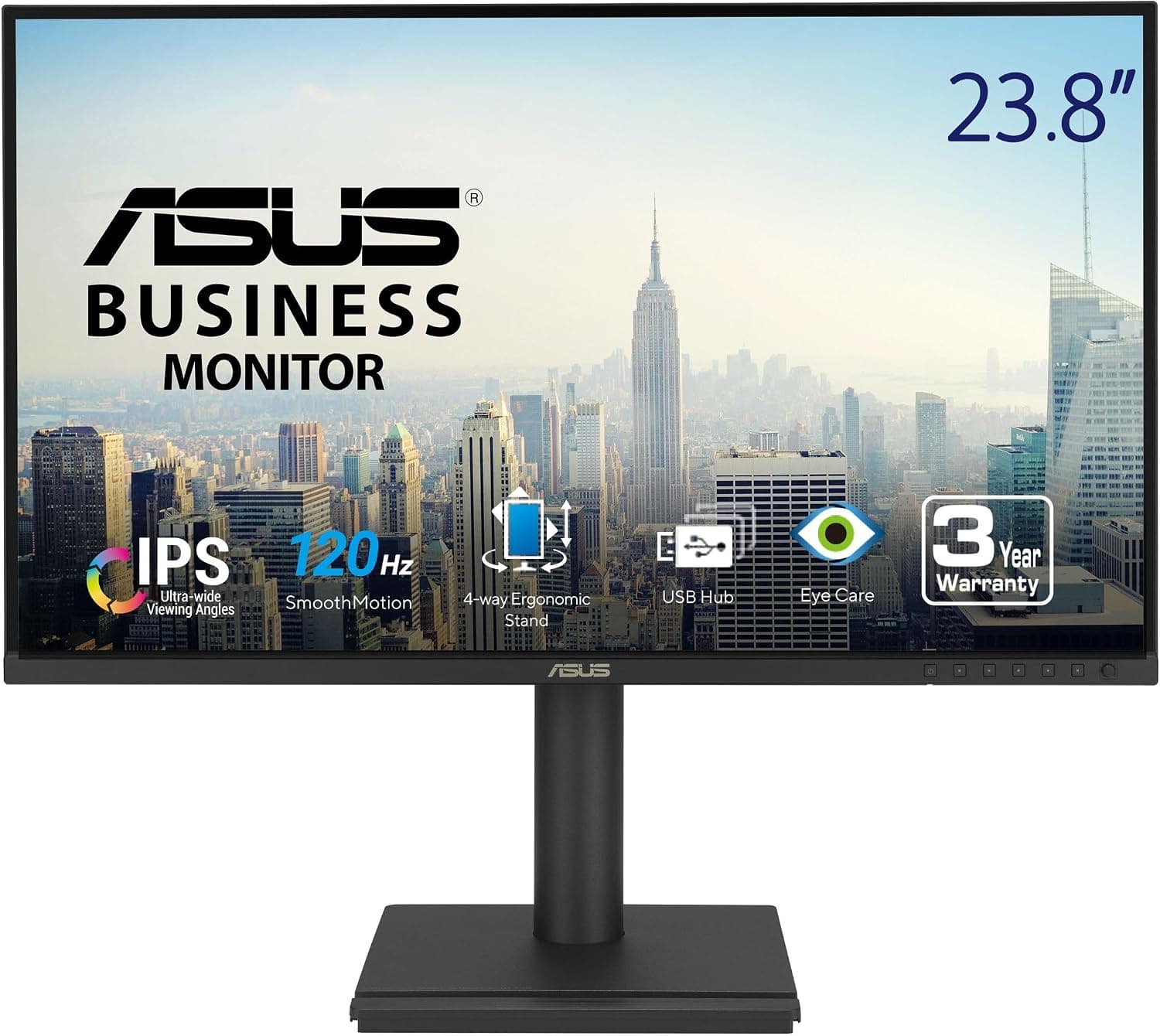
The ASUS VA24EHF2-61 cm 1080P FHD 120Hz IPS コンピューターモニター (the last word is Japanese for 'computer monitor') is an entry-level ASUS monitor that pairs a 23.8-inch Full HD (1920×1080) IPS panel with a 120Hz refresh rate.
In short, it suits people who want something smoother than a 60Hz office monitor but do not need a full gaming monitor. The catch is that the only video inputs are HDMI and VGA.
There is no DisplayPort and no USB-C, and that limitation decides whether this monitor is right for you.
It is rated at 1ms MPRT, supports Adaptive-Sync (VRR), and has TÜV Rheinland-certified flicker-free and low blue light features. With 99% sRGB coverage, it handles web browsing, video, and hobby-level photo touch-ups without trouble.
The frameless design and 100×100mm VESA mount make it easy to use in a dual-monitor setup or on a monitor arm.
As of October 2026, the Amazon.co.jp listing showed a rating of 4.9 out of 5 from 24 reviews.
That score is excellent, but 24 reviews is a small sample. It is too early to judge long-term durability or unit-to-unit variation from that number alone.
What 120Hz Actually Changes
Going from 60Hz to 120Hz cuts the time each frame stays on screen from about 16.7ms to about 8.3ms.
You notice this most in everyday use, not just in games. Scrolling in a browser or spreadsheet, moving the cursor, and dragging windows all show much less blur.
To get the full benefit in games, your PC must actually render around 120fps. Full HD is a light resolution, but demanding games at high settings may still sit around 60fps, depending on your graphics card.
Even then, if Adaptive-Sync works in your setup, it reduces tearing and stutter when the frame rate moves around.
| Item | Typical 60Hz monitor | ASUS VA24EHF2 | 144Hz+ gaming monitor |
|---|---|---|---|
| Time per frame | ~16.7ms | ~8.3ms | ~6.9ms or less |
| Office work feel | Standard | Smooth scrolling and cursor | Small gain over 120Hz |
| Competitive FPS | Not suited | Fine for casual play | Built for it |
| Video inputs | Varies | HDMI and VGA only | Many include DisplayPort |
As the table shows, the jump from 60Hz to 120Hz is much bigger than the jump from 120Hz to 144Hz+ for office work. If you mostly work and only game now and then, 120Hz is a sensible middle ground.
If you want every edge in competitive shooters, start with 144Hz or higher.
Compatibility Guide
Desktop PCs
The usual setup is to connect the HDMI output of your graphics card or motherboard. 1080p at 120Hz is not a heavy signal, so even fairly old graphics cards can often drive it.
The thing to watch is that many graphics cards have only one HDMI port, with the rest being DisplayPort. If this is your second monitor, you may end up using a DisplayPort-to-HDMI adapter.
Some adapters limit output to 60Hz, so pick one that clearly states 120Hz support.
Will Adaptive-Sync (VRR) Work?
On this monitor, VRR runs over HDMI. AMD Radeon cards generally support variable refresh over HDMI.
On NVIDIA GeForce cards, HDMI VRR depends on the method the display uses, so it may not turn on in every setup. GeForce users should check whether the G-SYNC Compatible option appears in the NVIDIA Control Panel after connecting.
Even without VRR, 120Hz output still works, so this is not a deal-breaker.
Laptops
If your laptop has an HDMI port, one cable is all you need. Laptops with only USB-C ports need a USB-C-to-HDMI adapter or a dock, and the USB-C port must support video output (DisplayPort Alt Mode).
The monitor cannot charge the laptop over a single cable, so you still need a separate charger.
Game Consoles
You can connect a game console over HDMI. However, 120Hz only applies when both the console and the game support 120Hz output and it is enabled in the console's video settings.
Many games run at 60Hz, so if consoles are your main use, expect limited benefit from 120Hz.
VGA Input
VGA is an analog input for older PCs and business equipment. Analog connections generally show softer text than digital ones and are not meant for 120Hz use.
Check the manual for the refresh rates VGA supports, and treat it as a backup input for legacy devices.
Mounting and Audio
The VESA mount is 100×100mm, which fits common monitor arms and wall mounts. The spec list does not mention height adjustment or portrait rotation, so if you want to fine-tune screen height, plan on using an arm.
Before choosing one, check the monitor's weight on the product page against the arm's load rating. Power is supplied by an AC power cord.
Audio comes out of the headphone jack, so sound sent over HDMI can play through headphones or external speakers. Built-in speakers are not listed in the specs, so check the product page if you need them.
Product Info
The product page lists it as 'ASUS VA24EHF2-61 cm 1080P FHD 120Hz IPS コンピューターモニター'. The '61 cm' in the name appears to refer to the 24-inch class, while the spec sheet gives the screen size as 23.8 inches.
| Item | Detail |
|---|---|
| Screen size | 23.8 inches |
| Resolution | 1920×1080 (Full HD) |
| Panel | IPS |
| Refresh rate | 120Hz |
| Response time | 1ms MPRT |
| Color gamut | 99% sRGB |
| Video inputs | HDMI, VGA |
| Audio output | Headphone jack |
| VESA mount | 100×100mm |
| Adaptive Sync | Supported (VRR) |
| Low blue light / flicker free | TÜV Rheinland certified |
At 23.8 inches and Full HD, pixel density is about 92ppi.
That is typical for a 24-inch-class 1080p screen, and text stays easy to read at 100% scaling in Windows.
As of October 2026, the Amazon.co.jp listing price was ¥34,254.
It is sold and shipped by a marketplace seller (Citron berry), not by Amazon itself. That looks high for an entry-level 1080p 120Hz monitor, so compare prices at other retailers and similar models before buying.
Prices move a lot with sales and seller changes, so check the product page for the current price.
According to the original listing details, the box includes an HDMI cable, power cord, quick start guide, and warranty card. It was also said to include a one-month Adobe Creative Cloud access code valid until August 31, 2026, which has already expired as of this update.
The standard manufacturer warranty is stated as three years in Japan. When buying from a marketplace seller, confirm that the unit is a domestic retail model and check the warranty terms first.
Who It's For
- Office and remote workers moving up from 60Hz: Smooth 120Hz scrolling and wide IPS viewing angles make browsers and spreadsheets more comfortable. Flicker-free and low blue light features help during long work sessions.
- Casual gamers using a desktop PC over HDMI: With 120Hz, 1ms MPRT, and Adaptive-Sync, racing, action, and casual shooter games feel noticeably better. It is a good budget step up from 60Hz.
- Dual-monitor builders: The frameless design and VESA mount help two screens sit side by side with a less visible seam. It also works well as a secondary screen next to a main monitor.
- People who still need to connect older equipment: The VGA input lets you use it as a backup screen for old PCs or business devices without HDMI.
Before You Buy
No DisplayPort and no USB-C is the biggest compromise. If your graphics card's HDMI port is already taken, or your laptop only has USB-C, you will need to buy an adapter or dock.
Adapters can cause problems such as being stuck at 60Hz. If you already know you need one, a model with DisplayPort or USB-C may cost less overall and save hassle.
GeForce users may not get VRR. Support for variable refresh over HDMI depends on the graphics card brand, its generation, and the method the monitor uses.
An Adaptive-Sync label does not guarantee it will turn on in your setup.
120Hz may not turn on just by plugging in. Windows often leaves the refresh rate at 60Hz in Advanced display settings.
If the screen does not feel smoother, check there first. The cable or adapter can also stop the 120Hz option from appearing at all.
1ms MPRT is not the same as GtG (gray-to-gray) response time. MPRT figures are generally measured with a backlight-strobing blur reduction mode turned on.
That mode dims the screen and, on some models, cannot run together with VRR. Do not expect response performance equal to a competitive gaming monitor based on that number alone.
99% sRGB does not guarantee color accuracy. It means the panel covers nearly the sRGB range.
Factory calibration and HDR are not listed in the specs. It is not suited to professional print color matching or wide-gamut work such as DCI-P3 video editing.
Full HD limits screen space. At about 92ppi on 23.8 inches, text is easy to read, but if you want many windows side by side or sharper text, WQHD or higher will likely satisfy you more.
Check the model number and the seller. The product name runs the model number and size together as 'VA24EHF2-61 cm', and ASUS sells similarly named models with different suffixes.
Make sure the model number on the box or rear label matches what you expected, and compare it with the photos and specs on the product page. Also, the listing had only 24 reviews as of October 2026, so the 4.9 rating may change as more reviews come in.
FAQ
Q. What cable do I need for 120Hz? A.
Use an HDMI cable. First check in Windows display settings whether 120Hz is available with the included HDMI cable.
If you are converting from DisplayPort, choose an adapter that clearly supports 120Hz.
Q. Can I connect a USB-C-only laptop such as a MacBook? A.
Yes, with a USB-C-to-HDMI adapter or a dock. The laptop's USB-C port must support video output, and the monitor cannot charge the laptop.
Q. Does Adaptive-Sync work with GeForce cards? A.
It depends on your setup. VRR over HDMI depends on the graphics card side.
Check whether the G-SYNC Compatible option appears in the NVIDIA Control Panel after connecting. Even if it does not, 120Hz still works.
Q. Is it good enough for competitive FPS games? A.
For casual play it is clearly better than 60Hz. If you play ranked matches to win, a 144Hz+ gaming monitor with DisplayPort is a better fit.
Q. Does it have built-in speakers? A.
The only audio output listed in the specs is a headphone jack. Plan on headphones or external speakers, and check the product page for built-in speakers.
Product Disclosure (Amazon)
- Manufacturer: ASUS
- Seller: Citron berry
- Fulfilled by: Citron berry
- ASIN: B0H46VYY2G
- Note: This article covers a manufacturer-made product based on Amazon listing details.