Overview
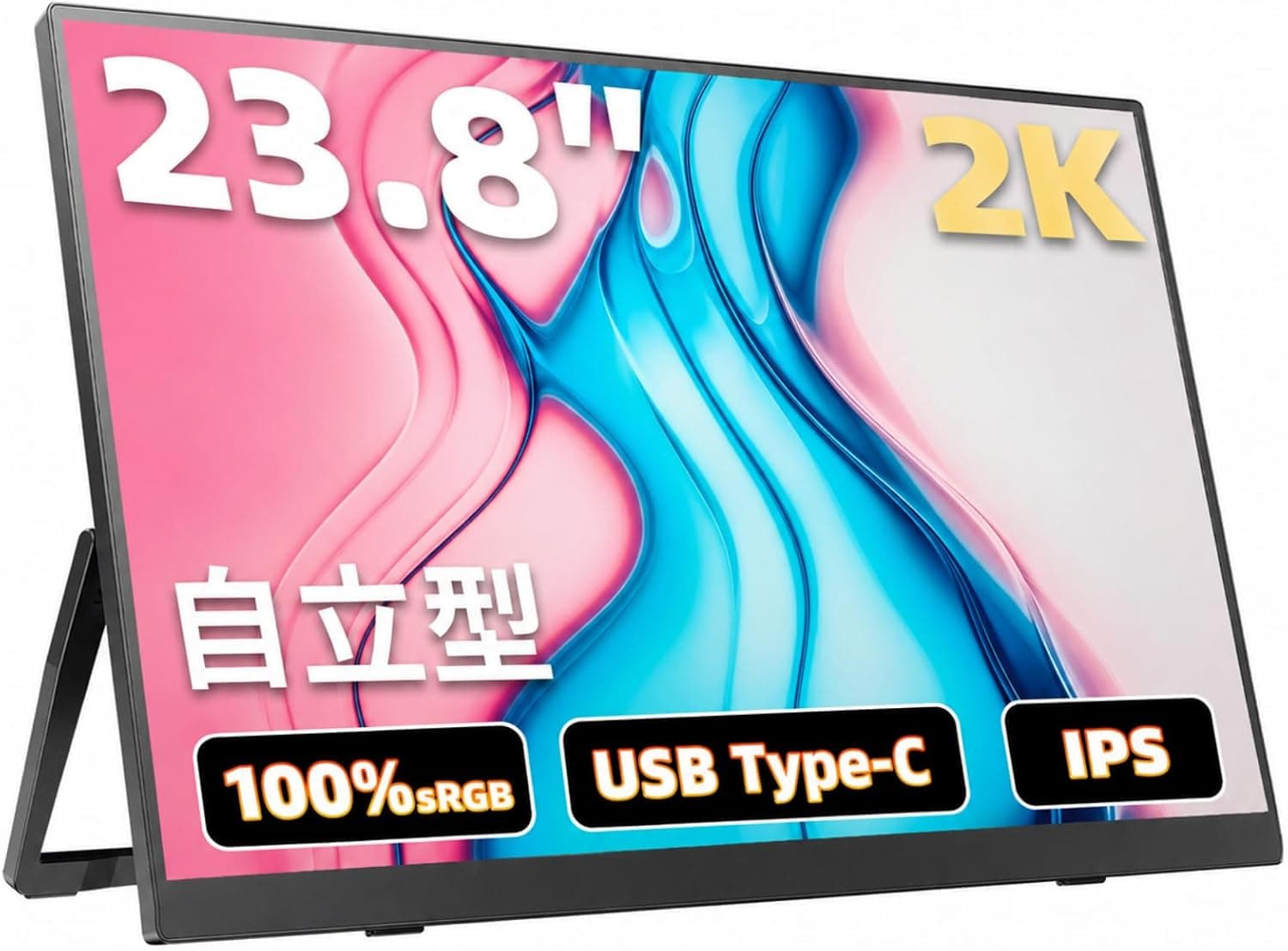
The Acouto Zen24 Pro — 23.8-inch 2K 90Hz portable gaming monitor is a portable monitor with the screen size of a desk monitor.
It pairs a 23.8-inch 2560x1440 (WQHD) IPS panel with two USB Type-C ports and one HDMI input.
In short, it makes sense if you want to add a large work screen to a laptop over a single cable. It is a poor fit if you plan to carry it in a bag every day, or if you want high refresh rates from a game console.
The listed specs are a 90Hz refresh rate, 1ms (MPRT) response, 1500:1 contrast, and 100% sRGB / 95% DCI-P3 color coverage. The anti-glare matte finish keeps reflections down near windows or under room lighting.
The chassis is aerospace-grade aluminum alloy with an integrated stand, the back supports VESA 100x100mm, and speakers are built in.
On Amazon.co.Check the retailer's page for the latest user reviews.
Ratings change over time, so check the latest score and the content of the negative reviews (especially power and compatibility complaints) before buying.
What the Specs Tell You
| Item | Listed value | What it means |
|---|---|---|
| Size / resolution | 23.8 in / 2560x1440 | About 123 ppi, noticeably sharper text than a 24-inch 1080p screen (about 92 ppi) |
| Panel | IPS (matte) | Wide viewing angles, little color shift off-axis |
| Refresh rate | 90Hz | Smoother than 60Hz, but not in the same class as 144Hz gaming monitors |
| Response time | 1ms (MPRT) | A motion-blur metric, not the same as pixel transition (GtG) |
| Contrast | 1500:1 | Higher than the roughly 1000:1 typical of IPS |
| Color gamut | 100% sRGB / 95% DCI-P3 | Plenty for web, photo viewing and light editing |
| Inputs | USB-C x2, HDMI x1 | Video and power can go to separate ports |
The combination that matters most is WQHD on a 23.8-inch screen.
At about 123 ppi, text stays crisp at 100 to 125% Windows scaling, and two browser windows or a spreadsheet side by side feel comfortable. Typical 15.6-inch portable monitors often feel barely larger than the laptop screen itself.
Fixing that is this product's main reason to exist.
The 90Hz refresh pays off on a PC, where scrolling and cursor movement are clearly smoother than at 60Hz. The 1ms MPRT figure, by contrast, describes perceived blur with techniques such as black-frame insertion.
Do not compare it directly with a 1ms GtG rating on another product. Competitive FPS players should look at dedicated high-refresh monitors.
The product name mentions HDR, but our data includes neither a peak brightness figure nor an HDR certification. Treat it as a monitor that accepts an HDR signal, and do not expect true HDR impact.
Compatibility Guide
The compatibility notes say that USB-C requires a USB PD power source and that HDMI works with most consoles and PCs. In practice, most problems come from two things: power and video-output support.
Connection Cheat Sheet
| Device | Video path | Power | Common pitfall |
|---|---|---|---|
| Laptop | Single USB-C | From the laptop, or a PD charger on the second USB-C | The laptop port must support DisplayPort output |
| Smartphone | USB-C | Separate PD charger expected | Many phones cannot output video |
| PS5 / Xbox Series X / S | HDMI | PD power on USB-C | Usually runs at 60Hz |
| Nintendo Switch | Dock via HDMI, or direct USB-C where supported | PD power | Output tops out at 1080p and gets upscaled |
| Desktop PC | HDMI | PD power on USB-C | No DisplayPort input |
Laptops and Macs
Not every USB-C port on a laptop carries video. You need DisplayPort Alt Mode or Thunderbolt, so look for the DP or lightning-bolt icon next to the port, or check your laptop's spec sheet.
A port without video support produces a confusing symptom: the power light comes on, but nothing appears on screen. Some Mac models limit how many external displays they can drive depending on the chip.
If you already use another monitor, confirm that a second one will work first.
Phones and Tablets
Only some phones can output video over USB-C. iPhones with USB-C (iPhone 15 and later) support it, while Android support varies even within the same brand.
Even when video works, a phone cannot realistically power a 23.8-inch panel.
Plan on a PD charger connected to the second USB-C port.
Game Consoles
PS5 and Xbox Series X|S connect over HDMI. Consoles normally output at 60Hz or 120Hz, so on this 90Hz monitor they typically run at 60Hz.
Treat 90Hz as a PC feature. Nintendo Switch is named in the product title, but the Switch outputs a maximum of 1080p, so its image is upscaled on the WQHD panel.
Pixel-art games may look slightly soft. Whether a direct USB-C connection works depends on the Switch's power requirements and the monitor's support, so check the compatibility notes on the product page.
Monitor Arms
With VESA 100x100mm support, it fits standard monitor arms. Our data does not list the weight, so check the product page before matching it against an arm's load rating.
Product Info
The price on Amazon.co.jp was ¥33,980 as of August 24, 2026.
Prices move with sales and stock, so check the product page for the current price. The 'global' price entry also points to the same Amazon.co.jp listing, so we could not confirm a US price.
The eBay link is only a search results page with no price.
The manufacturer is Acouto, the seller is Acouto's own monitor store on Amazon Japan, and Amazon handles fulfillment. The ASIN is B0H9L736XG.
According to the listing, the warranty is one year from purchase and extends to three years of zero-bright-dot coverage after registration. The listing also says the box includes USB-C and HDMI cables, an AC adapter and a quick-start guide.
Warranty terms and accessories can change, so confirm them on the product page when you buy.
Compared with an ordinary desk-only WQHD monitor of the same size, you pay a premium for single-cable USB-C use and an aluminum body with an integrated stand that is easy to move. If the monitor will never leave your desk and your PC has a free DisplayPort or HDMI output, a desk monitor at the same budget is worth considering.
Compared With Alternatives
| Option | Screen | Best for |
|---|---|---|
| Acouto Zen24 Pro | 23.8 in WQHD 90Hz | A large extra workspace that can occasionally move rooms |
| VisionOwl 16-inch 2.5K 144Hz | 16 in | Travel and daily carry |
| UPERFECT 17.3-inch 4K 120Hz | 17.3 in | Portable size with higher sharpness |
| HAILESI S135 13.5-inch | 13.5 in | Lightweight setups with a Switch |
| Acer 23.8-inch 1080p 120Hz | 23.8 in | Desk-only use; HDMI, DisplayPort and mini D-Sub inputs |
Against the 23.8-inch Acer desk monitor, the Zen24 Pro has more pixels and a USB-C connection.
The Acer wins on refresh rate and as a fixed setup. Against 16 to 17-inch portables, the Zen24 Pro gives far more workspace but cannot match them for portability.
Decide first whether you will carry it or leave it in place, and the right choice usually becomes obvious.
Best Use Cases
- Remote workers on a laptop: The 23.8-inch WQHD panel fits documents, a browser and a spreadsheet side by side. If your laptop has a video-capable USB-C port, one cable adds the screen. It is not suited to serious 4K photo or video work.
- People with small desks: Because it uses an integrated stand rather than a desk-monitor base, it is easy to stand on a shelf when not in use.
- Casual console players: It gives a Nintendo Switch or a phone a big screen without a TV. If you want 120Hz on PS5 or Xbox Series X, choose a 120Hz-capable monitor instead.
- Bringing a screen on trips: The aluminum chassis is sturdy, and the listing says the stand doubles as a carry handle. That is realistic for car travel. With no battery, you need wall power or a high-output PD power bank.
Before You Buy
It is portable in name, but desk-sized. The screen area alone is roughly 530 x 300 mm, so it will not slip into a laptop bag the way a 15.6-inch model does.
Our data does not list the weight, so check it if portability matters.
It will not run without external power. There is no internal battery, so you need a USB PD charger or power bank.
A low-output charger can cause dimming or dropouts. Check the required wattage on the product page and pick a charger with headroom.
Consoles usually cannot use 90Hz. As noted above, they normally run at 60Hz here.
Expecting a console to look smoother just because the monitor is 90Hz is a common misunderstanding.
Keep HDR and speaker expectations modest. No HDR certification or peak brightness is given.
The speakers are a convenience, so use headphones or external speakers if sound matters. We could not confirm whether there is a headphone jack, so check the product page if you need one.
Height adjustment is unconfirmed. All we can confirm is the integrated stand and VESA support.
For long work sessions at eye level, plan on a monitor arm.
Make sure you are on the right listing. Portable monitors come in many similarly named variants, and this product's long title makes it easy to land on a different size or an older model.
When buying, check the photos, the title and that the ASIN (B0H9L736XG) matches.
FAQ
Q. Can a smartphone supply both power and video? A.
Not realistically. Even with a video-capable phone, plan on powering the monitor from a separate PD charger.
Q. Will a PS5 display at WQHD? A.
PS5 and Xbox Series X|S connect over HDMI and usually run at 60Hz. Check the console's video output settings to see whether WQHD is available.
Q. Does a Nintendo Switch work with a single USB-C cable? A.
The product name says it is made for the Switch, but direct USB-C depends on power conditions and the Switch model. HDMI through the dock is the reliable route, and the 1080p output is upscaled.
Q. Can it be my main desktop monitor? A.
Yes, over HDMI. It has no DisplayPort input and still needs USB-C power.
If it will never move, also compare it with desk monitors.
Q. What about dead pixels? A.
According to the listing, registering the product extends zero-bright-dot coverage to three years. Check the screen with solid colors right after delivery, and complete the registration.
Product Disclosure (Amazon)
- Manufacturer: Acouto
- Seller: Acouto モニター専門店
- Fulfilled by: Amazon
- ASIN: B0H9L736XG
- Note: This article covers a manufacturer-made product based on Amazon listing details.