This article covers the cocopar 15.6-inch portable monitor, listed as cocopar モバイルモニター 15.6インチ耐久アルミ合金製ベゼルレス VESA 標準HDMI 非光沢IPS液晶軽量薄型 1920*1080 FHD モバイルディスプレイゲーム FreeSync対応, focusing on what actually matters before you buy.
Overview
The short version: this is a budget-focused portable monitor aimed squarely at adding a second screen next to a laptop. It pairs a 15.6-inch FHD (1920 x 1080) matte IPS panel with a 650g chassis, two USB-C ports and one full-size HDMI port.
On Amazon.co.Check the retailer's page for the latest price.
Prices on this kind of product move often, so treat that figure as a snapshot and check the listing.
The spec sheet is deliberately modest. Refresh rate tops out at 60Hz, and response time, brightness and color gamut are not published by the manufacturer.
In other words, this product never set out to be a gaming panel or a color-critical display. Buy it understanding that, and it delivers; buy it expecting more, and it will feel ordinary.
| Use case | Fit | Why |
|---|---|---|
| Laptop dual-screen (docs, spreadsheets, browser) | Excellent | One USB-C cable, no drivers |
| Travel and cafe work | Excellent | 650g plus a cover that folds into a stand |
| Secondary screen for PS5 / Xbox / Switch | Good | Full-size HDMI, but needs separate power |
| Primary console display | Fair | 15.6 inches, 60Hz, basic speakers |
| Competitive FPS or fighting games | Poor | 60Hz ceiling, response time unpublished |
| Photo or video color work | Poor | Brightness and gamut unpublished |
| Permanent desk setup | Poor | The same budget buys a 24-inch desktop panel |
Compatibility Guide
USB-C: why it sometimes shows nothing
The biggest pitfall is assuming any USB-C port will carry video. The host port must support DisplayPort Alt Mode.
Thunderbolt 3/4 and USB4 ports include it, but many laptops mix charge-only or data-only USB-C ports into the same chassis, and you cannot tell them apart by looking. Check the manufacturer spec page for the specific port before buying.
Corporate-issue laptops are the most common source of surprises here.
HDMI: the value of a full-size port
This monitor uses a standard Type-A HDMI connector rather than mini or micro HDMI. Most portable monitors use the smaller variants, so this is a quiet but real advantage: no adapters to buy, any HDMI cable you already own works, and you avoid the flaky contacts that thin adapter cables are prone to.
Note that HDMI carries video and audio but no power, so you must feed the monitor separately through USB-C using the bundled USB-A to C cable or the AC adapter. Most reports of a black screen over HDMI come down to forgetting power.
Consoles
PS5, PS4 and Xbox output video over HDMI only, so HDMI plus separate power is the standard setup. For Nintendo Switch, use the official dock's HDMI output rather than the console's USB-C port, which is unreliable with third-party displays.
Set the console output to 1080p; even a 4K-capable machine cannot add detail to a 1920 x 1080 panel. The built-in stereo speakers are basic, so route audio out of the 3.5mm jack if sound matters.
Phones and tablets
A phone with DisplayPort Alt Mode over USB-C works with a single C-to-C cable. iPhone 15 and later use USB-C and qualify; Lightning-era models need Apple's video adapter.
Android support varies widely, and cheaper models from the same brand often lack it. Powering the monitor from a phone drains the battery quickly, so for long sessions plug the AC adapter into the monitor and leave the phone out of the power path.
Mac and VESA mounting
MacBook Thunderbolt ports include DP Alt Mode, so a single C-to-C cable works. Note that base M1 and M2 Apple Silicon machines support only one external display, so you cannot add this alongside an existing monitor.
VESA mounting is supported, which is uncommon in this category and useful if you want to put the panel on an arm. Confirm the screw pitch, such as 75 x 75mm, on the product page.
Product Info
| Item | Value |
|---|---|
| Screen size | 15.6 inches |
| Resolution | 1920 x 1080 (FHD) |
| Panel type | IPS (matte) |
| Refresh rate | 60Hz |
| Weight | 650g |
| Ports | USB-C x2, HDMI x1, 3.5mm audio |
| Speakers | Built-in stereo |
| FreeSync | Supported |
| Blue light reduction | Supported |
| Warranty | 2 years |
The two USB-C ports matter more than the spec line suggests. You can dedicate one to power and the other to video, so a host with weak power delivery is no longer a dead end.
Since most portable monitor faults trace back to insufficient power, having that escape route is a practical difference.
The matte finish is the right call for a device meant to leave the house. Under cafe lighting or near a window, a glossy panel reflects your own face and the ceiling.
The trade-off is less punchy color and shallower blacks than a glossy screen would give. Read it as a choice that favors text legibility over video immersion.
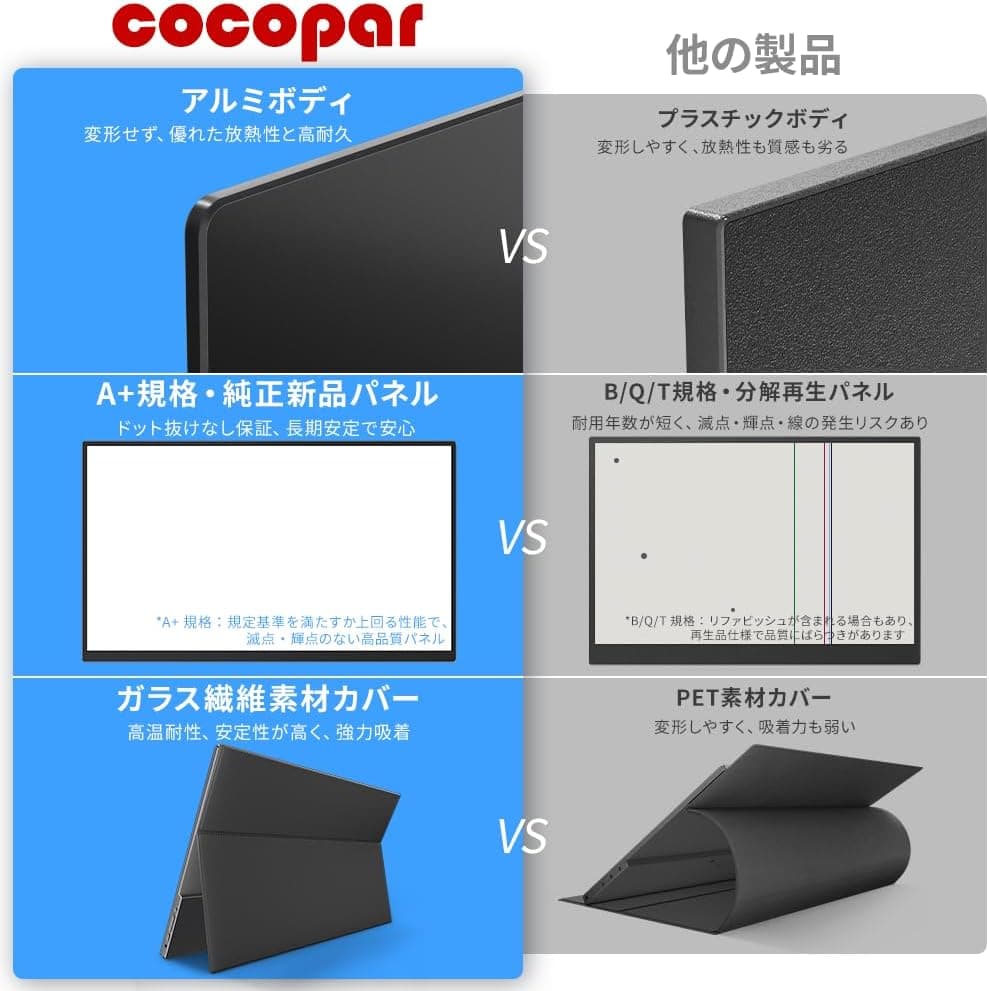
The aluminum-alloy, bezel-less chassis keeps weight at 650g, light enough to carry alongside a laptop without rethinking your bag.
co.jp.
Articles do not update while prices do, so verify the current figure on the listing. The box includes a C-to-C cable, an HDMI cable, a USB-A to C power cable, an AC adapter, and a magnetic cover that doubles as a stand, so nothing extra is required on day one.
Warranty runs 2 years, which is generous at this price.
Check the retailer's page for the latest user reviews. The sample size is the reassuring part: that is a long-running average across many units, not the impression of a handful of lucky buyers.
How It Compares
At roughly the same money, 24-inch FHD desktop monitors are a real alternative. They give a larger picture, a stand with real height and tilt adjustment, and their own power supply.
As a pure working surface, the desktop panel wins.
What this monitor wins is the case where the desk itself changes. Commuting between home and office, working from a hotel room, taking a screen to a relative's house: in those scenarios a 24-inch panel is not even a candidate.
If your screen will sit on the same desk all day every day, buy the desktop panel instead.
The same logic applies to gaming. This budget range includes 75Hz and 144Hz desktop gaming monitors, and there is no contest in motion clarity.
FreeSync here exists to suppress tearing within the 60Hz envelope, not to raise the frame rate ceiling.
Setup and Common Snags
- Start with a single C-to-C cable.
If it works, you are done. 2.
If nothing appears, your laptop's USB-C port likely lacks DP Alt Mode. Switch to HDMI plus USB power before suspecting a broken cable.
- Flicker, dimness or intermittent blackouts mean insufficient power.
Plug the AC adapter into the free USB-C port. 4.
On Windows, press Win+P and choose Extend. Around 125% scaling suits a 15.6-inch FHD panel.
Match scaling with your laptop display or windows will jump size when moved between screens. 5.
No sound usually means the OS output device did not switch. Select the monitor manually in sound settings.
Recommended Users
- Laptop-only workers who want reference material and the working window side by side. This is the lowest-friction way to add a screen: no drivers, no configuration.
- Frequent travelers who refuse to add bulk. At 650g with a cover that folds into a stand, it fits in a laptop sleeve.
- Console owners who want to play in a bedroom or another room. Full-size HDMI means the cable you already have just works.
Before You Buy
Start with the performance ceiling. A 60Hz limit with unpublished response time rules this out for competitive FPS or fighting games.
FreeSync operates inside that 60Hz envelope, so it will not make anything feel faster. Likewise, with brightness and color gamut unpublished, you cannot rely on it for near-outdoor visibility or for color work destined for print or streaming.
Treat it as a productivity second screen and it will not disappoint.
Power is the second issue. There is no internal battery, so a power source is mandatory.
Drawing from your laptop's USB-C port drains that laptop faster. If you plan to work somewhere without an outlet, budget for a PD-capable power bank as part of the kit.
Light enough to carry and able to run unplugged are not the same claim.
The stand deserves a look too. The magnetic cover folds into a stand with a handful of fixed angles; there is no height adjustment and no portrait orientation.
Over long sessions you end up looking down at it, which your neck will notice. If it will mostly sit on a desk, consider a separate stand or an arm, which the VESA support makes possible.
Finally, read the listing carefully. In the data behind this article, an entry labeled Amazon US carried the same yen price as the Japanese listing, so do not read it as an overseas price.
Portable monitors in this range also tend to bundle size and touch-panel variants onto one product page, where switching options changes both spec and price. Listing metadata is occasionally wrong outright, so confirm from the images, the title and the selected variant that you are buying the 15.6-inch non-touch model before checkout.
FAQ
Q: I connected USB-C but nothing appears. Is it broken?
A: Suspect the host port first. A USB-C port without DisplayPort Alt Mode will not carry video.
Try a Thunderbolt-marked port, or switch to HDMI plus USB power. Only if both fail should you suspect the monitor.
Q: Can I use it with a Nintendo Switch? A: Yes, through the official dock's HDMI output.
Power the monitor separately with the included AC adapter. The full-size HDMI port accepts the dock's own cable.
Q: The screen flickers, dims, or cuts out. A: This is almost always insufficient power.
Plug the included AC adapter into the second USB-C port so the monitor no longer depends on the host device.
Q: Does it display 4K from a PS5? A: No.
The panel is 1920 x 1080, so set the console to 1080p. A 4K source cannot add detail the panel cannot show.
Q: Is there a built-in battery?
A: No. It needs USB-C power or the bundled AC adapter. Plan on a PD power bank for use away from an outlet.
Q: Can it go on a monitor arm? A: Yes, it supports VESA mounting.
Check the screw pitch, such as 75 x 75mm, and the arm's minimum load rating: at 650g it may be too light for some gas-spring arms without retensioning.
Product Disclosure (Amazon)
- Manufacturer: cocopar
- Seller: cocopar tech
- Fulfilled by: Amazon
- ASIN: B083RFYZGW
- Note: This article covers a manufacturer-made product based on Amazon listing details.