Parts Life
A desktop companion where PC part characters show your machine's load through how they look. No numbers up front. The busier they are, the faster they move; at full tilt their outlines glow red and steam rises from their heads. And the work they do each day quietly becomes an adventure of its own.
It is Task Manager — minus the numbers, plus parts that are alive.
Unzip it and run PartsLife.exe. Single-exe version (no unzipping) also exists, but it uses nearly twice the memory while resident, so we recommend the zip. It also lacks the helper, so the storage check is not available.
Windows 10 (1809+) / 11, 64-bit. No installer, no .NET required. Free and open source.
While resident it uses about 1.8% of one CPU core and around 118 MB of memory — measured on real hardware.
What's new in v0.7.4: tabs along the top of the window — Look / Display / Startup & updates / Checkup / Data. Click one to open its settings below; click it again or press Esc to fold it. Ctrl+1–5 switches tabs. The right-click menu still works, with the same items and behaviour. Irreversible actions such as “Start over” still ask for confirmation. Auto-update does not swap while a tab is open. The GPU counter reading is lighter. The save format is unchanged.
v0.7.3: adds auto-update (v0.7.2: the Checkup's System tab can copy a build code or save the build as JSON)
Downloaded 16 times so far (0 for the current v0.7.4)
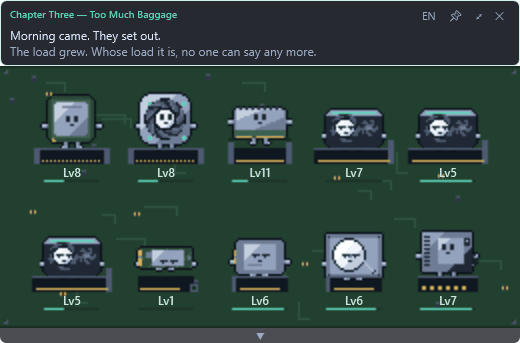
The harder they work, the hotter they get
Speed alone cannot tell 'quick' from 'desperate'. As load rises their outlines start to glow, and higher still, steam rises from their heads. Parked in a corner of your screen, it tells you at a glance whether your machine is coasting or gasping.
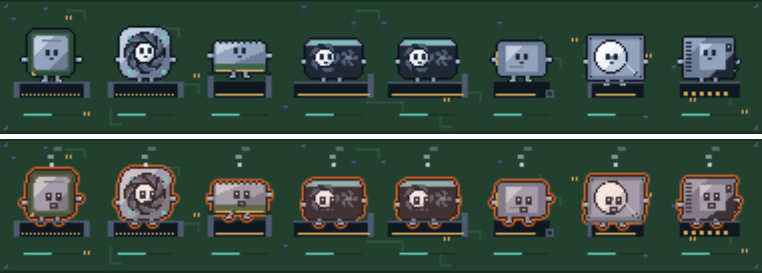
Want the numbers? Press the arrow
While collapsed it shows no numbers at all. Press the arrow and you get per-logical-core load, memory, per-GPU utilisation and VRAM, throughput split by storage type, and every drive's capacity. Every graphics card you own gets its own row.
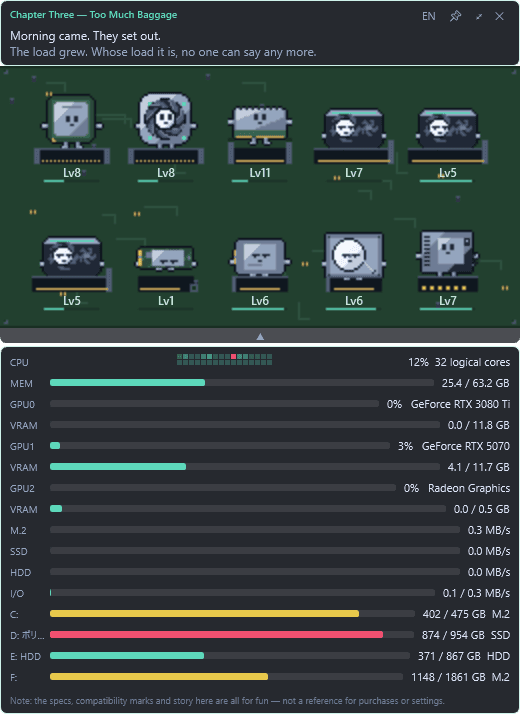
A story that runs itself
Along the top, their journey advances on its own — powered by how much your machine actually works. Leave it idle and it crawls; put it under load and it moves. Experience works the same way: each character only earns from its own work. With two graphics cards, only the busy one grows; writing to the M.2 does nothing for the hard disk.
Between chapters the party wanders towns and expeditions on its own. It rests at inns, sells what it found, wears whatever it buys, picks a destination from the notice board, and comes home when tired. For each scene it settles on a stance (bold, balanced or careful) and one line says why. The reasons include your real machine: sustained high load makes the party careful, a quiet machine makes it bold. Levels are not affected; experience still comes only from each part's own work.
You cannot interfere. There are no choices, no stats to raise, nothing to click. Because you cannot interfere, you can simply leave it running — and glance over now and then to find the scene has moved on. The one exception is the Checkup window below: you open it yourself, and it runs only when you press a button.
“The cooler stayed close. It guards exactly one part — but today it is trying to cool the whole valley.”
“The board was hot. The party turned back.”
Checkup
Choose “Checkup…” from the “Checkup” tab at the top of the window (or from the right-click menu) to open a separate window. Pressing the tab alone only opens a settings panel below the bar; it does not open the Checkup window. Nothing runs until you press a button, and closing it stops everything. The checkup code is not loaded while the app sits in the background, so its everyday footprint does not change. The System check and Load test need no administrator rights and write nothing to your disks (the storage check is the one exception, described below).
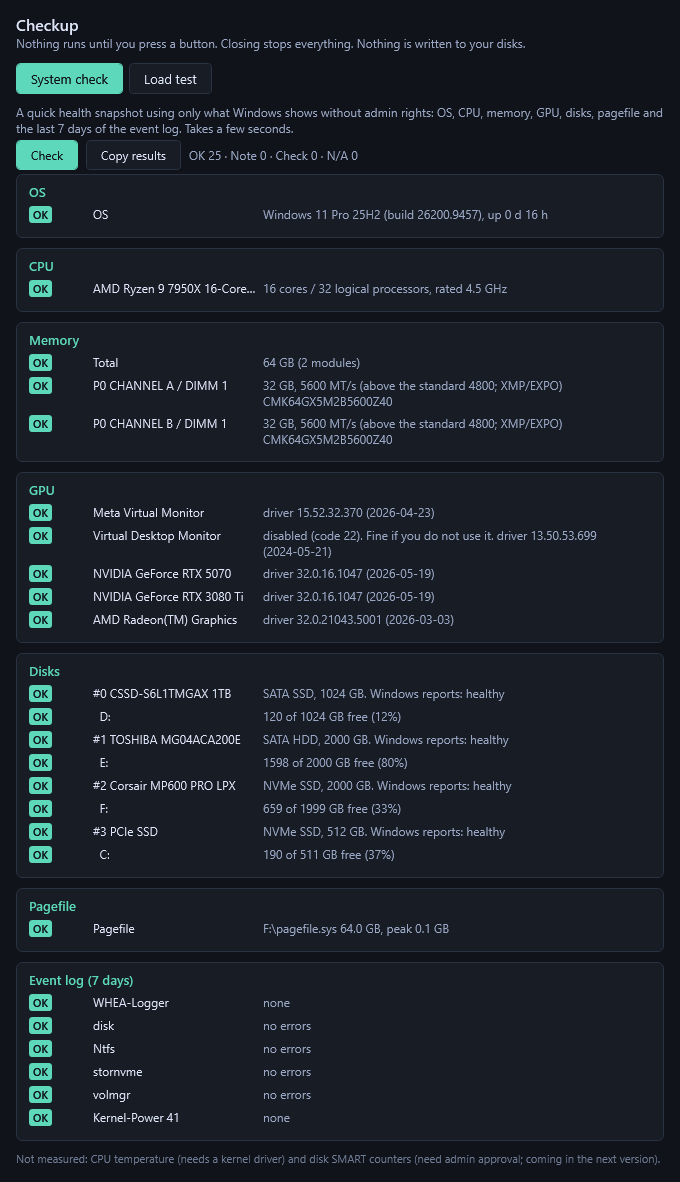
- System check: OS, CPU, each memory module (rated and actual speed), GPUs and drivers, disks (Windows' health status and free space), pagefile, and event-log errors from the last 7 days.
- Load test: the CPU computes on every logical core and checks its answers; memory writes patterns into part of the free space and verifies them. Choose 30 seconds, 2 minutes or 5 minutes.
- Storage check: reads the NVMe health log and SATA SMART and shows how much each counter has grown since the last check. This is the only tab that needs administrator approval (UAC).
Results are one of OK, Note, Check or Not measured. Anything that could not be measured is never reported as OK.

Storage check
The third tab of the Checkup window. It reads the NVMe health log and SATA SMART and lists counters such as power-on hours, data written and reallocated sectors. Windows requires administrator rights for this, so a UAC prompt appears only when you press the button. Say no and nothing happens.
- The part that needs administrator rights lives in a separate small exe in the ZIP (PartsLife.Check.exe), not in the resident app, which still never asks for them. The helper runs only when you press the button, hands its readings back and exits.
- Read-only. It never writes to your disks.
- Readings are saved, and the next check shows the growth since last time (for example, “data written is up 1.2 TB since the last check” — an illustrative figure).
- Surface scan (optional): reads the disk looking for unreadable and slow spots. Choose sampled (1 in 256 blocks) or full, and stop at any time. Also read-only.
- Drives behind a bridge, such as USB enclosures, are shown as “can't be read over this connection” instead of being guessed at.

Build code (register your whole PC as My PC)
In Checkup → System you can use “Copy build code”, “Save build as JSON” and “View contents”. They turn this PC's parts into a string (or a file) that you can register as My PC on this site as it is.
- Checkup → System → “Copy build code” (or “Save build as JSON” for a file). “View contents” shows what is included.
- /my-config — paste the code there, or load the JSON file.
- “Save as a candidate build” on a part page makes a candidate with that part swapped in and leaves My PC unchanged.
Included: CPU, GPU with VRAM, motherboard, memory (part number, capacity, speed, DDR type, count), SSD/HDD (capacity, NVMe or SATA), monitors and optical drives. Every graphics card is included if there are several (except CPU-integrated graphics).
Not included: CPU coolers, PSUs and cases (Windows can't read them, so the site lists them as “parts Parts Life can't read” and you pick them yourself). CPU-integrated graphics, virtual displays and USB storage (external drives, USB sticks) are left out too.
- No serial numbers, PC name, user name or SMART values are included.
- The only network use is checking for and downloading updates (GitHub); “Don't check” in the settings turns it off. Nothing else is sent. The code goes nowhere until you paste or load it yourself.
Auto-update
From v0.7.3 you can choose how updates work (right-click → “Update”; from v0.7.4 also via the “Startup & updates” tab at the top of the window). It checks 1 minute after start, then at most once a day.
- “Update automatically” (default): downloads in the background, swaps when idle and tells you “updated to v0.x.x”.
- “Check and notify only” just tells you a new version exists. “Don't check” uses no network at all. “Check now” is also there.
- It talks only to GitHub (this repo's latest release) and sends just a User-Agent (PartsLife/version) — no PC info, user info or game progress.
- For safety it only takes the official release over HTTPS and checks SHA256, size and version (newer only — never a downgrade). If the running exe is signed, an update without a valid signature from the same signer is refused.
- A new version that can't start is rolled back automatically and never installed again; your save (%APPDATA%\PartsLife) is untouched. In a folder that isn't writable (e.g. Program Files) it behaves like “Check and notify only”.
If you are on v0.7.2 or earlier, download v0.7.4 by hand once; updates are automatic after that (v0.7.3 users on “Update automatically” get v0.7.4 by themselves). v0.7.4 release notes
What it deliberately does not do
- It does not list processes. It is not a replacement for Task Manager.
- While resident it never asks for administrator rights. The one exception is the storage check, which asks only when you press its button.
- Because of that, it does not show CPU temperature or fan speed: reading those on Windows requires a kernel driver, which brings antivirus false positives and trust problems for a distributed binary. Not a cost a playful desktop toy should pay. Load stands in for heat instead.
- The only network use is checking for and downloading updates (GitHub); “Don't check” in the settings turns it off. Nothing else is sent. It only saves settings and story progress under %APPDATA%\PartsLife\.
- It stays out of the way: about 1.8% of one CPU core and around 118 MB of memory while resident. A tool for watching resource usage has no business consuming twice that itself, so this was measured and trimmed on real hardware.
Windows SmartScreen will warn you the first time. Click “More info” then “Run anyway”. If you would rather not, read the source and build it yourself — everything is public.
This warning is not really about signing. Microsoft changed the rules in 2024: even an EV certificate no longer clears it immediately. Reputation now accrues per file, whatever the certificate.
Code signing
The executable we distribute is built from source by GitHub Actions, and every release ships with its SHA-256 so you can verify what you downloaded.
Free code signing is provided by SignPath.io, with a certificate by the SignPath Foundation.
Free code signing provided by SignPath.io, certificate by SignPath Foundation.
Open source
Take it apart and rebuild it however you like. The story text lives in a JSON file, so you can add scenes without recompiling anything.
- Source code: MIT licence
- Character artwork: CC BY 4.0 (attribution required)
Unzip it and run PartsLife.exe. Single-exe version (no unzipping) also exists, but it uses nearly twice the memory while resident, so we recommend the zip. It also lacks the helper, so the storage check is not available.
The specifications, compatibility marks and story these characters show are all for fun. They are not a reference for purchases or settings — always check the actual product specs.