This article takes a close look at the iiyama XUB2293HS-B6 — 21.5-inch IPS 1ms Office Monitor with Height Adjustment, focusing on the points that matter when choosing a monitor for office or home-office work.
Overview
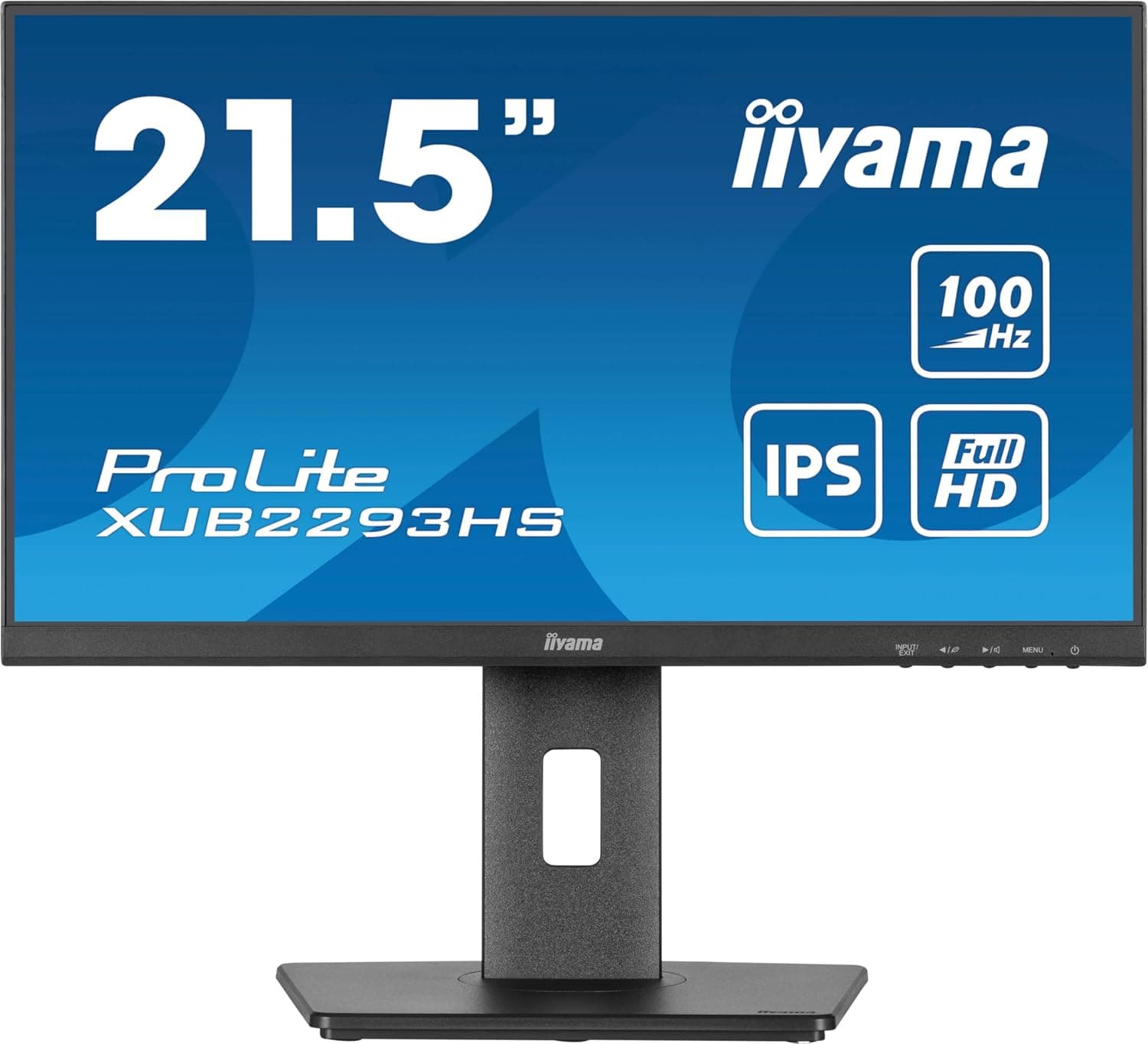
The iiyama ProLite XUB2293HS-B6 is a 21.5-inch IPS monitor built for office work.
It runs at 1920×1080 (Full HD) with a 100Hz refresh rate, so scrolling and moving windows look smoother than on a standard 60Hz panel. The 1ms MPRT response time cuts down on blur when you skim through documents.
In short, this is a strong choice if you spend long hours working with text and want an IPS monitor with a posture-friendly stand for under ¥20,000. The stand adjusts 150mm in height, so you can bring the screen up to eye level without buying a monitor arm.
It also has HDMI and DisplayPort inputs, 2W×2 stereo speakers, a 3.5mm headphone output, and a 100×100mm VESA mount, which covers everything most office setups need.
It is not built for color-critical work or high-refresh gaming, though. The Before You Buy section below explains where those limits are.
What 21.5 Inches at Full HD Means
At 21.5 inches, Full HD works out to about 102 pixels per inch (ppi).
The same resolution drops to about 92ppi at 24 inches and about 82ppi at 27 inches. That makes 21.5 inches the size where Full HD text looks sharpest.
Text stays clean at 100% Windows scaling, which suits spreadsheets with small cells and documents with small fonts.
The workspace is still 1920×1080, the same as a 24-inch or 27-inch Full HD screen. A bigger screen at this resolution does not show you more.
If you want more on screen at once, you need a higher resolution (WQHD or 4K) or a second monitor. The narrow width of a 21.5-inch panel helps here: two of them side by side need very little head turning.
Compatibility Guide
The monitor has one HDMI input and one DisplayPort input. It works with any desktop, laptop, or console that outputs video over HDMI or DisplayPort, whatever the operating system (Windows, macOS, Linux).
- No USB-C video input. Laptops and MacBooks that only output video over USB-C (DisplayPort Alt Mode) need a USB-C to HDMI or USB-C to DisplayPort cable, or a dock. If you want a single USB-C cable for both video and charging, look elsewhere.
- 100Hz only works if your PC can send 1920×1080 at 100Hz. Most graphics cards and integrated graphics can, but older adapters and KVM switches in the signal path may top out at 60Hz. After connecting, check your OS display settings and confirm the refresh rate is set to 100Hz. Many people keep using it at 60Hz without realizing.
- Consoles will not run at 100Hz. Game consoles output 60Hz or 120Hz and have no 100Hz mode, so expect a 60Hz picture from a console.
- Audio comes through HDMI or DisplayPort. The built-in speakers and headphone jack only work if the video cable also carries sound. If your PC is not set to send audio to the monitor, you will hear nothing.
- VESA 100×100mm. Standard monitor arms and wall mounts fit. A 21.5-inch monitor is light, and it may weigh less than the minimum a gas-spring arm is designed to hold. Check the monitor's weight on the product page and make sure it falls between the arm's minimum and maximum load.
Product Info
Key specifications:
| Item | Value |
|---|---|
| Screen size | 21.5 inches |
| Resolution | 1920×1080 (Full HD) |
| Panel | IPS |
| Refresh rate | 100Hz |
| Response time | 1ms (MPRT) |
| Brightness | 300 cd/m² |
| Contrast ratio | 1000:1 (typical), 80,000,000:1 (advanced) |
| Viewing angles | 178°/178° |
| Video inputs | HDMI ×1, DisplayPort ×1 |
| Audio | 2W ×2 stereo speakers, 3.5mm headphone output |
| VESA | 100×100mm |
The 80,000,000:1 figure is measured with the backlight adjusting itself to what is on screen, so treat it as a reference number only. The panel's real contrast is the typical 1000:1, which is normal for IPS.
300 cd/m² is bright enough for a well-lit office, and you will probably turn it down when working at night. The 178° viewing angles mean colors barely change when you look from the side, so the screen stays easy to read when you show it to a colleague.
Amazon Japan listed it at ¥16,980 as of September 22, 2026. Prices change with sales and stock, so check the product page for the current price.Check the retailer's page for the latest user reviews.
That is a high rating, but from a small number of reviews, so it may change.
iiyama's ProLite line is a business range known for reliability and good value. This model is listed as released in early 2024.
It reportedly comes with a power cable, an HDMI cable, and a quick-start guide, and has iiyama's standard three-year warranty that includes the panel. Accessories and warranty terms can vary by retailer and time of purchase.
If you plan to connect over DisplayPort, check whether a cable is included.
It sits between the entry and mid-range tiers as an affordable 21.5-inch IPS monitor with solid features.
Few monitors under ¥20,000 come with a height-adjustable stand, and that is its biggest strength.
Compared With Alternatives
At this price, it is most often compared with Full HD IPS monitors around 24 inches at about 120Hz. One example is the ASUS VA24EHF2, a 24-inch class Full HD 120Hz IPS model with a bigger screen and a higher refresh rate.
| Point of comparison | iiyama XUB2293HS-B6 | 24-inch 120Hz IPS (e.g. ASUS VA24EHF2) |
|---|---|---|
| Screen size | 21.5 inches | About 24 inches |
| Pixel density (Full HD) | About 102ppi | About 92ppi |
| Refresh rate | 100Hz | 120Hz |
| Height adjustment | 150mm | Check each product page |
The choice is simple: pick this one if posture matters most, or a 24-inch model if you want a bigger, smoother screen. In office work, the gap between 100Hz and 120Hz is hard to notice.
A height-adjustable stand, on the other hand, affects your neck and shoulders every day. If you want larger text or sit farther from the screen, a 24-inch model will be easier to read.
If you want much more on screen, a higher-resolution monitor such as the 27-inch 4K LG 27UP600K-W is worth comparing.
Best Use Cases
- Remote and home-office workers: You can raise the screen to eye level, which eases strain on your neck and shoulders. 100Hz makes scrolling through documents and web pages easier on the eyes. If you switch between several computers often, consider a model with a built-in KVM or an external KVM switch.
- Laptop users adding a second screen: The thin bezels and VESA support make it easy to set up next to a laptop. At roughly 500 mm wide, it fits most desks.
- Dual-monitor setups on small desks: Two 21.5-inch screens take up less width than two 24-inch screens, and the higher pixel density lets you run both at 100% scaling.
Before You Buy
- Not for color-critical work. No sRGB or other color-gamut coverage is listed, so it is a poor fit for photo editing, print design (DTP), or video color grading. If color accuracy matters, choose a monitor that states its gamut coverage and supports calibration.
- Fine for casual gaming only. 100Hz is clearly smoother than 60Hz, but competitive players will be happier with 144Hz or more. The 1ms figure is MPRT, which is usually measured with a blur-reduction mode switched on, and that mode can dim the screen. We could not confirm the GtG (gray-to-gray) response time from the data we have.
- Limited inputs. There is only one HDMI port, so keeping a console and an HDMI PC connected at the same time means using DisplayPort or an HDMI switch. There is no USB-C input and no USB hub.
- Basic speakers. 2W×2 is enough for calls and system sounds, not for music or movies. If sound quality matters, plan on headphones or external speakers.
- Still a Full HD workspace. If you want to see much more at once, this is the wrong monitor. Choose by resolution rather than screen size.
- Watch overseas listings. Some overseas marketplace listings cost far more than the Japanese retail price, and shipping and warranty terms differ. Compare against domestic prices before buying.
FAQ
Q. Can I connect a MacBook? A.
Models with an HDMI port connect directly. USB-C-only models need a USB-C to HDMI or USB-C to DisplayPort cable, or a dock.
The monitor has no USB-C input.
Q. I connected it, but it only shows 60Hz. A.
Set the refresh rate to 100Hz in your OS display settings. If 100Hz is not listed, your adapter or switch may not support it.
Connect the monitor directly to the PC to check.
Q. Does it work with a PS5 or Nintendo Switch?
A. Yes, over HDMI. Consoles have no 100Hz output, so expect 60Hz.
Q. Can I mount it on a monitor arm? A.
Yes. It supports VESA 100×100mm.
Because the monitor is light, also check the arm's minimum weight.
Q. Is text too small at 21.5 inches? A.
At about 102ppi, most people can read it comfortably at 100% scaling. If it feels too small, raise the scaling slightly or look at a 24-inch model.
Product Disclosure (Amazon)
- Manufacturer: iiyama
- ASIN: B0CWDCT1K5
- Note: This article covers a manufacturer-made product based on Amazon listing details.