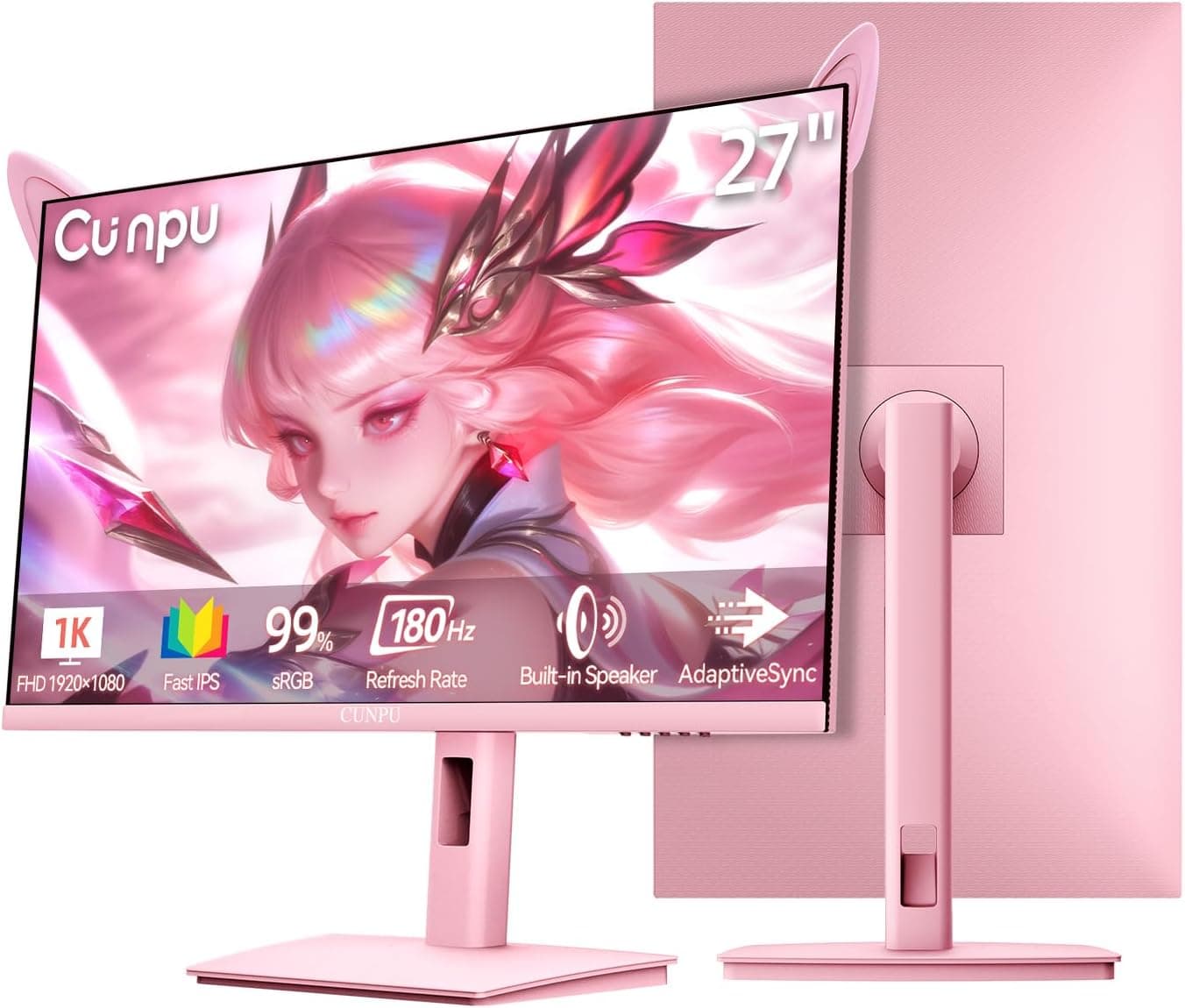
This article covers CUNPU 24インチウェーブピンクカワイイゲーミングモニター FHD 1920x1080 180Hz 1ms GTG Fast IPS 100%sRGB アダプティブ同期スピーカー内蔵 USB Type-C 15W HDMI — a 24-inch display chosen first for how it looks, and second for a spec sheet that reads like a competitive gaming panel. Below, each number is translated into what it actually changes in daily use, and where you will have to compromise.
Overview
The short version: this is a monitor for people who can put design first. The wave-pattern pink chassis has almost no direct equivalent, so if you are building a pink desk or stream setup, your options are genuinely limited.
The underlying numbers — 180Hz, 1ms GTG, Fast IPS, 100% sRGB — are respectable but not exceptional for a 24-inch FHD panel. Average on performance, unique on looks, is the honest summary.
Translated into feel: 180Hz means roughly 5.6ms per frame versus about 16.7ms at 60Hz, so flick aiming and page scrolling look noticeably cleaner after an upgrade from a 60Hz display.
At 1920×1080 on 24 inches, pixel density lands near 92ppi, which means Windows display scaling can stay at 100% without fuzzy text. Fast IPS behaves like IPS generally does: better viewing angles and color stability than TN, weaker black contrast than VA.
Pricing was ¥34,260 on Amazon.co.jp as captured on 2026-07-13.
Prices move with sales and stock, so always confirm the current figure on the product page. User rating was 4.4 out of 5 stars from 50 reviews as captured on 2026-07-12 — a good score, but 50 reviews is a small sample, so it tells you little about unit-to-unit consistency.
Quick Verdict by Use Case
| Use case | Verdict | Why |
|---|---|---|
| 1080p competitive gaming | Good fit | 180Hz Fast IPS keeps motion clean |
| Streaming and desk aesthetics | Best fit | The pink chassis has no real substitute |
| One-cable laptop docking | Conditional | Video works over USB-C, power stops at 15W |
| Photo and video color grading | Poor fit | Gamut tops out at 100% sRGB |
| Side-by-side document work | Poor fit | 24-inch FHD is tight on space |
| Monitor arm mounting | Verify first | No VESA support is stated |
The table is only the entry point. The conditional and verify-first rows are the ones that cause regret after purchase, so the compatibility section below expands on them.
Compatibility Guide
There are three video inputs: HDMI, DisplayPort, and USB Type-C. DisplayPort is the safest route to a confirmed 180Hz signal.
The HDMI version is not stated in the specifications, so check the listing before assuming 180Hz over HDMI. As a general rule, 1080p at 180Hz needs roughly HDMI 2.0 class bandwidth, and HDMI 1.4 era ports or cables often cap out near 120Hz.
Use a cable explicitly rated DisplayPort 1.2 or higher, or HDMI 2.0 or higher, rather than whatever is in the drawer.
USB Type-C input requires DP Alt Mode on the source device, which the compatibility notes state directly. Plenty of laptops have USB-C ports with no video output at all, especially budget models and front-panel desktop ports.
Thunderbolt 3 and 4 ports include DP Alt Mode, so those work. Before buying, check whether your laptop's USB-C port carries a DisplayPort or Thunderbolt icon.
Power delivery is capped at 15W. That is closer to phone charging than laptop charging, and it cannot replace a laptop's own adapter.
Even a 13- to 14-inch low-power notebook can lose battery while connected if the workload exceeds what 15W supplies. Gaming and workstation laptops must keep using their original charger.
Treat it as one cable for video and data, plus a separate cable for power.
On the GPU side, remember to actually enable adaptive sync: the G-SYNC page in the NVIDIA control panel, or the FreeSync entry on AMD. Certification level and low framerate compensation behavior are not stated in the specifications, so how it performs at low frame rates is something to verify on your own hardware.
Also set the refresh rate to 180Hz manually in Windows display settings — leaving a new high-refresh monitor running at 60Hz is the single most common setup mistake.
Physically, the stand offers tilt only. Plan your desk layout assuming you may need a riser or a stack of books for height.
VESA mounting is not listed in the specifications, so confirm it on the listing if a monitor arm is part of your plan. Stand depth is also unlisted, which matters on shallow desks.
For consoles, 1080p output is fine, but current consoles generally top out at 120Hz, so only a PC can use the full 180Hz. Some machines, such as Nintendo Switch 2, support 1080p at 120Hz in selected titles, though this depends on the game.
Audio can run through the built-in stereo speakers, but monitor speakers are typically light on volume and bass, so use a headset when positional audio matters.
Product Info
Key specifications:
| Item | Value |
|---|---|
| Screen Size | 24 inch |
| Resolution | 1920×1080 (FHD) |
| Refresh Rate | 180Hz |
| Response Time | 1ms (GTG) |
| Panel Type | Fast IPS |
| Color Gamut | 100% sRGB |
| Adaptive Sync | Supported |
| Built-in Speakers | Stereo |
| USB-C Power Delivery | 15W |
| Video Inputs | HDMI, DisplayPort, USB Type-C |
| Stand Adjustment | Tilt |
The recorded price is ¥34,260 on Amazon.co.jp as of 2026-07-13.
The overseas listing for the same ASIN is recorded at the same yen figure, so this data cannot be used to compare domestic and international pricing. No marketplace figure was captured for resale listings, and availability there varies over time.
Captured prices age badly in articles that are not updated, so make the final call on the product page.
Color coverage is 100% sRGB. That is enough for web images, social posts, documents, and general video, and deliberately no more than that.
Print and video work that demands DCI-P3 or Adobe RGB coverage is outside this panel's design brief. No factory calibration report is mentioned in the specifications, so budget for a colorimeter if color accuracy is a work requirement.
How It Compares
If features matter more than looks in the same 24-inch FHD class, panels like the MSI MAG 242F advertise 200Hz along with explicitly stated VESA mounting and height adjustment. That ergonomic difference shows up every day.
Choosing this CUNPU model means trading that flexibility for appearance.
For pure competitive use, something like the BenQ ZOWIE XL2540X+ — a 24.1-inch 280Hz TN panel — is the natural rival: worse viewing angles and color, higher refresh ceiling, more esports-oriented tuning.
If screen area and gamut matter more, a 27-inch FHD IPS panel such as the Gigabyte G27F claims 95% DCI-P3, though stretching FHD to 27 inches lowers pixel density and makes text look coarser.
So the case for this monitor comes down to one line: ordinary as a 180Hz Fast IPS display, nearly unique as a pink wave-finish one at this performance tier. Whether that justifies the price is the whole decision.
Day-One Setup
Select 180Hz in the Windows advanced display settings first, then enable adaptive sync in the GPU driver. Next, check the overdrive setting in the OSD: the maximum step often introduces overshoot artifacts, so compare the middle and maximum settings in an actual game before committing.
Pick the sRGB or custom picture mode if color matters to you, and lower brightness from its usual maximum default to match room lighting. If you plan to use the built-in speakers, remember to switch the Windows playback device to the monitor.
Best Use Cases
- People coordinating a desk or stream layout around pink. The value here sits outside the spec sheet.
- 1080p competitive gamers upgrading from 60Hz, where 180Hz and Fast IPS produce a clear improvement.
- Users switching between a laptop and a desktop, thanks to three separate video inputs.
- Buyers around the ¥30,000 range who want one panel for gaming and office work, since sRGB-accurate IPS is comfortable for documents too.
Before You Buy
Lower your expectations for the 15W power delivery first. It will not replace a laptop charger.
The one-cable-desktop pitch is true for video and data but not for power, and misreading that is the most common disappointment with monitors in this class.
Second, the stand and mounting. Tilt is the only listed adjustment; height and swivel are not included.
VESA support is not stated either, so verify mounting compatibility and hole spacing before buying if an arm is part of your setup. If you cannot confirm it, budget as though it is unsupported.
Third, the 1ms GTG figure is, as is typical, a rating measured with aggressive overdrive. Most users end up dialing overdrive back to avoid overshoot, so the catalog number is not what you experience.
And despite the Fast IPS label, IPS glow in dark scenes remains part of the deal — if you mostly play horror or dark-toned games in a dim room, VA or OLED will satisfy you more.
Size and resolution require acceptance too. 24-inch FHD is a clean choice for gaming but cramped for side-by-side document work; 27-inch WQHD or an ultrawide suits that better.
Light-colored chassis also show dust and fingerprints more readily, which is worth a thought when choosing placement.
Finally, the listing data itself. The seller is recorded as an overseas storefront while the price is recorded in yen, so the listing metadata is not internally consistent.
Shop listing fields such as manufacturer, seller, bundled accessories, and warranty are populated automatically and can disagree with reality, so confirm seller, currency, and — via the product images and title — that the listing is the product you want. A one-year warranty is the usual baseline for this category, but terms vary by seller, so treat the listing page as authoritative.
FAQ
Q. Will the jump from 60Hz be noticeable? A.
180Hz is about 5.6ms per frame versus roughly 16.7ms at 60Hz, so fast camera movement and scrolling look clearly cleaner.
For films or turn-based games the benefit is limited.
Q. Can consoles run at 180Hz? A.
Current consoles generally top out at 120Hz, so only a PC uses the full refresh rate. 1080p output itself works fine.
Q. Can one USB-C cable charge my laptop while driving the display? A.
Video and up to 15W of power run together, but 15W is often below a laptop's draw, so the battery can still drain under load. Gaming laptops need their own adapter.
Q. Can I mount it on a monitor arm? A.
VESA support is not stated in the specifications, so this article cannot confirm it. Check the listing before buying if an arm is required.
Q. Is it usable for photo or video editing? A.
100% sRGB is practical for web-targeted work but falls short where DCI-P3 or Adobe RGB coverage is required. Hobby-level retouching is the realistic limit.
Q. Are the built-in speakers enough? A.
Fine for video playback and voice chat. Monitor speakers are typically weak on bass and maximum volume, so use a headset when footstep positioning matters.
Product Disclosure (Amazon)
- Manufacturer: CUNPU
- Seller: Amazon US
- Fulfilled by: Amazon US
- ASIN: B0H2P1RHHX
- Note: This article covers a manufacturer-made product based on Amazon listing details.