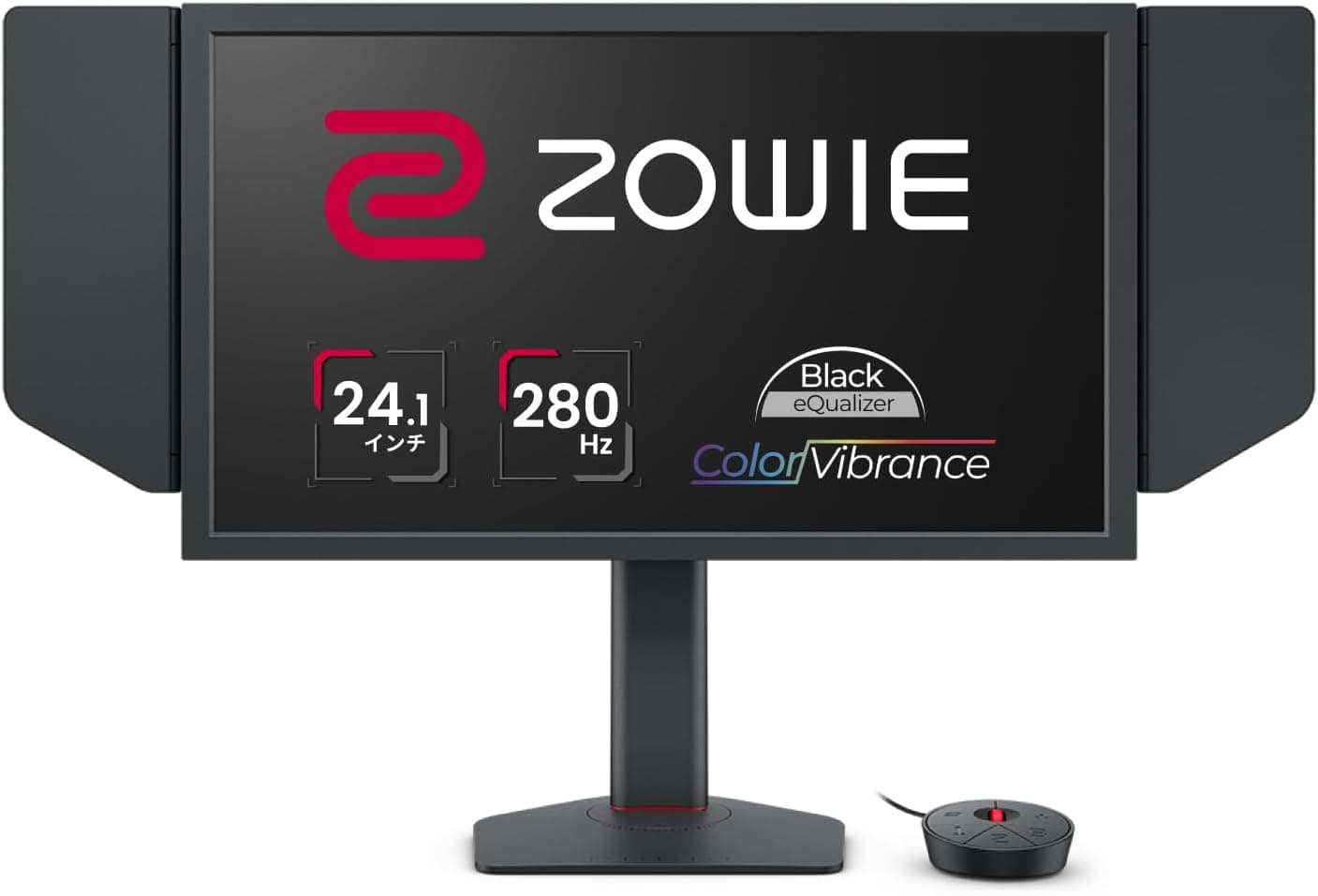
This article takes a closer look at BenQ ZOWIE XL2540X+ 24.1インチ フルHD TN 280Hz esports ゲーミングモニター — whether it is genuinely worth buying for competitive play, and exactly what you give up to get there.
Overview
The BenQ ZOWIE XL2540X+ packs 1920×1080 (Full HD), 280Hz and a 1ms (GTG) response time into a 24.1-inch TN panel.
Put bluntly, this monitor throws away almost everything related to looking pretty and spends the entire budget on not losing track of a moving target. If you play shooters to win, that trade lands well.
If you also want to edit photos or watch films on the same screen, it will feel expensive for what you get.
280Hz means roughly 3.6ms per frame.
Compared with a common 144Hz panel (about 6.9ms), the gap between frames is nearly halved, which is where the difference in a fast flick actually shows up — you will not see it in a still image.
The ZOWIE-specific kit is here too: Black eQualizer to lift shadow detail, Color Vibrance for stepped saturation, the S.Switch puck for OSD and profile swaps, and a physical eye shield to block side light.
That package is what separates it from a generic gaming monitor at a similar price.
The panel, however, is TN. Viewing angles and color accuracy are clearly behind IPS.
Whether you can live with that single fact decides the whole purchase.
| Use case | Fit | Why |
|---|---|---|
| Competitive FPS (CS2, Valorant, Apex) | Excellent | 280Hz + 1ms (GTG), Black eQualizer, eye shield |
| Consoles alongside PC | OK | Three HDMI 2.0 ports, but 1080p/120Hz is the realistic ceiling |
| Photo / video editing | Poor | TN viewing angles and color accuracy |
| Movies and streaming | Fair | 24.1 inches, Full HD, no built-in speakers |
| Secondary display | OK | Small footprint, VESA 100×100 for easy remounting |
The table is a rough guide, but the pattern is clear: this is a monitor with sharp highs and sharp lows, not an all-rounder.
Compatibility Guide
Video inputs are three HDMI 2.0 ports plus one DisplayPort 1.2.
The first trap is that 280Hz is available over DisplayPort only; HDMI 2.0 tops out at 240Hz.
240Hz is still fast, but if you bought this for 280Hz and leave it on HDMI, part of what you paid for simply never arrives. After hooking it up, confirm the refresh rate in the OSD or in your OS display settings.
On bandwidth, 8-bit Full HD at 280Hz fits inside what DisplayPort 1.2 can carry without relying on compression.
In other words, you choose DisplayPort here not because of bandwidth headroom but because the HDMI input itself is specified to 240Hz. A fancier HDMI cable will not raise that ceiling.
For variable refresh, the monitor supports VESA Adaptive-Sync, but it is listed as not officially G-Sync Compatible certified. NVIDIA drivers can often enable variable refresh on uncertified displays, yet behavior is not guaranteed.
If you see flicker, turning it off and running flat out at high refresh is the more sensible setup for competitive titles — at 280Hz, tearing is far less visible in the first place, so this is not a major deduction.
Consoles connect fine over HDMI 2.0.
A PlayStation 5 or Xbox Series X|S can output 1080p at 120Hz, but no console will feed this panel 280Hz. If consoles are your main platform, there is little reason to pick this model over something aimed at that use.
Physically, it supports VESA 100×100mm mounting, and the stand offers height, swivel and tilt. A 24.1-inch 16:9 screen works out to roughly 53cm wide, so it suits shallow desks and dual-monitor layouts.
Pixel density lands near 91ppi — tighter than a 27-inch Full HD panel (about 82ppi), but still a level where long reading sessions feel coarse.
Do not overlook the PC side. 280Hz is the ceiling the monitor accepts, not the frame rate your game produces.
Competitive titles are light on the GPU but easily CPU-bound, and plenty of builds never reach 280fps no matter how low the settings go. If you plateau around 200fps, swapping only the monitor delivers a limited gain.
How It Compares
The 24-25 inch Full HD high-refresh segment is full of IPS options. IPS buys you viewing angles and color: white stays white slightly off-axis, and the panel holds up for photo checks and video.
TN buys you a lower price at the same refresh rate plus raw response speed. It is not a question of which is better, but of what you can afford to lose.
The XL2540X+ also differentiates on workflow details. Carrying your settings on the S.Switch and blocking side light and neighboring players with the eye shield matter far more at a LAN or a tournament than in your own room.
Playing solo at home, those two features lose most of their value — and that is exactly where you should decide whether the premium over a similar-spec rival is recoverable.
Above it sits the 360Hz model in the same series. The frame-interval difference between 280Hz and 360Hz is about 0.8ms, against roughly 3.3ms going from 144Hz to 280Hz.
On a limited budget, stabilizing frame rate with a better CPU or GPU beats reaching for 360Hz.
Product Info
This model arrived in late 2025. On Amazon.co.jp the listing showed ¥54,445 (tax included) when the price was captured on 15 September 2026.
Prices move often with sales and stock, so check the product page for the current figure before buying. Note that the "global" price entry in our data points at the same Japanese listing and repeats the same yen figure — it is not a useful reference for US pricing, and the eBay entry is a keyword search link rather than a confirmed price.
Reviews on Amazon.co.jp total 45, averaging 4.6 out of 5, which works out to about 92% positive.
The trend is good, but 45 is a small sample where a handful of unit-specific or use-case-specific opinions can swing the average. Treat the number as a hint and weigh it against your own conditions: can you connect over DisplayPort, and can you live with TN?
Core specs: 24.1 inches, 1920×1080, 16:9, TN, 280Hz, 1ms (GTG).
Inputs are three HDMI 2.0 and one DisplayPort 1.2, with VESA 100×100mm mounting and height, swivel and tilt adjustment.
Features include Black eQualizer, Color Vibrance, the S.Switch, an eye shield, flicker-free operation and low blue light.
There are no built-in speakers, so plan on a headset or external speakers. Warranty is listed as the manufacturer's standard three years (proof of purchase required).
Setup Tips That Matter
Step one is connecting over DisplayPort and then switching the OS refresh rate to 280Hz. Windows frequently leaves a new display at 60Hz, and most "I bought an expensive monitor and nothing changed" stories start right there.
Check your in-game frame cap and vsync settings too.
Black eQualizer lifts shadow detail so outlines in dark corners stand out, but the higher you push it, the more overall contrast you lose and the washier bright scenes look. Raise it gradually from the default and stop at the point that works on the maps you actually play.
Color Vibrance behaves the same way — overdone, colors merge and become harder to separate.
Mounting height interacts directly with the panel's weakness. TN is worst in the vertical axis, so raising the screen above eye level shifts brightness and tint from top to bottom.
Even on an arm, keep the center of the screen slightly below eye level. The eye shield blocks light and sightlines from the sides, and pays off most in bright rooms or when someone is sitting next to you.
Best Use Cases
First, players who treat CS2, Valorant or Apex Legends as competition and already run a PC that sustains 200+ fps. 280Hz and 1ms (GTG) only mean something once that condition is met, and Black eQualizer earns its keep in titles where spotting first decides the round.
Second, buyers who want high refresh without paying the IPS premium. Equivalent-refresh IPS panels typically cost more; if color and viewing angles are expendable, TN is the efficient choice.
Third, people who carry a monitor to LANs or tournaments. The compact 24.1-inch chassis, portable settings via S.Switch and the eye shield form a package built for environments that change every event.
If you never do this, part of the premium goes toward features you will not use.
It also works as a secondary display. The small footprint and VESA 100×100 mounting make it easy to keep as a second screen after a larger primary monitor takes over.
Before You Buy
The headline compromise is the TN panel. Viewing angles are narrow, and brightness and color shift as soon as you move off-axis.
It is a poor fit for color-critical work, for two people leaning in at the same screen, or for viewing from a couch at an angle. Buy it knowing games will be fast and everything else will be tolerated.
Expecting wide gamut or meaningful HDR will end in disappointment.
Second, 280Hz requires DisplayPort. The accessory list referenced here covers the S.Switch, power cable, HDMI cable, eye shield and quick-start guide — no DisplayPort cable.
Bundles can change by production run, so verify on the product page and buy a cable separately if you do not have one. Miss this and you will own a 280Hz monitor running at 240Hz.
Third, your PC is part of the spec. As noted, competitive titles tend to be CPU-bound, and a new monitor does not create frames.
If you are currently at 144Hz and around 150fps, the same money in a CPU or GPU will change how the game feels far more.
Smaller points to keep in mind: no built-in speakers, no official G-Sync Compatible certification, and limited desktop space from a 24.1-inch Full HD panel.
None of these are defects — they are the spec — but they are the kind of thing that becomes a grievance when discovered after delivery.
Finally, a word on listing data itself. Even in the data behind this article, the "global" price field points back at the Japanese listing.
Retail pages regularly carry mismatched model numbers, accessory lists or generation labels, so confirm from the images and title that you are ordering the XL2540X+ specifically. This series is easy to confuse with an older model one character away, or with a sibling running a different refresh rate.
FAQ
Q. What do I need to actually run 280Hz? A.
A DisplayPort connection — HDMI 2.0 caps at 240Hz — plus setting the refresh rate to 280Hz in your OS display settings and a PC capable of producing high frame rates.
Q. Does it work with a PS5 or Xbox Series X|S? A.
Yes, over HDMI 2.0, up to 1080p at 120Hz.
No console outputs 280Hz, so console-first players have little reason to choose this model.
Q. Can I use G-Sync on NVIDIA? A.
It supports VESA Adaptive-Sync but is listed as not officially G-Sync Compatible certified. Drivers may let you enable it anyway, without a guarantee; if it flickers, turn it off and run flat out.
Q. Is it usable for work? A.
Usable, with compromises. 24.1 inches at Full HD (about 91ppi) does not show much at once, and TN viewing angles make long document or color work unpleasant.
Q. Can I put it on a monitor arm? A.
Yes, it supports VESA 100×100mm. Just avoid mounting it above eye level, since TN vertical viewing angles are its weakest axis.
Q. Are there speakers?
A. No. Plan for a headset or external speakers.
Product Disclosure (Amazon)
- Manufacturer: ベンキュージャパン
- Seller: Amazon.co.jp
- Fulfilled by: Amazon.co.jp
- ASIN: B0FNWK9S7K
- Note: This article covers a manufacturer-made product based on Amazon listing details.