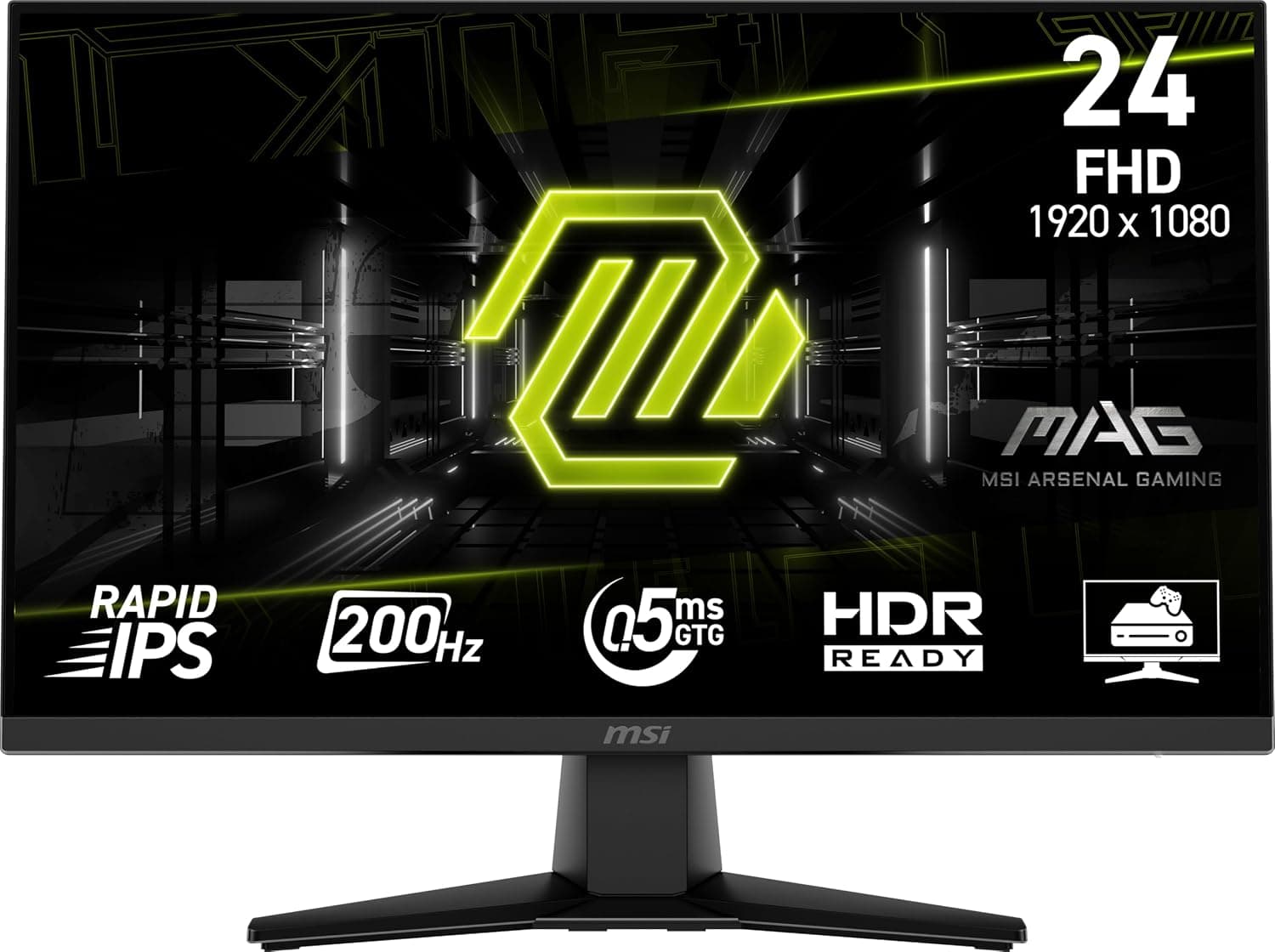
This article covers MSI MAG 242F 24インチ 1920 x 1080 (FHD) ゲーミングモニター 200Hz アダプティブ同期 HDMI DisplayPort VESAマウント可能 傾き 高さ調整可能 スピーカー 0.5ms ブラック.
Overview
MSI expands its MAG lineup with the MAG 242F, a 23.8-inch gaming monitor built around a 1920x1080 Fast IPS panel. It pushes a 200Hz refresh rate and a 0.5ms (GtG, min.) response time, delivering buttery-smooth motion for competitive shooters and action-heavy titles alike.
The anti-glare surface keeps reflections at bay, while MSI's AI Vision technology enhances shadow details without washing out bright areas. At around ¥22,800 (Japanese online retailers price as of writing), it sits in the sweet spot between entry-level 165Hz monitors and premium 240Hz panels, offering strong cost-performance for budget-conscious gamers.
Two HDMI 2.0b ports and a DisplayPort 1.2a input provide flexible connectivity for both PC and console. The stand is fully adjustable (tilt, swivel, height, pivot), and VESA 100x100mm mounting is supported for arm setups.
Compatibility Guide
Any modern PC with DisplayPort or HDMI output will drive the MAG 242F at its native 1080p. For full 200Hz, use the DisplayPort input—HDMI 2.0b on this monitor caps at 144Hz at 1080p, though that's still plenty for PS5/Xbox Series X (120Hz max).
The stand offers 130mm height adjustment, ±20° swivel, -5° to 20° tilt, and 90° pivot for portrait mode. If you prefer a monitor arm, the 100x100mm VESA pattern is standard and compatible with most third-party mounts.
Built-in 2W×2 speakers are present but underwhelming in volume and clarity. For immersive gaming, pair this monitor with a dedicated gaming headset or external desktop speakers.
Product Info
The MSI MAG 242F launched in the second half of 2025. MSI backs it with a standard three-year warranty. The retail price hovers around ¥21,000 to ¥24,000 depending on the seller.
Market positioning: entry-level high-refresh segment. It undercuts native 240Hz competitors while offering a tangible upgrade over 165Hz panels. The Fast IPS panel ensures wide viewing angles (178°/178°) and decent color reproduction for the price tier.
Key specifications: 23.8-inch diagonal, 1920×1080 resolution, 200Hz refresh rate, 0.5ms GtG (min.) response, 1000:1 contrast ratio, 250 cd/m² brightness, 16.7M colors (8-bit), anti-glare coating.
Best Use Cases
- Competitive FPS gamers — 200Hz and 0.5ms response give a clear edge in fast-twitch shooters like Valorant, Overwatch 2, or Apex Legends. Motion clarity is excellent, with minimal ghosting. If you're chasing higher ranks, this monitor's smoothness helps you track targets and react faster.
- Dual-monitor setups on a budget — A 24-inch 1080p panel is perfect as a secondary screen for Discord, browser tabs, or streaming tools. The 200Hz refresh means you can even game on it without feeling held back, making it a flexible companion to a larger main display.
- First-time high-refresh buyers — Upgrading from a standard 60Hz office monitor to 200Hz is a night-and-day difference. The MAG 242F offers the most dramatic improvement for the least money, making it an ideal entry point for gamers who want to see what high-refresh gaming feels like.
Creative professionals needing accurate DCI-P3 or Adobe RGB coverage should look elsewhere—this panel is sRGB-biased and lacks hardware calibration support. It's also not suited for HDR content creation due to its modest 250 cd/m² brightness ceiling.
Things to Consider
The built-in speakers are weak. At maximum volume, they're barely loud enough for a quiet room, and distortion creeps in at anything above 70%. Plan on using a headset or external speakers from day one.
HDR support is limited. The monitor accepts HDR10 signals but lacks the brightness (250 cd/m²) and local dimming needed for a convincing HDR image. Leave HDR disabled for most content.
No USB hub or KVM switch is included. If you need to share the monitor between a work laptop and a gaming PC with a single mouse/keyboard set, you'll need an external KVM or a USB switch.
Competing models to consider: ASUS TUF Gaming VG249Q1A (165Hz, similar price), MSI G244F E2 (180Hz, slightly cheaper), and Dell S2422HG (165Hz, better warranty). The MAG 242F wins on raw refresh rate and response time, but its feature set is lean.
FAQ
Q: Does the MAG 242F support G-Sync or FreeSync?
A: It supports Adaptive-Sync (FreeSync compatible) over both HDMI and DisplayPort. With a GeForce GPU, you can enable G-Sync Compatible mode, but it is not officially certified by NVIDIA. Some users report occasional flicker at very low frame rates (below 30 FPS), so keeping V-Sync on in GPU settings can help stabilize the experience.
Q: Can I use this monitor for photo editing?
A: For casual photo editing and web use, the sRGB coverage (≈110% of sRGB, per MSI) is adequate. However, the panel is 8-bit (no FRC), and brightness uniformity is average. Professional color-critical work on a monitor with hardware calibration and wider gamut would be a better fit.
Q: Th
Product Disclosure (Amazon)
- Manufacturer: MSI
- ASIN: B0F5TN13GV
- Note: This article covers a manufacturer-made product based on Amazon listing details.