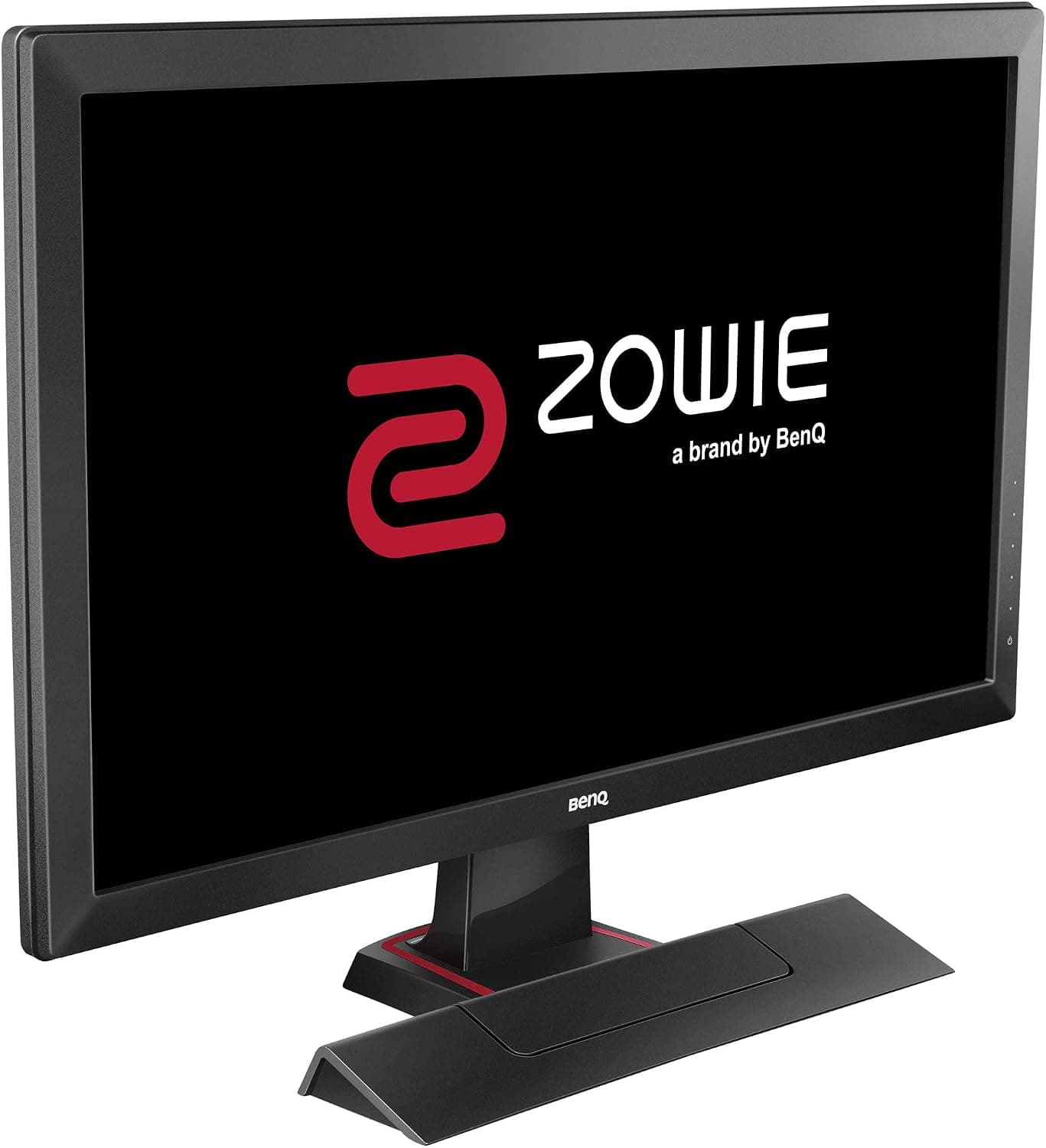
This article covers the BenQ RL2455 — 24-inch TN gaming monitor for esports.
Overview
The short answer: if you limit it to playing console games at 60Hz, the BenQ RL2455 is still a solid 24-inch Full HD TN monitor. It has a 1ms (GTG) response time, 1920×1080 resolution, a 16:9 aspect ratio, and Black eQualizer, which brightens dark areas.
Its refresh rate tops out at 60Hz, though. That makes it a poor fit for PC gamers who want 144Hz or more, and for color-critical photo or video editing.
BenQ's RL line was built with competitive console play in mind, and this model belongs to it. It puts fast response and dark-scene visibility first, for genres like fighting games and shooters where you can't afford to miss a single frame.
It has four video inputs of three types (D-Sub, DVI-DL and HDMI×2) plus built-in 2W×2 speakers.
On Amazon.co.Check the retailer's page for the latest user reviews.
That is a steady rating for a model that has been on sale this long.Check the retailer's page for the latest price.
Compatibility Guide
Game consoles
PS5, PS4, Xbox Series X|S, Xbox One and Nintendo Switch all connect over HDMI. With two HDMI inputs, you can leave a PS5 and a Switch plugged in and just change the input.
The monitor tops out at 1080p/60Hz, though, so the 120Hz and 4K modes of the PS5 and Xbox Series X|S won't work. HDR isn't listed in the specs either, so expect HDR titles to display in SDR.
Setting your console's video output to 1080p is the safest choice. If auto-detection misbehaves, choosing the resolution by hand in the console settings usually makes the picture stable.
PC (where people get caught out)
The biggest catch is that there is no DisplayPort. Most current graphics cards have three DisplayPort outputs and one HDMI, and DVI and VGA are mostly gone.
Using HDMI for one monitor is fine. If this is your second or third screen, though, you'll need a DisplayPort-to-HDMI or DisplayPort-to-DVI adapter or cable.
Common adapters usually work at 1080p/60Hz, but check your GPU's or laptop's outputs before you buy.
The DVI-DL port supports dual-link, but this is a 1080p/60Hz panel, so the maximum is the same whichever input you use. D-Sub is analog and can make text look soft.
For PC use, HDMI or DVI is the better pick.
Over HDMI, some GPU settings can make blacks look gray and washed out. This is usually not a fault: the color range setting (full vs.
limited) just doesn't match the monitor. Check it in your graphics driver's settings.
Audio
The built-in speakers are 2W×2 and play audio received over HDMI, so a console needs no extra gear to make sound. There are also a headphone jack and a line-in port, so you can listen to console audio on headphones.
Treat the speakers as basic. If you need to hear which direction footsteps come from, headphones are the realistic choice.
Placement
24 inches at Full HD lets you see the whole screen with little eye movement, even on a desk about 600 mm deep. TN panels change color and brightness when viewed from above or below, so place the center of the screen at or slightly below eye level.
Check the product page to see whether the stand adjusts for height and whether VESA mounting is supported.
Product Info
| Item | Detail |
|---|---|
| Screen Size | 24-inch |
| Resolution | 1920×1080 (FHD) |
| Panel Type | TN |
| Response Time | 1ms (GTG) |
| Aspect Ratio | 16:9 |
| Video Inputs | D-Sub, DVI-DL, HDMI×2 |
| Built-in Speakers | Yes (2W×2) |
On Amazon.co.jp it was listed at ¥7,000 as of September 1, 2026.
Prices change often with sales and stock, so check the product page for the current price before buying.
Amazon has carried this model since around 2016, so it is an older generation. The manufacturer warranty is said to be three years, but terms can vary by retailer and how you buy.
Used units and marketplace listings may not be covered, so confirm this when you buy.
The box is said to include a power cable, a DVI-DL cable, a quick start guide and a CD-ROM with drivers and the manual. No HDMI cable is included.
Box contents may differ by production period, so if you plan to use HDMI, make sure you have a cable on hand.
It sits in the entry-level class. Compared with IPS monitors, its color gamut and viewing angles are weaker.
When response speed is the top priority, it still holds up well.
Real-world Use (Strengths and Weaknesses of TN)
What TN does well is switch pixels quickly. Edges stay sharp during fast motion, which you'll notice at the start of fighting-game moves and when you turn quickly in a shooter.
Many console games run at 60fps or lower, so the 60Hz cap rarely holds things back.
Keep in mind that a 1ms (GTG) rating is usually measured at the strongest overdrive setting. Push overdrive too far and moving objects can get bright halos around their edges (inverse ghosting).
Try each level in the menu and pick the one that looks cleanest to you.
Black eQualizer brightens only the dark parts of the image, which makes enemies in shadows easier to spot. It also makes the whole picture look slightly washed out.
A practical approach is to turn it on for competitive play and off for films and story-driven games.
Narrow viewing angles matter little if one person sits straight in front of the screen. If two people watch side by side from a sofa, or someone watches at an angle from a bed, colors will shift for whoever is off to the side.
If you're thinking of using it as a living-room TV, accept that trade-off.
Comparison with Competitors
| Model | Difference (based on product titles) |
|---|---|
| BenQ RL2455 | 24-inch, TN, 1ms, 60Hz. HDMI×2, DVI-DL, D-Sub |
| ASUS VA24EHF2 | 1080P FHD, 120Hz, IPS. Higher refresh rate and wider viewing angles |
| ASUS ROG Swift PG259QNR | 24.5-inch, 360Hz, Fast IPS, 1ms. A premium pick for competitive PC play |
| LG UltraGear 27GN65R-B | 27-inch. An option if you want a larger screen |
The RL2455's strengths are its price and its range of inputs, as long as you stick to 60Hz console play. If your PC can push 120Hz or more, a high-refresh IPS model will likely satisfy you more.
If you only plan to plug in consoles and won't use high refresh rates, a premium model's extra performance goes unused.
Best Use Cases
- Competitive console players: 1ms response and Black eQualizer help you read the screen in shooters and fighting games.
- Buyers on a tight budget: at ¥7,000 as of September 1, 2026, it's an affordable 24-inch Full HD monitor.
- People who switch between consoles: two HDMI inputs let a PS5 and a Switch stay connected at the same time.
- Owners of older PCs and devices: DVI-DL and D-Sub make it easy to connect devices without HDMI.
We don't recommend it for 144Hz+ PC gaming, color-accurate photo or video work, or setups where you often view the screen at an angle.
Before You Buy
The refresh rate tops out at 60Hz. If you hear 'gaming monitor' and expect high refresh rates, this model won't meet that expectation.
A PC that can produce high frame rates won't be able to show them here.
There is no DisplayPort. Many current GPUs and laptops have only one HDMI port, or only USB Type-C video output.
In that case you'll need an adapter, so buy one together with the monitor.
No 4K or HDR. The PS5's and Xbox Series X|S's high-quality modes won't work.
If you want this monitor to last through your next console upgrade, accept that trade-off.
Check the screen coating. In rooms where a window or light faces the screen, glossy and matte panels look very different.
Confirm the coating on the product page, and plan the monitor's position if reflections bother you.
This is an older generation. Because it has been sold for so long, listings mix new old stock, used units and marketplace sellers.
Check the warranty and the seller before you buy.
Watch the 'retail store model' wording in the title. Model numbers and box contents can differ by sales channel.
Product listings sometimes mix in details from other models, so confirm the product from its photos and title before you order. On our price panel, the entry shown as a global listing also points to the same Amazon Japan product page.
FAQ
Q. Does it work with the PS5?
A. Yes, over HDMI at 1080p/60Hz. The 120Hz mode, 4K output and HDR are not available.
Q. Can I use it for PC gaming?
A. Yes, if you play at around 60fps. If you want 144Hz or more, choose a high-refresh model.
Q. My graphics card only has a free DisplayPort. A.
Use a DisplayPort-to-HDMI or DisplayPort-to-DVI adapter or cable. At 1080p/60Hz, common adapters usually work.
Q. Are the built-in speakers enough? A.
At 2W×2, they're fine for basic sound. For competitive games where footstep direction matters, plug headphones into the headphone jack.
Q. Does 1ms mean there's no ghosting at all? A.
Ghosting is minimal, but too much overdrive can cause inverse ghosting. Adjust the level in the menu.
Product Disclosure (Amazon)
- Manufacturer: ベンキュージャパン
- ASIN: B01H5KKRLO
- Note: This article covers a manufacturer-made product based on Amazon listing details.