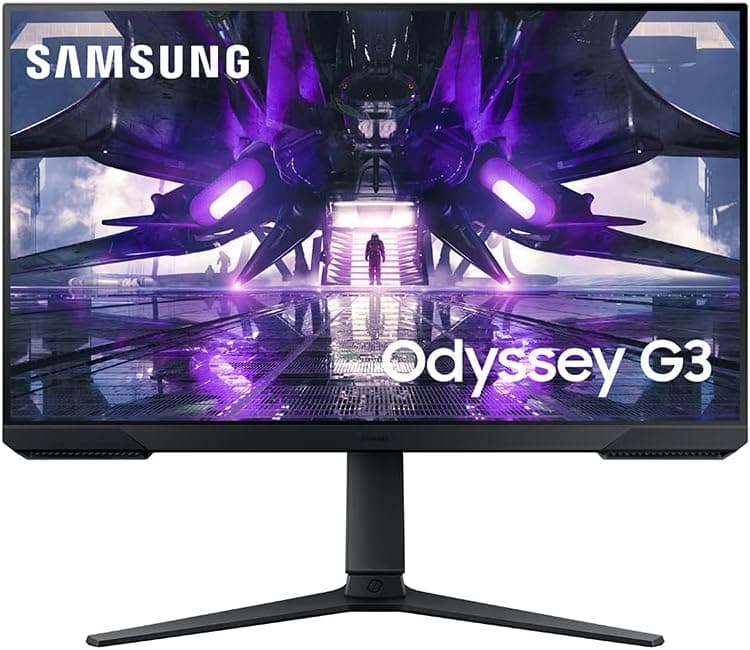
This article takes a close look at the Samsung 25" Odyssey G4 (G40H) Series — 300Hz FHD Gaming Monitor: how to read its specs, the connection mistakes people commonly make, and who should skip it.
Overview
The 25-inch model in Samsung's Odyssey G4 (G40H) series is a gaming monitor built squarely for competitive FPS. Here is the verdict up front.
Its core appeal is the combination of 25 inches, Full HD, a Fast IPS panel and up to 300Hz. In shooters where high frame rates are easy to reach, that responsiveness is a real advantage.
If you want fine detail or impactful HDR, though, this is not the monitor for you.
The Fast IPS panel is rated at 1ms GTG. Because the monitor supports both G-Sync Compatible and AMD FreeSync Premium, variable refresh rate (VRR) can suppress tearing and stutter whether your GPU is NVIDIA or AMD.
It also accepts HDR10 signals and has a Black Equalizer feature that makes dark areas easier to read.
The stand adjusts for height, tilt, swivel and pivot. Being able to set a comfortable posture for long sessions matters at this price point.
The best way to think of this monitor: it puts responsiveness and smoothness first and deliberately compromises everywhere else.
What the Specs Tell You
| Item | Value | What it means |
|---|---|---|
| Size / Resolution | 25" / 1920×1080 | About 88 ppi. You can see the whole screen without moving your eyes much |
| Panel | Fast IPS | Better viewing angles and color stability than VA, with fast response |
| Refresh rate | 300Hz (DP) / 144Hz (HDMI) | 300Hz works only over DisplayPort |
| Response time | 1ms (GTG) | Meant to keep blur low at high refresh rates |
| VRR | G-Sync Compatible / FreeSync Premium | Works with GPUs from either brand |
| HDR | HDR10 | Accepts HDR input. Peak brightness is not listed in the specs |
| Stand / VESA | Height, tilt, swivel, pivot / 100×100mm | Wide adjustment out of the box, and you can move it to an arm |
Converted to time per frame, 144Hz is about 6.9ms, 240Hz about 4.2ms and 300Hz about 3.3ms.
Going from 144Hz to 300Hz saves about 3.6ms per frame, but going from 240Hz saves only about 0.8ms.
So if you already own a 240Hz monitor, upgrading will feel like a small change. The biggest gains come when moving from 60Hz or 144Hz.
Pairing 25 inches with Full HD follows the same logic that made 24–25 inch screens the standard in esports: less eye travel. The trade-off is that text and UI look coarser than on a 27-inch WQHD screen.
If you also plan to use it for desk work, be ready to accept that.
Compatibility Guide
The most common mistake with this monitor is how it gets connected. It has one DisplayPort 1.2 input and one HDMI 2.0 input, and 300Hz is available only over DisplayPort.
Over HDMI it runs at up to 144Hz. If 300Hz is why you are buying it, make sure your PC has a DisplayPort output.
- Desktop PCs: Almost every graphics card has a DisplayPort output, so a DP cable gets you 300Hz. A common mistake is plugging into the motherboard's video port (the integrated GPU) instead of the graphics card, so double-check.
- Gaming laptops: If the only external output is HDMI, you are capped at 144Hz. If a USB Type-C port supports DisplayPort Alt Mode, a USB-C to DP cable can reach 300Hz. Check the laptop's spec sheet to confirm.
- Cables: Use a cable rated for DisplayPort 1.2 or later. Old or very long cables can hide high refresh-rate options or cause signal dropouts.
- NVIDIA GPUs: The monitor works as G-Sync Compatible. You may need to enable G-SYNC in the driver, so set it up over DP.
- AMD GPUs: The monitor works as FreeSync Premium. Enable FreeSync in the driver settings.
- PS5 / Xbox Series X: These connect over HDMI. The monitor accepts up to 144Hz over HDMI, but consoles generally output at most 120Hz, so expect 120Hz in practice. On PS5, 120Hz output only works in supported titles.
- Monitor arms: The rear VESA pattern is 100×100mm. Check the monitor's weight on the product page and choose an arm with enough load capacity.
Your GPU's performance is the other compatibility question. To take advantage of 300Hz, the game has to hold close to 300fps.
Lighter competitive titles can get there on mid-range or better GPUs, but heavier titles often fall short. Check what frame rate your GPU actually reaches in your games before you buy, so you don't end up feeling it is no different from 144Hz.
Product Info
On Amazon.co.jp, the price was ¥47,937 as of September 27, 2026.
Prices change often with sales and stock, so check the product page for the current price before you buy. At the same point, the Amazon rating was 4.8 out of 5 from 35 reviews (96% positive).
The score is high, but 35 reviews is not enough to judge unit-to-unit variation or early-failure trends.
This model is listed under the model number LS25HG402ENXZA. Samsung model suffixes can change by region, so check the model number and photos on the product page before ordering.
Bundled cables and warranty terms may also differ by sales channel, so check the listing. If you don't already have a DisplayPort cable, whether one comes in the box matters most.
In the market, this is an entry-to-mid-priced competitive gaming monitor. It gives up resolution and screen size compared with 27-inch or WQHD models and spends the budget on refresh rate and response time instead.
Comparison with Competitors
Here is how it compares with other Full HD, high-refresh monitors that take a different approach (figures for the other models are limited to what their product names state).
| Product | Size | Max refresh rate | Notes |
|---|---|---|---|
| Samsung Odyssey G4 (G40H) 25" | 25" | 300Hz (DP) | Fast IPS, G-Sync Compatible / FreeSync Premium, 4-way stand |
| ASUS ROG Swift PG259QNR | 24.5" | 360Hz | Fast IPS, G-SYNC, ULMB, NVIDIA Reflex |
| MSI MAG 272F X24 | 27" | 240Hz | Full HD, AMD Adaptive Sync, tilt-only stand |
If you want an even higher refresh rate plus NVIDIA's latency tools, a higher-tier model like the ASUS ROG Swift PG259QNR is the step up. If you'd rather have a bigger screen and 240Hz is enough, a 27-inch FHD model like the MSI MAG 272F X24 is an option, though Full HD looks even coarser at 27 inches.
The 25-inch Odyssey G4 sits in between: 300Hz and a fully adjustable stand without paying top-tier prices.
Recommended Users
The first group is players whose main games are competitive shooters such as VALORANT, Counter-Strike 2, Overwatch 2 or Apex Legends, on a PC that can push high frame rates. 300Hz and 1ms response make enemy movement easier to catch early and clearly.
Coming from a 60Hz or 144Hz monitor, the difference should be easy to notice.
Next are people with shallow desks. At 25 inches the whole screen stays in view even up close, and there is room left for wide mouse movements.
Height and swivel adjustment also help you line up your eye level in tight spaces.
Finally, the monitor suits people who might switch GPU brands. With both G-Sync Compatible and FreeSync Premium, you keep VRR when moving from NVIDIA to AMD or back, without buying a new monitor.
Pivot also lets it work in portrait as a secondary screen for stream chat.
Before You Buy
HDMI-only setups won't reach 300Hz. This is worth repeating.
Over HDMI the limit is 144Hz, so if you can't use DisplayPort, for example with an HDMI-only laptop or consoles only, a 300Hz model makes little sense. A cheaper 144Hz monitor would likely give you the same experience.
Without about 300fps, the extra refresh rate is wasted. A high refresh rate does nothing for smoothness if the game can't produce that many frames.
If you mostly play demanding games at high settings, spending on resolution or screen size will probably satisfy you more.
Keep HDR expectations low. HDR10 here means the monitor accepts HDR signals.
The specs list no peak brightness or local dimming. On typical edge-lit IPS monitors, HDR tends to look modest.
If movies or beautiful RPGs are your priority, look at OLED or high-brightness HDR monitors. Like most IPS panels, blacks can also look raised in a dark room.
Full HD looks coarse for productivity. 25-inch FHD reads well in games, but for documents and spreadsheets it offers less workspace and sharpness than a 27-inch WQHD screen.
If this will be your only monitor, including for work, make sure you can live with that.
Check who is selling it. At the time of writing, the Amazon listing shows "Amazon US" as both seller and shipper.
If this is overseas stock, domestic warranty and support channels may differ. Check the seller, warranty terms and power adapter specs on the product page before buying.
Listing details can also contain errors, so confirm from the photos and title that it is the 25-inch G40H.
There aren't many reviews yet. The rating is high at the time it was captured, but 35 reviews can't reveal unit-to-unit issues such as dead pixels or backlight bleed.
Check the return policy for peace of mind.
FAQ
Q. What refresh rate do I get over HDMI?
A. Up to 144Hz. You need DisplayPort for 300Hz.
Q. Can a PS5 or Xbox Series X run at 300Hz? A.
No. Consoles connect over HDMI and generally output at most 120Hz.
The monitor still works well for 120fps-capable titles.
Q. Can I use VRR with an NVIDIA GPU?
A. Yes. It is G-Sync Compatible. Connect over DisplayPort and enable G-SYNC in the driver.
Q. Is it worth upgrading from a 240Hz monitor? A.
The per-frame difference is about 0.8ms, so the improvement is small.
Upgrading from 144Hz or below gives a much more noticeable change.
Q. Can I use a monitor arm?
A. Yes. The back has a 100×100mm VESA pattern. Check the monitor's weight and pick an arm rated for it.
Product Disclosure (Amazon)
- Manufacturer: サムスン(SAMSUNG)
- Seller: Amazon US
- Fulfilled by: Amazon US
- ASIN: B0GVZ837Q3
- Note: This article covers a manufacturer-made product based on Amazon listing details.