Overview
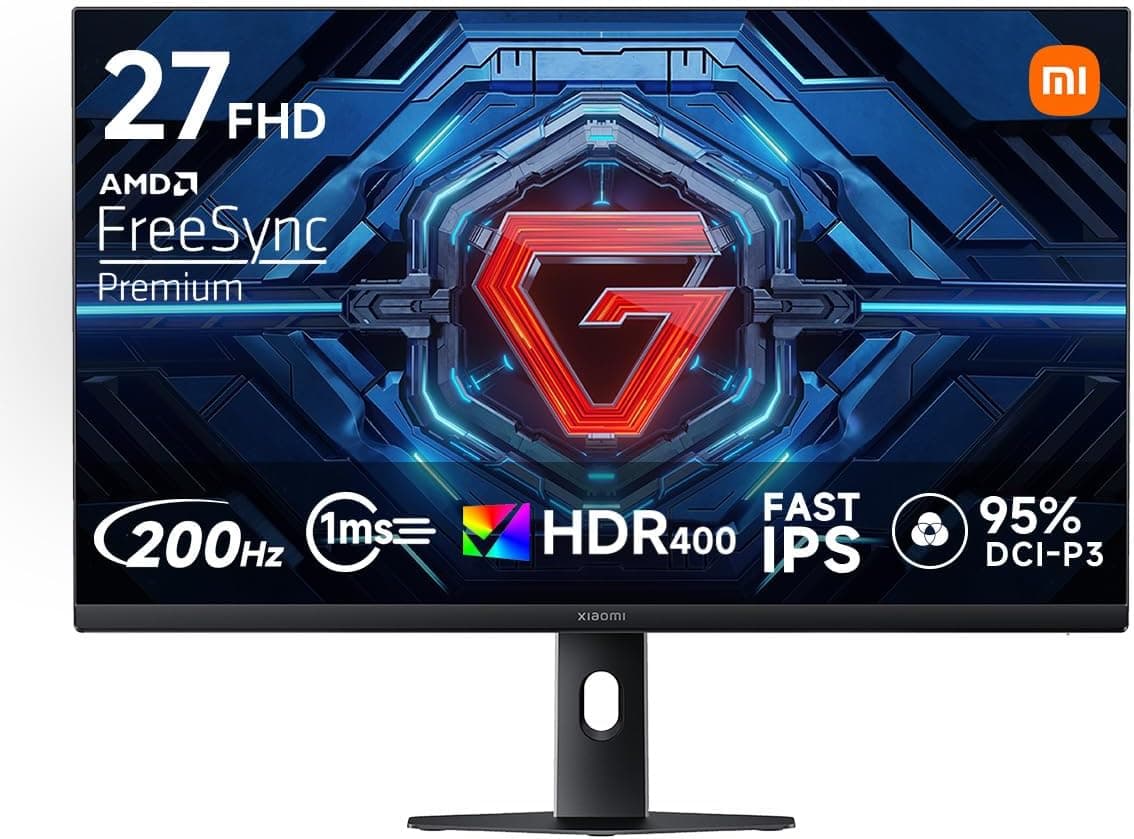
The Xiaomi G27i — 27-inch FHD 200Hz Fast IPS Gaming Monitor pairs a 27-inch Fast IPS panel with a 1920×1080 resolution, a 200Hz refresh rate and a 1ms (GTG) response time. The short verdict: for PC gamers who want to move up from a 60Hz or 144Hz display on a budget of around ¥20,000, it is very strong value.
However, 1080p on a 27-inch screen puts it at a disadvantage for text sharpness. If you mostly do office work or programming, or you mainly play on a 4K-capable console, other monitors will serve you better.
Xiaomi rates the panel at 100% sRGB and 95% DCI-P3 coverage with ΔE<2 color accuracy. It also carries VESA DisplayHDR 400 certification and 400 nits of brightness.
Adaptive sync is AMD FreeSync Premium, and the video inputs are DisplayPort 1.4 and HDMI.
TÜV Rheinland-certified low blue light, a matte non-glare surface and 178° viewing angles help during long sessions.
On Amazon.co.Check the retailer's page for the latest user reviews.
That is still a modest number of reviews, but satisfaction is high for this price class. Reviews tend to reflect first impressions, though, so this article also covers what tends to matter after months of use.
What 200Hz, Fast IPS and 1ms Actually Mean
Refresh rate is how many times per second the screen redraws. A new frame arrives every 16.7ms at 60Hz, about every 6.9ms at 144Hz and every 5ms at 200Hz.
Coming from 60Hz, the difference is obvious even when you move the mouse cursor or scroll a web page. Coming from 144Hz, the gap is smaller, but many players find enemies easier to track during fast camera flicks in shooters.
There is a catch: you only benefit from 200Hz if the game actually runs at around 200fps. A mid-range GPU can sometimes get there at 1080p in lighter esports titles, but demanding AAA games often sit around 100fps.
That is where FreeSync Premium helps. It matches the refresh rate to fluctuating frame rates, which reduces tearing and stutter.
Fast IPS keeps the color and viewing-angle strengths of IPS while speeding up the liquid crystal response. Note that a 1ms GTG figure is typically measured at the most aggressive overdrive setting.
Pushing overdrive to maximum can cause overshoot, a bright halo trailing moving objects. In practice, a middle setting often looks cleanest.
Compatibility Guide
| Source | Recommended connection | Expected output | Notes |
|---|---|---|---|
| Desktop PC | DisplayPort 1.4 | 1920×1080 / 200Hz | GPU needs a DP output |
| Laptop | DP output, or USB-C (DP Alt Mode) to DP | Depends on the laptop's port | No USB-C input is listed |
| PS5 / Xbox Series X | HDMI | 1080p / up to 120Hz | 200Hz unavailable; 4K is downscaled |
| Nintendo Switch | HDMI | 1080p / 60Hz | No high-refresh benefit |
DisplayPort is the safe choice for 200Hz on a PC. DisplayPort 1.4 has ample bandwidth for 1080p at 200Hz.
The specs we have do not state the HDMI version or the maximum refresh rate over HDMI. If you plan to run 200Hz over HDMI, confirm this on the product page or in Xiaomi's spec sheet before you buy.
On the GPU side, AMD Radeon cards support FreeSync Premium directly. NVIDIA GeForce cards often work through the G-SYNC Compatible setting in the driver.
However, NVIDIA does not guarantee monitors that are not on its certified list, so flicker or other issues are not covered. Laptop HDMI ports are sometimes an older standard that cannot drive 200Hz.
If your laptop's USB-C port supports DisplayPort output, a USB-C to DisplayPort cable is the most reliable option.
With devices that support HDMI VRR, consoles can also use variable refresh. Still, check separately whether your specific console supports it.
Physically, a 27-inch 16:9 screen is about 600 mm wide for the visible area alone. A desk at least 600 mm deep and a viewing distance of around 700 mm are good targets.
The back supports VESA mounting, so you can switch to a monitor arm or wall mount. When choosing an arm, check that the hole spacing and the monitor's weight fall within the arm's supported range.
Comparison With Alternatives
| Model | Panel | Resolution | Refresh rate | Best for |
|---|---|---|---|---|
| Xiaomi G27i | 27-inch Fast IPS | 1920×1080 | 200Hz | A larger screen with high fps on a budget |
| ASUS VA24EHF | 24-inch IPS | 1920×1080 | 120Hz | Cheapest step up from 60Hz |
| ASUS ROG Swift PG259QNR | 24.5-inch Fast IPS | 1920×1080 | 360Hz | Serious competitive play |
| ViewSonic VA2756-4K-MHD | 27-inch IPS | 3840×2160 | See its own review | Sharp text and workspace |
The G27i's position is clear. It has a bigger screen than 24-inch 1080p models, but a lower pixel density.
It is slower than 360Hz esports monitors but costs far less. Compared with a 27-inch 4K monitor, it loses on text and photo sharpness, and in return it delivers high refresh rates for little money.
Among other 27-inch gaming monitors, the LG UltraGear 27GN65R-B is also worth a look. When comparing models, focus on refresh rate, HDR certification and stand adjustability.
If you have more budget and split your time evenly between gaming and work, a 27-inch WQHD (2560×1440) monitor is also worth considering.
Product Info
As of September 1, 2026, Amazon.co.jp listed it at ¥18,110.
Prices change often with sales and stock, so check the product page for the current price. At that captured price, getting 200Hz, Fast IPS and DisplayHDR 400 together is an aggressive offer for an entry-to-mid gaming monitor.
Many monitors in the same range stop at 144Hz or 165Hz, so 200Hz support is a clear point of difference.
| Item | Value |
|---|---|
| Screen size | 27-inch (16:9) |
| Resolution | 1920×1080 (FHD) |
| Panel | Fast IPS |
| Refresh / response | 200Hz / 1ms (GTG) |
| Brightness / HDR | 400 nits / VESA DisplayHDR 400 |
| Gamut / accuracy | sRGB 100% / DCI-P3 95% / ΔE<2 |
| Adaptive sync | AMD FreeSync Premium |
| Viewing angle | 178° |
| Inputs | DisplayPort 1.4 / HDMI |
Xiaomi is known for low-priced appliances and smartphones, and the G27i follows the same value-first approach. Before buying, check the warranty terms, which cables are bundled (especially whether a DisplayPort cable is included) and the stand's adjustment range on the product page.
First Settings to Check After Setup
Plugging the monitor in often does not give you 200Hz automatically. Check the following in order once it arrives.
- Windows refresh rate: Go to Settings, then Display, then Advanced display, and select 200Hz. Many people run at 60Hz for months without noticing.
- GPU driver: Enable FreeSync on AMD, or G-SYNC Compatible on NVIDIA.
- Monitor menu: Check any adaptive sync or response time settings. Start with a middle overdrive level rather than the maximum.
- Frame cap: Capping games in the low 190s fps is a common way to stay within the variable refresh range.
- HDR: Leaving Windows HDR on all the time can make the normal desktop look washed out. Turning it on only for HDR games and videos is easier to live with.
Who Should Buy
1. PC gamers who want smooth shooters and fighting games. The 200Hz refresh rate and 1ms GTG response keep fast motion clear.
The jump from 60Hz is large and easy to feel. If you are chasing 4K or OLED image quality, though, this is not the monitor for you.
**2. Budget buyers who want accurate color. Professionals who need managed color should look at calibration-capable higher-tier models.
3. People sharing one screen between a PC and a console. With HDMI VRR-capable devices, supported games run more smoothly.
However, the 1080p panel downscales 4K console output, and consoles top out at 120Hz anyway. If you mainly play on a console, a 4K model will likely satisfy you more.
4. Home office workers and people who spend long hours at a PC. The TÜV Rheinland low blue light mode and matte screen reduce eye strain.
If your work is text-heavy, read the pixel density note below first. Also check the specs if you need a USB hub or speakers.
Before You Buy
Text looks somewhat soft on a 27-inch 1080p screen. Pixel density is about 82ppi, lower than 24-inch 1080p (about 92ppi) or 27-inch WQHD (about 109ppi).
It rarely matters in games or video, but up close, spreadsheets and code show jagged text edges. Plan on sitting about 700 mm away.
200Hz is wasted on a weak GPU. If heavy games only reach about 100fps, you will see little difference from a 144Hz-or-lower monitor.
Consoles cap at 120Hz anyway. Before buying for the 200Hz figure alone, check what frame rates your GPU actually delivers in the games you play.
DisplayHDR 400 is an entry-level HDR tier. Local dimming is not a requirement for this tier, so do not expect full HDR effects such as bright highlights against deep darks.
IPS panels also generally have lower contrast than VA or OLED, so blacks look slightly gray in a dark room. Some IPS glow in the corners is possible, and it varies from unit to unit.
Open questions about connections. The specs we have do not confirm 200Hz over HDMI, and no USB-C input is listed.
The stand is described as tilt-adjustable, but check the product page for height and swivel adjustment. Discovering after delivery that the height is wrong and then buying an arm is a common story.
Make sure you are on the right listing. Monitors with similar names but different specs are sometimes sold side by side.
Confirm that the listing says 200Hz, Fast IPS and DisplayHDR 400. Store listings can also contain errors, so check the images and title, not just the model number.
FAQ
Q. Can I play at 200Hz on a PS5? A.
No. The PS5 outputs at most 120Hz, so that is the limit on this monitor too.
4K output is downscaled to 1080p.
Q. Does variable refresh work with NVIDIA GPUs? A.
It often works through G-SYNC Compatible in the driver. Monitors not on NVIDIA's certified list are not guaranteed to work, though.
If you see flicker, adjust the settings or try a different DisplayPort cable.
Q. Does HDMI give me 200Hz? A.
The specs we have do not list the HDMI version, so we cannot say for sure. For reliable 200Hz on a PC, use DisplayPort.
Q. 24-inch or 27-inch for shooters? A.
Competitive players often prefer around 24 inches so they can see the whole screen at once. If immersion and video matter too, 27 inches is the better fit.
Because 27-inch 1080p shows softer text, decide based on how much non-gaming work you do.
Q. How good is the HDR? A.
DisplayHDR 400 is an entry-level tier, so expect only somewhat punchier brightness than SDR. Serious HDR needs a higher HDR tier or an OLED panel.
Product Disclosure (Amazon)
- Manufacturer: xiaomi(シャオミ)
- Seller: Amazon.co.jp
- Fulfilled by: Amazon.co.jp
- ASIN: B0FW258JYX
- Note: This article covers a manufacturer-made product based on Amazon listing details.