This article looks at what the Plugable USB 2.0 Display Adapter (Windows, USB-to-DVI with VGA/HDMI adapters, DisplayLink chipset) can and cannot realistically do.
Overview
The Plugable USB 2.0 Display Adapter lets you attach one additional external monitor through a plain USB 2.0 port.
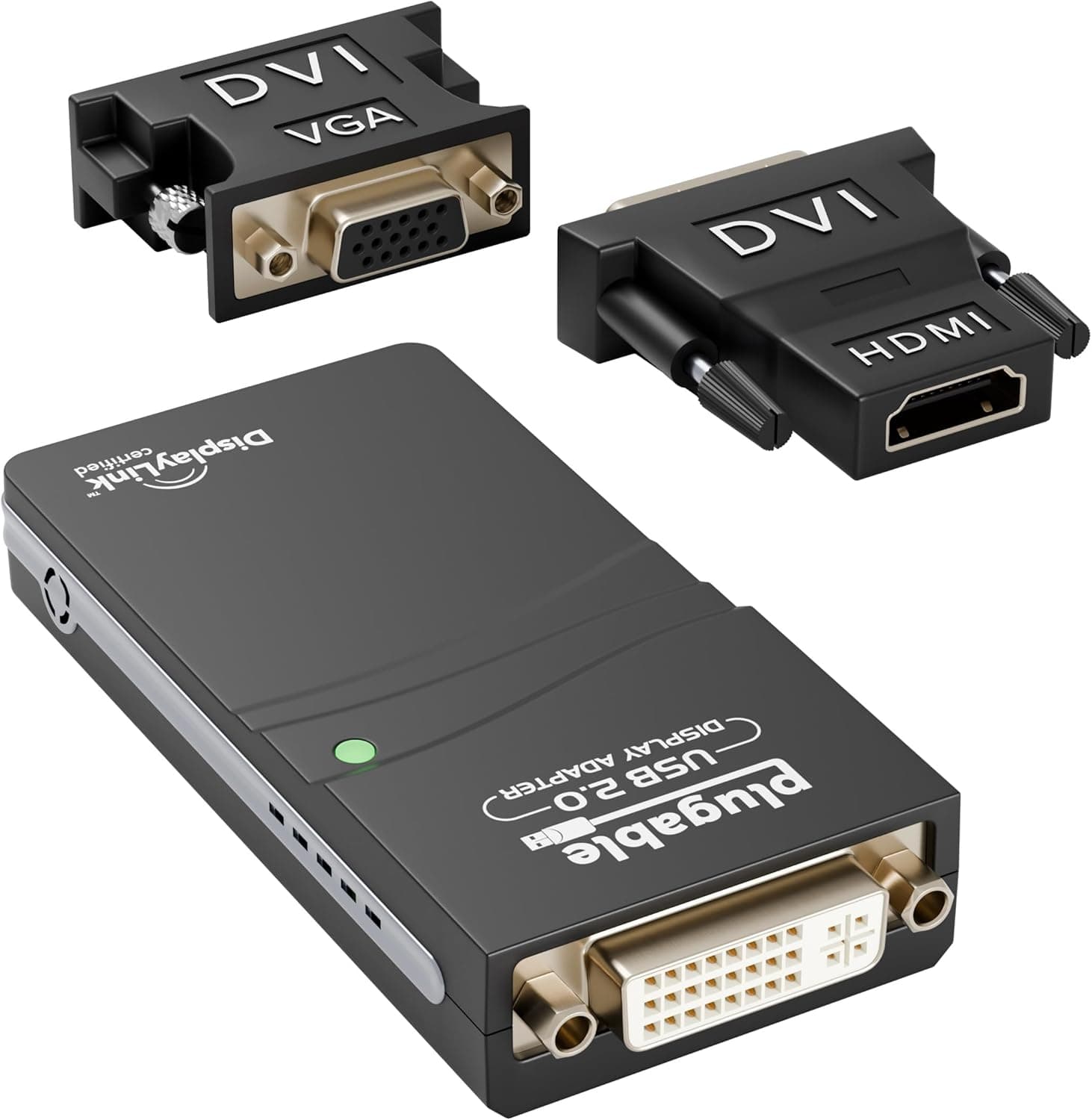
It uses the DisplayLink DL-165 chipset and supports resolutions up to 1920×1080 (1080p) at 60Hz. The video output on the unit itself is DVI; bundled DVI-to-VGA and DVI-to-HDMI adapters cover projectors and monitors with older or newer inputs.
The key framing is this: it adds screen area, not graphics performance. If your laptop has no free video output, or the one it has is already in use, and you want one more surface for documents, spreadsheets, chat, and browser windows, this is one of the few ways to solve it without opening the chassis.
If your goal is video playback or gaming on that second screen, the USB 2.0 bandwidth ceiling described below will get in the way.
As captured in June 2026, the Amazon.co.jp listing showed 1,600 reviews averaging 4.6 out of 5 (92% positive).
That is a strong score with a four-digit sample behind it. Keep in mind, though, that high ratings on an accessory like this usually reflect buyers whose use case matched the product — the score is evidence of fit, not of versatility.
What USB 2.0 Can and Cannot Carry
The single most important spec here is that the interface is USB 2.0, not USB 3.0.
USB 2.0 tops out at 480Mbps in theory, which is nowhere near enough for uncompressed 1080p60 video.
DisplayLink works around this: the driver on the PC compresses the frame and sends only the changed regions, and the chip in the adapter decodes them for the monitor.
That design explains the strengths and weaknesses directly. When most of the screen is static — word processing, spreadsheets, code, email, chat, line-of-business apps — very little data moves and the experience feels normal.
When the entire frame changes every refresh — full-screen video, games, fast scrolling, animation-heavy slides — the data volume spikes and you are likely to see dropped frames, stutter, or lag.
Because the compression runs on the CPU, there is also a CPU cost. On a modern processor doing static office work you will rarely notice it, but on a low-power ultrabook playing video you may notice both the load and the fans.
Treat this as a place to park information, not as a gaming display.
Compatibility Guide
The stated OS support is Windows 10, 8.1, and 7.
macOS and Linux are not supported. Mac users who want a second display should look at Thunderbolt or USB-C DisplayPort Alt Mode docks instead.
Drivers are expected to arrive automatically through Windows Update, so on a typical machine it works on plug-in. On corporate networks where driver delivery via Windows Update is blocked, you will need to obtain the DisplayLink driver separately.
Your system needs a WDDM-compatible graphics driver, and this is where people most often get stuck. If the integrated GPU is still running the generic driver Windows shipped with, clone (duplicate) mode may be unavailable or extended mode may behave erratically.
Older chips such as Intel HD 4000, which never received current Windows 10 drivers from the vendor, are known cases where clone mode cannot be selected. If you plan to use this on an older second-hand laptop, check driver availability first.
Windows 11 is not listed in the stated OS support. DisplayLink driver coverage varies by chip generation, so if Windows 11 is your target, verify current driver availability on the product page before buying rather than assuming it works.
Physically, the unit measures 9×4×1.5 cm, so it travels easily.
The output is DVI, connecting directly to DVI monitors and via the bundled adapters to VGA or HDMI. One caveat: a DVI-to-HDMI adapter passes video only, not audio.
If you need sound from a meeting-room projector or external monitor, route it separately from the PC's audio output. Also prefer a direct port on the machine over a USB hub, which tends to be less stable.
Product Info
Key specifications:
| Item | Value |
|---|---|
| Chipset | DisplayLink DL-165 |
| Max resolution | 1920×1080 @60Hz |
| Interface | USB 2.0 |
| Dimensions | 9×4×1.5 cm |
| Connectors | DVI (VGA and HDMI adapters included) |
| OS support | Windows 10 / 8.1 / 7 (no macOS or Linux) |
On pricing: as captured on 8 June 2026, Amazon.co.jp listed it at ¥8,573; as captured on 16 August 2026, Rakuten (Palms America) listed it at ¥10,980.
Both are point-in-time figures and move with sales and stock. The gap between sellers exceeded ¥2,000, so check current prices at more than one retailer before ordering.
The eBay entry did not return a specific listing price and is not a usable comparison point.
The box includes the adapter plus DVI-to-VGA and DVI-to-HDMI adapters, so you generally do not need extra cables to match an existing monitor. DisplayLink itself is a long-established approach, which is reassuring on the driver-maturity front.
How It Compares to the Alternatives
If your PC still has a free video output — HDMI, DisplayPort, or USB-C Alt Mode — using it is better on every axis: image path, latency, and CPU load. This adapter earns its place only when there is no free output, physically or practically.
There are also USB 3.0 DisplayLink adapters.
With more bandwidth they handle higher resolutions, more screens, and moving content far better. If you have a free USB 3.0 port, that route is worth considering.
This USB 2.0 model makes the most sense when only USB 2.0 is available on an older machine, or when one static 1080p work surface is genuinely all you need.
Finally, if both your monitor and your PC have matching DisplayPort or HDMI ports, a single cable may be all it takes. Writing down the inputs and outputs you already own before buying an adapter often saves the purchase entirely.
Best Use Cases
- Laptop users who need one more screen but cannot add a graphics card or a video output. It plugs into USB with no disassembly required.
- Remote and office workers juggling documents, email, spreadsheets, and a browser at once. Tiling static windows is exactly what this adapter is best at.
- Presenters connecting to whatever a meeting room happens to have. With DVI plus bundled VGA and HDMI adapters, older room equipment is easy to accommodate.
- Owners of older USB 2.0-only laptops who want more life out of the machine. For clerical work, extending that hardware this way is a realistic option.
Things to Check Before Buying
The biggest pitfall is expecting comfortable video playback or gaming on the attached screen. Because of the USB 2.0 bandwidth ceiling and the compression scheme, full-screen video and 3D games routed through this adapter tend to drop frames and lag.
Buying it so you can "watch videos on the second monitor while working" is likely to disappoint. The practical split is: moving content on the PC's built-in output, static content on the adapter.
Second, macOS and Linux are not supported. Mac owners sometimes assume anything over USB will work; treat this as Windows-only.
Even on Windows, an outdated or generic GPU driver can leave you without clone mode. Updating your GPU driver before installing avoids most of the common trouble.
The 1080p ceiling matters too. Even if you own a 1440p or 4K monitor, output through this adapter is capped at 1920×1080.
If you want to make use of a high-resolution panel, this is the wrong product. And since DVI-to-HDMI carries no audio, you cannot plan around the external monitor's speakers.
Be careful with the listing data itself. In the pricing information referenced here, the Amazon entry was labeled "Amazon US" while actually pointing to a yen-denominated Amazon.co.jp price — the collected label and the actual storefront did not agree.
Listing metadata mismatches like this are not rare. Before ordering, confirm with your own eyes that the product image, title, and model identifier (ASIN B004AIJE9G) match the item you intend to buy.
USB display adapters in particular are sold in many near-identical-looking variants with different chips and interface generations.
Finally, consider value. At the ¥8,573–¥10,980 range captured above, this is not cheap for simply adding one screen.
If your PC has an unused video output, check whether a single cable solves the problem first. If it does not, that is where this adapter starts to make sense.
FAQ
Q. Can I add two or more monitors? A.
One adapter supports one additional monitor. You can use several adapters, but they share USB 2.0 bandwidth and CPU headroom, so the experience degrades.
For a genuine multi-screen setup, choose a higher-bandwidth connection method.
Q. Can I use it as a gaming second screen? A.
For static content — chat, a wiki, a stream comment panel — it is usable. Do not put the game itself on this output; USB 2.0 bandwidth is not suited to fast-moving video.
Q. Does it work with a Mac?
A. No. Supported systems are Windows 10, 8.1, and 7; macOS and Linux are not supported.
Q. Does it work on Windows 11? A.
The stated support stops at Windows 10. DisplayLink driver coverage varies by chip generation, so verify current driver availability on the product page before buying.
Q. Can I connect a 4K monitor?
A. Even if it connects, output is capped at 1920×1080 @60Hz. You cannot take advantage of a 4K panel.
Q. Does it carry audio? A.
The bundled DVI-to-HDMI adapter passes video only. For sound from an external monitor or projector, run a separate cable from your PC's audio output.
Q. Do I need to install drivers? A.
Normally they install automatically via Windows Update. On managed corporate networks where driver delivery is restricted, manual installation may be required.