Overview
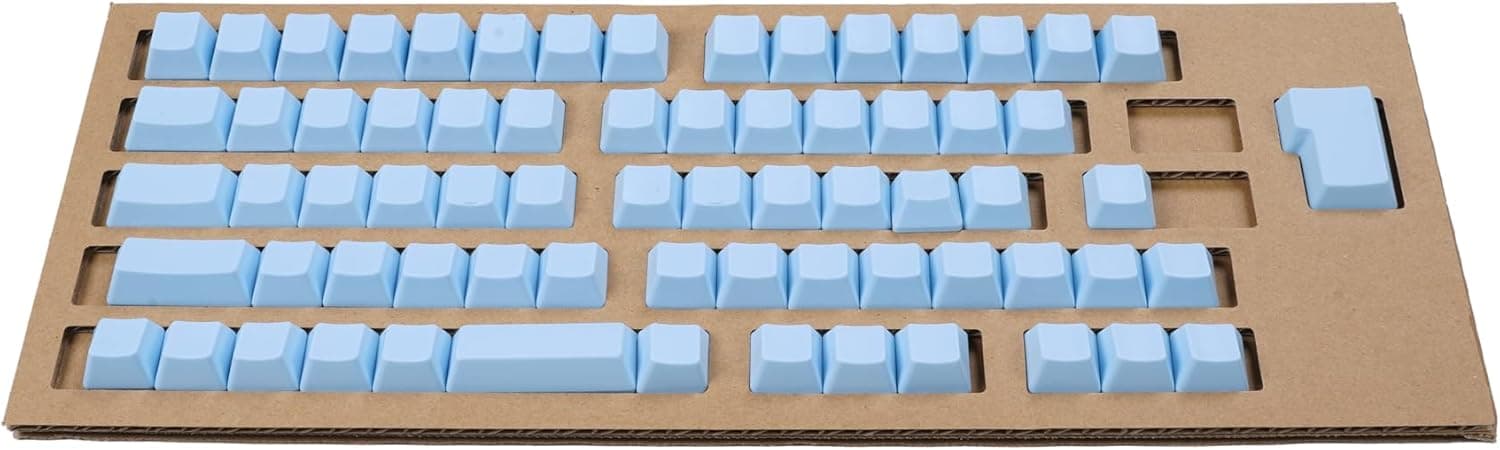
PFU HHKB Professionalシリーズキートップセット日本語配列無刻印空 PD-KB420KTLBN is a 69-piece blank (unprinted) replacement keycap set built exclusively for Japanese-layout models of the HHKB Professional series. It is the fifth entry in PFU's HHKB Color Keycap Project, finished in a pale blue called "Sora" (sky).
No keyboard body is included.
The short version: this set pays off only if you already own a Japanese-layout HHKB and can touch-type without looking. If you still glance at legends to find symbols or Fn-layer functions, you are trading real usability for looks.
On Amazon.co.jp the set was ¥9,240 as of 27 Aug 2026, with a 4.4-star average (roughly 88% positive) across 44 reviews as of 17 Jun 2026.
That rating is strong, but 44 reviews is a small sample — read the individual comments rather than trusting the average alone. Prices move with sales and stock, so confirm the current figure on the product page.
What Blank Keycaps Actually Change
The visual change is easy to picture, so let's talk about typing instead. Removing legends removes visual noise: a pale blue accent over a white or charcoal base settles in a way printed caps never manage.
The catch is the layout. HHKB is a 60%-class board that puts arrows, Delete and several symbols behind the Fn key.
The Japanese layout carries more symbol keys than the US layout, plus conversion keys, which makes blank caps a harder proposition on JP than on US boards. Prose and code you write daily will be fine; the rarely-used symbol, or an Fn function you touch once a month, is where your hands will stop.
Keep your original keycaps — going back should always stay an option.
Compatibility Guide
The supported list is strict: Japanese-layout models only. US-layout boards and the HHKB Studio line are out.
| Model | Supported |
|---|---|
| HHKB Professional JP | Yes |
| HHKB Professional JP Type-S | Yes |
| HHKB Professional BT | Yes |
| HHKB Professional HYBRID | Yes |
| HHKB Professional HYBRID Type-S | Yes |
| HHKB Professional Classic Type-S | Yes |
| HHKB Studio series | No |
| US-layout models | Not covered by this set |
The 69-cap count matches the key count of a Japanese-layout HHKB, so the set can replace every key at once. If you only plan a partial swap, expect leftovers.
Do not plan on reusing these on other keyboards. HHKB uses a capacitive (non-contact) mechanism, and while the sliders carry a cross-shaped stem, the widths around right Shift, Backspace and the spacebar follow HHKB's own layout.
Treating "MX-compatible" sets and HHKB as fully interchangeable leaves gaps. Treat this as a dedicated JP-layout part.
For material and surface finish, check what the product page states rather than assuming.
Product Info
The box holds three things: 69 replacement keycaps, a keycap puller, and a manual with the replacement procedure and a key layout chart. Since the puller is included, no separate tool purchase is needed.
The layout chart matters more than it sounds for a blank set — it is your reference right after the swap.
Price was ¥9,240 on Amazon.co.jp as of 27 Aug 2026, broadly matching PFU Direct.
On the overseas secondhand market (eBay), pricing varies per listing and there is no fixed reference figure. Given that the keyboard itself costs several times this, you are spending roughly 20–30% of the board's price on cosmetics.
Reviews stood at 44 with a 4.4 average (about 88% positive) as of 17 Jun 2026.
| Item | Detail |
|---|---|
| Model number | PD-KB420KTLBN |
| Keycaps | 69 |
| Color | Sora (pale blue) |
| Legends | None (blank) |
| Included | Keycap puller, manual |
| Reference price | ¥9,240 (as of 27 Aug 2026) |
Alternatives and Other Colors
The closest competitor is PFU's own printed color keycap sets. If blank isn't a hard requirement, printed caps are the more practical buy — and on a shared machine that others touch, it isn't even a debate.
For color, earlier releases include "Sakura," "Wasabi," "Tanpopo" and "Fuji." Beyond a full Sora build, you can use a handful of caps as accents; 69 pieces give you room to experiment.
Cheap third-party PBT sets get compared here, but as noted, HHKB's JP layout includes non-standard widths, so generic sets often leave keys unfilled. Saving money with a generic set is a poor bet on this particular keyboard.
Best Use Cases
- JP-layout HHKB owners who genuinely touch-type: you lose nothing in speed and gain the look. This is the intended audience.
- People who style their desk: Sora over a white or charcoal base, or just Esc and Control as accents — 69 caps give you options. Useful if your desk appears on camera.
- Anyone curious about blank keycaps: far cheaper than buying a second, blank-model keyboard, and reversible if it doesn't click.
- Owners of multiple HHKBs: a color change makes it obvious at a glance which unit is assigned to which task.
Things to Consider
This is keycaps only — no keyboard body. Product photos often show a full keyboard, and people do order expecting one.
A compatible Japanese-layout HHKB Professional is a prerequisite.
"You'll get used to it" isn't always true. The JP layout leans on legends for symbols and Fn functions.
Before buying, try working for half an hour while deliberately not looking at your current legends — that test answers the question faster than any review.
Replacement is done at your own risk. Pull straight up, slowly.
Angled pulls scratch the cap's edges and neighboring keys. Large keys like the spacebar warp if you lift one side first, so apply even pressure.
Lay removed caps out in their original arrangement so restoring them is trivial.
Remember the small review sample. 44 reviews at 4.4 is good, but color perception varies, and photo-versus-reality complaints are common for this product class.
Pale blue shifts noticeably with lighting temperature — under warm desk lighting it can read duller than expected.
Finally, listing data itself is sometimes wrong. Manufacturer, model number and compatibility fields on retail pages occasionally contradict the physical product, even for accessories at this price.
Before ordering, match the product image, the title and the model number PD-KB420KTLBN against your own HHKB and confirm it is the Japanese layout. US-layout and Studio variants sit right next to this one in listings, which is exactly how mix-ups happen.
Replacement Tips
- Photograph your current layout from directly above.
Your own photo beats the included chart. 2.
Hook the puller wire on opposite corners and lift straight up. No levering.
Work row by row instead of stripping the whole board — you never lose your place.
When seating a cap, lower it squarely onto the cross stem and press with your fingertip until it clicks.
No hammering required. 5.
When finished, type through everything including the Fn layer to check for missed or binding keys.
FAQ
Q. Will it fit a US-layout HHKB?
A. No. This set is Japanese-layout only; PFU sells separate sets for US-layout boards.
Q. Does it work with HHKB Studio?
A. No. Studio uses a different key configuration and is explicitly excluded.
Q. Can I swap only some keys? A.
Yes. You don't have to use all 69 — Esc and Control alone make a fine accent.
Store the spares in the original box.
Q. Does typing feel change? A.
The switching mechanism lives in the keyboard, so actuation force is unchanged. Surface texture and sound may shift slightly depending on material and finish; check the product page for those details.
Q. What if I lose track of the layout? A.
The manual includes a key layout chart, and you can always reinstall your original caps — which is why you should keep them.
Q. Is ¥9,240 still the price? A.
That figure was captured on 27 Aug 2026. Stock and sales move it, so check the product page for the current price.