Overview
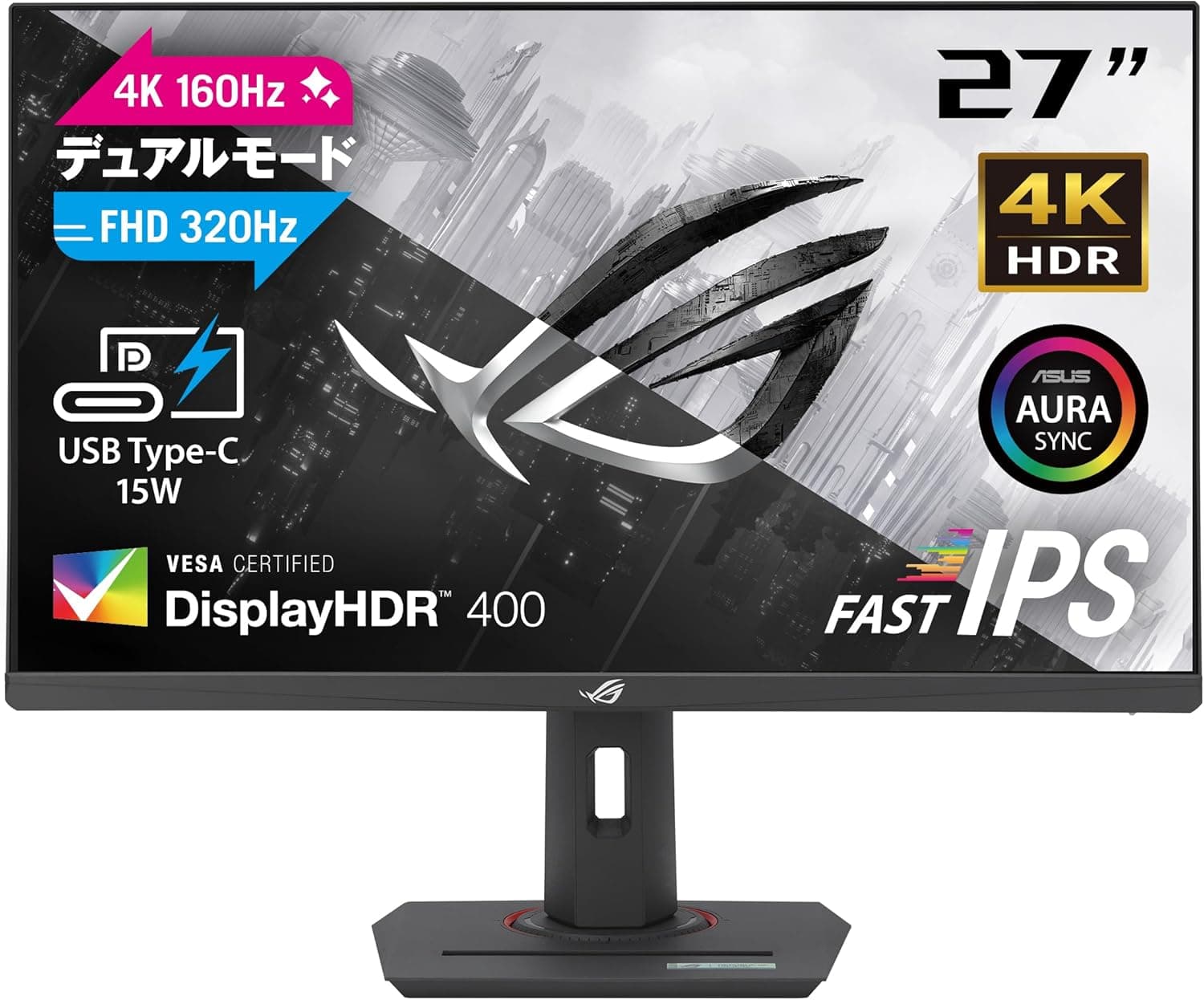
The ASUS 4K ゲーミングモニター ROG Strix XG27UCG デュアルモード 黒 27インチ — the ASUS ROG Strix XG27UCG — is a 27-inch gaming monitor that lets you switch between two operating modes on one panel: 4K (3840×2160) at up to 160Hz, and Full HD (1920×1080) at up to 320Hz. It uses a Fast IPS panel rated at 1ms GTG and offers three video inputs: DisplayPort 1.4, HDMI 2.1, and USB-C with DisplayPort Alt Mode.
The short verdict: this monitor earns its price only if you genuinely split your time between competitive shooters and detail-heavy single-player or video content. If you play only competitive titles, or only want a sharp 4K panel for media and work, a single-purpose monitor at the same price will serve you better.
Dual mode is a real feature, but it is a feature you are paying extra for.
Ergonomics are solid: height adjustment (0–120mm), tilt, swivel, and pivot, plus VESA 100×100mm mounting. The stand is flexible but takes up desk depth, so plan on a monitor arm if you want a clean desk or a multi-monitor setup.
How Dual Mode Actually Works
Dual mode does not change the physical panel. It changes the signal the monitor accepts.
Displaying 1920×1080 on a 4K panel is an integer relationship — each output pixel maps to a 2×2 block — so it generally avoids the soft edges you get from non-integer scaling. You switch from the monitor's on-screen menu; no cable swapping required.
| Mode | Resolution | Refresh rate | Frame time | Pixel density (approx.) |
|---|---|---|---|---|
| 4K mode | 3840×2160 | 160Hz | ~6.25ms | ~163ppi |
| Full HD mode | 1920×1080 | 320Hz | ~3.13ms | ~82ppi |
The gap in frame time is about 3.1ms.
That is not "twice the reaction speed" — it shows up as reduced smear during fast view movement and a more connected feel to mouse input. Whether you benefit depends entirely on whether your game actually reaches roughly 300fps.
Lightweight competitive titles like CS2 or VALORANT can; a heavy AAA title cannot, and switching to 320Hz mode there just lowers your resolution for nothing.
The same logic applies in reverse to 4K 160Hz: your GPU, not the monitor, sets the ceiling. High resolution still looks better even at lower frame rates, but do not assume 160Hz means permanently smooth.
Compatibility Guide
Inputs are DisplayPort 1.4 ×1, HDMI 2.1 ×1, and USB-C (DP Alt Mode) ×1.
4K at 160Hz exceeds raw DisplayPort 1.4 bandwidth, so DSC (Display Stream Compression) is required.
As a rough guide, DSC-capable GPUs are NVIDIA RTX 20-series and newer, AMD RX 5000-series and newer, and Intel Arc. On older GPUs, 160Hz simply will not appear in the refresh-rate list.
Cables matter more than people expect. Use a certified DP 1.4 (HBR3) cable, or an "Ultra High Speed HDMI" cable rated for 48Gbps.
Reusing an old HDMI cable typically shows up as flicker, a blank screen, or missing high-refresh options.
Consoles need a caveat. The HDMI 2.1 input accepts full console bandwidth, but both the PS5 and Xbox Series X cap their own output at 4K 120Hz — you will not see 160Hz from a console.
And since there is only one HDMI 2.1 port, owning both consoles means buying an HDMI 2.1 switch.
Treat the DisplayPort input as PC-only.
USB-C carries video plus 15W Power Delivery. 15W is not charging — it slows battery drain at best.
Thin-and-light laptops typically want 45–65W and gaming laptops 100W or more, so keep the original AC adapter connected. Note that the provided specifications do not list a USB hub or VRR/Adaptive-Sync support; verify those on the product page if they matter to you.
Mounting is VESA 100×100mm. Panel weight is not listed in the specifications, so check the product page figure against your arm's load rating before ordering.
Competitor Comparison
| Type | Strength | Weakness | Best for |
|---|---|---|---|
| Dual-mode 4K/FHD (this model) | One display covers detail and speed | Price premium; ~82ppi in FHD mode | Split competitive / single-player use |
| Single-purpose 4K 144–160Hz | Same money buys better brightness, color, HDR | Won't reach 240Hz+ smoothness | Media, creation, story games |
| Full HD 240–280Hz esports panel | Cheaper; 24-inch means less eye travel | Too low-res for work or video | Competitive-only players |
Concretely: a competitive-focused panel like the BenQ ZOWIE XL2540X+ (24.1-inch Full HD 280Hz) is the more rational buy if shooters are all you play.
Meanwhile 27-inch 1080p panels such as the Gigabyte G27F (144Hz IPS) or MSI MAG 274F are cheaper but leave you living with low pixel density all day. The XG27UCG's argument is that you avoid that trade-off by staying at 4K normally and dropping to Full HD only for matches.
If that specific argument doesn't move you, a single-purpose monitor at the same price is the better value.
Product Info
Key specifications: 27-inch, 4K UHD (3840×2160), dual mode at 1920×1080, 160Hz at 4K and 320Hz at Full HD, 1ms GTG response, Fast IPS panel, 350 cd/m² typical brightness, three video inputs, 15W USB-C PD, VESA 100×100mm. Contrast ratio is not published; a typical IPS panel lands around 1000:1.
Combined with 350 cd/m², that means it is fine for SDR use in a bright room but not a display for deep blacks or convincing HDR highlights.
On pricing: as captured on 26 August 2026, the listed price was ¥70,681. Prices move constantly with sales and exchange rates, so check the product page for the current figure before buying.
The overseas marketplace entry only shows "See listing" rather than a confirmed amount, so it is not used as a reference here.
The original listing states a 3-year domestic warranty, with DisplayPort and HDMI cables, power cord, quick start guide, a ROG pouch, and warranty card in the box. Warranty terms and bundled accessories can differ by sales channel, so confirm them with the retailer at purchase.
Reading the Review Data
The review snapshot taken on 23 June 2026 shows 4.0 out of 5 (80 on a 100-point scale) from only 10 reviews.
A 4.0 average is respectable, but with a sample of 10, a single additional poor rating moves the average by 0.2–0.3.
That is not a statistically meaningful sample — do not let it decide your purchase.
Niche high-spec monitors accumulate reviews slowly. Reading the individual review text (DOA reports, backlight uniformity, firmware updates) is far more useful than the average score.
Best Use Cases
- Players split between competitive and story games — 320Hz Full HD during the week, 4K 160Hz on weekends, without a second monitor or a second set of cables.
- Gamers who also work at the desk — 27-inch 4K is about 163ppi, so text is crisp, though Windows display scaling around 150% is the practical setting. Color is decent for a Fast IPS panel, but DCI-P3 coverage is not published, so serious color work deserves a dedicated display.
- Laptop users — one USB-C cable carries video, which keeps the desk tidy. Just plan on keeping the AC adapter plugged in, since PD is only 15W.
- Anyone planning an arm setup later — VESA 100×100mm keeps that option open.
Who should skip it: competitive-only players, 4K-media-only buyers, and anyone shopping specifically for HDR. The first group is better served by a 24-inch high-refresh panel; the other two by a display that spent its budget on brightness and contrast instead.
Before You Buy
The listing metadata is inconsistent. The collected product information lists a manufacturer name belonging to an unrelated memory/storage brand, and the ASIN shown there does not match the ASIN of the page the price came from — a classic sign of another product's metadata bleeding into the listing.
Rather than publish an incorrect manufacturer as fact, that block has been removed from this article. When buying, confirm from the product photo and title that you are looking at the ASUS ROG Strix XG27UCG, and do not rely on the listing's specification fields alone.
The same mismatch may still be visible on the storefront page.
The Full HD mode is coarser than most people picture. 1080p on a 27-inch panel is roughly 82ppi — lower than a 24-inch 1080p display at about 92ppi.
Many players stop noticing mid-match, but if you buy expecting to live in 320Hz mode and end up retreating to 4K because text looks fuzzy, you paid the dual-mode premium for nothing. Treat 320Hz as a temporary, competitive-title-only mode.
Keep HDR expectations low. 350 cd/m² typical brightness, unpublished contrast, an IPS panel, and no mention of local dimming add up to HDR that is a checkbox rather than an experience.
Other things buyers discover late: only one HDMI 2.1 port, so multiple consoles need a switch; 15W USB-C PD cannot charge a laptop; 4K 160Hz requires a DSC-capable GPU and a proper cable; VRR/Adaptive-Sync and USB hub functionality are not in the provided specifications and need verifying; and with only 10 reviews, there is not yet a visible pattern for unit variance.
Check the retailer's dead-pixel and DOA policy before ordering.
FAQ
Q. Can a PS5 or Xbox Series X run 4K 160Hz on this monitor? A.
No. The HDMI 2.1 input supports it, but both consoles cap their own output at 4K 120Hz.
160Hz is a PC-only mode.
Q. What do I need for 4K 160Hz? A.
A DSC-capable GPU (roughly NVIDIA RTX 20-series and newer, AMD RX 5000-series and newer, or Intel Arc) plus a certified DP 1.4 cable or a 48Gbps Ultra High Speed HDMI cable.
Older hardware simply won't list 160Hz.
Q. Does switching modes require changing cables? A.
No. You switch from the monitor's menu.
The screen blanks briefly while the PC re-detects the new display mode — check the refresh rate in Windows display settings afterwards.
Q. Can one USB-C cable charge my laptop while displaying video? A.
Not meaningfully. 15W slows battery drain on low-power machines at best.
Keep the AC adapter connected.
Q. Will it fit a monitor arm? A.
Yes, via VESA 100×100mm. Panel weight is not listed in the specifications, so check the product page figure against your arm's rating.
Q. Is text too small at 27-inch 4K? A.
At 100% scaling, yes. At roughly 163ppi, around 150% Windows scaling is the practical setting — games still render at 4K while the UI stays readable.