Overview
The short answer: they suit people who want one pair of speakers for several sources, such as a PC, a TV and a phone. If your desk is shallow, or you need studio-flat sound for music production, look elsewhere.
For anyone unhappy with built-in PC or TV speakers, it is an easy first step into proper speakers.
On Amazon.co.Check the retailer's page for the latest user reviews.
Keeping a high score over that many reviews is a sign of a long-selling, well-established model. Ratings change over time, so check the current figures before buying.
Compatibility Guide
Each input suits different devices. First check which outputs your devices have, then match them to the table below.
| Input | Best for | Common pitfalls |
|---|---|---|
| Optical digital | TVs, recorders, PCs or USB DACs with optical out | The source needs an optical output; audio format settings matter |
| AUX x2 | Desktop PCs, audio interfaces, portable players | You need cables that match the connectors |
Bluetooth works after a simple pairing, with no extra drivers on iOS, Android, Windows or macOS. It does add a small delay by design.
That is fine for music, but lip sync in videos and sound effects in games can feel slightly off. For anything tied to a screen, prefer a wired input.
For TVs, the optical input is the natural choice. If the TV's optical output is set to bitstream (such as Dolby Digital), you may get no sound or unexpected results.
Switching the TV's setting to PCM is a good first step. Check the product page for how surround signals are handled.
Game consoles need special care. The PS5 and Xbox Series X|S have no optical output, so you cannot connect them directly.
Some older guides simply say 'connect your console via optical', so confirm your model has the port first.
USB input is not listed in the connectivity specs. For a PC, your options are analog AUX, Bluetooth, or optical out from the PC or a USB DAC.
Many desktop motherboards lack optical output, so adding a USB DAC is worth considering if sound quality matters to you.
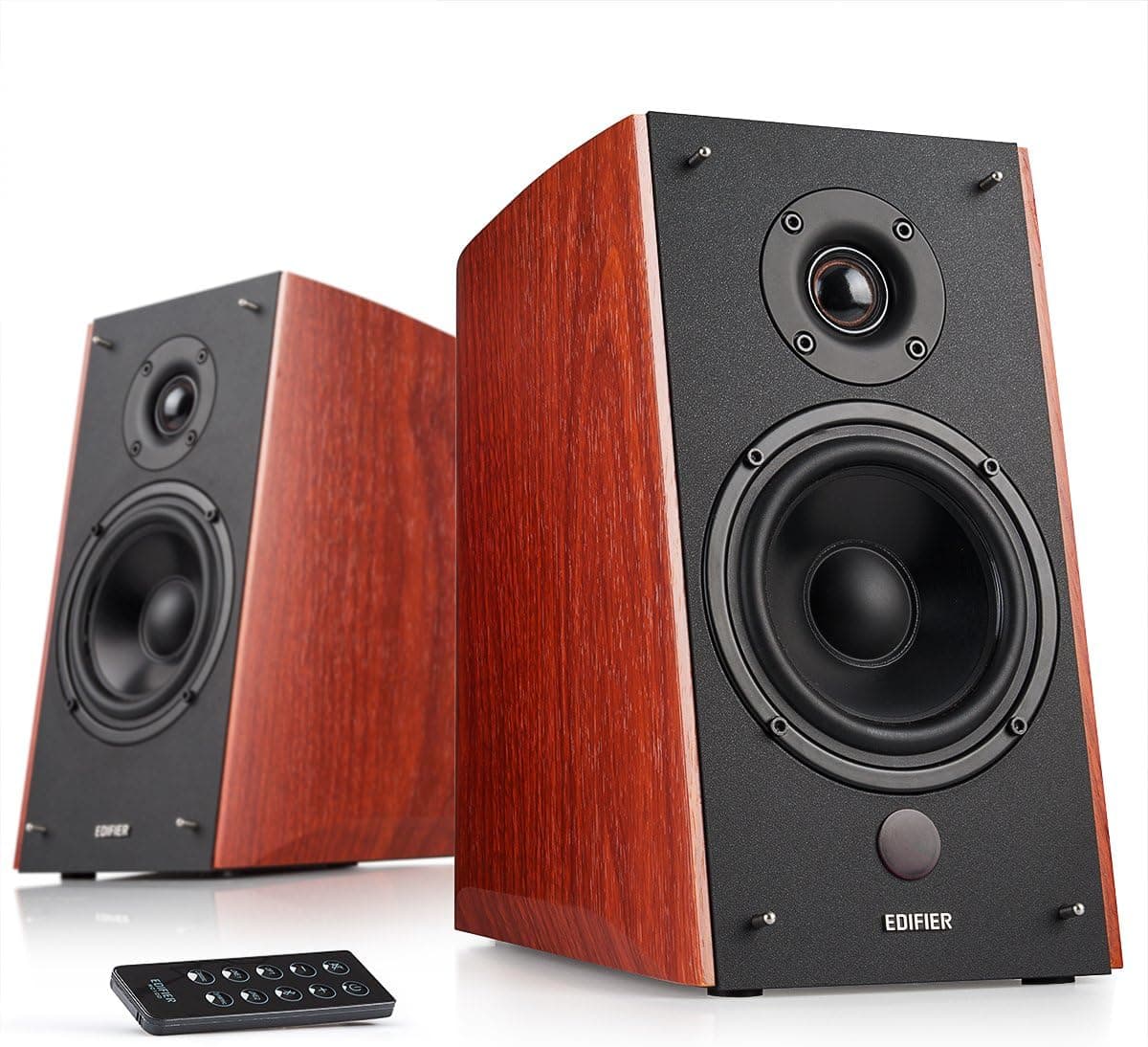
Physically, bookshelf speakers need desk width and depth for two cabinets. As with many active speakers, one side typically houses the amplifier and inputs and connects to the other by cable.
Check the rear-panel photos on the product page before deciding on left/right placement and where your power strip goes.
Connection Scenarios
Desktop PC + phone: Connect the PC to one AUX input and the phone via Bluetooth. Use the PC while working and stream music from your phone on breaks, switching with the remote.
Avoiding cable swaps is the practical strength of having both dual AUX and Bluetooth.
TV + PC: Use optical for the TV and AUX for the PC. If the speakers will sit on a TV stand, measure its width and depth first.
They take more room than a typical soundbar.
Console + PC: Since newer consoles lack optical output, route audio through the TV or monitor. If your monitor has an audio output jack, you can feed it into AUX, but remember the monitor's own volume setting also applies.
Why two AUX inputs help: You can keep two wired devices connected, such as a PC and an audio interface. Together with Bluetooth and optical, up to four sources can stay connected at once.
Product Info
| Item | Detail |
|---|---|
| Speaker type | 2-way bookshelf (active) |
| Remote control | Included |
| Cabinet material | Wood |
As of September 3, 2026, Amazon.co.jp listed it at ¥69,998.
That price came from a marketplace seller (online Shop Yamamoto), not an official Edifier store. Prices for the same model vary widely between retailers and sellers and change with sales and stock, so compare several stores before buying.
That lets you connect both RCA-output devices and 3.5mm headphone-jack devices without buying extra cables, though contents may differ by seller.
If you buy from a marketplace seller, confirm who handles warranty claims.
Placement Tips
Near-field means designed for close listening. On a desk, aim for an equilateral triangle between the two speakers and your head for clear stereo imaging.
Keep the tweeters roughly at ear height.
Setting the speakers directly on the desk can make the desktop vibrate and muddy the bass. Isolation pads or small stands, angled slightly upward, usually help.
Placing them tight against a wall tends to boost the bass, so start a few centimeters to a little over ten centimeters away and compare.
Next to a monitor, place one on each side. With a very wide monitor the speakers can end up far apart, so make sure your desk is wide enough.
Best Use Cases
- Simple TV sound upgrade: If your TV has optical output, one cable is all you need, and the remote keeps daily use easy.
- Keeping several devices connected: Bluetooth, optical and two AUX inputs, all switchable from the remote, let one pair serve a PC, phone and TV.
- Those who care about looks: The wood finish has a calm look that fits living rooms and studies better than all-black gaming gear.
Before You Buy
They are not small. These are bookshelf speakers, and buyers expecting laptop-size speakers may be surprised.
Check exact dimensions on the product page and measure your space before ordering. On a shallow desk they will compete with your keyboard and monitor.
Monitor in the name does not mean studio monitor. The Japanese listing calls them near-field monitor speakers, but treat them as home speakers tuned for enjoyable listening.
For mixing or mastering, consider production monitors that advertise a flatter response.
For deep bass, consider a subwoofer. Bookshelf speakers do not reach the deep rumble of movie explosions.
Whether a subwoofer output exists is not listed in the specs, so check the product page if you plan to add one.
Consoles may not connect over optical. The PS5 and Xbox Series X|S lack optical output, so plan on routing through the TV.
Considering Bluetooth latency as well, use wired connections for gaming.
Check the price and seller. The Amazon.co.Check the retailer's page for the latest price.
Price and warranty depend on who sells it, so compare stores and check the seller and fulfillment details.
Check the listing itself. The product name is long and packed with keywords.
FAQ
Q. Can I connect it to a TV?
A. Yes, if the TV has optical output. If there is no sound, set the TV's audio output to PCM.
Q. Can I connect a PS5 directly?
A. No. The PS5 has no optical output.
Q. Can I connect it to a PC with a USB cable? A.
USB input is not listed in the specs. Use AUX, Bluetooth, or optical out from the PC or a USB DAC.
Q. Will it fit on a small desk? A.
They take up real space, so measure width and depth first. If space is tight, a smaller PC speaker may suit you better.
Q. Do I need a subwoofer? A.
For music and everyday video, try the speakers on their own first. Consider a subwoofer only if you want deeper bass for movies or games, and check the product page for whether one can be connected.
Product Disclosure (Amazon)
- Manufacturer: Edifier
- Seller: online Shop Yamamoto
- ASIN: B01CDU3IAI
- Note: This article covers a manufacturer-made product based on Amazon listing details.