This article takes a close look at the Sceptre Curved 27" Gaming Monitor up to 165Hz DisplayPort 144Hz HDMI Edge-Less AMD FreeSync Premium (model C275B-1858RN), focusing on how its spec-sheet numbers translate into everyday use. The short version: it suits people who want a bigger 1080p screen with 144–165Hz smoothness at a modest price.
If sharp text or accurate color matters most to you, look elsewhere.
Overview
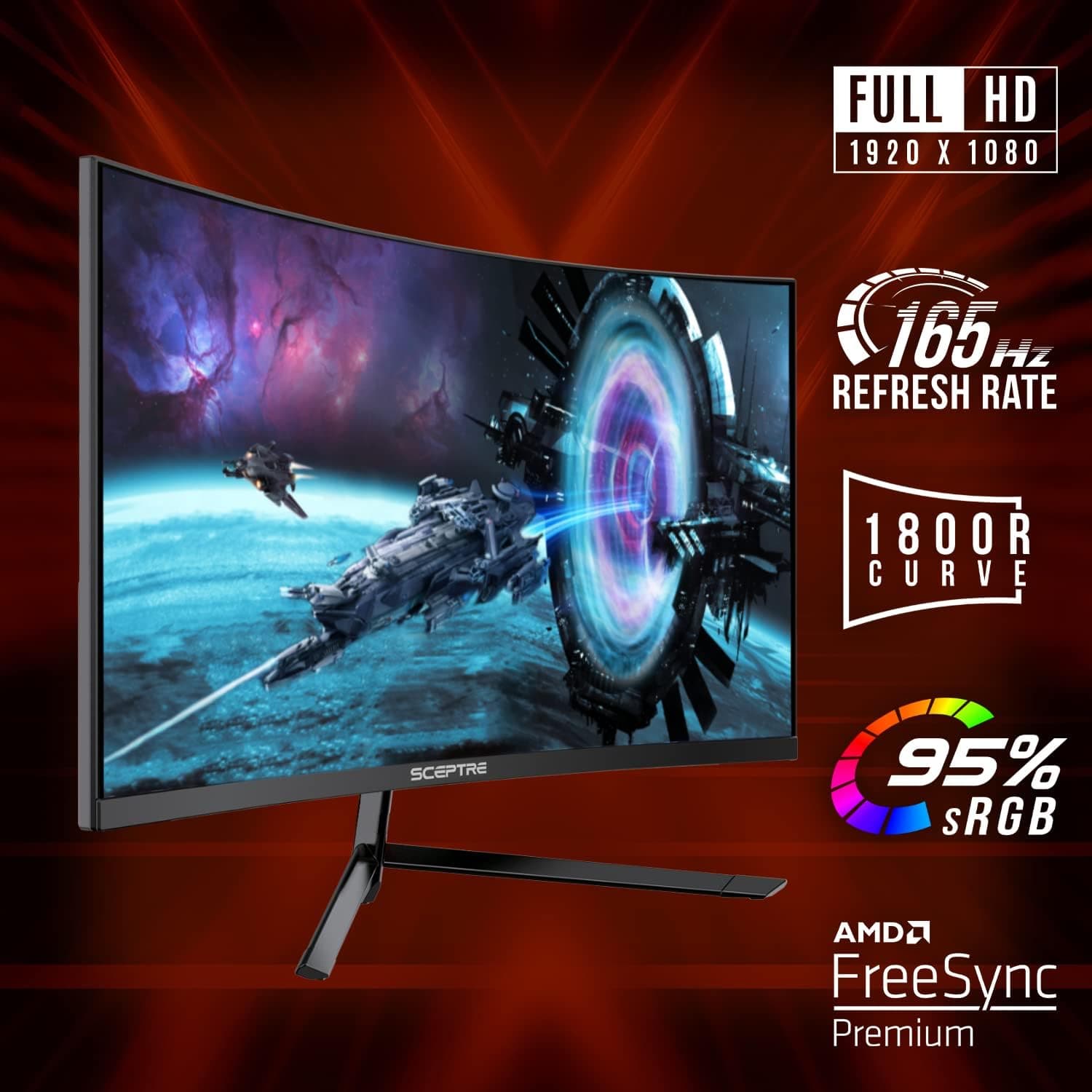
The Sceptre C275B-1858RN is a 27-inch, 16:9 curved gaming monitor with a 1920x1080 (Full HD) panel. It reaches up to 165Hz over DisplayPort and up to 144Hz over HDMI, with a manufacturer-rated 3ms response time.
AMD FreeSync Premium support reduces tearing and stutter when frame rates fluctuate, as long as you pair it with a compatible GPU.
It also includes built-in 2W x2 speakers and a 100x100mm VESA mount, so it works for games and video right out of the box. As of August 2026, the Amazon.co.Check the retailer's page for the latest user reviews.
Keeping a rating that high across that many reviews points to strong satisfaction for the money.
The catch is that 1080p at 27 inches gives you a bigger screen at the cost of pixel density. Whether you can accept that is the main question when deciding if this monitor is right for you.
What the Specs Tell You
| Item | Value | What it means in practice |
|---|---|---|
| Size / resolution | 27" / 1920x1080 | About 82 PPI; text edges look jagged up close |
| Refresh rate | 165Hz (DP) / 144Hz (HDMI) | DisplayPort is required for 165Hz |
| Response time | 3ms | Rated figure; measurement methods vary by brand |
| Sync | FreeSync Premium | Variable refresh rate with AMD GPUs |
| Speakers | 2W x2 | Fine for basic audio only |
| VESA | 100x100mm | Fits most standard monitor arms |
Pixel density is the number that affects daily use the most. At about 82 PPI, a 27-inch 1080p screen is coarser than a 24-inch 1080p panel (about 92 PPI) and much coarser than a 27-inch 1440p panel (about 109 PPI).
You won't notice it much in fast-paced games, but small browser text and thin spreadsheet gridlines look grainy.
On the other hand, 1080p has an upside. It is light on the GPU, so you can hit high frame rates without an expensive graphics card and actually make use of 165Hz.
Results depend on the game and settings, but if your goal is high refresh rates without a big GPU upgrade, this monitor fits.
Compatibility Guide
PC over DisplayPort
To run at 165Hz, connect the monitor with a DisplayPort cable to a DisplayPort output on your GPU. Windows often starts at 60Hz after you plug it in, so open Advanced display settings and set the refresh rate to 165Hz.
Forgetting this step, then wondering why motion doesn't feel smooth, is the most common mistake with high-refresh monitors.
PC over HDMI
HDMI tops out at 144Hz. The HDMI version isn't listed, but because it supports 144Hz at 1080p, it is likely HDMI 2.0-class or newer.
On laptops with only an HDMI output, expect 144Hz to be the limit.
FreeSync Premium and GPU Compatibility
FreeSync Premium works with AMD Radeon GPUs. NVIDIA GeForce cards may be able to use variable refresh through the G-SYNC Compatible setting over DisplayPort.
However, the data doesn't say whether the monitor is NVIDIA-certified, so some setups may see flicker. If that happens, turn the feature off or try a frame rate cap.
Game Consoles
You can connect a PS5 or Xbox Series X over HDMI. These consoles output at most 120Hz, though, so you won't use the full 144Hz.
The data also doesn't confirm whether this monitor accepts a 120Hz signal or works with console VRR. If you're buying mainly for a console, check the product page or user reviews for confirmation of 120Hz output first.
Devices limited to 60Hz at 1080p, such as the Nintendo Switch, work without issue.
Desk and Arm Mounting
The 100x100mm VESA mount fits standard monitor arms. The monitor's weight isn't in the data, so check it on the product page against the arm's load rating.
Because the edges of a curved 27-inch screen curve toward you, it takes up more desk depth than a flat panel. As a rough guide, a desk about 60cm (24 in) deep or more makes it easier to sit at a comfortable distance.
Product Info
As of August 29, 2026, Amazon.co.jp listed it at ¥36,940.
Prices change with sales and stock, so check the current price on the product page before buying. There are also eBay listings, but we didn't capture a specific price there.
On Amazon.co.jp, both the seller and the shipper were Boggyy's Store, a third-party marketplace seller.
Because Amazon isn't the seller, warranty contact, return terms, and included accessories (such as power and video cables) may vary by seller. Check the listing details before you order.
It sits on the affordable end of 27-inch 165Hz gaming monitors. Compared with other options at a similar budget, its strength is offering a large curved screen, high refresh rate, and built-in speakers in a single package.
How It Compares
| Alternative | Where the alternative wins | Where this monitor wins |
|---|---|---|
| ~24" 1080p flat monitors (120–144Hz) | Slightly sharper text, easier to fit on a desk | Bigger, more immersive screen; 165Hz |
| 27" 1440p monitors | Sharper text and images, more workspace | Lighter GPU load, easier to hit high fps |
| ~24.5" 240Hz+ esports monitors | Better for fast competitive FPS | Big screen that also suits video and single-player games |
This monitor doesn't specialize in any one area. It is a budget balance of size and smoothness.
Serious competitive FPS players will be happier with a 24.5-inch 240Hz+ panel, and people who also work on their monitor will be happier with a 27-inch 1440p screen.
Best Use Cases
- First-time high-refresh buyers on a budget: Moving up from 60Hz, you'll clearly notice the smoothness of 165Hz, and 1080p keeps GPU demands modest.
- Players who want a big screen for RPGs, racing games, and video: The curved 27-inch screen fills more of your view and pairs well with single-player games and movies.
- People who want a tidy desk: The built-in speakers mean you can skip external speakers if basic audio is enough.
- Anyone curious about curved monitors: It costs less than large ultrawide curved models, so it's a low-risk way to find out whether a curved screen suits you.
Things to Know Before Buying
Don't expect sharp text. At about 82 PPI, text-heavy work looks coarse.
If you'll also use it for long work or study sessions, many people find a 27-inch 1440p or 24-inch 1080p monitor easier on the eyes.
Panel type and curvature aren't listed. We know the screen is curved, but the data doesn't give the panel type (VA, IPS, etc.) or the curvature radius.
Color accuracy, viewing angles, and black levels depend heavily on panel type, so check the product page if you plan color-sensitive work such as photo editing. At the very least, this is not a monitor sold on color accuracy.
3ms is a rated figure. Brands measure response time differently, so comparing it to another brand's "1ms" by the numbers alone means little.
To judge motion blur, look at real-world photos in user reviews.
165Hz works only over DisplayPort. HDMI is limited to 144Hz, and game consoles only output up to 120Hz.
If you buy it for a console because the box says 165Hz, you'll likely be disappointed.
Treat the speakers as a bonus. 2W x2 is fine for system sounds and video, but it lacks bass and can't help you pinpoint footsteps in games.
For FPS games, use a headset.
Check the seller and warranty. At the time of capture, a third-party marketplace seller handled the listing.
Who handles defects, how long the warranty lasts, and what accessories come in the box may vary by seller, so confirm these before ordering. The Amazon listing details (manufacturer Sceptre, ASIN B089V2R9WW) match this product.
Because the data was collected automatically, still check that the product images and model number match the monitor you're considering.
Curved screens don't suit everyone. Some people find that straight lines in spreadsheets or drawings look bent.
Because of its shape, it also takes more planning to place against a wall or line up next to other monitors.
FAQ
Q. Why can't I get 165Hz? A.
HDMI is capped at 144Hz. Use DisplayPort and set the refresh rate to 165Hz in Windows display settings.
It may start at 60Hz.
Q. Does it work with NVIDIA graphics cards? A.
Any GPU can display an image on it. Variable refresh may work over DisplayPort with G-SYNC Compatible, but it isn't guaranteed.
Q. Will a PS5 run at 144Hz? A.
No. The PS5 outputs at most 120Hz, and the data doesn't confirm support for 120Hz input or PS5 VRR.
Check the product page or reviews before buying.
Q. Can I mount it on a monitor arm? A.
Yes, it supports 100x100mm VESA. Check the monitor's weight on the product page against the arm's load rating.
Q. Is it good for work too? A.
It works, but text is less sharp than on a 27-inch 1440p monitor. Email and browsing are fine.
For heavy spreadsheet or writing work, compare other options.
Product Disclosure (Amazon)
- Manufacturer: Sceptre
- Seller: Boggyy's Store
- Fulfilled by: Boggyy's Store
- ASIN: B089V2R9WW
- Note: This article covers a manufacturer-made product based on Amazon listing details.