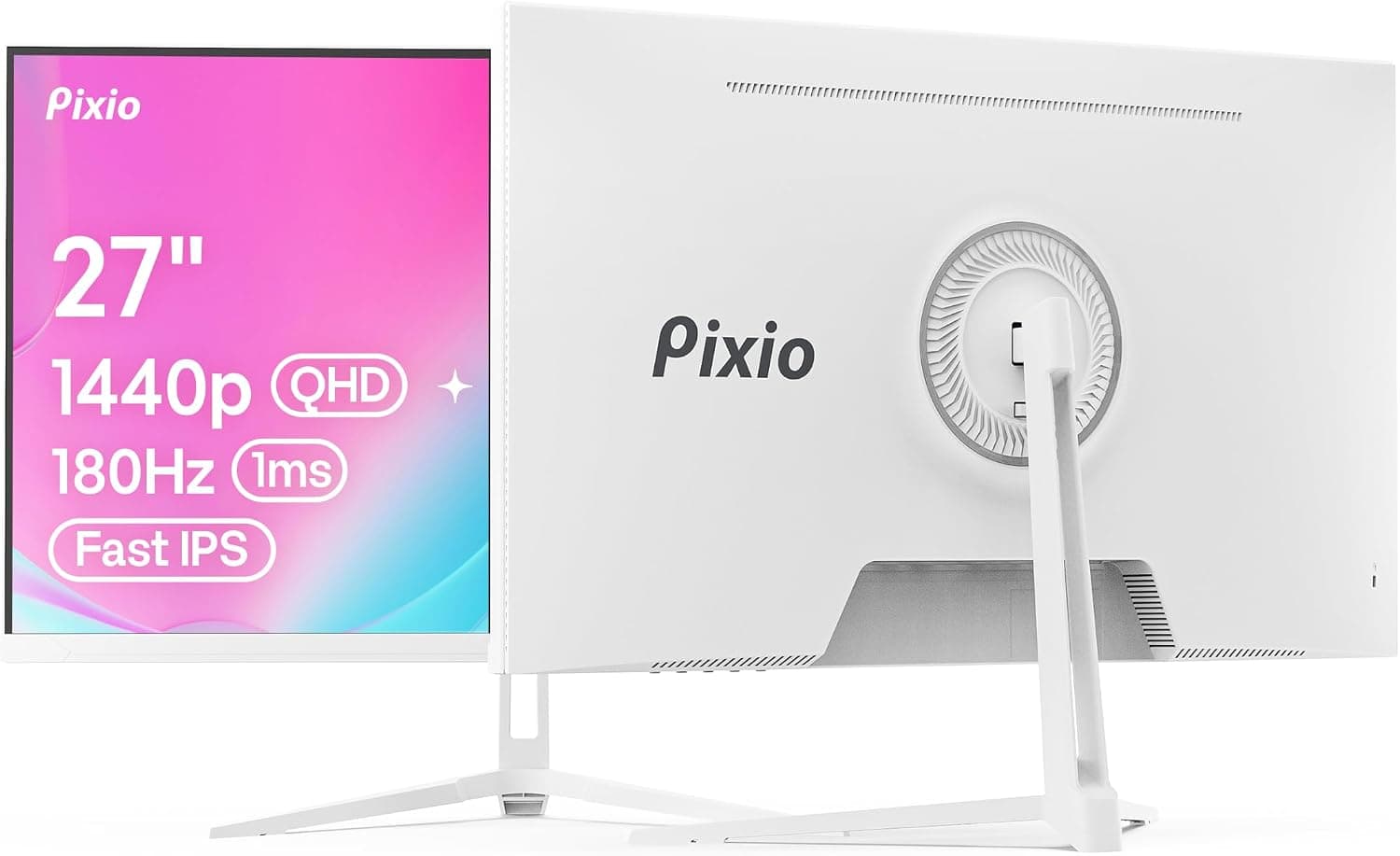
This article covers the Pixio PX278 Wave White 27インチ Fast IPS FHD 2560 x 1440 180Hz リフレッシュレート 1ms GTG 応答時間 AMD FreeSync ホワイトゲーミングモニター in depth: what the specs actually mean, what you need to drive them, and the traps buyers hit after the box is open.
Overview
The Pixio PX278 Wave White is a 27-inch gaming monitor pairing a Fast IPS panel with 2560x1440 (WQHD) resolution. It runs at up to 180Hz over DisplayPort and 144Hz over HDMI, claims a 1ms GTG response time, and supports AMD FreeSync for variable refresh rate.
The surface is matte (non-glare), colour gamut is a claimed ~99% sRGB, the chassis is white, and the warranty is one year.
The short version: this monitor makes the most sense when two things are true at once — you want an all-white desk, and you want a single 27-inch 1440p high-refresh panel to cover everything. If colour scheme is irrelevant to you and you buy on numbers alone, 27-inch / 1440p / around 180Hz is the most fiercely contested segment on the market, and this model is easily substituted depending on price.
So the real question is not whether the specs are enough, but how much the white chassis is worth to you at whatever the price is today.
Owner feedback on Amazon.co.jp stands at 4.7/5 across 124 reviews — roughly a 94% positive score (both captured 8 September 2026).
That is a high and stable rating, though with a sample in the low hundreds you cannot infer much about the rate of dead pixels or DOA units.
Quick Verdict by Use Case
| Use case | Fit | Why |
|---|---|---|
| Competitive FPS/TPS | Excellent | 180Hz and 1ms GTG, but only over DisplayPort |
| General PC gaming | Excellent | 27-inch 1440p is the comfortable sweet spot at 100% scaling |
| All-white build | Excellent | White chassis options are scarce in this class |
| PS5 / Xbox Series X/S | Good | Accepts 1440p, but consoles cap at 120Hz |
| Hobby photo/video editing | Good | ~99% sRGB claimed; no factory calibration or DCI-P3 figure |
| Professional colour work | Limited | No accuracy guarantee; assume calibration is required |
| HDR content | Limited | No HDR certification listed; brightness and contrast unpublished |
The two Limited rows are marked that way because the published specification simply has no numbers for them — not because the panel is known to be poor. Where there is no evidence, this article will not invent a verdict.
Compatibility Guide
Start with the ports: one DisplayPort 1.2, two HDMI 2.0, and a 3.5mm headphone output.
The critical detail is that 180Hz is available only over DisplayPort. HDMI 2.0 bandwidth caps 2560x1440 at 144Hz, which is why the specification lists the two figures separately.
Buying a 180Hz monitor and then leaving it on HDMI at 144Hz is the single most common oversight with this class of display.
Having only one DisplayPort also matters in practice. Connect two PCs, or a PC plus a console, and everything after the first device falls back to the 144Hz path.
Decide before you buy which machine gets the DisplayPort. A DisplayPort cable is listed among the included accessories; if you need a longer run, choose one rated for 1440p at 180Hz.
On the GPU side: AMD cards get FreeSync directly. NVIDIA users should note that this model carries no official G-Sync Compatible certification, so stable variable refresh is not guaranteed.
You can often force-enable it from the driver over DisplayPort, but flicker at low frame rates is a known risk and you have no grounds for complaint if it misbehaves. If VRR is a hard requirement, an AMD card or a certified monitor is the safer route.
Consoles: the panel accepts 1440p, but the ceiling is set by the console. PlayStation 5 and Xbox Series X/S both output 1440p at up to 120Hz, short of the 144Hz the monitor can accept over HDMI.
PS5 variable refresh relies on HDMI 2.1 VRR, so assume it will not engage on this HDMI 2.0 panel.
Xbox Series X/S does support FreeSync over HDMI, so that combination may work.
As for GPU horsepower, pinning 180fps at 1440p is realistic on a current mid-range card in light competitive shooters, but demanding AAA titles at high settings raise the bar sharply. When frame rates fall short, FreeSync (where supported) smooths things considerably, and upscaling helps further.
Actual numbers vary too much by title and settings to state precisely here.
For desk planning, a 27-inch 16:9 panel measures roughly 60cm x 34cm (calculated from the 68.6cm diagonal).
Add bezels and the stand foot, and a desk at least 60cm deep makes a comfortable viewing distance easy. Stand height/tilt range and VESA mount support are not in the published specification, so check the product page if you plan to use a monitor arm.
How It Compares
Against a 27-inch 1080p 144Hz panel, this model gives you 1.78x the pixels: sharper text and UI, and noticeably better distance detail in open-world titles — at a correspondingly higher rendering cost.
If your GPU is tight, a 1080p panel will deliver higher real-world frame rates.
If competition is everything, a 24-inch 240Hz-plus display is the alternative: less eye travel and more frames. And if you want deep blacks or genuine HDR, an OLED panel is the answer, at a different price tier.
The PX278 Wave White deliberately sits between those extremes — a compromise of resolution, speed and looks rather than a peak in any one direction.
Product Details
| Item | Value |
|---|---|
| Screen size | 27 inch |
| Panel type | Fast IPS |
| Resolution | 2560x1440 (WQHD) |
| Refresh rate | 180Hz (DisplayPort) / 144Hz (HDMI) |
| Response time | 1ms (GTG) |
| Aspect ratio | 16:9 |
| Surface | Matte (non-glare) |
| Sync | AMD FreeSync |
| Inputs | DisplayPort 1.2 x1, HDMI 2.0 x2, 3.5mm headphone jack |
| Colour gamut | ~99% sRGB (manufacturer claim) |
| Chassis colour | White |
| Warranty | 1 year |
Those figures work out to roughly 109 ppi — text stays legible at 100% scaling while the workspace is about 1.78x that of 1080p, which is exactly why 27-inch 1440p became the default.
The matte finish keeps window and ceiling-light reflections manageable.
Pixio is a US-based gaming monitor brand, sold in Japan primarily through online retail. The PX278 Wave White is listed as a 2024 model with a one-year manufacturer warranty, and the box includes a power cable, DisplayPort cable, HDMI cable and quick start guide.
On price: the Amazon.co.jp listing read 78,000 yen when captured on 8 September 2026, while an overseas marketplace (eBay) listing read $289.99 when captured on 9 September 2026.
Both are point-in-time figures that move with sales, exchange rates and seller turnover. The gap between them is the point worth noting — measured against typical pricing for 27-inch 1440p 180Hz displays, 78,000 yen sits on the high side, and the listing is fulfilled by a marketplace seller rather than the brand.
Treat that number as one seller's price on one day, and check the current price before buying; at that level, 4K panels and higher-tier technologies enter the comparison.
Who It Is For
- Gamers building an all-white desk. White chassis options are genuinely limited in this class, and for some buyers that alone is the reason. It will look out of place in a black-themed build.
- FPS/TPS players wanting 1440p high refresh from one panel. 180Hz with 1ms GTG is a real, perceptible step up — provided you use DisplayPort and a mid-range or better GPU.
- Anyone merging work and play on a single display. About 109 ppi, matte finish and a claimed ~99% sRGB cover browsing, documents and hobby-level photo editing without strain.
- Multi-device setups. Two HDMI 2.0 inputs let a console or laptop stay permanently connected alongside the PC, accepting the 144Hz ceiling on those ports.
If white is not a requirement, or you want 4K, 240Hz-plus or credible HDR, there is little here that argues specifically for this model.
Before You Buy
1. The product name says FHD, but the panel is not FHD. The listing title carries both FHD and 2560 x 1440.
FHD properly means 1920x1080; the actual resolution here is 2560x1440 (WQHD/QHD). It is an error in your favour, but if you sized your GPU or game settings around 1080p, the real load will be higher.
Listing metadata does contain mistakes — confirm the product from the images and the spec table.
2. Prices differ sharply between channels. 78,000 yen on Amazon.co.jp (captured 8 September 2026) versus $289.99 on eBay (captured 9 September 2026) is a wide spread for one model.
The pricing data also carries a Japanese-yen figure and a Japanese product page under an overseas label, which suggests the listing data is not fully tidy. Compare current prices yourself before ordering.
3. 180Hz is DisplayPort only. On HDMI you are capped at 144Hz. Count your free ports before buying.
4. 1ms GTG is the maximum-overdrive figure. As a rule with this class of panel, the fastest overdrive setting can introduce overshoot — a pale trailing halo behind fast motion.
If you see it, step the overdrive down one level in the OSD. Do not expect the headline number in every scene.
5. No guaranteed VRR on NVIDIA. Without G-Sync Compatible certification, force-enabling is at your own risk.
If certified VRR is a must, choose a certified model.
6. IPS limitations still apply. In a dark room with dark content, black levels and IPS glow may bother you.
Contrast ratio and brightness are not published, so you cannot check this on paper. For deep blacks, VA or OLED is the right category.
7. Several specifications are simply absent. HDR certification, brightness, contrast ratio, stand adjustment range, VESA support, and whether built-in speakers exist (there is a 3.5mm output, but audio from the chassis itself is not stated).
If any of these decide your purchase, verify them individually.
8. White plastics can yellow over time. Generally speaking, sunlight, UV and smoke accelerate discolouration on white resin parts.
If the colour is the reason you are buying, consider how much direct light the desk gets.
9. Check who handles the warranty. The stated warranty is one year, but the seller and shipper are a marketplace vendor.
Confirm before purchase whether DOA support goes through the seller or a domestic brand channel.
FAQ
Q. What do I need to actually run 180Hz? A.
A DisplayPort 1.2 or better connection plus a settings change.
Plugging in often leaves you at the default 60Hz, so select 180Hz in Windows advanced display settings or your GPU control panel. HDMI is limited to 144Hz by specification.
Q. Does it work with PS5 or Xbox Series X/S? A.
Yes. Both output 1440p, capped at 120Hz on the console side.
PS5 VRR requires HDMI 2.1 and will not engage here; Xbox Series X/S supports FreeSync over HDMI and may work.
Q. Will FreeSync work on an NVIDIA card? A.
Not officially — there is no G-Sync Compatible certification. You can try force-enabling it over DisplayPort, but low-frame-rate flicker is possible and non-operation is within spec.
Q. What GPU do I need for 180fps at 1440p? A.
It depends on the title. Light competitive shooters are reachable on a current mid-range card; demanding AAA games at high settings need something stronger.
Where FreeSync works, falling short of 180fps still feels smooth.
Q. Is it suitable for work? A.
Yes. At roughly 109 ppi, text is comfortable at 100% scaling with about 1.78x the workspace of 1080p, and the matte finish limits reflections.
Since the stand's adjustment range is unpublished, plan on a monitor arm if precise ergonomics matter to you.
Product Disclosure (Amazon)
- Manufacturer: Pixio
- Seller: Wide Pine
- Fulfilled by: Wide Pine
- ASIN: B0CWJR6BZW
- Note: This article covers a manufacturer-made product based on Amazon listing details.