Overview
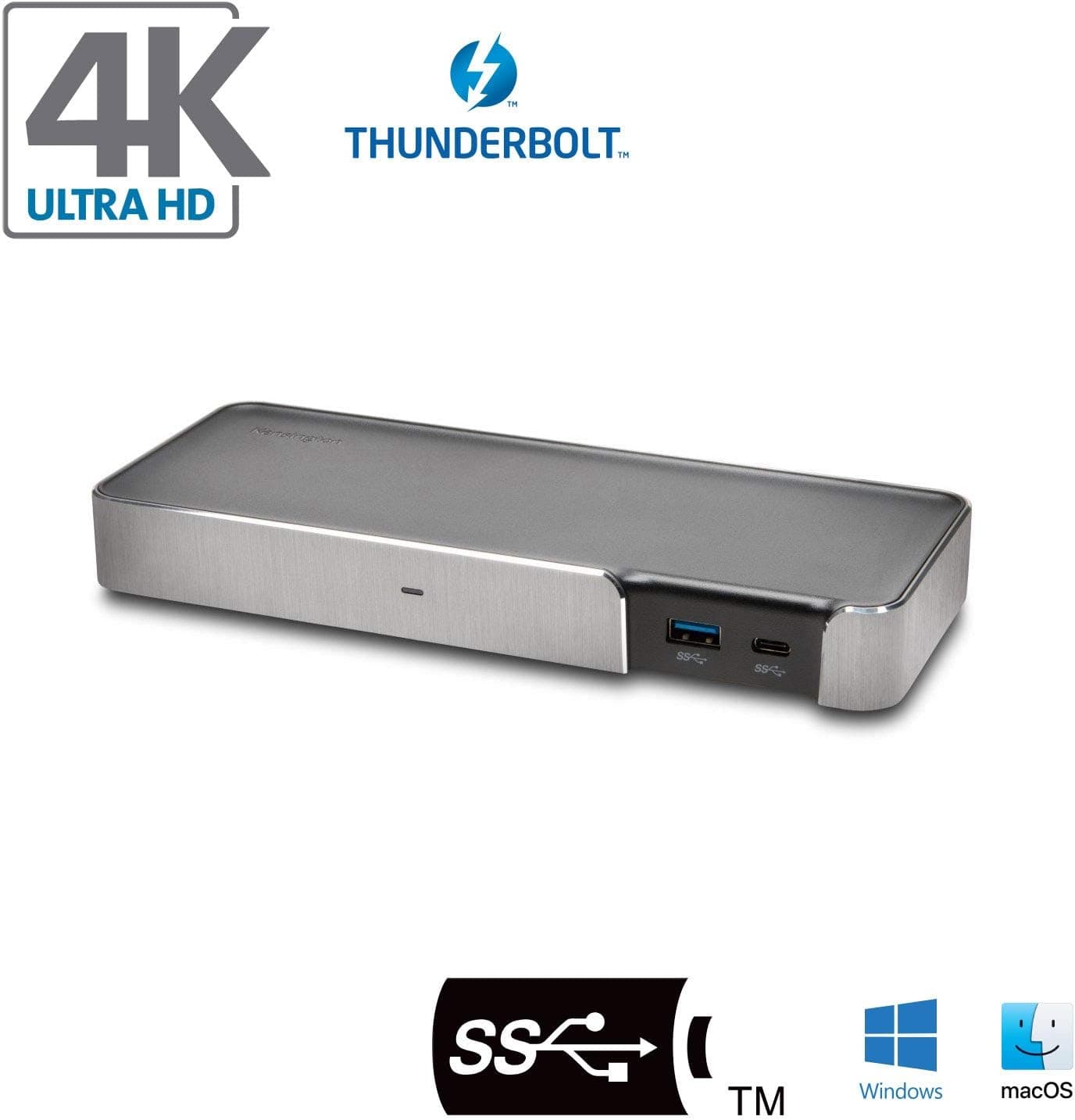
The Kensington SD2500T — Thunderbolt 3 Docking Station with Dual 4K Support is a desktop dock that connects a laptop to two 4K monitors, wired Ethernet, USB devices, SD cards and audio through a single Thunderbolt 3 (USB-C connector) cable. The short verdict: it is a solid choice if you have a Thunderbolt 3/4 or USB4 laptop and want to drive two DisplayPort monitors.
It is a poor fit if your monitors are mostly HDMI, if your laptop needs more than 60W of charging, or if you want two external screens on a base M1/M2 Mac.
The Kensington SD2500T offers up to 40Gbps of bandwidth. Its two DisplayPort 1.4 outputs drive dual 4096×2160 @ 60Hz (30-bit color), or a single display at up to 8K @ 30Hz.
It also has one USB-C Gen2 port (10Gbps), three USB-A ports (two front Gen2, one rear Gen1), an SD/microSD reader (UHS-II SD 4.0), Gigabit Ethernet and a 3.5mm headphone/mic combo jack.
A 120W AC adapter is included, and up to 60W (PD 3.0) of that goes to charging the laptop.
There is a Kensington lock slot and VESA mounting holes, so you can secure the dock with a lock cable or hide it on a monitor arm or behind a display. It is built for people who carry their laptop around and want to plug back into a full desk setup with one cable.
Compatibility Guide
Most setups that show nothing on screen fail on one of these checks, not on the spec sheet. We look at four of them: the laptop, the monitors, power and the cable.
Laptop: Thunderbolt support is the first check
This is a Thunderbolt 3 dock. Thunderbolt 4 and USB4 ports generally work with Thunderbolt 3 devices, so most recent laptops can use it.
But a USB-C port without Thunderbolt may give you fewer displays, lower speeds or missing features, even though the connector looks the same. Look for the lightning-bolt icon next to the port, or check that your laptop's spec sheet lists Thunderbolt or USB4.
The original listing names MacBook Pro, MacBook Air, Surface, and Windows laptops from Dell, Lenovo, HP, Acer, ASUS, MSI and Razer as compatible. Note that some Surface generations have no Thunderbolt at all, so check the port specs for your exact model rather than going by brand.
Macs: the chip sets the display limit
MacBooks with a base M1 or M2 chip support only one external display. Connecting two monitors to this dock will not give you an extended dual-screen desktop on those machines.
Dual displays need a MacBook Pro with an M1 Pro/M1 Max chip or later. The number of external displays on base chips varies by generation and model, so check the External Display line in Apple's tech specs before you buy.
Monitors: DisplayPort only
Video comes out of two DisplayPort 1.4 ports, and there is no HDMI port.
HDMI monitors need an active DisplayPort-to-HDMI adapter. Cheap passive adapters may not work, so buy one that says active.
DisplayPort cables are not included, so buy cables rated for 4K at 60Hz. The spec only lists 4K at 60Hz, so do not count on high refresh rates such as 4K at 120Hz or 144Hz.
Power: check whether 60W is enough
The dock delivers up to 60W to the laptop. That is usually enough for 13-14 inch ultrabooks and MacBook Air.
Machines whose stock charger is far above 60W, such as the 16-inch MacBook Pro or gaming laptops with barrel-plug chargers, may charge slowly or drain the battery under heavy load. Plan to keep the original charger plugged in on those.
Cable and placement
The included Intel-certified Thunderbolt 3 cable is only 0.8m long, which may not reach if the dock sits at the back of the desk.
If you buy a longer cable, get a Thunderbolt-certified one rated for 40Gbps. A generic USB-C cable may give you no picture or reduced bandwidth.
Product Info
rmation
| Item | Detail |
|---|---|
| Host interface | Thunderbolt 3 (USB-C) |
| Max bandwidth | 40Gbps |
| Video output | DisplayPort 1.4 ×2 |
| Dual display max | 4096×2160 @ 60Hz (30-bit color) |
| Single display max | 8K @ 30Hz |
| USB-C | 1 (Gen2, 10Gbps) |
| USB-A | 3 (2× front Gen2, 1× rear Gen1) |
| Card reader | SD / microSD (UHS-II SD 4.0) |
| Wired LAN | Gigabit Ethernet (RJ-45) |
| Audio | 3.5mm headphone/speaker/mic combo |
| Laptop charging | 60W (PD 3.0) |
| AC adapter | 120W |
The two front USB-A ports run at 10Gbps (Gen2), so use them for speed-sensitive devices like external SSDs and card readers. One of them also supports 5V/1.5A fast charging.
The rear USB-A port runs at 5Gbps (Gen1), which suits devices that stay plugged in, such as keyboard or mouse receivers and webcams. The UHS-II card reader is useful if you copy files from a camera.
According to the original listing, the Kensington SD2500T came out in 2020 and has a 3-year warranty plus lifetime technical support. The box includes the 120W AC adapter, the 0.8m Intel-certified Thunderbolt 3 cable and a quick-start guide.
It is mainly sold through online stores such as Amazon.co.jp.
On Amazon.co.jp, it was ¥16,625 as of May 2026 and ¥22,205 as of August 2026.Check the retailer's page for the latest price.
Check the product page for the current price before you buy.Check the retailer's page for the latest user reviews.
Comparison with Alternatives
Products that add two screens to a laptop fall into four main types. The type decides which laptops will work and how the screens behave.
| Type | Example | What decides dual display | Laptop charging | Best for |
|---|---|---|---|---|
| Thunderbolt 3 dock (this one) | Kensington SD2500T | A Thunderbolt/USB4 port on a dual-display-capable laptop | 60W | A desk with two DP monitors |
| USB-C multiport hub | Anker 565, UGREEN 14-in-1, etc. | Depends on how DP Alt Mode is split | Varies | HDMI users, tighter budgets |
| DisplayLink dock | WAVLINK triple-display dock, etc. | A driver adds the extra screens | Varies | Base M1/M2 Macs needing more screens |
| Bus-powered Thunderbolt dock | CalDigit Thunderbolt 3 mini Dock | A Thunderbolt laptop | Usually none | Travel use, with a separate charger |
USB-C hubs are cheaper and often include HDMI. But macOS does not support MST, the method many hubs use for two screens, so on a Mac the two monitors often just mirror each other.
DisplayLink docks can give a base M1/M2 Mac more screens, but they need a driver, add CPU load, and may not show protected video from streaming services.
For desk use, the Kensington SD2500T is the most straightforward option: it drives two screens over Thunderbolt bandwidth without a driver, and charging goes over the same cable. The trade-off is that it only works with certain laptops.
Setup Tips
- Plug the AC adapter into the dock first.
Without power, video and USB can seem unreliable. 2.
Connect the monitors with DisplayPort cables. Put an active adapter between the dock and any HDMI monitor.
Connect the laptop with the included Thunderbolt 3 cable.
On some Windows laptops, a prompt asks you to allow the Thunderbolt device.
Approve it. 5.
If nothing appears, reseat the cable, try a different DP cable, then update the laptop's BIOS and Thunderbolt firmware.
On company-issued Windows laptops, an administrator policy may block Thunderbolt devices. If you get no picture and no USB either, ask IT before assuming the dock is faulty.
Who Should Buy
- Photo, video and 3D creators on an M1 Pro/M1 Max or later MacBook Pro: dual 4K screens give plenty of workspace while 60W keeps the laptop charged, and the UHS-II SD reader speeds up camera imports.
- People who want one cable for a crowded desk: Ethernet, SD, USB-A/C and audio all live in one box, which cuts down on plugging and unplugging if you split time between home and the office.
- Owners of Thunderbolt 3/4 13-14 inch Windows laptops: business laptops from Dell, Lenovo and Surface's compatible models pair well with it, and 60W matches their power draw.
- Anyone who already has two DisplayPort monitors: no adapters needed, just two 4K@60Hz screens.
Things to Check Before Buying
Base M1/M2 Macs will not get two screens. This is an Apple chip limit, not a flaw in the dock, but it is the most common mistake buyers make.
If you need two screens on a base M1/M2 Mac, the original listing suggests other docks such as the Kensington SD4780P (K33620NA). Check its display method and supported OS on the product page.
HDMI monitors cost extra. You need one active adapter per monitor, which adds to the price if both are HDMI.
If all your monitors are HDMI, a dock with native HDMI outputs may cost less overall and be simpler to set up.
Charging tops out at 60W. Large or gaming laptops may not get enough power, or may drain while plugged in.
If you want a true one-cable setup, check your laptop's stock charger wattage first.
Other trade-offs to accept: Ethernet is Gigabit only, so it cannot take full advantage of 2.5GbE or faster connections.
There is only one downstream USB-C port, so if you use many USB-C devices you will need another hub. The 120W power brick is bulky and not made for travel.
This is a 2020 Thunderbolt 3 product, so if you want downstream Thunderbolt ports, look at Thunderbolt 4 docks as well.
Price and seller. As noted above, the Amazon.co.
The Amazon.co.jp seller is a marketplace vendor (ピトロシ・ジャポン), so confirm with the seller or with Kensington that you will get the 3-year warranty.
We left out overseas marketplace prices because those listings may include used units or different variants.
FAQ
Q. Does it work with a USB-C laptop that lacks Thunderbolt? A.
It may connect, but you can lose displays, speed or some features. For reliable dual 4K you need a Thunderbolt 3/4 or USB4 port.
Q. Can a MacBook Air (M2) run two external monitors with it? A.
No. Base M1/M2 chips support only one external display, so you will not get an extended dual-screen desktop.
You need an M1 Pro/M1 Max or later MacBook Pro.
Q. Can I use two HDMI monitors?
A. Yes, with two active DisplayPort-to-HDMI adapters. Passive adapters may not work.
Q. Will it charge a 16-inch MacBook Pro? A.
It supplies up to 60W, which is less than the stock charger, so charging may be slow or the battery may drain under heavy load. Keep the stock charger connected too.
Q. Is it a good dock for a gaming laptop? A.
It works for connecting peripherals and monitors, but 60W is not enough power for most gaming laptops. Power the laptop from its own charger and use the dock for peripherals only.
Product Disclosure (Amazon)
- Manufacturer: Kensington
- Seller: ピトロシ・ジャポン
- Fulfilled by: ピトロシ・ジャポン
- ASIN: B08KQ9JQZR
- Note: This article covers a manufacturer-made product based on Amazon listing details.