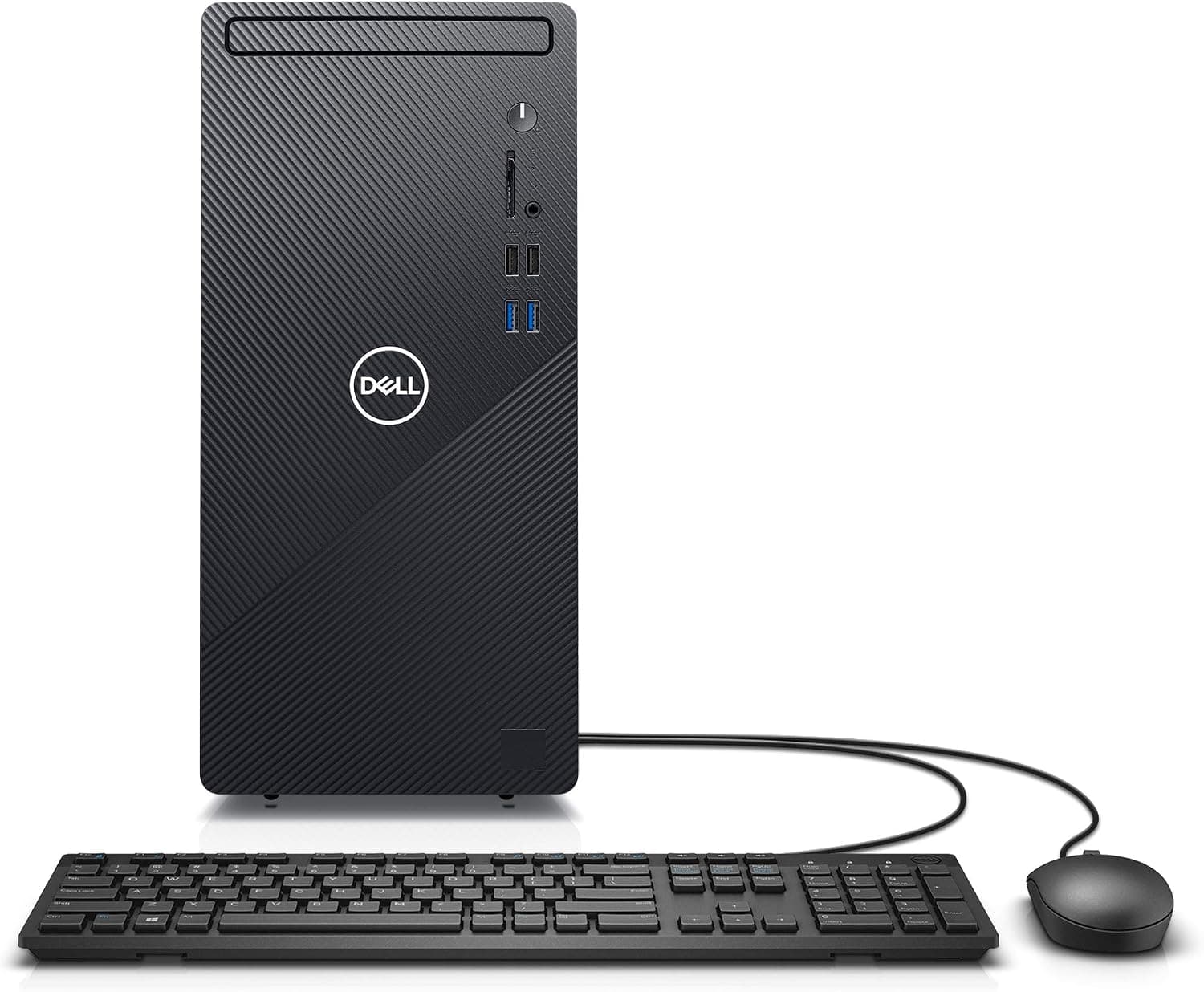
This article takes a close look at the Dell Inspiron 3880 — Desktop Computer with 10th Gen Intel Core i5, asking whether it still makes sense to buy in 2026. It covers how to read the specs, what to do about the end of Windows 10 support, how far you can upgrade it, and how to judge the price.
Overview
The short answer: the Dell Inspiron 3880 is an entry-level desktop tower that still handles everyday work such as documents, spreadsheets, video calls and streaming without trouble. However, it launched in 2020 and ships with Windows 10 Pro, so plan to move it to Windows 11 as soon as it arrives.
Once you factor in the price, it is hard to recommend without reservations.
The configuration is a 10th-generation Intel Core i5 (up to 4.3 GHz with Turbo Boost), 12GB of DDR4 memory, a 512GB SSD and Intel UHD Graphics 630 built into the CPU.
Thanks to the SSD, boot times and app launches should feel quick. On Amazon.co.Check the retailer's page for the latest user reviews.
On the other hand, graphics are integrated only and the power supply is a modest ~260W. It is not a good base for building up into a gaming PC later.
The compatibility guide below explains exactly how far it can be expanded.
What the Specs Mean in Practice
| Item | Value | What it means |
|---|---|---|
| CPU | Intel Core i5 (10th Gen) | Plenty for office work and video calls |
| Max clock | 4.3 GHz (Turbo Boost) | Short heavy tasks still feel responsive |
| Memory | 12GB DDR4 | Enough headroom for many browser tabs |
| Storage | 512GB SSD | Fast, but fills up quickly with photos and video |
| Graphics | Intel UHD Graphics 630 (integrated) | Good at video playback, weak at 3D games |
| OS | Windows 10 Pro | Now out of support; plan to move to Windows 11 |
Most 10th-gen desktop Core i5 chips are 6-core/12-thread parts. That is enough to run Office, a browser and Zoom or Teams at the same time without strain.
The 4.3 GHz turbo figure suggests an i5-10400-class chip, but check the listing for the exact model number.
UHD Graphics 630 supports hardware video decoding, so YouTube and streaming services play smoothly. It does not have the graphics power for modern 3D games.
Treat browser games and light 2D titles as the practical limit.
Windows 10 Pro and Moving to Windows 11
This is the most important caution for this product. Regular support for Windows 10 ended on October 14, 2025.
Running it online without security updates is not recommended.
Fortunately, 10th-gen Core processors are on the Windows 11 supported CPU list. If TPM 2.0 (Intel PTT) is enabled in the BIOS, the machine can normally be upgraded to Windows 11 Pro.
When it arrives, first check whether Windows Update offers the Windows 11 upgrade. If it does not, use the PC Health Check app to confirm the machine's status.
Upgrading the OS normally keeps your data. Still, it is safer to finish the upgrade before moving your work files over.
Because this is the Pro edition, features such as BitLocker, domain join and Remote Desktop hosting carry over to Windows 11 Pro.
Compatibility Guide
Here is the compatibility data at a glance.
| Item | Details |
|---|---|
| CPU socket | LGA1200 |
| Memory | DDR4-2666 / DDR4-2933 (up to 64GB) |
| Expansion | PCIe 3.0 |
| Storage | SATA 6Gbps / M.2 NVMe |
| Power supply | Internal, about 260W |
| Chassis | Tower (listed as mid-tower) |
Memory upgrades: A 12GB total is often made up of one 8GB and one 4GB module. Rather than adding to a free slot, replace both with a matched pair (8GB x2 or 16GB x2); that is better for both capacity and stability.
The maximum is 64GB. If the CPU officially supports DDR4-2666, DDR4-2933 modules will run at 2666.
Storage upgrades: The M.2 NVMe slot is PCIe 3.0, so a PCIe 4.0 SSD will work but at PCIe 3.0 speeds.
When adding a SATA SSD or HDD, you may be short on data cables or power connectors. Check the free bays and cables inside before buying, and get extra cables if needed.
Graphics cards: There is a PCIe x16 slot, but with a ~260W supply and likely no PCIe power cable, adding a high-performance GPU is not recommended. If you add a card at all, limit yourself to low-power cards that run on slot power alone (75W or less).
Even then, check that the card's length and thickness fit the case first.
PSU and CPU swaps: Prebuilt PCs sometimes use proprietary power supplies and motherboards, so a standard ATX PSU may not drop in. An LGA1200 CPU will physically fit, but cooling, power and BIOS support make a CPU swap an unrealistic upgrade.
Wireless: Wi-Fi and Bluetooth depend on the configuration. If you need them, check the listing; if they are missing, add a USB wireless adapter or use wired Ethernet.
Product Info
The Dell Inspiron 3880 launched in 2020. As captured on August 29, 2026, it was listed at ¥145,891 on Amazon.co.jp.
Prices change a lot with sales and stock levels, so check the current price before you buy.
The seller and the shipper are both a third-party merchant called Reg shop, not Amazon itself. The original version of this article described a two-year onsite warranty.
However, whether a manufacturer warranty applies to a third-party purchase, and how much of it is left, depends on the listing. Always check the listing to confirm whether the unit is new or refurbished and how the warranty is handled.
Amazon sometimes shows reviews for configurations with different memory or SSD sizes together, so the rating may not reflect this exact configuration alone.
Fit by Use Case
| Use | Rating | Notes |
|---|---|---|
| Documents and spreadsheets | Excellent | Plenty of headroom |
| Video calls | Good | CPU is fine; a webcam and microphone are separate purchases |
| Video streaming (incl. 4K) | Good | Smooth thanks to the integrated GPU's hardware decoding |
| Light photo editing | Good | SSD space runs out before performance does |
| Video editing | Limited | Short Full HD clips only; exports are slow |
| 3D gaming | Poor | Integrated GPU is too weak, and GPU upgrades are capped by the PSU |
| Image-generation AI | Poor | No dedicated GPU, so not realistic |
As the table shows, if your needs stop at office work and video, you are unlikely to be disappointed. If gaming or serious creative work is even a possibility, buying a desktop with a dedicated GPU from the start is cheaper and more reliable than trying to add one later.
Best Use Cases
- Sole proprietors and small offices that need one work PC: After moving from Windows 10 Pro to 11 Pro, business features such as BitLocker and domain join are still available.
- Households that want a shared family PC: For browsing, streaming and kids' schoolwork, 12GB of RAM and an SSD are comfortably enough.
- People who want to add RAM or SSDs and keep the PC for years: With support for up to 64GB of memory and an M.2 NVMe slot, it is easier to work on than a laptop.
On the other hand, it is not a good fit for gamers, people whose main job is video editing, or anyone who does not want to handle setup and the OS upgrade themselves.
Before You Buy
Do not keep running Windows 10. As noted above, support has already ended, and you will need to move to Windows 11 yourself.
If that sounds daunting, a current model with Windows 11 preinstalled is the safer choice.
**Compare the price against newer machines before deciding.Check the retailer's page for the latest price. Entry-level desktops with newer-generation CPUs and Windows 11 are also on the market now. Check what generation the same budget buys before you commit.
Check the seller and the warranty. As mentioned, this is sold by a third-party merchant.
Warranty coverage, handling of defects on arrival and the unit's condition (new or refurbished) can only be judged from what the listing says.
Do not plan to turn it into a gaming PC with a GPU upgrade. The power supply, the lack of PCIe power and the case size all hold it back.
Once you count a PSU replacement, the cost and effort end up about the same as buying a new gaming PC.
Check how the 12GB of memory is configured. A mix of different-size modules may not get the most out of the memory.
The real-world difference is usually small, but when upgrading, plan to replace both modules with a matched pair.
Check the size on the product page. The data lists it as a mid-tower, but Inspiron 3000-series desktops are usually smaller than a typical DIY mid-tower case.
If it will sit under a desk, or you are planning upgrade parts around its dimensions, confirm the actual external measurements.
FAQ
Q. Can it be upgraded to Windows 11? A.
The 10th-gen Core i5 is on the Windows 11 supported CPU list. If TPM 2.0 (Intel PTT) is enabled, the upgrade is normally available.
Check Windows Update when the PC arrives.
Q. Can it play games? A.
Browser games and light 2D titles will run. Modern 3D games are too much for the integrated GPU, and with a ~260W supply, adding a powerful GPU later is not recommended.
Q. How much memory can it take? A.
Up to 64GB of DDR4-2666 or DDR4-2933. To go beyond 12GB, a 16GB (8GB x2) or 32GB (16GB x2) matched pair is the safe choice.
Q. Can I add another SSD? A.
There is an M.2 NVMe slot plus SATA connections.
Adding a SATA SSD or HDD may require extra cables or power connectors, so check inside the case first.
Q. Does it have Wi-Fi?
A. It depends on the configuration. If it is missing, use a USB wireless adapter or wired Ethernet.
Product Disclosure (Amazon)
- Manufacturer: Dell
- Seller: Reg shop
- Fulfilled by: Reg shop
- ASIN: B08BS5LW7X
- Note: This article covers a manufacturer-made product based on Amazon listing details.