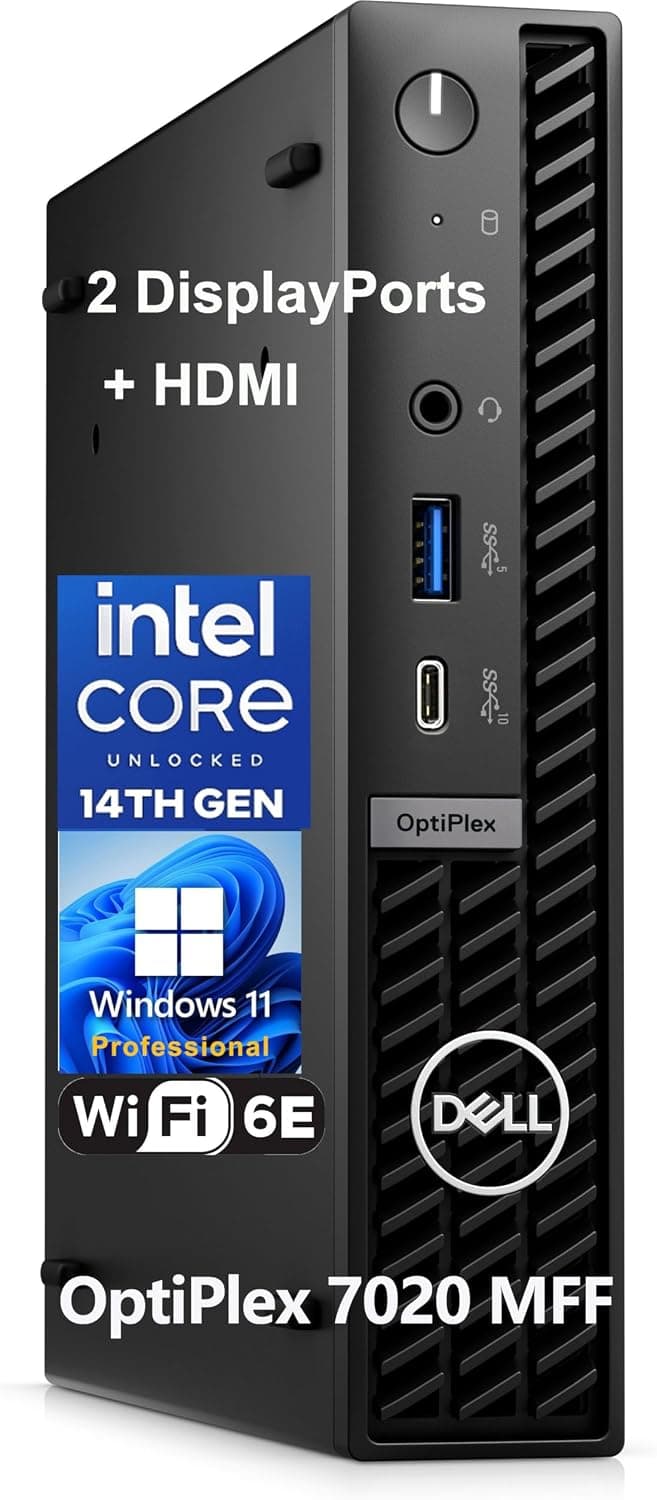
This article covers the Dell OptiPlex 7020 MFF Mini Business Desktop Computer. In short, it is a strong choice if you need to handle office work, video calls, and multi-monitor workflows on a cramped desk.
It is not for anyone planning to add a graphics card, play games, or run long, heavy rendering jobs. At the time prices were captured, some listings also looked very expensive for this configuration, so check the price carefully before you buy.
Overview
The Dell OptiPlex 7020 MFF (Micro Form Factor) is a compact business desktop built around a 14th-gen Intel Core i5-14500T. The CPU has 14 cores (6 P-cores and 8 E-cores) and 20 threads, so it handles multitasking comfortably: office apps side by side, many browser tabs, or building a document during a video call.
This configuration includes 32GB of DDR5 memory and a 1TB PCIe NVMe SSD, which is generous for an office PC.
The chassis is only a little over one liter in volume, so it fits in a desk corner or mounts behind a monitor via VESA. It is designed to run quietly and has the ports a business desk needs.
In short, this is not a machine for maximum performance. It is a stable office tool for tight spaces and long service.
Performance: What the i5-14500T Is Good For
The T suffix marks Intel's power-efficient desktop CPUs. The i5-14500T has a 35W base power rating, which is much lower than the regular i5-14500 with the same core layout.
Its P-cores boost up to 4.8GHz, so short bursts of work feel responsive.
Under long all-core loads, however, it has to work within a small chassis and a tight power budget, so sustained performance trails a full-size desktop.
Graphics come from the CPU's integrated Intel UHD Graphics 770. It is fine for video playback, online meetings, and showing documents across several displays.
It is not suited to 3D games, serious 3D CG work, or AI inference. The MFF chassis has no expansion slot, so you cannot add a graphics card later to make up for this.
| Workload | Expected experience |
|---|---|
| Office, email, browsing | Plenty of headroom. 32GB handles lots of open tabs |
| Video calls while editing documents | Comfortable. This is the core use case |
| Programming, light builds | Fine. Sustained all-core loads run slower |
| Photo editing, short video edits | OK for light work. Use a dedicated machine for serious editing |
| 3D gaming, 3D CG | Not recommended. Integrated GPU only, with no upgrade path |
Compatibility Guide
The front has one USB 3.2 Gen 1 Type-A port with PowerShare (charging while the PC is off), one USB 3.2 Gen 2x2 Type-C port, and a universal audio jack.
The rear has three USB 2.0 ports, one USB 3.2 Gen 1 Type-A port, two DisplayPort 1.4a outputs, one HDMI 1.4b output, an RJ-45 Gigabit Ethernet port, and the power input.
Wireless is handled by WiFi 6E (AX211) and Bluetooth 5.3.
| Item | Detail | What to check |
|---|---|---|
| Memory | DDR5-4800, dual-channel, up to 64GB | Whether the 32GB is one module or two |
| Storage | One M.2 2280 NVMe SSD | No second internal SSD can be added |
| Video | 2x DP 1.4a, 1x HDMI 1.4b (up to three 4K displays) | The HDMI port cannot drive 4K at high refresh rates |
| Power | External 65W adapter | Replace only with one of the same wattage and connector |
| Optical drive | None | Use an external USB drive if needed |
| OS | Windows 11 Pro 64-bit | Supports BitLocker and Remote Desktop hosting |
The HDMI version is the most common trap. HDMI 1.4b tops out at 30Hz at 4K.
If you run three 4K monitors, connect the two you want at a smooth 60Hz to DisplayPort, and use HDMI for a static screen such as spreadsheets or chat. With only one or two 4K monitors, use DisplayPort from the start and this is a non-issue.
Upgrade room is limited. Memory runs in dual channel and supports up to 64GB.
But the upgrade path depends on whether the current 32GB is a single module or two 16GB modules: you either add one module to a free slot or replace both. Compact chassis often use the same small SO-DIMM modules as laptops, so check the module type and slot count in Dell's service manual before you buy.
There is only one M.2 2280 slot, so adding capacity means swapping the SSD or using an external SSD or NAS.
The front USB 3.2 Gen 2x2 Type-C port is rated at 20Gbps.
The information here does not say whether it supports video output or charging. If you plan to run a monitor over a single Type-C cable, confirm support on the product page.
Power comes from a 65W external adapter, so although the PC is tiny, you still need somewhere to put the brick.
Product Info
| Item | Detail |
|---|---|
| Processor | Intel Core i5-14500T (14C/20T, P-core 1.7-4.8GHz) |
| Memory | 32GB DDR5-4800 (up to 64GB) |
| Storage | 1TB M.2 PCIe NVMe SSD |
| OS | Windows 11 Pro 64-bit |
| Wireless | WiFi 6E (AX211), Bluetooth 5.3 |
| Video outputs | DisplayPort 1.4a x2, HDMI 1.4b x1 (up to three 4K displays) |
Among compact 14th-gen Core business desktops, this is a mid-range configuration. The box normally includes the power adapter, power cord, and quick-start guide.
Whether a VESA mounting bracket is included may vary by listing, so check the product page if you plan to mount it behind a monitor.
On Amazon.co.Check the retailer's page for the latest user reviews.
With so few reviews, one or two ratings can move the average noticeably, so read it with that in mind.
On price: as of August 2026, the Amazon.co.jp listing price looked an order of magnitude high for a compact business PC of this class.
It was also far apart from listings on an overseas marketplace. Prices change often, so check the current price on the product page.
We strongly recommend getting quotes for the same configuration from Dell's business sales channel and other retailers before you decide.
Comparison with Competitors
The direct rivals are HP's Elite Mini and Lenovo's ThinkCentre M Tiny models. All of them pack laptop-class parts into a chassis of about one liter and offer VESA mounting and business management features, so they are very similar.
The deciding factors are usually not small performance gaps. They are which vendor your organization already manages, who holds your support contract, and whether the number and type of video outputs meet your needs.
| Factor | OptiPlex 7020 MFF | Typical consumer mini PC | Business tower |
|---|---|---|---|
| Footprint | Just over 1L, VESA mountable | Similarly small | Needs floor or desk-side space |
| Expandability | Mainly memory and one SSD | Varies | Easy to add cards and drives |
| Management and support | Built for business management and support | Mostly consumer warranties | Mostly business-oriented |
| GPU upgrade | Not possible | Rarely possible | Possible on most models |
Dell began moving its business lineup to Dell Pro branding in 2025, so this OptiPlex-branded model belongs to the generation before the rename. If you want the newer successors, or want to compare a tower for more expandability, see the related Dell Pro articles.
Best Use Cases
1. Business users who need a space-saving desktop: It suits everyday work such as writing documents, video calls, and spreadsheets.
The tiny chassis keeps the desk clear and can mount behind a monitor via VESA. It is especially good for reception desks and hot-desking stations where the PC should stay out of sight.
2. Remote workers who want a stable machine: With both WiFi 6E and wired Ethernet, it is easy to keep video calls and VPN connections stable.
Windows 11 Pro adds BitLocker drive encryption, which helps meet company security requirements.
3. Office workers who run multiple displays: Two DisplayPorts plus HDMI support up to three 4K displays.
That suits traders, engineers, and anyone who needs a lot of information on screen at once. As noted above, connect any 4K screen you want at 60Hz to DisplayPort.
4. People who need a quiet machine: It is not fanless, but it is very quiet at light loads, which makes it easy to use in shared offices and quiet rooms.
Fan noise can become noticeable under sustained heavy load.
Setup and Upgrade Steps
- Initial setup: After finishing Windows 11 Pro setup, install all Windows Updates first.
Update the BIOS and drivers with Dell's update tool as well, which helps avoid sleep and multi-monitor glitches. 2.
Assign video outputs: Connect 4K screens to DisplayPort first, and use HDMI for a Full HD monitor or a mostly static screen. 3.
BitLocker recovery key: If you enable encryption, save the recovery key to your Microsoft account or your company's management system. You may be asked for it after a BIOS update.
- Memory and SSD upgrades: Unplug the power adapter before opening the cover.
Check the module type, slot count, and M.2 SSD length (2280) against the service manual first.
It is also wise to confirm that your warranty or support contract allows you to open the case.
Before You Buy
Compare prices across several sources. As of August 2026, the Amazon.co.jp listing price was unusually high for a compact business PC with this configuration, and far apart from overseas listings.
Listings with the same title can differ widely in price depending on the seller. Check the current price on the product page, then compare it with a quote from Dell's business sales channel.
The seller is a third-party retailer, not Dell. Amazon lists Dell as the manufacturer, but the seller and shipper are a third-party retailer.
Warranty length and support level can differ by sales channel and configuration. If you are counting on extended support, ask the seller exactly which warranty is included before you buy.
Double-check the configuration on the listing. The collected pricing data had inconsistencies, such as a supposedly US price that pointed to the Japanese Amazon site.
The OptiPlex 7020 MFF also ships in many configurations with different CPUs, memory, and SSD sizes. Check the images, title, and spec section to confirm you are getting the i5-14500T / 32GB / 1TB / WiFi 6E build.
Who should skip it: Gamers and anyone who needs GPU-accelerated video editing or AI work should choose a tower that can take a graphics card. With only one internal SSD, it is also cramped for storing large amounts of data locally.
If you want three 4K monitors all at 60Hz, the HDMI 1.4b limit will get in the way.
And if you run heavy loads for long periods, expect compromises in both fan noise and sustained performance.
There is no optical drive. If your organization still distributes software on discs, budget for an external USB drive.
FAQ
Q. Can it play games? A.
Browser games and light 2D titles may run. With integrated graphics only and no upgrade path, choose a different product if 3D gaming is the goal.
Q. Can I upgrade to 64GB of RAM? A.
Yes, the spec supports up to 64GB. The parts you need depend on whether the current 32GB is one module or two, so check inside the case or consult the service manual before buying memory.
Q. Can I run three 4K monitors at 60Hz? A.
The two monitors on DisplayPort can run at 4K 60Hz. HDMI 1.4b is limited to 30Hz at 4K, so the third monitor will run at 4K 30Hz or at a lower resolution.
Q. Can I add a second SSD? A.
There is only one internal M.2 slot.
If you need more space, swap in a larger SSD or use an external USB SSD or a NAS.
Q. Would Windows 11 Home be enough? A.
For personal home use, Home often is. But BitLocker, Remote Desktop hosting, and domain join are Pro features, so keep Pro if the PC will be company-managed.
Product Disclosure (Amazon)
- Manufacturer: Dell
- Seller: 安田屋堂
- Fulfilled by: 安田屋堂
- ASIN: B0DGGK6TVX
- Note: This article covers a manufacturer-made product based on Amazon listing details.