Overview
The Skytech Archangel Gaming Computer PC Desktop – Ryzen 5 3600 3.6GHz is a pre-built gaming tower from US-based Skytech Gaming.
It runs an AMD Ryzen 5 3600 (6 cores/12 threads, 3.6GHz base, 4.2GHz boost), and according to the retail listing it pairs that CPU with an NVIDIA GeForce GTX 1660 6GB.
The build targets 1080p gaming in esports titles and lighter games. It ships with 8GB of DDR4-3000 memory, a 500GB SSD, and Windows 10 Home 64-bit.
802.11AC Wi-Fi and an 80 PLUS certified power supply are included, so it works out of the box.
Here is the short version. If you want to play popular competitive games at 1080p without building a PC, this machine can do the job.
Buying it in 2026, though, comes with real caveats. The CPU launched in July 2019, 8GB of RAM is often not enough for current games, and Windows 10 support ended in October 2025.
This article covers what you can live with, what you will need to fix, and who should skip this machine.
Performance Expectations
The Ryzen 5 3600 is a Matisse-generation chip built on a 7nm process, with 32MB of L3 cache and a 65W TDP. Its PassMark multi-thread score is 18194.
Six cores and twelve threads are enough to run Discord and a browser alongside a game. Single-thread performance trails current CPUs, though.
On a 144Hz or faster monitor, the CPU can become the limit before the GPU does.
The GTX 1660 6GB is a Turing-generation GTX card without the RT cores used for ray tracing or the Tensor cores used for DLSS. Many recent games rely on DLSS to cut the load, and that option is not available here.
The realistic use is light-to-mid competitive games such as Fortnite, VALORANT, and Apex Legends at 1080p, with settings adjusted. For demanding modern AAA titles, expect to drop to medium or low settings.
Frame rates vary a lot by game and settings, so check benchmarks for the titles you care about.
| Item | This build | Verdict in 2026 |
|---|---|---|
| CPU | Ryzen 5 3600 (6C/12T, up to 4.2GHz) | Still usable for games, but an older generation |
| GPU | GTX 1660 6GB (per listing) | Light-to-mid 1080p gaming, no DLSS |
| Memory | 8GB DDR4-3000 | Tight. An upgrade to 16GB is recommended |
| Storage | 500GB SSD | Fills up after a few large games |
| OS | Windows 10 Home 64-bit | Out of support. Plan to move to Windows 11 |
The table shows that the CPU and GPU are old but still workable if you keep your expectations narrow. Memory and storage are the real shortfalls, and you should plan to upgrade them yourself.
If you are comfortable doing that, you can fix most of this machine's weak points.
Compatibility Guide
The available data lists Socket AM4, DDR4 memory, PCIe 3.0 expansion, and a tower case.
Because this is a pre-built system, the internal configuration can differ between units, so open the case and check before buying upgrade parts. These are the points where upgrades most often go wrong.
Memory: Only DDR4 works. DDR5 modules will not physically fit.
The listing does not say whether the 8GB is a single 8GB module or two 4GB modules. Check how many slots are in use in Task Manager (Performance > Memory) before you buy more.
Mixed speeds fall back to the slower module, so matching DDR4-3000-class modules of the same capacity is the safe choice.
Storage: You need the motherboard model to find out whether the 500GB SSD is M.2 or 2.5-inch SATA, and whether a free M.2 slot or SATA port is available.
The original article said there was room to expand, but that varies by unit and cannot be confirmed. Open the case and check.
GPU upgrades: The slot is PCIe 3.0, and newer cards work in it because PCIe is backward compatible.
Cards that use only x8 lanes have less bandwidth on PCIe 3.0, though.
The bigger obstacle is the power supply. The specs say only 80 PLUS certified and do not give the wattage.
Before upgrading, read the wattage and the auxiliary power connectors off the PSU label, and measure how long a card the case can fit.
CPU upgrades: AM4 means a Ryzen 5000-series chip physically fits. Whether it works depends on the motherboard BIOS supporting it.
BIOS updates for boards in pre-built systems can be hard to track down, so look up the motherboard model and check the manufacturer's CPU support list first.
Windows 11: The Ryzen 5 3600 is on the Windows 11 supported CPU list. Windows 11 also requires TPM 2.0 and Secure Boot, and on AMD systems you may need to enable fTPM in the BIOS.
The setting names vary by motherboard.
Power: This is a US-market unit sold as an import. US outlets supply 120V and Japanese outlets supply 100V, and both use the same Type A plug shape.
Most PC power supplies accept a wide voltage range, but check the input rating on the PSU label to be sure.
Product Info
On Amazon.co.Check the retailer's page for the latest price.
Both are prices at the time of capture and can change a lot with sales and stock. Check the product page for the current price.
To be frank, this price is high for a 2019-generation build, probably partly because the unit is sold as an import. Before buying, we strongly recommend comparing it with pre-built PCs that use a newer CPU and an RTX-series GPU.
Check the retailer's page for the latest user reviews. The score is high, but many of those reviews date from around the original launch, when both the price and the demands of games were different.
Do not rely on the score alone. Look for recent reviews that mention initial defects or packaging condition.
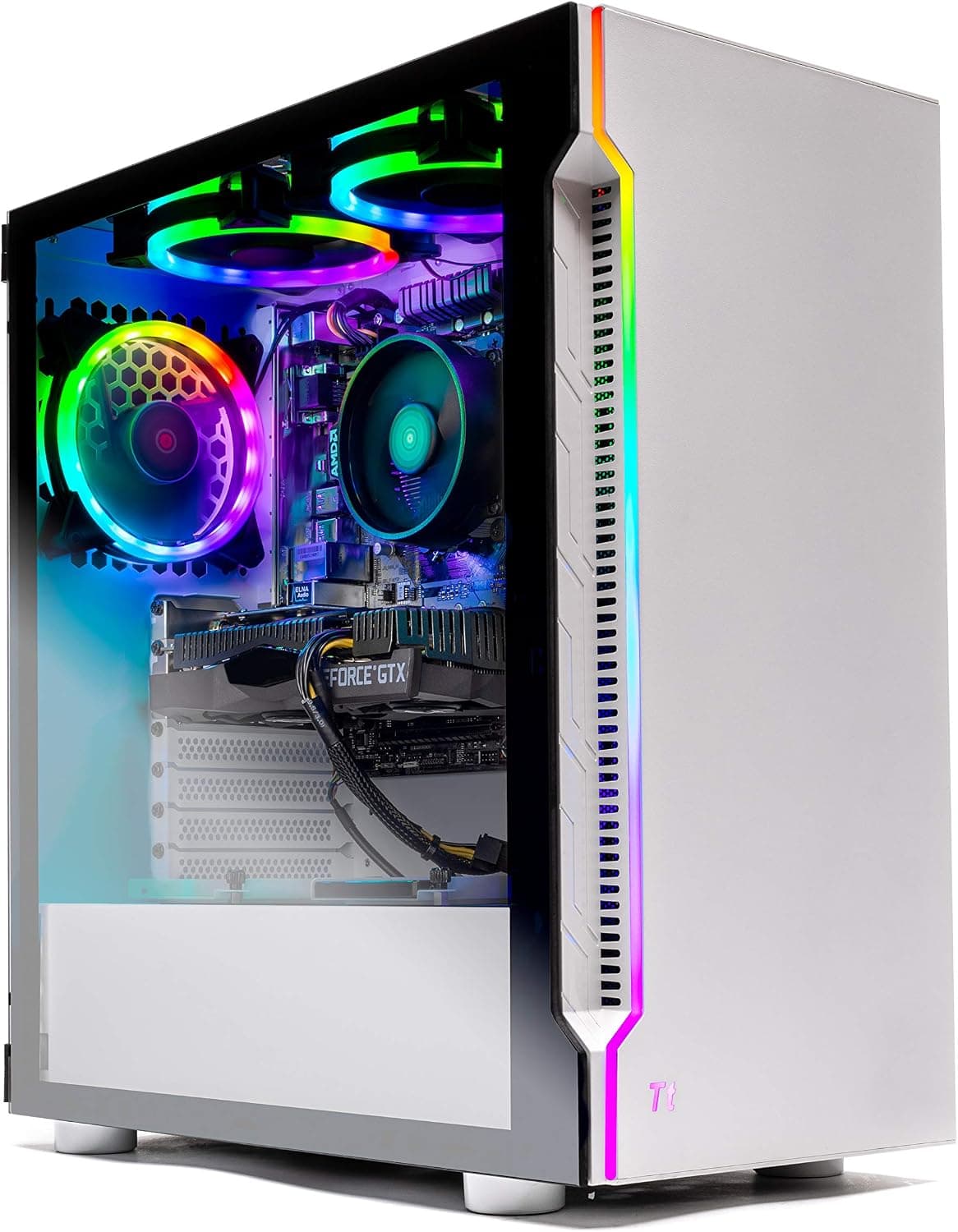
The main configuration is a Ryzen 5 3600 (Socket AM4, 65W TDP), 8GB DDR4-3000, a 500GB SSD, Windows 10 Home 64-bit, 802.11AC Wi-Fi, a white tower case with tempered glass, three 120mm RGB ring fans, and an 80 PLUS certified PSU.
The seller and shipper is Reg shop, so warranty terms and support depend on that seller. Check the listing for included accessories and warranty conditions.
Comparison with Alternatives
Putting this machine next to newer pre-built gaming PCs makes its position clear. The ZYNEEX build with a Ryzen 5 5500 and RTX 3050 6GB uses a newer Zen 3 CPU, and its GPU supports DLSS.
The ViprTech Stryker 3.0 (Ryzen 7 2700 and RTX 3060) has a CPU of a similar age but much more GPU headroom.
Further up, the ViprTech Stryker 4.0 (Ryzen 7 3700X and RTX 5060) and the DarumaPC build (Core i5-14400F and RTX 5060) use RTX 50-series cards.
They get newer DLSS features, which helps if you plan to play demanding games for years. Prices move a lot, so open each product page at the same time and compare total cost, memory, and storage.
The main reason to pick this machine is that you like the white case and RGB look and the price gap is small. If you are choosing on value for performance alone, the newer builds usually win.
Best Use Cases
- First-time buyers who do not want to build a PC: The OS, power supply, and Wi-Fi are already included, so there is no part picking or cabling.
- Players who mainly play light-to-mid competitive games at 1080p: The build fits titles like Fortnite and VALORANT with settings adjusted.
- Buyers who care about a white case and RGB lighting: Tempered glass and three 120mm RGB fans make it look good on a desk.
- Users who can upgrade RAM and move to Windows 11 themselves: If you can fix the weak points yourself, the machine stays useful longer.
It is not a good fit if you want to play the latest AAA games at high settings, want ray tracing or DLSS, or mainly do CPU- and memory-heavy work such as video editing or streaming. If you would rather not touch system settings at all, the Windows 11 migration may also cause you trouble.
Before You Buy
Windows 10 is out of support. The machine ships with Windows 10 Home 64-bit.
Support ended in October 2025, so it no longer receives regular security updates. The Ryzen 5 3600 supports Windows 11, so plan to move to Windows 11 when the PC arrives.
That may require enabling TPM (fTPM) and Secure Boot, which is where some users get stuck.
8GB of RAM is often not enough for current games. Running a game, a browser, and voice chat together fills 8GB quickly and causes stutter.
Budget for an upgrade to 16GB on top of the purchase price.
500GB of storage fills up fast. Some large games take more than 100GB each.
After the OS and updates, only a few will fit, so plan on adding another SSD.
The GPU is not in the spec table. The GTX 1660 6GB comes from the retail listing description, but the collected spec data has no GPU entry.
Pre-built configurations can change over time, so check the spec section and photos on the product page to confirm which GPU you will get. Listing details sometimes do not match the actual unit, so compare the title, the photos, and the specs.
**The price does not match the age of the hardware. It is common to find newer pre-built systems for a similar budget.
Check warranty and support for this import. The seller is Reg shop, and the support contact, warranty length, and return terms depend on that seller.
Units bought in Japan as imports may not be covered if you contact the manufacturer directly. Confirm the terms before ordering.
FAQ
Q. Can it be upgraded to Windows 11? A.
In most cases, enabling TPM 2.0 (AMD fTPM) and Secure Boot in the BIOS meets the requirements.
Setting names vary, so check the motherboard manual.
Q. How much RAM should I add? A.
16GB is a sensible target for gaming. Only DDR4 works, so DDR4-3000-class modules of matching capacity are the safe choice.
Check how the current 8GB is configured first.
Q. Can it run Apex Legends or VALORANT? A.
Yes, at 1080p with settings tuned. Holding 144Hz or more will mean lowering settings considerably.
Check benchmarks for exact frame rates.
Q. Can I swap the graphics card later? A.
Newer cards fit the PCIe 3.0 slot, but the unknown PSU wattage is the biggest constraint.
Check the wattage and auxiliary connectors on the PSU label, and measure how long a card the case can fit.
Q. Does it work on Japan's 100V outlets?
A. The plug is the same Type A shape used in Japan.
Product Disclosure (Amazon)
- Manufacturer: Skytech Gaming
- Seller: Reg shop
- Fulfilled by: Reg shop
- ASIN: B07WCLNZWR
- Note: This article covers a manufacturer-made product based on Amazon listing details.