Overview
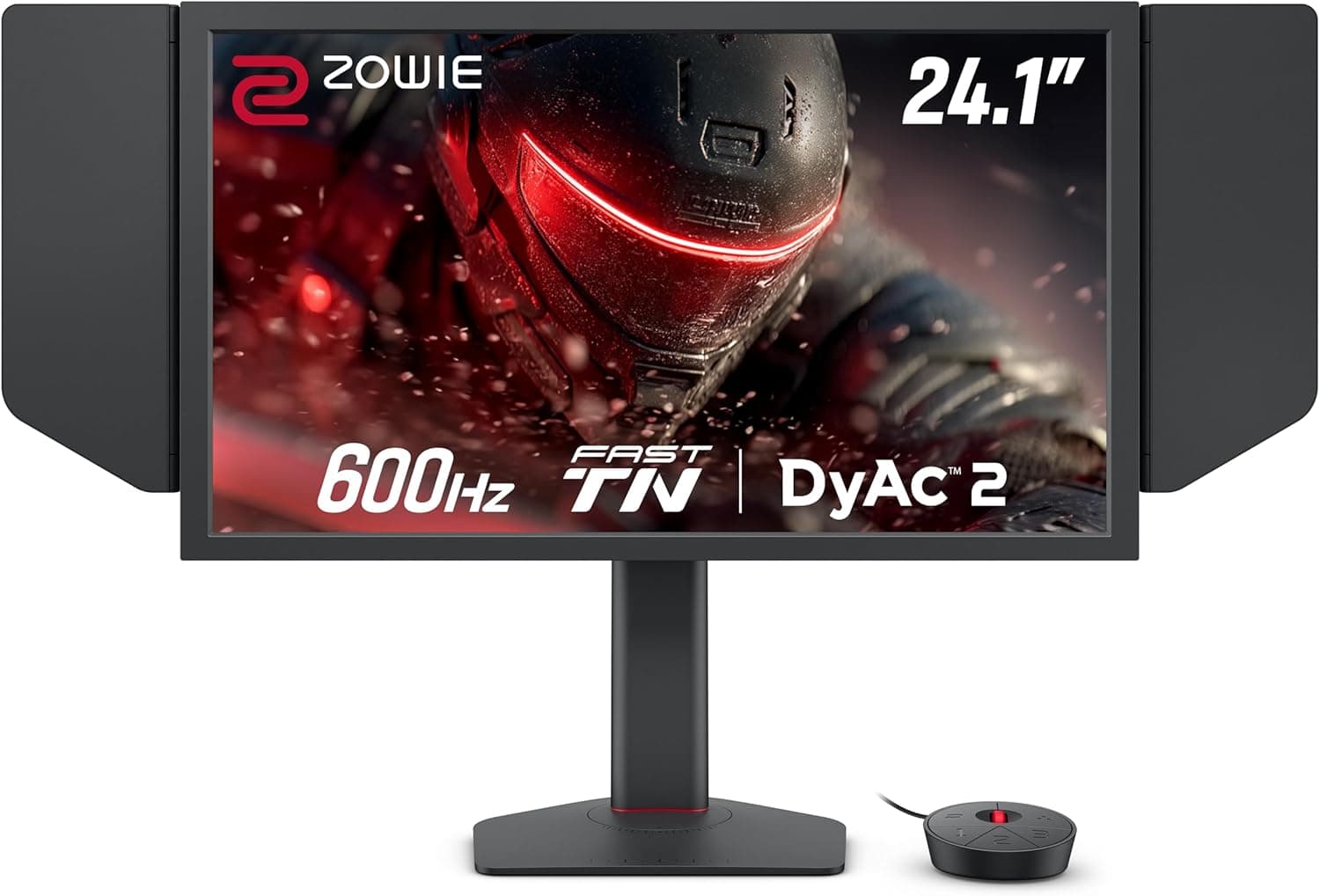
The BenQ Zowie XL2566X+ is a 24.1-inch monitor built as a tool for competitive FPS play.
The short version: if you already have a PC that sustains 300+ fps in light competitive titles like Valorant, CS2, or Overwatch 2, this is a top-tier option — for anything else it is almost certainly overkill. The specification boils down to four numbers: 1920x1080 (FHD), a 400Hz refresh rate, a Fast TN panel, and a 0.5ms (GtG) response time.
It comes from ZOWIE, BenQ's pro gaming brand, and its headline feature is DyAc 2, the company's motion blur reduction technology. Sticking with FHD is not cost-cutting but competitive logic: the same GPU pushes far more frames, and the whole playfield stays inside your central vision.
The trade-off is pixel density — 1920x1080 across 24.1 inches works out to roughly 91ppi, so text and distant detail look coarse if you are used to 27-inch 1440p.
Choose it knowing you are trading sharpness for speed.
The stand uses an industrial-grade ball-bearing height mechanism and also tilts and swivels. The bundled shield hood blocks ambient light so you can recreate tournament conditions at home, and the S-Switch OSD controller puts brightness and DyAc level a button away.
XL Setting to Share lets you carry your profile on a USB stick.Check the retailer's page for the latest user reviews.
What 400Hz and DyAc 2 Actually Do
A higher refresh rate means each frame stays on screen for less time: about 6.9ms at 144Hz, about 4.2ms at 240Hz, and 2.5ms at 400Hz.
The shorter that window, the less the image smears while your eyes track motion, which makes the outline of a strafing opponent and your own spray pattern easier to read. DyAc 2 pushes that further, working with the 0.5ms (GtG) panel to increase the share of frames that look genuinely still.
The catch is simple: 400Hz only fully pays off when you are actually producing close to 400fps. If your rig tops out near 200fps, most of the benefit stays on the table.
It is not wasted — a higher ceiling shortens the wait before a finished frame is shown, so dips feel less jarring — but the step from 240Hz to 400Hz is only about 1.7ms per frame, and it rarely lands as obviously as the jump from 144Hz to 240Hz did.
As a general rule, blur-reduction techniques that modulate the backlight cost brightness, and many implementations cannot run alongside variable refresh rate. The exact conditions under which DyAc 2 engages are not in the data available here, so if you game in a dark room or treat VRR as a requirement, check the product page notes first.
Connectivity & Compatibility
Inputs are one DisplayPort 1.4 and two HDMI 2.0.
Only DisplayPort reaches 400Hz; HDMI 2.0 caps at 240Hz.
Miss this and you end up owning a 400Hz monitor that only offers 240Hz in the display settings. Use the bundled DisplayPort cable straight into your GPU, and avoid HDMI-to-DisplayPort adapters, which invite bandwidth and sync problems.
- Free GPU port: with no DisplayPort output available, 400Hz is off the table. Count the connectors on the back before you buy, especially if you are keeping an existing monitor.
- Laptops: machines with HDMI only, or with unclear USB-C DisplayPort Alt Mode specs, may not reach 400Hz.
- OS settings: a fresh connection often defaults to a lower refresh rate. Set 400Hz explicitly in both Windows advanced display settings and your GPU driver.
- VESA 100x100mm: arms and wall mounts are supported, but the shield hood tends to collide with arm posts and neighbouring panels, so plan on removing it in tight setups.
- Audio: there is one 3.5mm headphone jack. No built-in speakers are listed in this specification, so plan to use a headset or your PC's output.
Physical dimensions, weight, and VRR (G-SYNC / FreeSync) support are absent from the data here. If your arm's load rating or desk depth is marginal, or VRR is non-negotiable, confirm it on the product page.
Assuming an unlisted feature is "probably supported" is the single most common mistake in this category.
Product Info
| Item | Value |
|---|---|
| Screen Size | 24.1 inches |
| Resolution | 1920x1080 (FHD) |
| Refresh Rate | 400Hz |
| Panel Type | Fast TN (Twisted Nematic) |
| Response Time | 0.5ms (GtG) |
| Video Inputs | DisplayPort 1.4 x1 / HDMI 2.0 x2 |
| Headphone Jack | 3.5mm x1 |
| VESA Mount | 100x100mm |
As captured on 31 August 2026, the Japanese Amazon listing showed ¥79,800. Monitors move a lot on sales and stock, so treat that as a reference point and confirm the current figure on the listing before ordering.Check the retailer's page for the latest price.
The eBay entry simply reads "See listing", meaning per-seller pricing.
Released in June 2024, it sits at the upper end of the ZOWIE monitor line. Warranty is the standard three years in Japan, and the box includes a DisplayPort cable, power cable, shield hood, S-Switch, and quick-start guide.
Warranty terms and bundled items can differ by sales channel and batch, so read the order page carefully — particularly if you are considering a parallel import. Beyond the usual online shops and electronics retailers, esports specialty stores are worth checking for stock.
How It Compares
| Intended use | Better fit |
|---|---|
| Competitive FPS first, PC sustains 300+ fps | This monitor (24.1-inch FHD / 400Hz / Fast TN / DyAc 2) |
| High refresh on a tighter budget | 24-inch FHD around 200Hz (e.g. MSI MAG 242F) |
| Color and sharpness still matter | 27-inch IPS around 144Hz (e.g. Gigabyte G27F) |
| Immersion and media | Large OLED or ultrawide (e.g. LG 39GX90SB-W) |
On raw numbers, rivals offer 360Hz to 500Hz in this bracket. The XL2566X+ is positioned on motion clarity rather than peak figures, and DyAc 2 plus Fast TN is the core of that argument.
Conversely, the moment resolution, color gamut, or screen size becomes a priority, this model drops off the list. Accepting 24-inch FHD is the first fork in the decision.
Against 200Hz-class panels, the price gap does not convert directly into wins. If you plateau near 200fps, buying a 200Hz screen and spending the rest on a GPU delivers more felt improvement.
If frames are already plentiful and smear is your only remaining complaint, the difference here makes sense.
Best Use Cases
- Serious competitive FPS players: in light, high-framerate titles such as Valorant, CS2, and Overwatch 2, the 400Hz panel and DyAc 2 pay off directly, making strafing targets easier to resolve and tracking steadier.
- Tournament and scrim players: the value is rehearsing at home on a setup close to the stage. The shield hood approximates venue lighting and XL Setting to Share carries your profile, cutting setup time on site.
- People who feel refresh-rate differences: if 144Hz to 240Hz was an obvious change for you, the extra headroom is likely perceptible — expect diminishing returns, though.
- Tinkerers: height, tilt, and swivel plus one-touch OSD changes via the S-Switch suit anyone who retunes brightness or DyAc per title.
It is a poor fit for office work and video watching, for anyone judging color professionally, and for players who want sprawling RPGs on a big screen. This is a device with its whole budget aimed at competitive visibility, and as a general-purpose display it loses several categories to IPS panels costing far less.
Before You Buy
Accept the Fast TN color and viewing angles. TN is generally narrower in viewing angle than IPS or VA, and color washes out when you move off-axis.
That matters little when you sit square in front of it for matches, but it rules out color-critical work and side-by-side viewing. No gamut or color-accuracy figures are included in this data, so creative users should reconsider the panel type entirely.
Below 400fps, half the investment sleeps. The benefit scales with actual framerate, and in the 400fps range the CPU usually becomes the wall before the GPU — plenty of builds plateau no matter how low the settings go.
Measure your current framerate first; if you are short of 300fps, upgrading the PC before the monitor will feel like the bigger step.
Expect a brightness trade-off with blur reduction. Backlight-based approaches generally darken the image and sometimes cannot run with variable refresh rate.
Since the operating conditions for DyAc 2 are not documented in this data, dark-room users and VRR-dependent setups should read the product page notes.
24.1 inches at FHD is cramped for a do-everything display. At roughly 91ppi, text looks coarse over long document or browser sessions and desktop space is limited.
If one screen has to cover everything, consider a two-monitor setup with a 27-inch 1440p panel, or narrow your use case.
Verify the listing data yourself. Even here, the "Amazon US" field held the same yen figure as Japan, which is why no dollar price appears above.
Retail pages also list closely related model numbers that differ by a single character, so check all the way to the trailing plus sign or you will receive a different monitor. Manufacturer and model-number metadata on listings is sometimes simply wrong, so confirm the product from the images, the title, and the spec table before ordering.
FAQ
Q. What do I need for 400Hz? A.
A DisplayPort 1.4 connection (the bundled cable is fine), 400Hz selected in both the OS and the GPU driver, and a PC capable of pushing close to 400fps.
Miss any one of the three and the refresh rate goes unused.
Q. What happens over HDMI? A.
You are limited to 240Hz. That is still high, but if 400Hz is the reason you are buying, DisplayPort is the only option.
With a console, the image is FHD and the refresh ceiling follows the console's own limits.
Q. Is it worth upgrading from 240Hz? A.
Frame-on-screen time drops from about 4.2ms to 2.5ms.
Some players see it clearly, but do not expect the shock of 144Hz to 240Hz. Decide based on how much the DyAc 2 motion clarity is worth to you.
Q. Can I use it for photo or video editing? A.
It will display the work, but it is not suited to it. The TN panel has narrow viewing angles and no gamut or accuracy figures are provided here.
Choose IPS for color-critical tasks.
Q. Will a monitor arm work? A.
Yes, via VESA 100x100mm. Be aware that the shield hood often collides with arm posts or an adjacent screen, so plan to remove it if needed.
Q. Are speakers built in? A.
Nothing is listed in this specification. There is one 3.5mm headphone jack, so assume audio comes from a headset or your PC.
Product Disclosure (Amazon)
- Manufacturer: ベンキュージャパン
- ASIN: B0D3JC9S9M
- Note: This article covers a manufacturer-made product based on Amazon listing details.