Overview
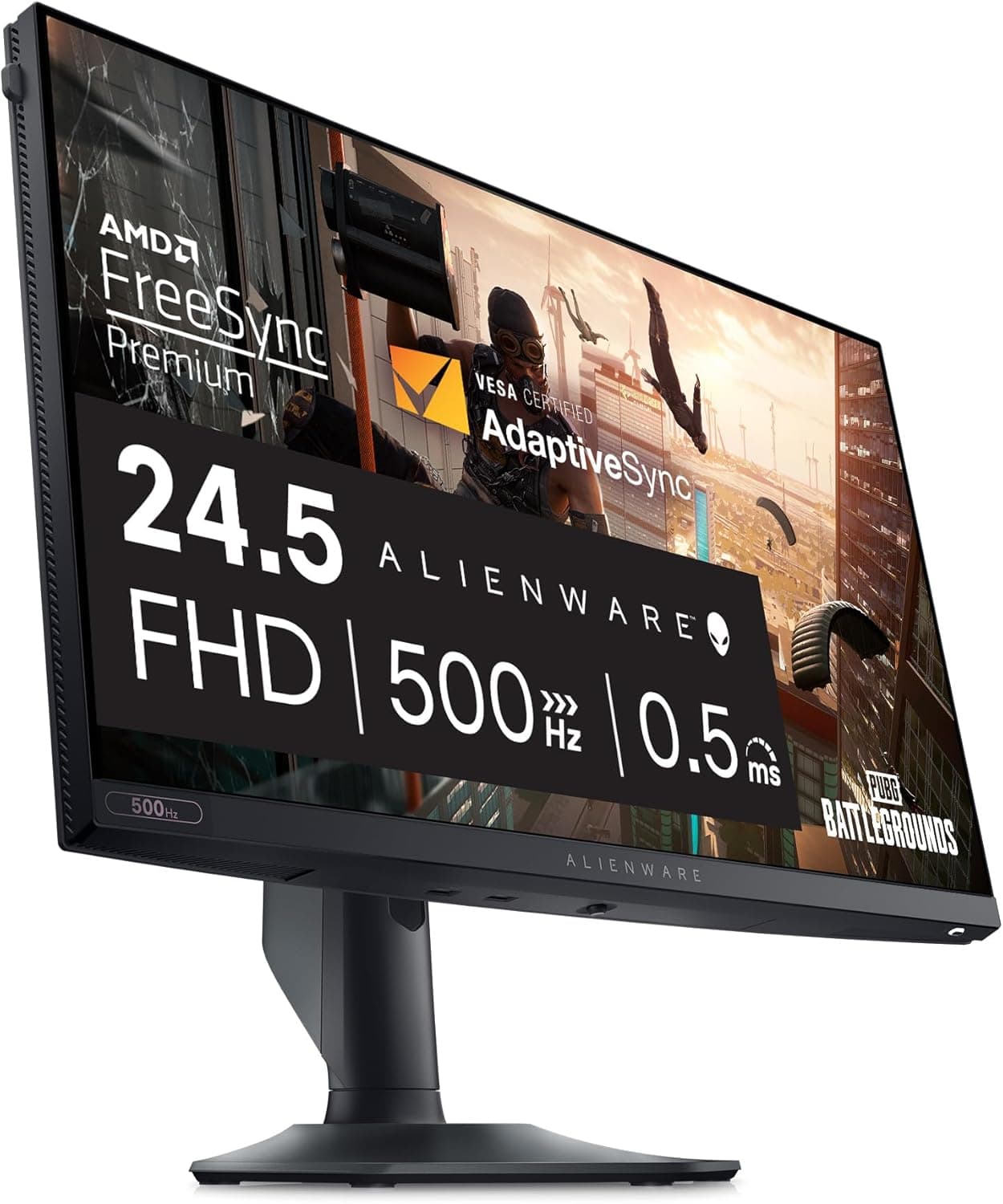
The Alienware AW2524HF — listed in Japan as Alienware AW2524HF ゲーミングモニター — is a 24.5-inch, 1920x1080 Fast IPS display that runs at 500Hz overclocked and 480Hz natively.
Response time is 0.5ms GTG in Extreme mode, color coverage is sRGB 99%, and it carries AMD FreeSync Premium support plus VESA AdaptiveSync certification.
The honest framing is this: the monitor gives up resolution, screen size, and color gamut in order to spend everything on how motion looks.
That trade is brilliant for a narrow group and an expensive mistake for everyone else. A 500Hz panel means nothing on its own — you also need a PC that genuinely renders close to 500 frames per second, in games light enough to reach it.
If you already have that, this is one of the most extreme options on the market. If you don't, the money belongs somewhere else in the build.
That is a solid score, but 88 is not a large sample, so read it alongside the disqualifiers below rather than as a verdict.
What 500Hz Actually Changes
The arithmetic makes the decision easy. A single frame is held for roughly 6.9ms at 144Hz, 4.2ms at 240Hz, 2.1ms at 480Hz, and 2.0ms at 500Hz.
Going from 240Hz to 480Hz saves about 2.1ms; going from 480Hz native to 500Hz overclocked saves roughly 0.08ms.
The 500Hz headline is a 4% garnish on top of 480Hz, not a reason to buy.
What you actually perceive is reduced motion blur during fast flicks, rather than lower input latency. An LCD holds each frame until the next refresh, so shorter hold times keep moving objects sharper.
The real payoff of a 480Hz-class panel is that enemies stay legible while you are mid-turn.
What does not change is just as clear. You still get 1920x1080 worth of information, and across 24.5 inches that lands at roughly 90 PPI.
Text sharpness and desktop working space are identical to a budget Full HD 144Hz panel.
Compatibility Guide
Rule one: 500Hz (OC) and 480Hz native are available over DisplayPort 1.4 only.
The monitor provides one DisplayPort 1.4 input and one HDMI 2.0 input.
HDMI 2.0 has far less bandwidth, so its 1080p refresh ceiling drops substantially — check the product page for the exact figure.
If you are buying this display for its headline feature, DisplayPort is the only cable that matters.
Next, your PC. DisplayPort 1.4 does not carry 1080p at 480Hz uncompressed, so a DSC (Display Stream Compression) capable chain is the practical requirement.
DSC depends on your GPU and driver; older cards and passive adapters may simply never expose the top refresh rates in display settings. Verify DSC support on your GPU's spec sheet before ordering, and use the bundled DisplayPort cable rather than a spare of unknown quality.
Frame rate is the part buyers forget. 500Hz assumes your system produces close to 500fps, and in most competitive titles the limiter is the CPU, not the GPU.
If dropping settings does not raise your frame rate, a new monitor will not add a single frame. Measure what you get today; if you are not clearing 240fps, spend on the CPU instead.
Variable refresh comes through AMD FreeSync Premium with VESA AdaptiveSync certification. FreeSync Premium includes low framerate compensation, so tearing stays under control when frame rates dip.
Whether your NVIDIA driver exposes adaptive sync here is worth confirming in the driver's compatibility list.
For mounting, the panel accepts a VESA 100x100mm plate, and the included stand offers height, tilt, swivel, and pivot. Physical dimensions and weight are not part of this article's data, so check arm load ratings against the product page.
The USB hub is USB 3.2 Gen 1 with four ports total, one of which is the upstream USB-B link to the PC; the bundled upstream cable must be connected for the hub to work.
Port breakdowns are often written ambiguously, so if you plan to route keyboard, mouse, and headset through the monitor, confirm the layout before ordering.
Product Details
| Item | Spec |
|---|---|
| Screen size | 24.5 inches |
| Resolution | 1920x1080 (Full HD) |
| Refresh rate | 500Hz (OC) / 480Hz native |
| Panel type | Fast IPS |
| Response time | 0.5ms GTG (Extreme mode) |
| Color gamut | sRGB 99% |
| Aspect ratio | 16:9 |
| Surface | Matte (non-glare) |
| Sync | AMD FreeSync Premium, VESA AdaptiveSync |
| Inputs | DisplayPort 1.4 x1, HDMI 2.0 x1 |
| USB hub | USB 3.2 Gen 1 x4 (1 upstream) |
| VESA mount | 100 x 100mm |
The matte finish keeps lamps and windows off the panel, which matters more in competitive play than deep blacks do. The flip side of sRGB 99% is that this is not a wide-gamut or HDR display; for color-critical photo or video work, look elsewhere.
Amazon.co.Check the retailer's page for the latest price.
The eBay reference points to a search rather than a fixed listing, so it yields no usable figure. Street prices for high-refresh panels swing sharply with sales and generational turnover, so treat the number here as a snapshot and check the live page before ordering.
In the box: DisplayPort cable, HDMI cable, USB upstream cable, power cable, and a quick setup guide. The warranty runs three years and includes Advanced Exchange Service, which ships a replacement before you return the faulty unit, plus a premium panel guarantee covering even a single bright pixel — an unusually strict standard in a category where dead-pixel claims are often refused.
The model dates from June 2023, so newer high-refresh designs have appeared since; whether you can find it at a late-cycle discount depends on the market when you buy.
How It Compares
Full HD panels split sharply by price bracket. A 144Hz–200Hz 24- or 27-inch Full HD monitor is already fast enough for most players, and it frees budget for the GPU or CPU.
The AW2524HF only pulls ahead if you already own that stronger system and play titles that clear 400fps. Buy it without that context and you have purchased a number, not performance.
On size, a 27-inch Full HD panel spreads the same pixels wider, so this 24.5-inch model looks noticeably less coarse at the same resolution.
The 24.5-inch format has been an esports standard for years precisely because it minimizes eye travel.
Ultrawides and large OLEDs pull in the opposite direction — immersion rather than competition. If you are torn between categories at this budget, decide whether you spend more hours trying to win or more hours enjoying the view.
Who It's For
First, competitive players running VALORANT, CS-style shooters, Apex Legends, or Fortnite on a strong CPU with settings turned down. If you already live on a 240Hz-plus panel and still want more, 500Hz (OC) / 480Hz is a meaningful upgrade rather than a spec-sheet trophy.
Second, players who dislike TN color shift and viewing angles but refuse to give up speed. Fast IPS holds color and off-axis consistency far better than TN, and sRGB 99% is enough that desktop work and video look normal between matches.
Third, marathon players. TUV ComfortView Plus reduces blue light in hardware rather than through a software filter, so the image does not turn yellow.
Combined with the matte surface and a fully adjustable stand, it is a display you can sit in front of for long sessions without fighting reflections or a bad viewing height.
Before You Buy
If your PC cannot produce the frames, you are buying in the wrong order. This is the biggest trap.
A monitor adds zero frames. Competitive titles are usually CPU-limited, so if you are not clearing 240fps today, the same money spent on the CPU will do more.
Measure your current frame rate first.
Full HD at 24.5 inches is rough for mixed work.
At roughly 90 PPI, text looks coarse to anyone used to higher-density panels, and you gain no extra desktop space. As a dedicated gaming display that is fine; as your only screen for work, it is likely to disappoint.
Do not expect HDR or wide gamut. The published coverage is sRGB 99%, which is not what a color-grading or print-oriented workflow needs.
The 0.5ms figure is conditional on Extreme mode.
That is the most aggressive overdrive setting, and aggressive overdrive can produce inverse ghosting (overshoot) on moving edges. Many players end up one step below maximum.
Compare the modes yourself rather than assuming the fastest setting looks best.
500Hz is an overclock, not the native mode. Native is 480Hz, and the gap is about 0.08ms of frame interval.
It also requires DisplayPort plus enabling the overclock in the OSD — plugging in the cable does not deliver 500Hz automatically.
The price is a snapshot. ¥153,298 was captured on Amazon.co.jp on 2026-06-07 and may not match today's listing.
At this budget, 27-inch high-refresh QHD and OLED options enter the picture, so settle the question of whether you will truly use 500Hz before comparing.
Finally, listing data is not always accurate. Retail spec fields are often auto-populated, and details from a different model can creep in — USB port counts and per-input refresh ceilings are especially prone to this.
Sibling models can differ by a single character in the part number, so confirm the product images and the title read exactly AW2524HF before you order.
FAQ
Q. What do I need to actually run 500Hz? A.
A DisplayPort 1.4 connection (use the bundled cable), a GPU with DSC support, and the overclock enabled in the OSD.
Beyond that, you need a PC and a game light enough to push near 500fps, or the number does nothing.
Q. Can HDMI do 500Hz? A.
No. The HDMI 2.0 input lacks the bandwidth, so its 1080p ceiling is much lower.
Check the product page for the exact figure; treat HDMI as a console or secondary input.
Q. Is 500Hz noticeably better than 480Hz? A.
The frame interval difference is about 2.08ms versus 2.0ms — roughly 0.08ms.
Do not expect to feel it. Treat 480Hz native as the real specification.
Q. Is it usable for everyday desktop work? A.
Image quality is fine — Fast IPS, sRGB 99%, matte finish. The limitation is resolution: 24.5-inch Full HD is about 90 PPI, so long sessions of writing or spreadsheets will feel coarse and cramped.
Q. Can I put it on a monitor arm? A.
Yes, it supports VESA 100x100mm. Weight and dimensions are not in this article's data, so confirm the arm's load rating against the product page.
The included stand already offers height, tilt, swivel, and pivot, which covers most setups.
Q. What happens if I get a bad pixel? A.
The premium panel guarantee covers replacement for even a single bright pixel, within the three-year warranty, and Advanced Exchange Service sends the replacement before you return the unit. Confirm the exact terms at purchase.