Overview
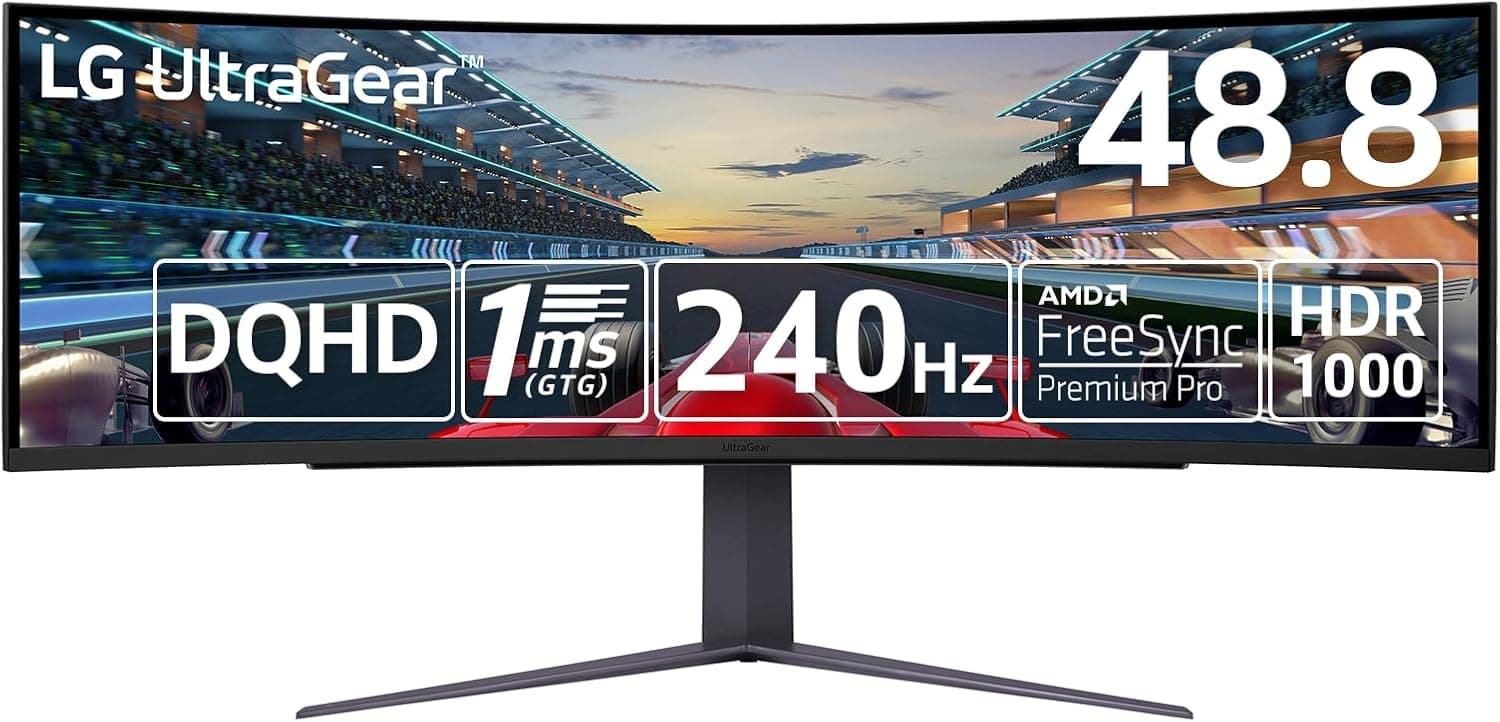
The LG 49GR85DC-B — 48.8-inch Ultra-Wide Curved Gaming Monitor is a super-ultrawide gaming monitor that shows 5120×1440 (32:9) on one curved panel.
Its main appeal is the screen area of two WQHD (2560×1440) monitors with no bezel down the middle. It supports 240Hz, 1ms (GTG), and VESA DisplayHDR 1000.
It is at its best in games where a wider field of view helps, such as racing and flight sims.
The short version: this is a monitor you buy for the screen width. However, it renders roughly 89% as many pixels as 4K (3840×2160).
To use the full 240Hz you need a fairly recent GPU that supports DSC (Display Stream Compression). It is also about 1200 mm wide.
Plan for the whole setup, including the PC, the desk, and the games you play, not just the monitor.
The panel is VA with a 1000R curve, a 3000:1 contrast ratio, and 95% DCI-P3 color gamut. Typical brightness is 450cd/m².
With DisplayHDR 1000 certification, bright highlights can stand out strongly in HDR. It is a panel built around deep blacks and strong highlights, which suits games and video.
Reading the Specs
| Item | Value | What it means |
|---|---|---|
| Screen size | 48.8 inches | At 32:9 it is about 1200 mm wide. The height is about the same as a 27-inch 16:9 monitor |
| Resolution | 5120×1440 (32:9) | About 7.37M pixels: ~89% of 4K and ~1.5x a 34-inch UWQHD (3440×1440) screen |
| Refresh rate | 240Hz | Only useful if your GPU can deliver high frame rates |
| Response time | 1ms (GTG) | Spec-sheet figure. VA panels tend to smear in dark transitions |
| Panel | VA (1000R curve) | Strong contrast, narrower viewing angles than IPS |
| Brightness | 450cd/m² (typical) | Plenty for everyday SDR use |
| Contrast | 3000:1 | Deeper blacks than typical IPS (around 1000:1) |
| Color gamut | DCI-P3 95% | Wide gamut for HDR games and video |
| HDR | VESA DisplayHDR 1000 | A higher-tier certification where the HDR effect is easy to see |
The key point is that 48.8 inches does not make the screen taller.
It is about as tall as a 27-inch 16:9 monitor and simply twice as wide. That suits people who work side by side, not people who want long vertical documents.
The other point is rendering load. 5120×1440 sounds like an extended WQHD, but its pixel count is close to 4K.
A game that ran smoothly at WQHD will lose a lot of frame rate here at the same settings.
Compatibility Guide
GPU and connections
Video inputs are one DisplayPort 1.4 and two HDMI 2.1 ports.
Over DisplayPort, the monitor supports the full 5120×1440 at 240Hz. That combination exceeds DisplayPort 1.4's raw bandwidth, so it normally relies on DSC.
As a rough guide, DSC is supported on NVIDIA RTX 20-series and newer, and AMD RX 5000-series and newer. On older GPUs you may have to lower the refresh rate or resolution.
The monitor also has two HDMI 2.1 inputs, but the refresh rate you can reach over HDMI depends on your GPU.
If 240Hz is the goal, plan on DisplayPort first. Check the product page or manual for the exact HDMI modes.
Variable refresh rate (FreeSync / G-Sync)
AMD FreeSync Premium Pro is supported, so AMD GPUs get tear-free output. NVIDIA G-Sync Compatible is unofficial but reported to work on many setups.
On NVIDIA cards you may need to turn it on manually in the driver settings. If you see flicker, turn G-Sync off first to check whether it is the cause.
Laptops and Macs
There is no USB-C video input. You cannot use one cable for both video and charging.
If you use a laptop, first check that it has a DisplayPort or HDMI 2.1-class output and supports DSC.
Whether a Mac can run 5120×1440 at a high refresh rate depends on the model and OS version, so we cannot promise it will work.
Game consoles
With two HDMI 2.1 ports, a PS5 or Xbox Series X|S can be connected.
Consoles output 16:9, though. The image will not fill the 32:9 screen: you get black bars on the sides or a stretched picture.
If you mainly play on a console, you lose most of what makes this monitor special.
Desk and monitor arm
The monitor is about 1200 mm wide, and the 1000R curve brings the edges toward you. A desk depth of at least 700 mm is a good guide.
The specs used here do not list the VESA mount pattern or the weight. If you plan to use an arm, check both on the product page.
Also confirm that the arm's weight rating and design suit a large curved monitor.
Peripherals
A USB hub (one USB 3.0 upstream, two downstream) lets you plug a mouse dongle or webcam into the monitor.
A 4-pole headphone/mic combo jack makes it easy to connect a gaming headset. To use the USB hub, connect the monitor to your PC with the included USB upstream cable.
Product Info
The LG UltraGear 49GR85DC-B combines a 48.8-inch 5120×1440 240Hz VA panel (1000R) with DisplayHDR 1000.
It supports PBP (Picture by Picture) and PIP (Picture in Picture). With PBP, two PCs can be shown side by side, each at WQHD.
It was reportedly released in late 2023. LG's official Japanese units come with a 3-year warranty.
Imported units may be handled differently, so check the seller before you buy.
The box reportedly includes a DisplayPort cable, HDMI cable, USB upstream cable, power cable, and the stand. The bundle can vary by batch or retailer, so check the product page to be sure.
The price data we collected in September 2026 was clearly far too low for a product in this class (details below under Things to Check Before Buying). To avoid printing a wrong figure, this article does not state a price.
Check the retailer's page for the latest user reviews. That is a small sample, so read it only as a rough signal.
Compared With the Alternatives
Other monitors in the same 49-inch, 5120×1440, 240Hz class include Samsung's Odyssey G9 series. In practice, though, buyers looking at this monitor are usually choosing between different sizes or setups.
| Option | Best for | Compared with this monitor |
|---|---|---|
| 48.8-inch 32:9 (this model) | People who want one wide screen with no seam | Most immersive, but needs the most GPU power and desk space |
| 34-inch UWQHD (21:9) | First-time ultrawide users | About 2/3 the pixels, so easier on the GPU. More games support 21:9 than 32:9 |
| Two 27-inch WQHD monitors | Mostly productivity | A bezel in the middle, but flexible layout such as one screen in portrait |
| 24 to 27-inch 240Hz+ | Competitive FPS players | Less eye travel and easier to reach high fps |
In competitive FPS games, moving your eyes to the edges of the screen is a cost in itself. A smaller, faster panel makes more sense for serious competitive play.
For sims and open-world games that you play for the view, nothing replaces the width of 32:9.
Best Use Cases
- Racing and flight sim players: The 32:9 screen and 1000R curve let you naturally see what is to your sides. Unlike a three-monitor setup, there is no bezel in the middle.
- Open-world RPG and video fans: The 3000:1 contrast and DisplayHDR 1000 bring out the difference between dark and bright scenes. The 95% DCI-P3 gamut also suits HDR content.
- Multitaskers and streamers: PBP shows two PCs side by side at WQHD. You can put the game on the left and streaming software or chat on the right. With a single PC, there is room for two WQHD-sized windows.
- Owners of high-end GPUs: If your GPU can handle near-4K loads, you can make use of both the width and the 240Hz refresh rate.
Things to Check Before Buying
**The price data does not add up.Check the retailer's page for the latest price. That is far too low for a 48.8-inch 240Hz DisplayHDR 1000 monitor, so it most likely came from a different product or a different listing. We also found a price field labeled Amazon US that actually pointed to Amazon Japan. Store listings can contain errors, so confirm the images, the model number (49GR85DC-B), and the seller before you buy. Treat any listing far below the usual price as possibly a different product or different terms.
The GPU load is close to 4K. At about 7.37M pixels, it is roughly 89% of 4K.
Even high-end GPUs struggle to hold 240Hz in the newest demanding games. In practice you will lower settings or use upscaling to balance frame rate and image quality.
If you have a mid-range GPU, budget for a GPU upgrade too.
Some games do not support 32:9. Few games handle 32:9 properly so far.
Unsupported games show black bars on the sides or a stretched image. Even supported games may push the HUD out to the far edges, where it is hard to read.
Some competitive games also limit the aspect ratio for fairness. Check community reports for your main games before buying.
Can you live with how VA panels behave? VA offers strong contrast, but colors and brightness shift when viewed from an angle.
The 1000R curve helps, but it is not made for viewing far off-center. VA panels also tend to show smearing in dark transitions.
The 1ms (GTG) figure is a spec-sheet number, so take care if you are very sensitive to motion blur.
HDR depends on the content and your settings. To get the most from DisplayHDR 1000, the game or video must support HDR and Windows HDR must be set up correctly.
Leaving HDR on during SDR work can make colors look washed out. The easiest approach is to keep HDR off normally and turn it on for HDR games.
Measure your desk first. Plan for about 1.2m of width and at least 700 mm of depth.
Finding out after delivery that the monitor does not fit, or that your speakers no longer have a place, is a common mistake. The box is large too, so think about the delivery route and where you will put it.
Who should skip it: console-first players, competitive FPS players who care most about winning, people on a mid-range or lower GPU with no plans to upgrade, and anyone with a desk around 600 mm deep. A 34-inch ultrawide or a fast 27-inch monitor will likely suit them better.
FAQ
Q. Can I use it with a mid-range GPU? A.
It will display fine, but 5120×1440 is about 89% of 4K's pixel count. High refresh rates in demanding games will be hard to reach.
Lighter games and desktop work are no problem. Reaching 240Hz also requires a DSC-capable GPU (roughly RTX 20/RX 5000 series or newer).
Q. Can I connect a PS5 or Nintendo Switch? A.
Yes, through the HDMI 2.1 inputs.
But consoles output 16:9, so the image will not fill the 32:9 screen: you get black bars or stretching. For console-only use, this monitor makes little sense.
Q. Does variable refresh rate work with NVIDIA GPUs? A.
Turn it on manually in the driver and check for flicker. AMD GPUs are officially supported through FreeSync Premium Pro.
Q. Can it show two PCs at once?
A. Yes. For example, you can combine a gaming PC and a streaming PC on one screen.
Q. Is it good for productivity? A.
Its width suits work with two or three windows side by side. On Windows, a window layout tool such as FancyZones in Microsoft PowerToys helps organize the space.
It is only as tall as a 27-inch 16:9 monitor, so it is not ideal for long vertical documents.
Product Disclosure (Amazon)
- Manufacturer: LG
- ASIN: B0CKBQ183S
- Note: This article covers a manufacturer-made product based on Amazon listing details.