Overview
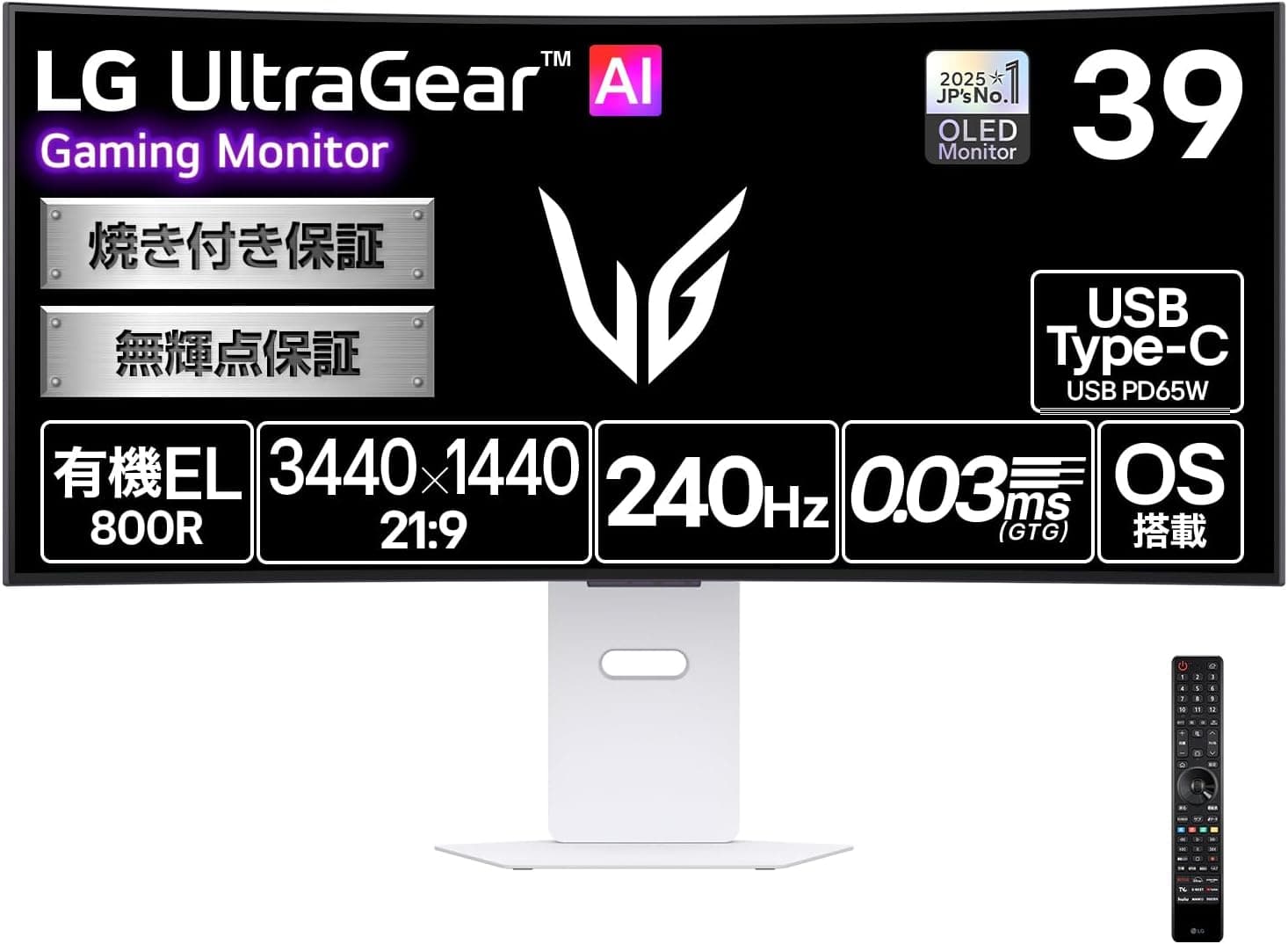
The LG Ultragear 39GX900A — 39-inch Curved OLED Gaming Monitor with WQHD 240Hz is an ultrawide monitor in LG's UltraGear line. It pairs a curved 21:9 OLED panel with a 3440x1440 resolution, a 240Hz refresh rate and a 0.03ms (GtG) response time.
In short, it is built for people who game mainly on PC and want both a wide field of view and deep blacks. If you mostly play on a console, or spend long hours reading text, another monitor may suit you better.
Check the retailer's page for the latest user reviews. Because OLED can switch off each pixel on its own, blacks stay black in dark scenes, and there is no blooming (the light halos a backlit LCD can show around bright objects).
The fast response and 240Hz refresh keep fast motion clean.
On the other hand, a 39-inch 21:9 screen needs a lot of desk space, and it puts more load on the GPU than a 16:9 1440p panel. The sections below cover where it performs at its best and where you will have to compromise.
Screen Size and Resolution
3440x1440 is about 4.95 million pixels.
That is roughly 34% more than standard 16:9 1440p (2560x1440, about 3.69 million) and about 60% of 4K (3840x2160, about 8.29 million).
It has the same 1440 vertical pixels as standard 1440p, so you can think of it as 1440p stretched sideways. It is also called UWQHD.
Spread over 39 inches, this resolution works out to about 96 PPI. That is coarser than a 34-inch ultrawide at the same resolution (about 110 PPI) or a 27-inch 1440p panel (about 109 PPI).
In games and video, this is hard to notice at a normal viewing distance. Up close, though, some people will see the grain in small Windows text.
Plan for a deep desk and a slightly longer viewing distance.
The 21:9 format shines in racing games, flight sims and open-world titles, where you see more of the scene at the edges. Games without 21:9 support show black bars on the sides, and some switch to 16:9 for cutscenes.
Support varies from game to game, so check your main titles before you buy.
PC Performance Requirements
To get full use of 240Hz, your PC has to render close to 240 frames per second at 3440x1440. That is realistic in lighter esports titles.
In the latest AAA games, holding 240fps is hard even for high-end GPUs, and depending on the GPU and settings, frame rates can fall well below that.
This is where variable refresh rate helps. The monitor supports G-SYNC Compatible, FreeSync Premium Pro and AdaptiveSync, which reduce tearing and stutter even when you are below 240fps.
You do not have to hit 240fps all the time. It is better to see the monitor as giving your frame rate plenty of headroom.
Upscalers such as DLSS or FSR also help raise frame rates in heavy games.
Compatibility Guide
The video inputs are 2x HDMI 2.1, 1x DisplayPort 1.4 and 1x USB-C (65W PD, DP Alt Mode).
| Source | Recommended port | Notes |
|---|---|---|
| Desktop PC | DisplayPort 1.4 / HDMI 2.1 | 3440x1440 at 240Hz needs more bandwidth than DP 1.4 provides, so DSC (compressed transmission) is required. Check that your GPU supports it |
| Laptop | USB-C | The laptop needs USB-C with DP Alt Mode. Charging tops out at 65W |
| PS5 / Xbox Series X | HDMI 2.1 | Consoles output at most 120Hz and generally do not support 21:9 |
Running 3440x1440 at 240Hz over DisplayPort 1.4 depends on DSC.
Most recent GPUs support DSC, but older graphics cards may not offer 240Hz. Use the bundled cable or one certified for DP 1.4 (HBR3).
Over HDMI 2.1, use an Ultra High Speed (48Gbps) cable, or you may not reach the maximum refresh rate.
Consoles need special care. The original article and the compatibility notes claimed full WQHD 240Hz output on PS5 and Xbox Series X.
That is not correct. Both consoles output at most 120Hz, and they generally do not support 21:9 resolutions, so you will usually see a 16:9 picture with black bars on the sides.
You still get 120Hz and OLED response times, but a 16:9 monitor uses the screen more fully if you only play on a console.
USB-C carries video, data and power over one cable. Gaming laptops and other high-power laptops that draw more than 65W may not fully charge, or may only drain more slowly.
Video also requires a laptop USB-C port with DP Alt Mode.
Physically, the visible screen alone is about 900 mm wide. With the stand depth and the curve, a desk at least 1000 mm wide with generous depth is the safe choice.
If you plan to use a monitor arm, check the product page for VESA support, the mount pattern and the weight.
OLED Strengths and Weaknesses
The strengths are contrast and motion clarity. The difference from LCD is most obvious in dark caves, night scenes and other dark-heavy content.
There are weaknesses too. First, brightness.
The 1300-nit peak applies only when a small part of the screen is lit. In full-screen bright content such as white documents, web pages or snowfields, the monitor limits brightness automatically and the image gets much dimmer.
In a bright room, do not expect it to match high-brightness LCDs for bright full-screen use.
Second, burn-in. Static elements such as the taskbar, game HUDs or browser frames can burn in if they stay on screen for long periods.
Auto-hiding the taskbar and turning off the display when idle reduce the risk.
Third, text. LG's OLED panels arrange their subpixels differently from typical LCDs, so text in Windows can show colored fringes.
Together with the roughly 96 PPI density, this is worth checking in person if you do a lot of text work.
Product Info
| Item | Detail |
|---|---|
| Screen size | 39 inches (21:9, curved) |
| Resolution | 3440x1440 |
| Refresh rate | 240Hz |
| Response time | 0.03ms (GtG) |
| Panel | OLED (MLA+) |
| Peak brightness | 1300 nits |
| HDR certification | DisplayHDR True Black 400 |
| Color gamut | DCI-P3 98.5% |
| Video inputs | 2x HDMI 2.1, 1x DisplayPort 1.4, 1x USB-C (65W PD) |
| Variable refresh | G-SYNC Compatible, FreeSync Premium Pro, AdaptiveSync |
| ClearMR | 13000 |
As of September 8, 2026, the price on Amazon.co.jp was ¥266,686.
Prices change with sales and stock, so check the product page for the current price. With that few reviews, a small number of reports about unit variation or defects can shift the score a lot, so read it with some caution.
The original article listed a three-year warranty and a power cable, DisplayPort cable, USB-C cable and manuals in the box. At capture time, the seller was a marketplace seller, not LG.
Check the listing and LG's warranty terms before buying, including how the warranty applies to third-party sellers.
Who Should Buy
- PC gamers who value immersion: The 21:9 view and OLED contrast shine in racing games, flight sims and story-driven AAA titles. The monitor is also good for movies and video.
- Competitive FPS and racing players on PC: 240Hz and 0.03ms response make fast motion easier to track. This assumes a GPU that can deliver high frame rates, and the price may be a barrier on a tight budget.
- Hobbyist photo and video editors: The 98.5% DCI-P3 gamut and True Black 400 HDR make it easy to judge vivid color and shadow detail. It does not replace a calibrated professional monitor for color-critical work.
- People who switch between a laptop and a desktop: With a compatible laptop, 65W USB-C charging and video share one cable, which helps keep the desk tidy.
Before You Buy
The most likely mistake is buying it for 240Hz on a console. PS5 and Xbox Series X cap at 120Hz and generally do not support 21:9.
If you mainly play on a console, you will not use much of what you are paying for.
Next, check your PC. 3440x1440 has about 34% more pixels than standard 1440p, and GPU load rises with it.
Estimate the frame rates your GPU can reach in the games you play. Variable refresh keeps motion smooth below 240fps, but a 240Hz panel does not give you an edge on its own.
The monitor suits some uses much better than others. If your work is mostly spreadsheets, documents or coding, with static content on white backgrounds for hours, three weaknesses stack up: burn-in, text fringing and the coarse ~96 PPI.
If it doubles as a work screen, plan on a dark theme and an auto-hidden taskbar.
Measure your space too. The visible screen alone is about 900 mm wide, which leaves little room for speakers or other items on a narrow desk.
On a shallow desk, the screen sits too close, and you will turn your head to see the edges.
Finally, check the listing. At capture time, the seller was a marketplace seller rather than LG.
Price, warranty and shipping can differ between sellers on the same product page. Confirm in the images and title that the model is the 39GX900A and not an older model with a similar name.
FAQ
Q. Can a PS5 or Xbox Series X run it at 240Hz? A.
No. Both consoles cap at 120Hz, and they generally do not support 21:9, so you will usually see black bars on the sides.
Q. Should I worry about burn-in? A.
The risk is never zero with OLED. It stays lower with games and video, where the image keeps changing.
For static work, auto-hide the taskbar and turn off the display when you are away.
Q. What GPU do I need? A.
For 240fps in light esports titles, aim for an upper-midrange GPU or better. Even high-end GPUs may struggle to reach 240fps in AAA games at high settings.
Pairing DLSS or FSR with variable refresh is the practical approach.
Q. Can I connect a laptop with a single cable? A.
Yes, if the laptop's USB-C port supports DP Alt Mode. Charging is limited to 65W, so higher-power gaming laptops may not keep up.
Q. Should I get a 34-inch ultrawide instead? A.
At the same 3440x1440, a 34-inch panel is about 110 PPI and this 39-inch one is about 96 PPI. Choose 34 inches for sharper text, or 39 inches for a bigger, more immersive screen viewed from farther away.
Product Disclosure (Amazon)
- Manufacturer: LG
- Seller: よろず流通館 送料無料!年中無休でお届けします!
- ASIN: B0FDC84LWV
- Note: This article covers a manufacturer-made product based on Amazon listing details.