Overview
This article covers the jar-owl keyboard and mouse combo (ASIN: B0C4T4DGFT), listed on Amazon Japan as かわいいレトロワイヤレスキーボードとマウスのコンボ、ラウンドキーキャップ付きカラフルなタイプライターキーボード、2.4GHzマルチカラーハイブリッドバブルキーボード、女性用、ファンキーブルーコンピューターキーボード、PC、ノートパソコン、オフィス用.
In short: it suits people who want a cheerful home-office desk and a set that works the moment you plug it in. It is not for gamers or anyone who wants to remap keys.
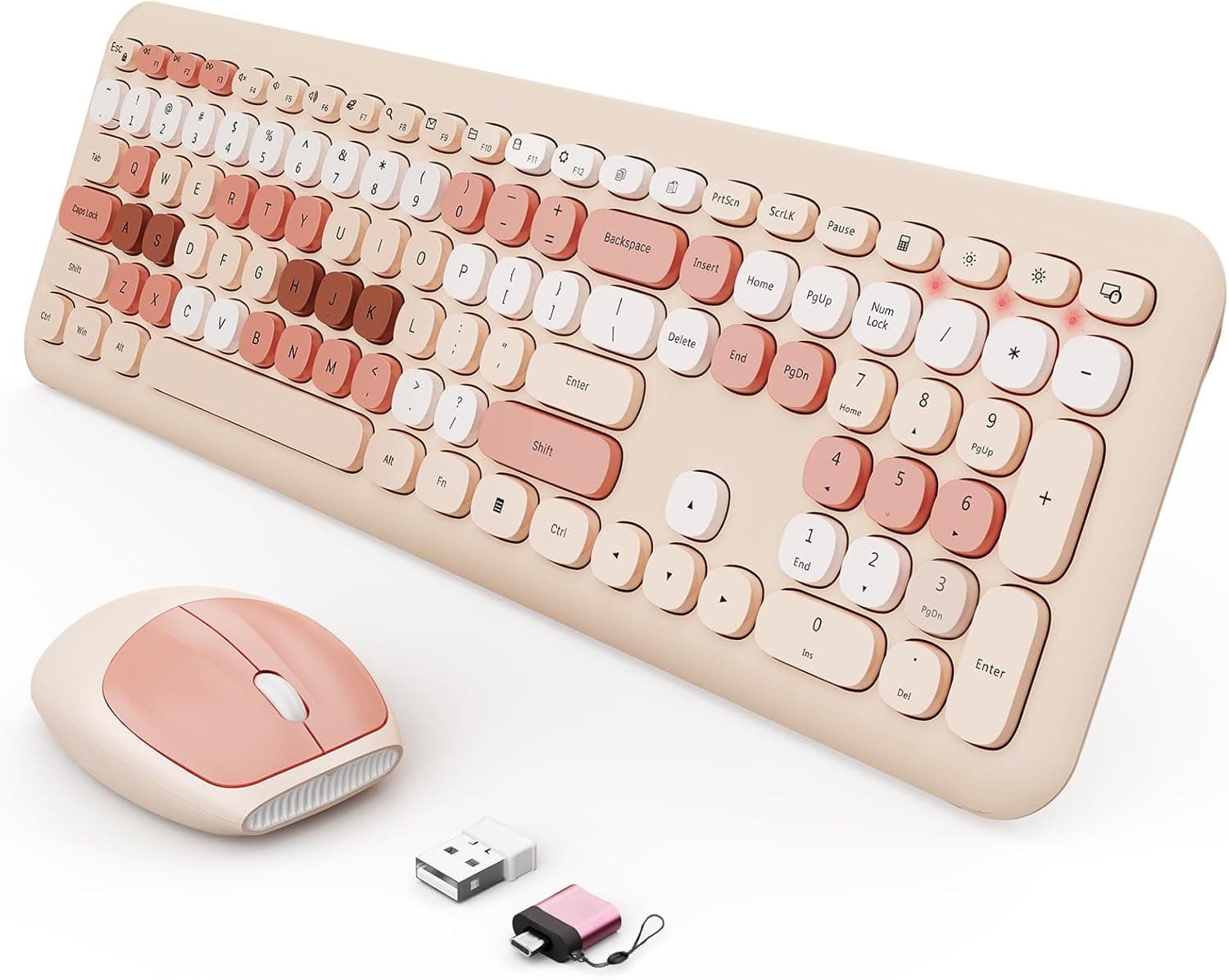
Its defining features are typewriter-style round keycaps and a blue-based multicolor palette. The keyboard has a full 104-key layout with a numeric keypad and 12 multimedia shortcuts.
The mouse switches between three DPI levels: 800, 1200 and 1600.
Both devices connect through a single 2.4GHz USB nano receiver.
The rated range is up to about 10 meters (33 feet), and both go to sleep automatically after about 30 minutes without use. As of October 4, 2026, the Amazon Japan listing had 547 reviews with an average of 4.2 out of 5 stars (84% positive).
Key Specs Explained
| Item | Spec | What it means |
|---|---|---|
| Key layout | 104 keys with numpad | The usual key count for a US English layout. Japanese (JIS) full-size boards usually have 108-109 keys |
| Connectivity | 2.4GHz wireless (USB nano receiver) | No Bluetooth. Needs one USB-A port |
| Wireless range | Up to about 10m / 33ft | Plenty for a desk, and enough for couch use with a TV |
| Mouse DPI | 800 / 1200 / 1600 | A common range for office work and browsing |
| Multimedia shortcuts | 12 | Volume and playback controls |
| Sleep mode | Auto-sleep after about 30 minutes | Designed to save battery |
| Batteries | Keyboard: 2x AAA / Mouse: 1x AA | Not included, so buy them separately |
| Keycap material | ABS | Removable and washable |
On paper this is a standard office set with nothing that stands out on performance. Its value comes from the look and from running two devices off one receiver.
A maximum of 1600 DPI is enough for everyday use on Full HD to WQHD monitors. On a large 4K screen, though, it can feel slow if you want to cross the screen with small hand movements.
Which of the three levels you choose depends on your screen size and preference.
Compatibility Guide
The only way to connect is the bundled 2.4GHz USB nano receiver; there is no Bluetooth.
Your computer needs a free USB-A port. On thin laptops that only have USB-C ports, you will need a USB-C to USB-A adapter.
The listing names Windows 2000, ME, XP, Vista, 7, 8 and 10 as supported. Windows 11 and macOS are not on the list. Sets like this usually work as a standard USB keyboard and mouse, but without an official statement you should not treat them as guaranteed to work.
On a Mac, the Windows key usually acts as Command and Alt acts as Option. If that layout bothers you, you can swap them in macOS settings.
The listing also says the set works with tablets, game consoles and TVs. Whether that works in practice depends on whether the device accepts USB keyboard input.
Android tablets and phones need a USB OTG adapter (USB-C to USB-A). Game consoles often accept keyboard input only in certain places, such as text fields, so check your device's support first.
Watch out for 2.4GHz interference as well.
If the receiver sits right next to a USB 3.0 port or near a Wi-Fi router, the cursor may jump or input may lag.
Moving the receiver to a front USB 2.0 port, or bringing it closer with a USB extension cable, often fixes this.
Product Info
The listing names jar-owl as the manufacturer and *Sunflower* as the seller and shipper. As of October 4, 2026, Amazon Japan showed a price of ¥14,088.
Prices change a lot with sales and sellers, so check the current price on the product page before buying. That price looks high for a round-key wireless combo, so compare similar products first.
The listing had 547 reviews averaging 4.2 stars as of October 4, 2026.
That is a steady rating, but for products like this, satisfaction with the look and satisfaction with typing tend to blend into one score. If typing feel matters to you, check the low-star reviews for complaints about key feel, durability or dropped connections.
The design uses baby-blue-based multicolor keycaps with round, typewriter-style keys. The ABS keycaps can be removed and washed.
Each key top has a U-shaped dip, which is meant to keep long nails from slipping and to reduce accidental presses of the next key. ABS tends to get shiny with long use, so clean the keycaps regularly if you want them to keep their look.
No drivers or setup software are needed; plug in the receiver and it works. In exchange, there is no macro programming or RGB lighting.
This is an everyday set built for a different purpose than feature-heavy gaming gear.
Compared With Similar Combos
Several other wireless keyboard and mouse sets also put style first. The table below lists the differences that can be read from each product's listing name.
| Product | Connection | Features from the listing name | Best for |
|---|---|---|---|
| jar-owl (this product) | 2.4GHz | Blue-based multicolor, round keys, 104 keys | People who like blue or multicolor designs |
| iRoboosta Pink | 2.4GHz | Typewriter-style round keys, full size with numpad | People matching a pink setup |
| MOFII 104-key | Wireless | Round keys, includes an OTG adapter and a brush | People who also want to connect phones or tablets |
| ProtoArc foldable | Bluetooth and 2.4G | Connects to 3 devices, USB-C rechargeable, slim | People who switch between several devices |
The closest in design are iRoboosta and MOFII, so the choice among them comes down to color and what is in the box. If you switch between devices or don't want to replace batteries, the Bluetooth, rechargeable ProtoArc makes more sense.
Treat this jar-owl set as something you buy because you like how it looks, and you are less likely to choose wrong.
Getting Started
Get batteries: 2 AAA for the keyboard and 1 AA for the mouse (not included).
Insert the batteries and turn on the power switch if the device has one.
Plug the USB nano receiver into a USB-A port.
If you see interference, use a USB 2.0 port or an extension cable.
On Windows, check that the keyboard setting matches the printed layout (see Before You Buy below).
Set the mouse to 800, 1200 or 1600 DPI to suit your screen size.
Recommended Users
People who type every day while working from home are a good fit. The full-size layout with a numpad speeds up number-heavy work such as spreadsheets and accounting.
The 12 media keys are handy if you play music while you work.
People who care about how their desk looks are another fit, especially those who like blue or soft colors. Placed next to a plain laptop or monitor, it becomes the accent of the desk.
People who want a keyboard and mouse in one purchase will also benefit. One receiver runs both devices, so it uses only one USB port and keeps cables tidy.
On the other hand, people who need fast response or custom keys for gaming, people who put quiet typing first, and people who switch between devices will be happier with products built for those needs.
Before You Buy
The biggest caveat is the key layout. 104 keys is the usual count for a US English layout.
Compared with a Japanese full-size layout (usually 108-109 keys), symbol positions, the Enter key shape, and the Henkan/Muhenkan keys all differ. With a US layout on Windows, you switch Japanese input with Alt plus the backtick key.
If the symbols you type don't match the printed keys, change the OS keyboard setting to an English layout. Check the key labels and shapes in the product photos before buying.
Round keys take getting used to. Round key tops make the gaps between keys harder to feel than square keys, so you may make more typing mistakes at first.
Typewriter-style keys also tend to sit higher, so a palm rest makes long sessions easier on your wrists.
Typing noise is not officially specified. If you plan to use it somewhere quiet, such as a library or a shared space at night, check reviews for comments on noise.
There is no Bluetooth and no way to switch between devices. The set is meant for one computer with the receiver plugged in.
Losing the receiver may leave the set unusable, and the listing doesn't say whether it can be re-paired, so decide where to keep the receiver when you unplug it to carry a laptop.
Batteries are not included, and the set sleeps after about 30 minutes. When waking from sleep, the first keypress or click may only wake the device and not register as input.
There is no official battery-life figure, so keep spare AAA and AA batteries on hand.
The listing name's mention of women is a design pitch. Nothing in the specs says the keys are smaller or shaped differently; it is a standard full-size layout.
Make sure you have the right product. Many similar listings exist in other colors or from other makers.
On the product page, check the ASIN (B0C4T4DGFT), the color (funky blue) and the photos before buying.
FAQ
Q. Does it work on a Mac? A.
macOS is not on the listing's list of supported systems. It often works as a standard USB keyboard, but this is not guaranteed.
The Windows key acts as Command and Alt acts as Option, so the layout takes some adjustment.
Q. Can I type Japanese? A.
Yes. With a 104-key US layout, though, you switch input differently than on a Japanese layout, for example with Alt plus the backtick key.
Set the OS keyboard setting to match the printed keys.
Q. Can I use it with a phone or tablet? A.
Yes, if the device supports USB keyboards and mice. You will often need a separate USB OTG adapter to plug in the receiver.
Q. How long do the batteries last? A.
No official figure is given. The roughly 30-minute auto-sleep keeps power use down when the set isn't in use.
The keyboard takes 2 AAA batteries and the mouse takes 1 AA, both sold separately.
Q. Is it good for gaming? A.
It works for light games, but no response-speed specs or macro features are listed. For serious competitive gaming, choose gaming keyboards and mice instead.
Product Disclosure (Amazon)
- Manufacturer: jar-owl
- Seller: *Sunflower*
- Fulfilled by: *Sunflower*
- ASIN: B0C4T4DGFT
- Note: This article covers a manufacturer-made product based on Amazon listing details.