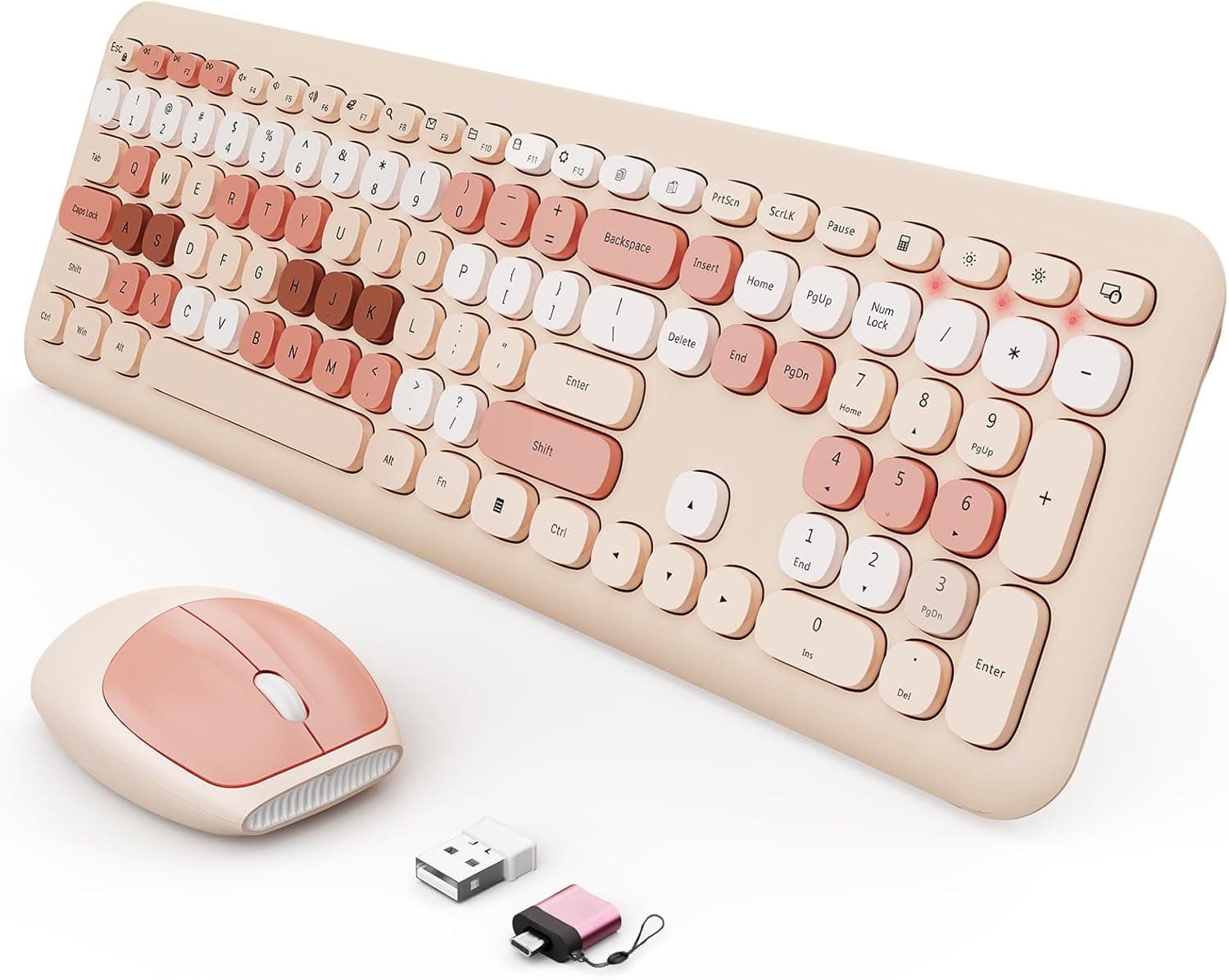
The SkyGive wireless keyboard and mouse combo is a full-size set built around a retro typewriter look. This article covers what it actually does well, where it will run, and the pitfalls buyers usually discover only after unboxing.
Overview
This is a 2.4GHz wireless keyboard-and-mouse set defined by its rounded brown keycaps and typewriter-inspired styling.
The honest summary: it is a keyboard you choose for how your desk looks and how quickly it works, not for typing performance. It uses a full-size layout with a number pad, adds 15 hotkeys, and ships with both a USB receiver and a Type-C adapter, so it works driver-free on desktops with only USB-A and on thin laptops with only USB-C.
It suits home-office desks, student study spaces, and secondary or bedroom PCs where appearance and simplicity outrank raw performance. It is not a first choice for competitive gaming or all-day professional typing, for reasons covered below.
On Amazon.co.jp it holds 4.2 out of 5 across 303 reviews (84% favorable) as captured on June 17, 2026 — a reasonable result for its class.
Reading the Key Specs
| Item | Value | What it means in practice |
|---|---|---|
| Connection | 2.4GHz wireless (USB receiver) | Lower latency than Bluetooth, but the receiver is mandatory |
| Layout | Full size with number pad | Fast numeric entry; takes horizontal desk space |
| Hotkeys | 15 | One-press volume, media, and browser control |
| OS support | Windows XP/Vista/7/8/10/11, macOS, Chrome OS | Effectively a generic HID device, no drivers |
| In the box | USB receiver, Type-C adapter, AA batteries (keyboard), AAA batteries (mouse) | Usable immediately; not rechargeable |
| Mouse | Ergonomic shape | Comfortable wrist angle, but a standard button set |
Two lines matter most: it runs on disposable batteries, and it is 2.4GHz only.
Being battery-powered means no charging cable routine — and no day lost to a dead internal cell, since a spare AA restores it in a minute. The lack of Bluetooth, however, limits which devices you can pair with, as explained below.
Compatibility Guide
The requirement is simple: one free USB-A port. Plug in the bundled receiver and the OS recognizes it through standard HID drivers, with no software to install.
On MacBooks, Chromebooks, or Android tablets that only offer USB-C, slide the included Type-C adapter onto the receiver first. That adapter is a passive converter and does nothing on its own, so keep the two pieces together.
OS coverage runs from Windows XP through 11 plus macOS and Chrome OS, which in practice means anything that accepts a USB keyboard. The 15 hotkeys, though, are typically mapped with Windows in mind.
Volume and media keys usually pass through everywhere, but Windows-specific shortcuts such as calculator or mail launch keys may do nothing or behave differently on macOS and Chrome OS.
One caveat deserves attention: input before the OS loads. BIOS/UEFI menus, boot selection screens, and Windows recovery environments do not always detect 2.4GHz receiver keyboards.
If you build PCs or need to enter a BitLocker password at boot, keep a wired keyboard on hand. Plugging the receiver directly into the machine is more stable than going through a hub, and placing it immediately next to a USB 3.0 port can introduce 2.4GHz interference — a short extension cable that moves the receiver away usually fixes stuttering.
Product Details
The specification set is a 2.4GHz wireless connection, a full-size layout with number pad, and 15 hotkeys.
The box includes the USB receiver, the Type-C adapter, AA batteries for the keyboard, and AAA batteries for the mouse. The mouse is described as ergonomically shaped, which fits a palm-grip style rather than a fingertip grip.
On pricing, Amazon.co.jp listed it at ¥15,602 as captured on August 27, 2026.
Retro-styled combos like this see wide street-price swings depending on coupons and timing, so treat that figure as a snapshot rather than the current price and confirm on the product page before buying. Similar design-led combos can often be found lower, so it is worth judging the value for yourself using the comparison points below.
For reception, Amazon.co.jp shows 303 reviews averaging 4.2 out of 5 (84% favorable).
A review count in the hundreds suggests this is not a product plagued by dead-on-arrival failures. At the same time, 4.2 is not a flawless score — for design-focused peripherals, the usual sources of complaint are color differing from product photos and typing feel not matching expectations.
What to Expect, and What Not To
Expect quiet operation and a fast setup. Membrane switches keep keystroke noise low enough for a shared room or a live video call, and you go from opening the box to typing in about ten seconds with zero configuration.
The round keycaps exist for looks, but their separated edges do make it easier to feel where one key ends and the next begins.
Do not expect mechanical-style tactility or strong simultaneous key handling. Membrane switches bottom out softly, so fast typists often notice the absence of a defined actuation point.
Round keycaps also present less flat surface to your fingertip than conventional caps, and some users initially feel their fingers slipping toward the edges during touch typing. That adaptation typically takes a few days.
How to Compare It Against Alternatives
Four axes settle most decisions in this category. First, power: disposable batteries versus a built-in rechargeable cell.
Rechargeable models save you from buying batteries but force a switch to wired operation the moment they die. Second, connectivity: 2.4GHz only versus Bluetooth as well.
If you move between multiple devices, Bluetooth support is decisive.
Third, switch type and quietness. Membrane quiet and scissor-switch quiet feel completely different; if you are used to laptop keys, a slim scissor-switch combo will feel more familiar, while membrane suits those who like a softer, deeper press.
Fourth, footprint: a full-size board with a number pad pushes your mouse further right. On a narrow desk, or with a low-DPI mouse grip that needs sweeping motion, tenkeyless or foldable options deserve a look.
This product lands on battery power, 2.4GHz only, membrane switches, and full size — check that combination against how you actually work before buying.
Best Use Cases
- Remote workers styling a desk — the brown retro finish sits well against wooden desks and monitors, and the number pad keeps spreadsheet work fast.
- Anyone typing late at night or in shared space — the low membrane keystroke noise is a genuine advantage on calls and in rooms with other people.
- USB-C-only laptop owners — the bundled Type-C adapter removes the need to buy a separate dongle, which matters most without a docking station.
- Casual writers, bloggers, and journalers — if a workspace you enjoy looking at makes you write more, the typewriter styling has practical value.
- Secondary or living-room PCs — battery power means no charge level to worry about on a machine you only use occasionally.
Conversely, it is not recommended for FPS or fighting-game players, all-day coders and long-form writers, or anyone who needs Bluetooth device switching. If any of those describe you, look at a different category of product.
Things to Check Before Buying
The most overlooked point is that the receiver is the only way to connect. There is no Bluetooth fallback, so losing or breaking the receiver renders both the keyboard and the mouse unusable, and replacement receivers are generally not sold separately at this price level.
If you carry it around, make a habit of returning the receiver to its storage slot — or plan to leave the set on one desk. The Type-C adapter is equally useless alone; treat the two as a single unit.
Typing feel requires acceptance of a trade-off. Membrane switches deliver no crisp click or tactile bump.
Whether "soft and quiet" reads as a benefit or as a lack of feedback is purely personal preference, and it likely explains part of why the score sits at 4.2 rather than higher.
The same applies to the round keycaps: attractive in photos, but they do change how your fingers travel.
The mouse is a standard left/right/wheel design with no side buttons, no DPI toggle, and no high-precision sensor. If you rely on a side button for browser back navigation, you will feel that loss immediately.
Both devices run on disposable cells, so keep spare AA and AAA batteries around.
One pricing caution: the captured ¥15,602 is on the high side for a retro membrane combo. Sales, coupons, and different sellers can move the real total substantially, so do not treat this article's figure as your benchmark.
Separately, Amazon listings are not always accurate about manufacturer, model number, or ASIN. Before ordering, verify visually from the product images and title that you are getting the brown retro typewriter styling, the full-size layout with number pad, and both the receiver and Type-C adapter — and confirm that the variation you selected is the color and layout you intended, since multiple versions are often grouped on one page.
Finally, operation in BIOS/UEFI and recovery environments cannot be guaranteed. If you handle your own PC setup and troubleshooting, keep one wired keyboard in reserve.
FAQ
Q. Can it connect over Bluetooth? A.
No. It works only over 2.4GHz using the bundled USB receiver.
If you need to pair directly with a phone or tablet, choose a different product.
Q. Is it rechargeable? How long do batteries last? A.
It is not rechargeable; AA batteries are included for the keyboard and AAA for the mouse. Runtime depends on use, but non-backlit membrane wireless sets commonly last months.
Check the product page for the manufacturer's figure.
Q. Does it work on Mac and Chromebook? A.
macOS and Chrome OS are both listed as supported, and basic input works fine. Some hotkeys are mapped for Windows and may not all function.
Note also that Command and Option key positions differ from a Mac keyboard.
Q. Is it usable for gaming? A.
Fine for browser, simulation, and turn-based games. Not suited to FPS or fighting games that demand precise, simultaneous input, given the membrane switches and the basic three-button mouse.
Q. Is typing really quiet? A.
Clearly quieter than a mechanical keyboard, though not silent — you still hear keys bottoming out. It should not be an issue for night use or video calls.
Q. Can I buy a replacement receiver? A.
In this price class, receivers are usually not sold individually, so losing one likely means replacing the whole set. Store it carefully.