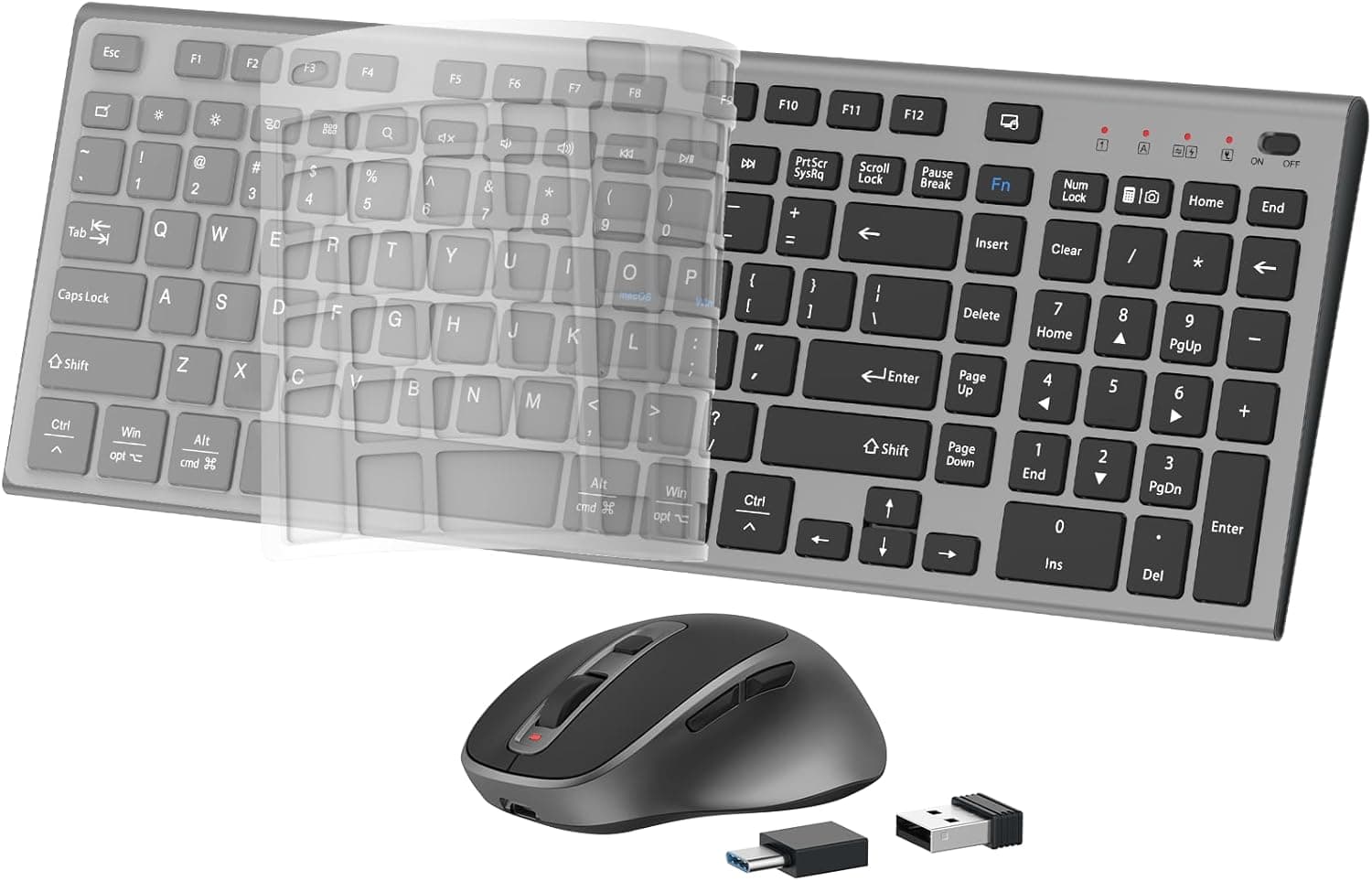
This article covers ワイヤレスキーボードとマウス、充電式スリムサイレントコンパクトフルサイズキーボードマウス、数字パッドとカバー付き、PC/コンピューター/ラップトップ/Windows用、macOS用 - ブラックグレー, from how to read its spec sheet to the pitfalls buyers notice only after unboxing.
Overview
The FENIFOX wireless keyboard and mouse combo bundles three things at once: USB-C rechargeable batteries, a quiet typing and clicking experience, and a full-size layout that keeps the number pad. The short version is that it works well for home-office paperwork and secondary machines, but it is a poor match for anyone locked into the Japanese JIS layout or anyone serious about competitive games.
Both limits come down to key layout and input responsiveness, and neither can be fixed with settings after purchase.
Translating the spec sheet into buying decisions looks like this.
| Use case | Verdict | Why |
|---|---|---|
| Home office and clerical work | Good fit | Silent design, full-size with number pad, up to 10 m range |
| Running Windows and macOS side by side | Good fit | A switch on the keyboard swaps the modifier-key arrangement |
| Japanese typing on a JIS-layout habit | Think twice | The layout is based on US (ANSI) |
| FPS or rhythm games | Not recommended | Mouse tops out at 2400 DPI in 5 steps, not a low-latency design |
| "Set it and forget it for years" | Think twice | Rechargeable: rated 30 days (keyboard) and 2 months (mouse) |
"Not recommended" does not mean poor quality; it means the design targets something else. This combo answers a clerical brief — quiet, cable-free, numeric entry, one keyboard for both operating systems — and within that brief it is straightforward.
Step outside it, and better-suited products exist at the same price.
Compatibility Guide
Connectivity is 2.4GHz wireless, with a single USB receiver serving both the keyboard and the mouse.
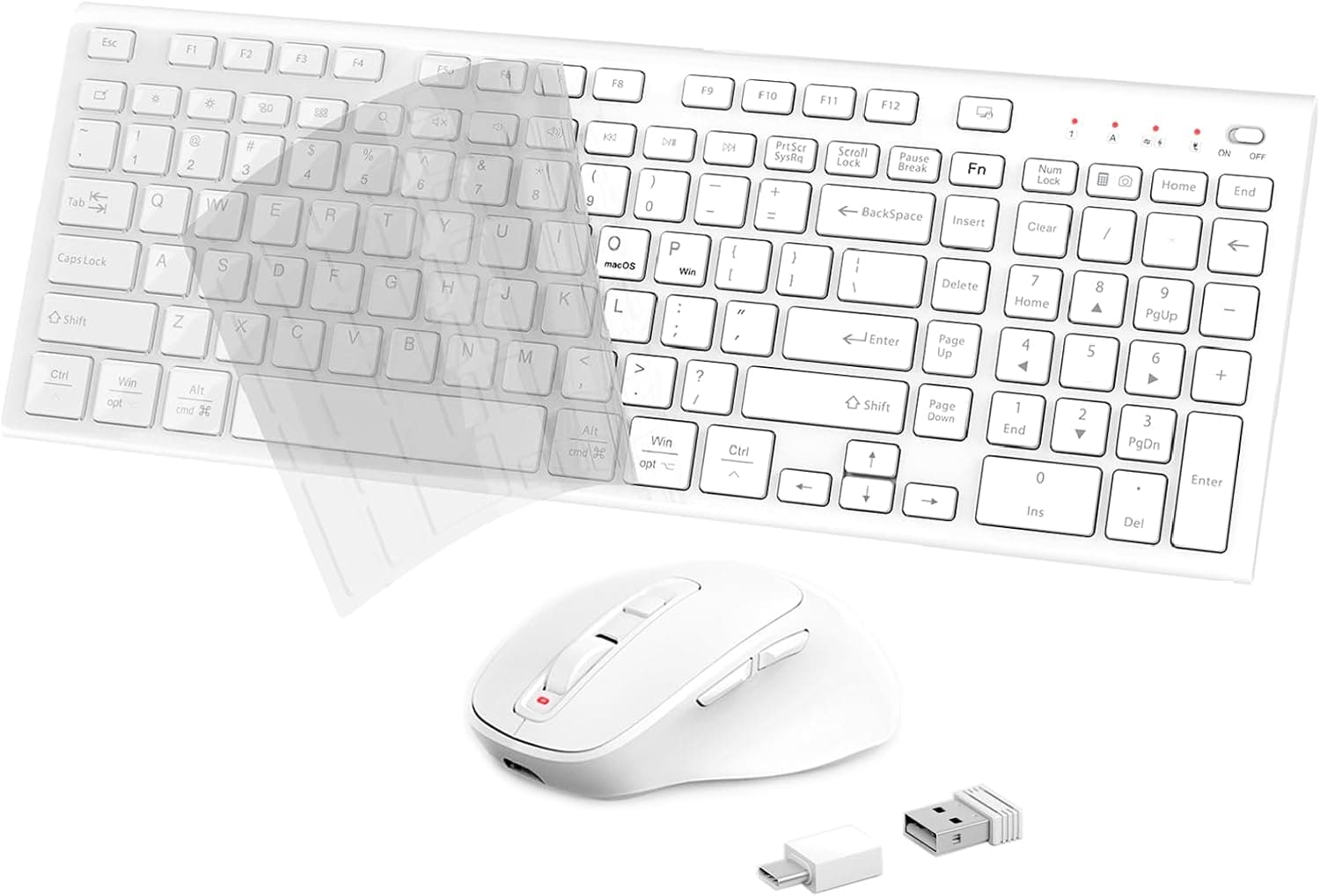
The receiver uses USB-A, but a USB-A to USB-C adapter is included, so laptops without Type-A ports are covered. Range is rated up to 10 meters (33 feet), which is generous for desk use.
Windows and macOS are the supported platforms; Chrome OS and Linux accept basic input, though some media keys may not map correctly.
In practice, the port you choose matters more than the spec. A 2.4GHz receiver plugged next to a USB 3.x port or hub is a well-known source of interference — cursor jumps, dropped keystrokes.
If that happens, run the receiver out to the desk on a USB extension cable rather than leaving it at the back of the case, and prefer a direct port over a hub.
There is no Bluetooth here. The flip side is that anything with a USB port works, with no pairing ritual.
Receiver-based sets usually operate in BIOS/UEFI screens, but that is not a guaranteed behavior; if you reinstall operating systems or edit firmware settings often, keep a wired keyboard nearby. The same caution applies to KVM switches and USB passthrough to virtual machines, where the whole dongle has to be handed over.
On a Mac, the keyboard setup assistant may appear on first connection to identify the key layout. Registering it as ANSI keeps the printed symbols and the on-screen layout in agreement.
The OS switch on the keyboard exists to align Command, Option, and Control with the macOS arrangement, which is what makes one keyboard usable across a Windows desktop and a MacBook.
How It Compares
Silent wireless combos split into roughly three schools of design, and sorting them makes the choice easier.
| Axis | This combo | Major-brand silent combos (general) | Gaming sets (general) |
|---|---|---|---|
| Power | USB-C rechargeable, 30 days / 2 months rated | Usually AA/AAA cells lasting a year or more | Rechargeable or wired |
| Layout | US layout plus OS switch | Japanese-market units are mostly JIS | Both, depending on model |
| Responsiveness | Fine for office work, not competitive | Similar | High polling rates or wired |
| Support | No stated warranty period | Warranty term and local support usually stated | Same |
The power row deserves attention. Rechargeable is not automatically more convenient.
Battery-powered keyboards often run for a year or more on one set of cells, while this one is rated at 30 days for the keyboard and 2 months for the mouse — meaning you will reach for a USB-C cable a dozen or more times a year. If a cable already lives on your desk, that is nothing.
If you wanted to forget the device exists, rechargeable is the bigger chore.
What it does offer is the combination of dual-OS switching, a number pad, and quiet keys at this price, which is a genuine strength. Prioritize a Japanese layout and a stated local warranty, though, and a major-brand set is the calmer purchase.
Product Info
The core specs: 2.4GHz wireless via USB receiver; mouse sensor up to 2400 DPI adjustable in five steps; range up to 10 meters; USB-C charging; rated battery life of up to 30 days for the keyboard and up to 2 months for the mouse at full charge; and a US layout with a Windows/macOS toggle.
The maker describes the keyboard as scissor-switch for quiet keystrokes and the mouse as 99% noise-free, with a power-saving chip that sleeps the devices when idle.
On the Amazon listing, the price captured on 23 June 2026 was ¥12,786 (ASIN: B0F937FPGB). Prices move often and sales can cut this sharply, so check the current figure on the product page before buying.
The overseas marketplace entry is a search link only, with no identifiable listing for the same unit, so no second data point is available.
Reviews stood at 21 ratings averaging 4.3 out of 5 — about 86% positive — as of 23 June 2026.
The direction is fine, but 21 is a thin sample where a handful of posts can move the average. Reading what individual reviewers actually did with it is worth more than the star count.
In the box: keyboard, mouse, USB-C charging cable, USB receiver, USB-A to USB-C adapter, manual, and a dust cover. FENIFOX is a value-focused peripheral brand commonly seen on Amazon.
No warranty period is stated in the product information and support details are unclear, so in practice the platform's return and replacement policy is your recourse.
Japanese Input on a US Layout
The single line "US layout" in the spec table matters more than it looks if you write in Japanese. A US keyboard has no hankaku/zenkaku key and none of the henkan/muhenkan keys beside the space bar, so the one-press IME toggle habit stops working on day one.
On Windows, Microsoft IME detects a US keyboard and by default assigns Alt + ` (the grave key left of 1) to toggle Japanese input; behavior varies by environment, so open the IME key settings if it does not respond as expected. On macOS, Control + Space switches input sources, and Caps Lock can toggle between Japanese and alphanumeric input. Both are perfectly usable once learned — but the learning itself is part of the purchase decision.
Symbol placement also shifts. The at sign, colon, brackets, and underscore all move, so email addresses and passwords will trip you up at first.
Programmers often prefer the US arrangement for exactly this reason, so it is not a flat drawback. The real question is whether you can retire your current muscle memory; if not, buy a JIS-layout product instead.
Best Use Cases
The clearest fit is clerical work that includes numeric entry, at home or in an office. The quiet switches keep typing and clicking unobtrusive during video calls or in a shared room, and the full-size layout with number pad makes spreadsheet work painless.
With only a receiver to plug in, it also fits a narrow desk shared with documents and a laptop.
The second fit is anyone running a Windows desktop and a MacBook. One switch aligns the modifier keys to each platform, removing the need for two keyboards.
If you already type on US layouts, that alone can justify the purchase.
The third is a spare set — a second machine, another room, a parent's house. Rechargeable batteries mean no cell stockpile, and the bundled dust cover suits hardware that sits unused for stretches.
If instead you are choosing the keyboard you will hammer for eight hours a day, a product with a stated warranty is the safer buy.
Before You Buy
Start with price. The ¥12,786 captured on 23 June 2026 is not cheap for an unfamiliar brand; that band is crowded with major-brand silent combos that ship with a Japanese layout and a stated warranty.
So the reason to choose this one should be a concrete requirement — rechargeable batteries, US layout, OS switching — not the price tag. Prices move, so re-run the comparison at the moment you buy.
Next, the trade-offs baked into the design. The mouse is shaped for right-handed use and will not suit left-handed users.
The keyboard's tilt stand has a single position, so you cannot fine-tune the angle. There is no battery level indicator, which means charging happens when behavior gets flaky — carry a USB-C cable or set yourself a monthly charging habit rather than getting stranded.
Check the product images for how the number pad cover actually works before ordering. A cover over the keypad is friction for anyone who wants the numbers exposed all day.
And "silent" is not "silent" in the absolute sense: it is clearly quieter than membrane or mechanical boards, but do not expect it to be inaudible through a wall at night.
Guard the receiver. A proprietary 2.4GHz dongle is hard to replace on its own, and losing it takes out the keyboard and the mouse together.
Decide now where it lives when the set is packed away.
Finally, about the listing data itself. In the data used for this article the manufacturer (FENIFOX), ASIN (B0F937FPGB), and seller (LIFE-I STORE) are consistent, but listing metadata on shopping sites does sometimes carry another product's details or another brand's price.
When you open the page, confirm the item from the photos and title — black-grey color, number pad present — rather than trusting the registered attributes alone, and pause if the displayed price looks out of character for the product class.
FAQ
Q. Can it connect over Bluetooth? A.
No. The only supported method is 2.4GHz wireless via the USB receiver, so it will not work where no USB port is free.
Q. Will it work with an iPad or an Android phone? A.
The bundled USB-A to USB-C adapter makes the physical connection possible, but operation depends on the device's USB host (OTG) support and power delivery. Keyboard input often works while pointer handling varies by OS, so check reports for your specific device.
Q. Can I use it while charging? A.
The product information does not state this. USB-C is listed as the charging port; confirm charge-and-use behavior on the product page or in the manual.
Q. Is it a Japanese (JIS) layout? A.
No. The spec lists a US layout with Windows/macOS switching.
There are no kana legends, and symbol positions differ from JIS.
Q. How long does the battery last? A.
Rated figures at full charge are up to 30 days for the keyboard and up to 2 months for the mouse. Treat those as upper bounds; real runtime depends on how much you type and click.
Q. Is it usable for games? A.
Fine for puzzle, strategy, or simulation titles. With a 2400 DPI five-step mouse and no low-latency claims, it is not suited to FPS or rhythm games where single frames matter.
Product Disclosure (Amazon)
- Manufacturer: FENIFOX
- Seller: LIFE-I STORE
- Fulfilled by: LIFE-I STORE
- ASIN: B0F937FPGB
- Note: This article covers a manufacturer-made product based on Amazon listing details.