Overview
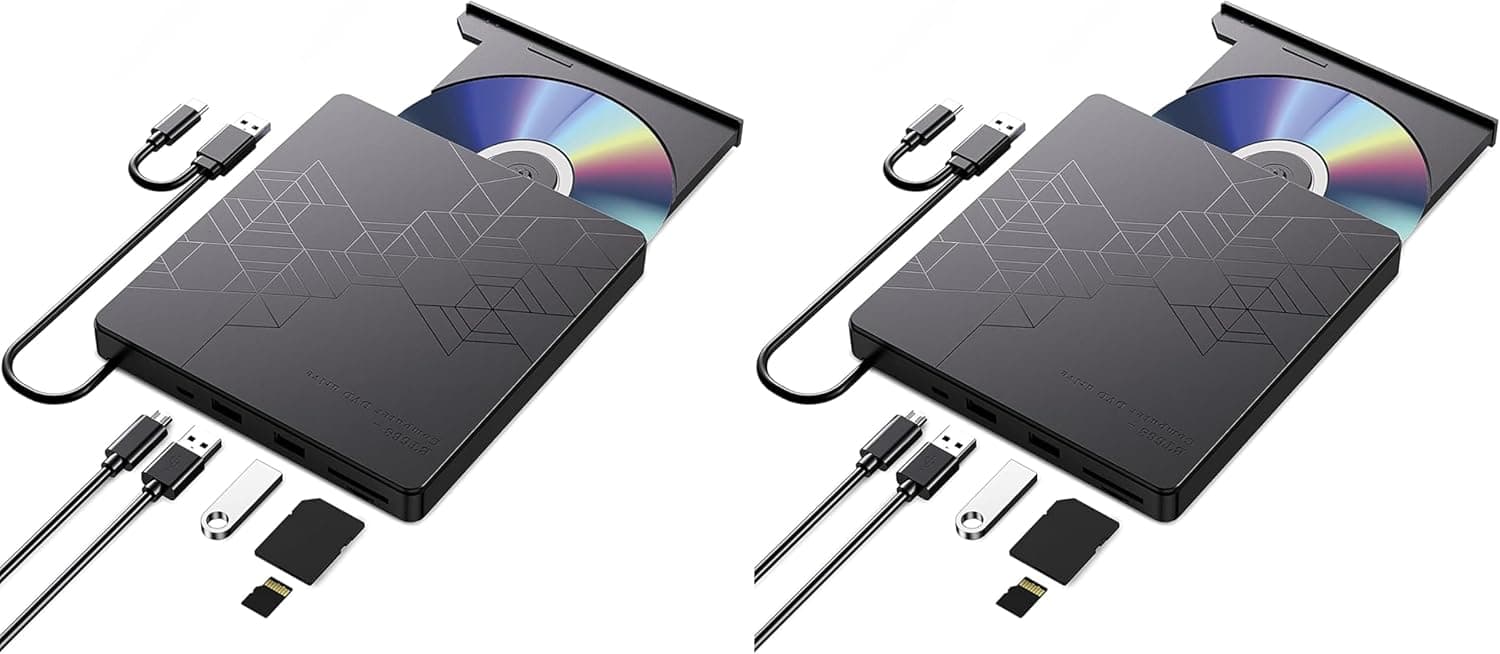
The Wolf War Ultra-Slim External USB 3.0 CD/DVD-RW Drive is an entry-level external optical drive built for thin laptops, MacBooks, and iMacs that no longer ship with a built-in drive. The honest summary: this is a device optimized for reading a handful of discs a few times a year, not for anyone who burns media regularly or cares about write quality. USB 3.0, bus power, and driverless operation make it the kind of tool you keep in a drawer and pull out when a disc shows up.
It weighs 250 g and the USB cable is attached to the body, so there is no adapter to carry and no cable to hunt for. On Amazon.co.jp it holds a 3.9-star average across 97 reviews (roughly a 78% positive score) — neither acclaimed nor panned, which fits a utility product with the caveats described below.
Compatibility Guide
The interface is USB 3.0 SuperSpeed, backward compatible with USB 2.0 and USB 1.0/1.1. In practice, USB 3.0 buys you almost nothing in speed here: even 8x DVD reading peaks around 11 MB/s, far under USB 2.0's ceiling. What USB 3.0 actually buys you is power. A USB 3.0 port supplies more current than a USB 2.0 port, which reduces the chance of a write failing when the disc spins up.
This drive is bus-powered only — there is no AC adapter jack. That is its single biggest compatibility trap.
Plug it into a weak port (a keyboard-side USB, an unpowered hub, a battery-powered device) and you get the classic symptoms: the drive enumerates but writes abort midway, or it disconnects the moment a disc spins. Connect it directly to a port on the computer itself; if you must use a hub, use a self-powered one.
Stated OS support is Windows 7/8/8.1/10, Linux, and Mac OS 10.1 through 10.11.
Read that carefully. Those are the versions that existed when the listing was created — the absence of Windows 11 or recent macOS releases likely means "not yet released," not "confirmed broken." USB optical drives generally run on the OS's built-in mass-storage class drivers and often mount fine on newer systems.
Still, since the maker does not state it, do not buy this expecting guaranteed operation on Windows 11, Apple Silicon Macs, or current macOS. If you need certainty, choose a drive that lists current-generation OS support.
The form factor is external only; it cannot be installed in a laptop's internal bay. Supported media covers Audio CD, CD-TEXT, CD-Extra, DVD+R/RW, DVD-R/RW, DVD-RAM, DVD-ROM, hybrid CD, multi-session CD, Photo CD, and Video CD.
Blu-ray is not supported at all, for reading or writing. iPads and tablets are also unsupported, for the same bus-power reason.
What the Speed Ratings Mean
Rated speeds are 8x DVD-ROM read, 24x CD-ROM read, 5x DVD-RAM read, and for writing: 8x DVD-R, 8x DVD+R, 8x DVD+RW, 6x DVD-RW, 5x DVD-RAM, 24x CD-R, 16x CD-RW. Translated into time:
| Task | Rated speed | Rough time |
|---|---|---|
| Burn a 4.7 GB DVD-R | 8x | about 8-10 min |
| Burn a 700 MB CD-R | 24x | about 4-5 min |
| Rip an audio CD | 24x | about 3-5 min |
| Play a DVD movie | 8x read | more than enough |
One DVD "x" is roughly 1.35 MB/s and one CD "x" is roughly 150 KB/s, so 8x DVD is about 11 MB/s and 24x CD about 3.6 MB/s in theory.
Real drives ramp up gradually and run slower on inner tracks, so the table allows margin over the theoretical figures.
The practical point: against a 16x DVD±R burner, this drive costs you several extra minutes per 4.7 GB disc.
Irrelevant for a few discs a year; several hours across a batch of fifty. If that is your workload, rule this drive out.
How It Compares
External optical drives split into three tiers: budget DVD units like this one, portable DVD drives from dedicated optical makers such as LG, and Blu-ray-capable models from the likes of Pioneer.
The budget tier's strength is simply price — a fraction of what a Blu-ray unit costs, and a clean answer to "I just need to read this disc." Its weakness is unit-to-unit variance and thin support.
A 3.9-star average implies most units work fine while a meaningful minority arrive faulty or fail early.
If you need something that reliably works for years with a clear support channel, a dedicated optical-drive brand is the better expected value.
Comparing against Blu-ray drives is really a use-case question. If you want to watch retail Blu-ray movies, back up to 25/50 GB discs, or play Ultra HD Blu-ray, no DVD drive at any speed solves it.
If your world is old install discs, audio CDs, and DVDs a relative burned, there is no reason to pay the Blu-ray premium.
Product Info
Pricing moves, so treat every figure as a snapshot. The Amazon listing showed ¥6,031 as captured on 18 July 2026, and ¥5,841 as captured on 19 August 2026. Both are point-in-time values that shift with sales and stock; always check the product page for the current price. This sits near the floor for external optical drives — roughly a fraction of what Blu-ray-capable externals cost.
Key specs: USB 3.0 interface (USB 2.0/1.0 compatible), 250 g, read at 8x DVD-ROM / 24x CD-ROM / 5x DVD-RAM, write at 8x DVD-R, 8x DVD+R, 8x DVD+RW, 6x DVD-RW, 5x DVD-RAM, 24x CD-R, 16x CD-RW.
Power is USB bus only; the form factor is external.
Feedback on Amazon.co.jp stands at 3.9 out of 5 stars across 97 reviews (78% positive, captured 19 July 2026).
That sample is small next to category staples with tens of thousands of reviews, so the average could still move. In the box you get the drive with its attached USB 3.0 cable and nothing else — no power adapter needed.
Warranty details are sparse, which makes the retailer's return window your real safety net. Test a CD and a DVD the day it arrives, and burn one disc if you can, so any defect surfaces while you can still return it.
Best Use Cases
- Thin-laptop owners with no internal drive — for old install discs, CDs bundled with study guides, or a DVD-R handed to you at work. Plug it in, use it, put it away.
- MacBook and iMac owners — Apple dropped optical drives long ago and legacy media still needs reading. Read the OS caveat below before committing.
- One-time digitizers — ripping a shelf of CDs or home-video DVDs once and never again. At this price, that single project justifies the purchase.
- Anyone wanting a spare — a driverless stand-in if an internal drive dies.
It is the wrong drive for high-volume burning, for anyone tracking write-error rates closely, and for anyone touching Blu-ray.
Things to Check Before Buying
The biggest caveat is that the stated OS support has not been updated: officially Mac OS 10.1-10.11 and Windows up to 10. USB optical drives usually work through built-in OS drivers, so newer systems may well be fine — but with no vendor statement, do not buy this assuming it will work on Windows 11, an Apple Silicon Mac, or the latest macOS. If the need is work-critical, pick a drive that states current OS support.
Second, bus power only. With no AC jack, a weak port or an unpowered hub produces flaky behavior — writes that abort, disconnects when the disc spins up.
"I thought it was defective, but it was the port" is the single most common misdiagnosis with drives like this. Plug directly into the computer, ideally a USB 3.0 port.
Third, no Blu-ray. Some buyers read "USB 3.0, high speed" and assume Blu-ray capability. This drive reads and writes CD and DVD media only.
Fourth, the 8x write ceiling. Against a 16x model you lose several minutes per DVD — trivial for one disc, significant across a batch.
Fifth, expect unit variance at this price. A 3.9 average means most units are fine and some are not.
Test reads and writes immediately so a defect falls inside the return window.
Finally, about the listing data itself: product pages in this category are partly auto-populated, and the same OEM hardware circulates under several brand names, so manufacturer names and OS support lines sometimes disagree with the physical product. Do not rely on the spec text alone — confirm the product from the images and the title.
Blu-ray support and OS compatibility are the two fields where a mismatch actually costs you.
FAQ
Q. Does it work on Windows 11? A.
Officially the listing stops at Windows 10. USB optical drives typically run on built-in OS drivers so it may well work, but there is no vendor guarantee.
For certainty, choose a drive that states Windows 11 support.
Q. Can it read Blu-ray discs?
A. No. CD and DVD media only. Blu-ray playback or burning requires a Blu-ray-capable drive.
Q. Do I need a power adapter?
A. No — it is USB bus-powered. But avoid weak ports and unpowered hubs; connect directly to the computer.
Q. How long does burning a DVD take? A.
At the 8x maximum, roughly 8-10 minutes for a 4.7 GB DVD-R, varying with disc quality and system load.
Q. Will it work with an iPad or Android tablet? A.
No. Tablets cannot supply the current an optical drive needs, and an adapter will not make it stable.
Q. Does it handle DVD-RAM? A.
Yes, at 5x for both reading and writing. DVD-RAM also depends on OS-side support, so test with your own media first.
Product Disclosure (Amazon)
- Manufacturer: Wolf War
- Seller: Amazon US
- Fulfilled by: Amazon US
- ASIN: B074DDTJL3
- Note: This article covers a manufacturer-made product based on Amazon listing details.