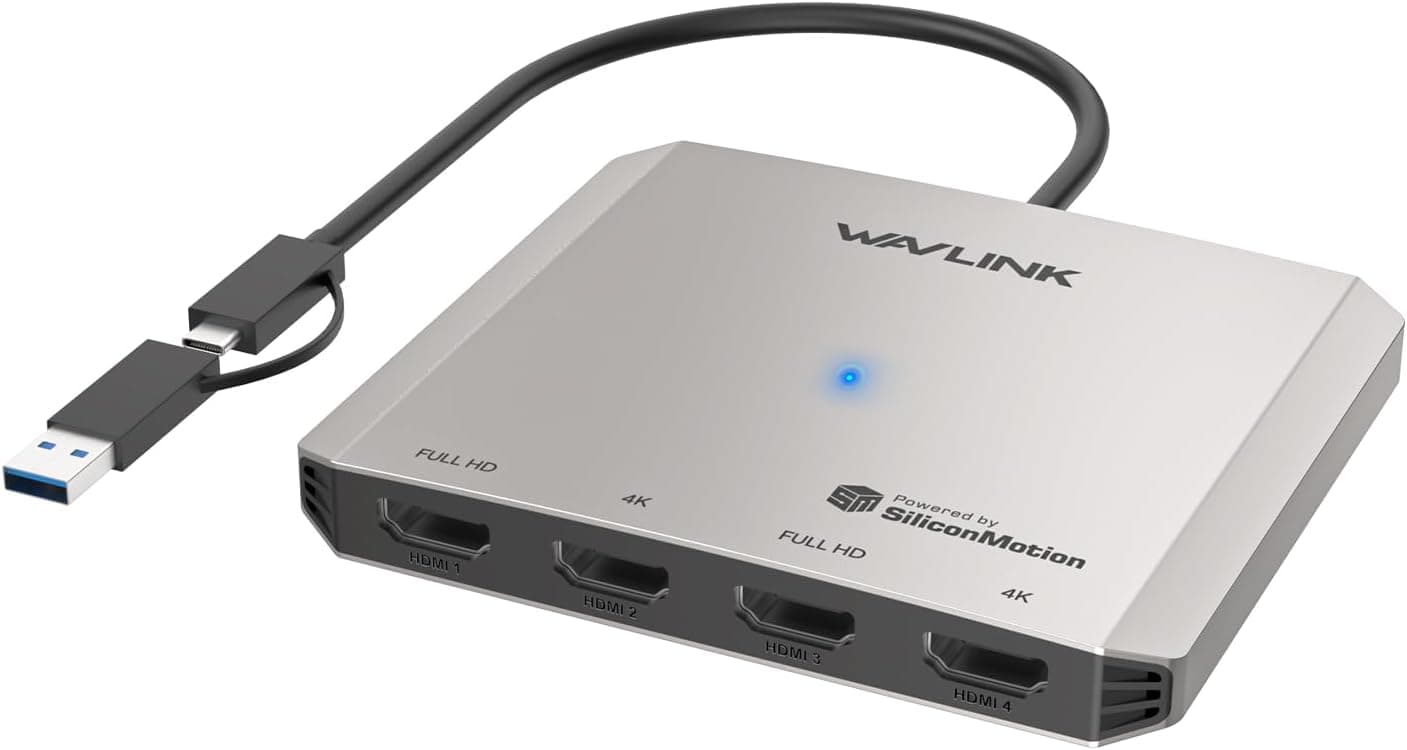
This article covers WAVLINK USB C. The WAVLINK USB-C Quad HDMI 4K Adapter Docking Station is a versatile multi-monitor solution that lets you connect up to four external displays to your laptop.
It supports a wide range of devices with USB-C or USB-A ports, including Windows PCs, Macs with M1/M2/M3/M4 chips, Chrome OS, Ubuntu, Android, and Harmony OS devices. The dock can output two displays at 4K UHD (3840×2160) @30Hz and two at Full HD 1080p@60Hz simultaneously, making it ideal for financial analysis, video editing, and heavy multitasking.
This docking station supports both extended and mirror display modes, as well as portrait orientation and clamshell mode (using external displays with the laptop lid closed). It delivers data transfer speeds up to 5Gbps via USB-C or USB-A interfaces, ensuring smooth file access even while driving multiple displays.
Supported interfaces: USB-C (USB 3.2 Gen 1 equivalent) and USB-A (USB 3.2 Gen 1 equivalent) Supported OS: Windows 11/10, macOS 11.x through 13.x and later, Chrome OS, Ubuntu, Android, Harmony OS Compatible devices: Laptops with USB-C or USB-A ports, Thunderbolt 3/4 laptops (including Macs) Connection method: Plug-and-play via the integrated USB-C or USB-A cable; driver download from wavlink.com required for first-time setup * Features an optional USB-C 5V power input port for stable operation under heavy loads.
Does not support PD fast charging, but the 5V input helps maintain performance during quad-display use. Check the retailer's page for the latest price.
It offers quad-display output at a relatively affordable price, sitting between premium professional docks and entry-level dual-display solutions. Financial traders and data analysts: Perfect for displaying multiple charts, spreadsheets, and dashboards simultaneously.
The quad-display setup reduces information gaps and boosts productivity. Video editors and creative professionals: Assign preview windows, timelines, tool palettes, and asset folders to separate monitors for a streamlined editing workflow.
Business users who multitask heavily: Ideal for keeping email, browsers, document editors, and chat apps open at the same time. Easy switching between extended and mirror modes also makes it handy for presentations.
Things to Consider
This dock does not support PD fast charging. You will need a separate AC adapter to charge your laptop while using the dock. When running four displays simultaneously, performance depends on your laptop's graphics capability and USB controller bandwidth. Older or entry-level laptops may experience stuttering or reduced resolution. Driver installation is required for first-time setup. Download the driver beforehand if you plan to use the dock in an environment without internet access. * On Macs with Apple Silicon, some display modes or resolutions may be limited. Check WAVLINK's official compatibility list before purchasing.
Product Disclosure (Amazon)
- Manufacturer: WAVLINK
- Seller: Amazon US
- Fulfilled by: Amazon US
- ASIN: B0FCMFZ9NW
- Note: This article covers a manufacturer-made product based on Amazon listing details.