This article takes a close look at Thermaltake SWAFAN EX14 ARGB TT Premium Edition 3個パック マグネット連結対応 140mm ARGB PCケースファン CL-F168-PL14SW-A FN2006, working from the published specifications and listing data to explain what actually happens when you install it.
Overview
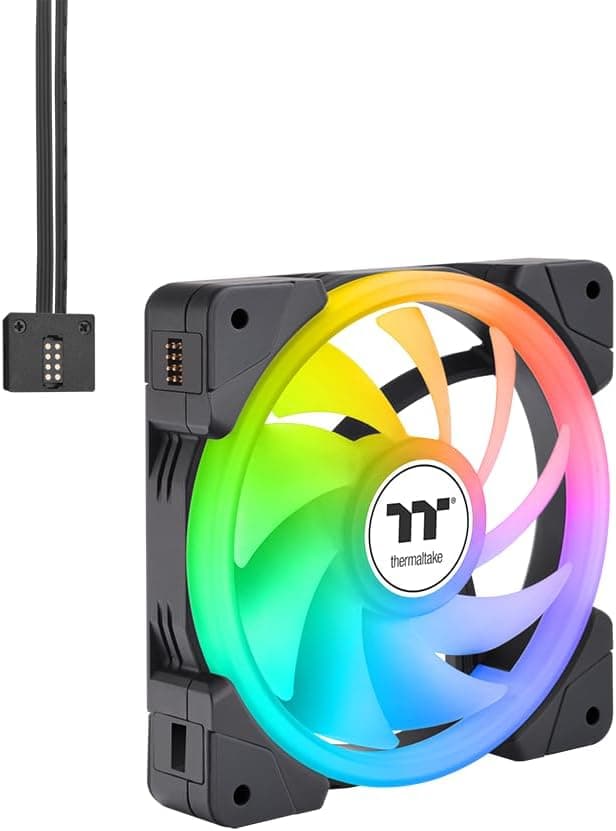
The Thermaltake SWAFAN EX14 ARGB TT Premium Edition is a three-pack of 140mm x 140mm x 25mm addressable-RGB case fans. The short version: it is built for people who want lighting, tidy wiring, and matching fan faces on both intake and exhaust at the same time.
If your only goal is silence, or if your motherboard has no 5V ARGB header, this is not the pack for you.
The headline feature is the swappable blade system. Standard blades and reverse-flow blades are both included, so you can change airflow direction without physically flipping the fan.
That solves a classic build dilemma: showing the same face of every fan while still running some of them as intake and others as exhaust.
The second feature is magnetic daisy-chaining. Place the fans next to each other and they connect both mechanically and electrically, so PWM and ARGB signals travel over a single run of cable back to the motherboard.
Thermaltake recommends a maximum of five fans in one chain.
For context on reception, the Amazon listing showed 4.4 out of 5 stars, an 88% positive score, across 173 reviews (data captured 2026-06-08).
That is a modest sample size, but a solid result for a case-fan three-pack.
| If you are... | Fit | Why |
|---|---|---|
| chasing lighting with less cabling | Great | One header run for the chain; three fans is comfortable |
| matching intake and exhaust looks | Great | Reverse blades included, no flipping required |
| pushing air through filters or a radiator | Good | 3.17 mmH2O static pressure is high for 140mm |
| building a quiet PC above all | Marginal | 38.8 dBA max; 2000 rpm is not an everyday speed |
| stuck with a 12V RGB header only | No | 5V ARGB required; a controller is an extra cost |
The table is a guide. The reasoning behind each row follows.
Reading the Numbers: 81.6 CFM and 38.8 dBA
Published figures are 500-2000 rpm, 81.6 CFM maximum airflow, 3.17 mmH2O maximum static pressure, and 38.8 dBA maximum noise.
The key point is that all of those peak values occur together at 2000 rpm, which is also the loudest state. Most 140mm fans top out somewhere around 1200-1500 rpm, so 2000 rpm is unusually fast for the size.
That buys real airflow headroom, but it also means you have to pick your own everyday speed.
The 3.17 mmH2O static pressure figure is strong for a 140mm fan, which means it holds up behind dust filters, mesh panels, and radiator fins rather than stalling.
Front intake positions with a filter and a drive cage, or the front of a large radiator, are where that number pays off. In an unobstructed exhaust slot, airflow matters more than pressure, so pushing the rpm higher returns less.
Three fans add up to roughly 245 CFM on paper, but that is a free-air rating. Inside a real chassis, filters and cable clutter eat a large share of it.
Catalog CFM is useful for comparing products against each other, not for predicting how many degrees your CPU will drop.
The 500 rpm floor is genuinely useful. Park the fans at minimum during idle and light loads, ramp gradually with CPU or GPU temperature, and the 38.8 dBA ceiling almost never appears.
These are PWM fans, so building a sensible curve in BIOS or your motherboard utility is part of the product, not an optional extra.
Compatibility Guide
The fans use the standard 140mm x 140mm x 25mm form factor and the 140mm mounting pattern. They drop into any 140mm mount but will not fit 120mm holes.
If your case is specified as front 120mm x3 or 140mm x2, choosing 140mm reduces how many fans you can install, so count your usable 140mm positions before buying a three-pack. The 25mm thickness is standard, but slim chassis or tight panel clearances sometimes demand 15mm-class fans instead.
Connections are a 4-pin PWM header for the fan and a 3-pin 5V ARGB header for the lighting. This is the real gate: without a 5V 3-pin ARGB header, the LEDs cannot be controlled by the board.
A 12V 4-pin RGB header looks similar but is a different standard, and connecting the fans to it risks damaging the LEDs. Check the silkscreen on your board (5V-D-G, ADD_HEADER, and similar) and the manual before plugging anything in.
Current draw is the detail most buyers miss. Working from the rated figures, the load per chain length looks like this:
| Fans | Fan side (12V) | ARGB side (5V) |
|---|---|---|
| 1 | 0.32A | 0.72A |
| 3 (this pack) | 0.96A | 2.16A |
| 5 (chain limit) | 1.60A | 3.60A |
As a general rule, a motherboard fan header is rated around 1A (12W) and a 5V ARGB header around 3A, though some boards specify 2A. In other words, a three-fan chain sits just inside typical limits on both rails.
The five-fan chain that the manufacturer allows would draw 1.6A on the fan side and 3.6A on the ARGB side, which is likely to exceed a common header rating.
If you plan to run five, budget for the bundled controller or a powered hub, or split the load across several headers. Your motherboard manual holds the only authoritative numbers.
ATX, Micro-ATX, and Mini-ITX builds are all viable, but only where a 140mm mount actually exists. Smaller cases usually offer just one or two.
One more practical note: swapping blades needs room for your hands, so if you expect to change airflow direction later, check that the front panel and filter come off easily.
Product Info
The model number is CL-F168-PL14SW-A (catalog reference FN2006) and the ASIN is B0CBYZKVW2. Published specs: 140mm x 140mm x 25mm, 500-2000 rpm, 81.6 CFM maximum airflow, 3.17 mmH2O maximum static pressure, 38.8 dBA maximum noise, 4-pin PWM plus 3-pin 5V ARGB connectors, fan rated at 12V/0.32A, ARGB rated at 5V/0.72A, 5W per fan, three fans in the box.
On pricing, the Amazon Japan listing showed 14,350 yen when the data was captured on 2026-06-09, which works out to roughly 4,780 yen per fan. That is firmly premium territory for case fans; plenty of practical-minded models sell for a fraction of it.
Prices move often and sales swing them further, so confirm the current figure on the product page before you buy.
The bundle includes three fans plus a set of reverse blades, linking cables, bearing lubricant, and mounting screws. The lubricant is not needed in normal use; treat it as a spare for years down the line if bearing noise appears.
Warranty is the standard two years. The SWAFAN line launched in 2023 and has since expanded into 120mm (EX12) versions and additional colors.
One caution about the source data: the same yen price appeared under an entry labelled Amazon US, so the storefront labelling in the listing data is inconsistent. Verify currency, seller, and fulfiller yourself.
The eBay entry only points to individual listings, so expect used and parallel-import stock there.
How It Compares
| Product | Lighting | Chaining | Airflow direction | Character |
|---|---|---|---|---|
| SWAFAN EX14 (this pack) | ARGB | Magnetic, up to 5 | Swappable blades | Flexibility plus looks |
| Noctua NF-A14 | None | None | Fixed | The quiet, durable benchmark |
| Corsair ML140 | Model dependent | None | Fixed | MagLev bearing, high pressure |
| Thermaltake CT140 EX ARGB | ARGB | Daisy-chain | Fixed | Value-focused 140mm |
| Lian Li UNI FAN series | ARGB | Linked frames | Reverse models exist | Highly refined link system |
The honest framing is that this pack competes with linkable ARGB fans, not with 140mm fans in general. The Noctua NF-A14 still sets the standard for quiet operation and longevity, but it does not light up or chain, so it answers a different question.
The Corsair ML140 delivers high static pressure and long bearing life, yet it is usually sold individually and your cable count grows accordingly.
Within Thermaltake's own range, the CT140 EX ARGB is the value option and has no blade-swap mechanism. If all you need is lighting and chaining, it lowers the total spend.
The premium for the SWAFAN EX14 makes sense for people who may change airflow direction later, or who want every fan face visible from the same side. If you already know you want a permanently reversed configuration, a dedicated reverse-blade model can be cheaper.
Installation Tips
- Decide the direction and visible face of each fan before mounting anything.
Writing it down is not overkill. 2.
Swap blades only on the fans that need it, and do it outside the case. Doing it after installation is awkward at best.
- Link the fans first, then mount them.
Magnetic chaining assumes adjacent placement; spread-out mounts lose the benefit. 4.
Route the PWM and ARGB cables to the correct headers. The ARGB run must go to a 5V header.
- Build a fan curve in BIOS or your board utility.
Idle near the 500 rpm floor and ramp in steps, and you will rarely meet the 38.8 dBA ceiling.
- Control lighting through one ARGB sync application.
Running multiple vendor utilities at once often causes flickering or conflicting effects.
Best Use Cases
First, builders who care about both aesthetics and cable routing. Three ARGB fans normally mean six cables; chaining collapses that into a single run.
The tighter the space behind the motherboard tray, the more that matters.
Second, people who reconfigure airflow over time. Swapping the case, adding an AIO, or fitting a larger GPU all change the intake and exhaust balance.
Because blade direction is changeable, you can follow those changes without buying new fans.
Third, anyone pulling air through dust filters or mesh. The 3.17 mmH2O static pressure is high for 140mm, so airflow holds up better behind obstructions.
Cases with full front filters are a natural match.
Conversely, this is not the pack for silence-first builds, for people with no interest in lighting, or for boards from the era before 5V ARGB headers. In each of those cases, the same money buys something more satisfying.
Things to Consider
Start with fan count and current. Three fans stay within typical header ratings, but taking the five-fan chain limit at face value pushes the ARGB rail to 3.6A, above the roughly 3A that many boards specify.
The result can be unstable lighting or a stressed header. Plan for a controller or hub if you intend to expand.
Next, size. 140mm is binary: your case either takes it or it does not, and a front panel designed for 120mm x3 will not accept a single one of these.
Returning a three-pack is a hassle, so count the 140mm mounting positions in your case specifications first. Even a 140mm-capable top panel can conflict with VRM heatsinks or tall memory.
Third, expectation versus price. At the 14,350 yen captured on 2026-06-09, roughly 4,780 yen per fan, you are in the same bracket as premium silence-focused fans.
What this pack returns is visual freedom and reduced wiring, not quiet. Understanding that in advance prevents disappointment, and the final call should be made on the price shown when you order.
Fourth, mechanical complexity. Removable blades add joints and parts compared with a conventional fan.
Release them gently and check the frame clips rather than forcing anything. Frequent cleaners will appreciate the access, but rough handling carries more breakage risk than a one-piece rotor.
Finally, the listing data itself. On any retail site, registered attributes such as manufacturer, model number, seller, and occasionally price can be swapped in from a different product.
In the data behind this article, the storefront label and currency did not line up. Before ordering, confirm that the product image, title, and model number (CL-F168-PL14SW-A) all match, and note that single fans and three-packs are often separate listings.
FAQ
Q. Can I use these without a 5V ARGB header? A.
Yes, as fans. The 4-pin PWM connection still gives full speed control.
The LEDs, however, cannot be driven by the board, so you would need a separate ARGB controller. Never connect them to a 12V 4-pin RGB header.
Q. Do five fans really run on one cable? A.
Mechanically, yes. But each fan draws 0.72A on the ARGB rail, so five reach 3.6A, above the roughly 3A many motherboard headers are rated for.
Run five through a controller instead.
Q. Are the reverse blades sold separately? A.
The three-pack includes a spare blade set. That lets you change airflow direction without flipping the fan, so intake and exhaust can share the same visible face.
Q. Is 2000 rpm loud? A.
The rating is 38.8 dBA at maximum.
For a 140mm fan, 2000 rpm is very fast and not an everyday setting. Keep the curve near the 500 rpm floor at idle and reserve the top end for heavy loads.
Q. Can I use them on a radiator? A.
The 3.17 mmH2O static pressure is high for 140mm, so radiator and filter duty suit them.
Check that 25mm of fan plus radiator thickness clears your case, and that a top mount does not collide with the motherboard.
Product Disclosure (Amazon)
- Manufacturer: Thermaltake
- Seller: Amazon US
- Fulfilled by: Amazon US
- ASIN: B0CBYZKVW2
- Note: This article covers a manufacturer-made product based on Amazon listing details.