This article takes a closer look at the STREONOR Stream Controller Mini S6 6キー・3ノブ搭載 — its specs, compatibility limits, and the practical pitfalls you only hit after buying one.
Overview
The STREONOR Stream Controller Mini S6 is a palm-sized stream controller (macro pad) aimed at streamers and creators. The short verdict: it suits people who are curious about a Stream Deck but unwilling to spend several times more, and it does not suit professionals who juggle a dozen-plus actions at once.
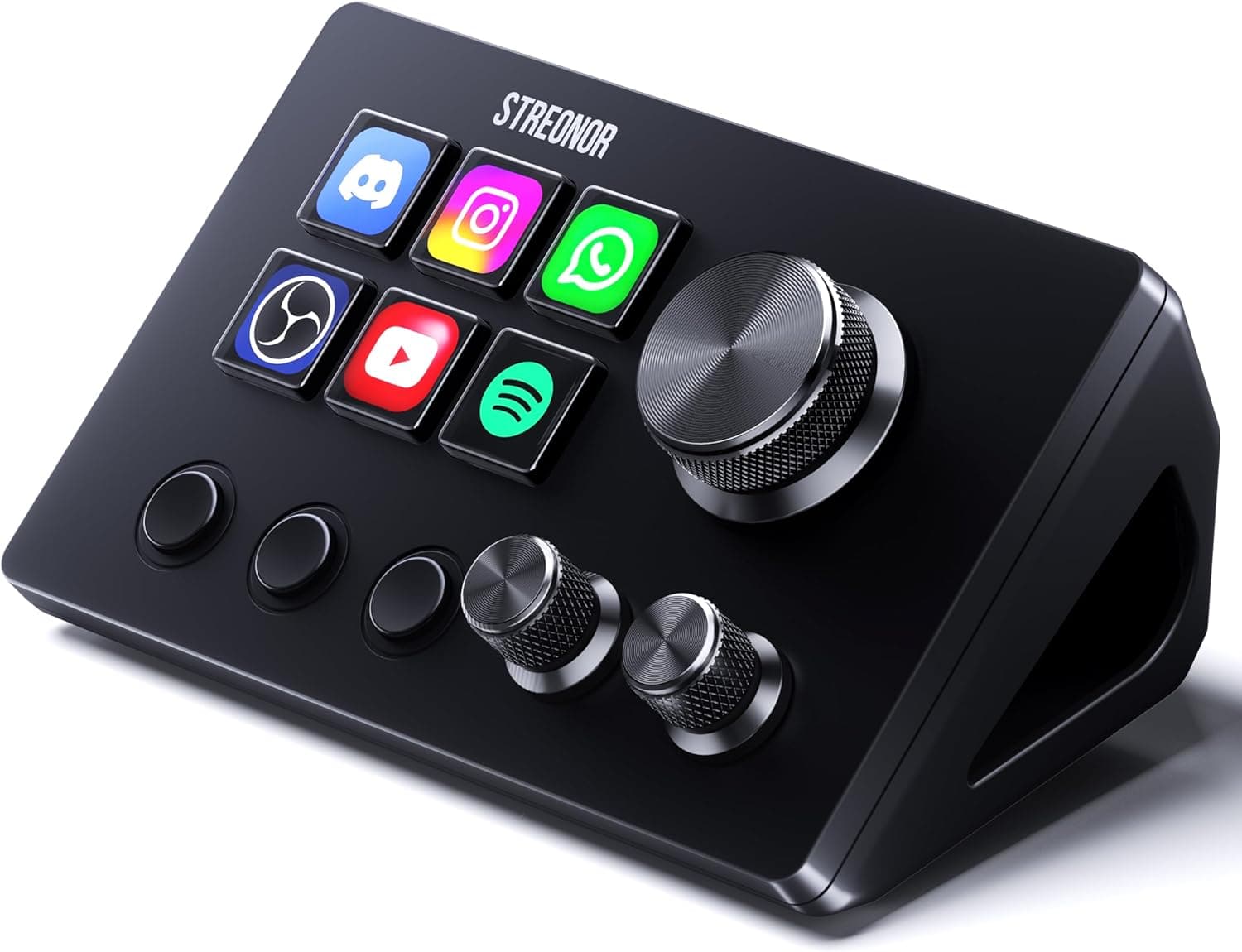
The layout is 6 customizable LCD keys, 3 multifunction rotary knobs, and 3 scene keys. The scene keys are the easy-to-miss part: they page the six LCD keys across three profiles, so you can reach roughly 18 actions quickly.
LCD keys use a recommended 126×126 pixel image and support animated icons, including GIFs.
Connection is wired USB-C only, drawing power over the bus. Nothing to charge, but a cable does live on your desk.
On Amazon.co.jp the rating was 4.8 out of 5 stars from 84 reviews (96% positive) as captured on September 8, 2026 — strong, though 84 reviews is a small sample worth discounting slightly.
Compatibility Guide
Supported operating systems are Windows 10 (64-bit) or later and macOS Big Sur 11.0 or later.
Linux is not supported — and that does not mean "plugs in but is limited." The configuration software that assigns keys and pushes icons to the LCDs simply is not offered, so a Linux-primary user should rule this out immediately.
Old 32-bit Windows installs are out too.
Physically all you need is one free USB-C port. Desktops without USB-C can generally use a USB-A adapter or hub, but since the device streams images to its LCDs, stick to a direct port on the machine rather than an unpowered hub or a long extension.
On laptops running through a Thunderbolt dock, verify that the controller is re-detected after sleep before you commit to that setup.
On the software side, OBS Studio integration expects a recent build — roughly 27.0/28.0+ on Windows and 28.0+ on macOS.
Update OBS before you buy if you have been putting it off. Beyond OBS, listed integrations include Twitch, YouTube, and Spotify, with over 100 plugins available.
Editors such as Premiere Pro or DaVinci Resolve are typically driven by sending keyboard shortcuts rather than by dedicated plugins.
Drivers and the configuration app are downloaded from the manufacturer's page in a browser. If you are on a locked-down work machine without install rights, this device will not work for you.
Check that first if the plan is to use it at the office.
Product Info
| Item | Value |
|---|---|
| Keys | 6 (customizable LCD) |
| Knobs | 3 (multifunction rotary) |
| Scene keys | 3 |
| Connection | USB-C (wired) |
| Supported OS | Windows 10 (64-bit)+ / macOS Big Sur 11.0+ |
| Plugins | 100+ |
| LCD key resolution (recommended) | 126×126 px |
| Animated icons | Supported, including GIF |
The standout line is three knobs. Many pads at this price offer one, occasionally two, so having three lets you keep dedicated roles — mic level, BGM level, game level, or scrub, zoom, volume — without remapping mid-session.
Constantly switching a single knob's function is more annoying than it sounds, which makes three a genuine practical advantage here.
Pricing was ¥5,699 on Amazon.co.jp as captured on September 8, 2026.
Prices move, especially during sales, so confirm the current figure on the product page. At the same capture the listing showed 84 reviews at 4.8 out of 5.
That puts the unit at a fraction of flagship stream-deck pricing, squarely in "core features, value-first" territory.
The box contains the controller and a USB-C cable. Do not expect stands or spare keycaps.
Release date and warranty terms are not something we can state with confidence here, so we won't; check the listing for warranty length and whether support runs through the maker or the seller.
How It Compares
There are three broad options: an LCD-equipped stream controller like this one, a plain macro pad without screens, or simply using macro keys on a full-size keyboard plus software hotkeys.
The value of LCDs is that you can see what each key currently does. The classic macro-pad failure is assigning more than ten actions, forgetting them, and quietly abandoning the device.
Icons plus paged scene keys make that failure much less likely.
If your real goal is fast repeated input — rhythm games, extra FPS binds — a screenless keypad with better switches is the more suitable tool. Decide up front whether you want a control surface for streaming and editing, or an input extension for gaming.
Suggested Mapping in Practice
Do not try to fill all 18 slots on day one. A good starting layout: page 1 for stream control (three scene switches, mic mute, start/stop stream, record), page 2 for editing shortcuts, page 3 left empty.
Keeping a blank page means later additions don't force you to rebuild everything.
Define each knob including its press action — "turn to adjust volume, press to mute" keeps related actions on one control and reduces hesitation. Default icons work fine, but color-coding by family (audio blue, scenes green, destructive actions red) visibly cuts mis-presses.
Best Use Cases
- Streamers a few months in — moving scene switching and mic mute to physical buttons alone prevents a lot of live mistakes, and ¥5,699 (captured September 8, 2026) is a rational way to test whether physical controls help you before spending far more.
- Part-time editors and commentators — assign cuts, markers, and play/pause, then use knobs for scrubbing and levels.
- Small-desk users — a six-key footprint sits beside a keyboard or on a monitor stand without crowding your mouse area.
- Windows or macOS users — since support is limited to these two, they are exactly who this fits.
Before You Buy
The biggest limitation is the lack of Linux support. If your streaming machine runs Linux, or you dual-boot and spend most time there, the configuration software will not run and the device is inert.
No workaround makes this go away.
Don't over-read the six keys. Scene keys stretch you to about 18 actions, but "switch page, then press" is two motions, and live reactions want one.
Design around six truly instant actions. If you need a dozen simultaneously, a larger model is cheaper in the long run than buying twice.
Software quality matters more than the hardware. With this class of product, satisfaction comes down to the config app and plugin stability.
Over 100 plugins is a decent count, but update cadence and support from a smaller brand may not match the major players. Assume you may need to fall back on plain keyboard-shortcut mapping for your favorite app rather than a purpose-built plugin.
Accept the wire. Bus power means no batteries to die, but a cable is permanently on your desk.
Plan the routing if your setup is cable-averse.
A note on listing data. Amazon listings occasionally carry manufacturer, model, or version details that don't match the physical product.
This article is based on listing information. Before buying, confirm the product via the images, title, and seller details, and if the stated OS versions differ from those above, trust the current listing.
Price, stock, and specs all change.
FAQ
Q. Does it work on Linux? A.
No. Supported systems are Windows 10 (64-bit)+ and macOS Big Sur 11.0+.
Without the config software you cannot assign keys or set LCD icons.
Q. How many actions can I really store? A.
Six LCD keys across three scene pages gets you to roughly 18, but only six are instantly reachable at any moment.
Q. Which OBS Studio version do I need?
A. Roughly 27.0/28.0+ on Windows and 28.0+ on macOS. Update OBS first if yours is older.
Q. Will it work with Premiere Pro or DaVinci Resolve? A.
Yes, typically by assigning keyboard shortcuts rather than relying on a dedicated plugin. Tidy up your shortcuts in the editor first, then map them.
Q. What does it cost?
A. ¥5,699 on Amazon.co.jp as captured on September 8, 2026. Prices change often, so check the listing.
Q. Can I use my own icons?
A. Yes. Recommended size is 126×126 pixels, and animated icons including GIFs are supported.
Product Disclosure (Amazon)
- Manufacturer: Streonor
- Seller: STREONOR
- Fulfilled by: Amazon
- ASIN: B0GZVCXKM1
- Note: This article covers a manufacturer-made product based on Amazon listing details.