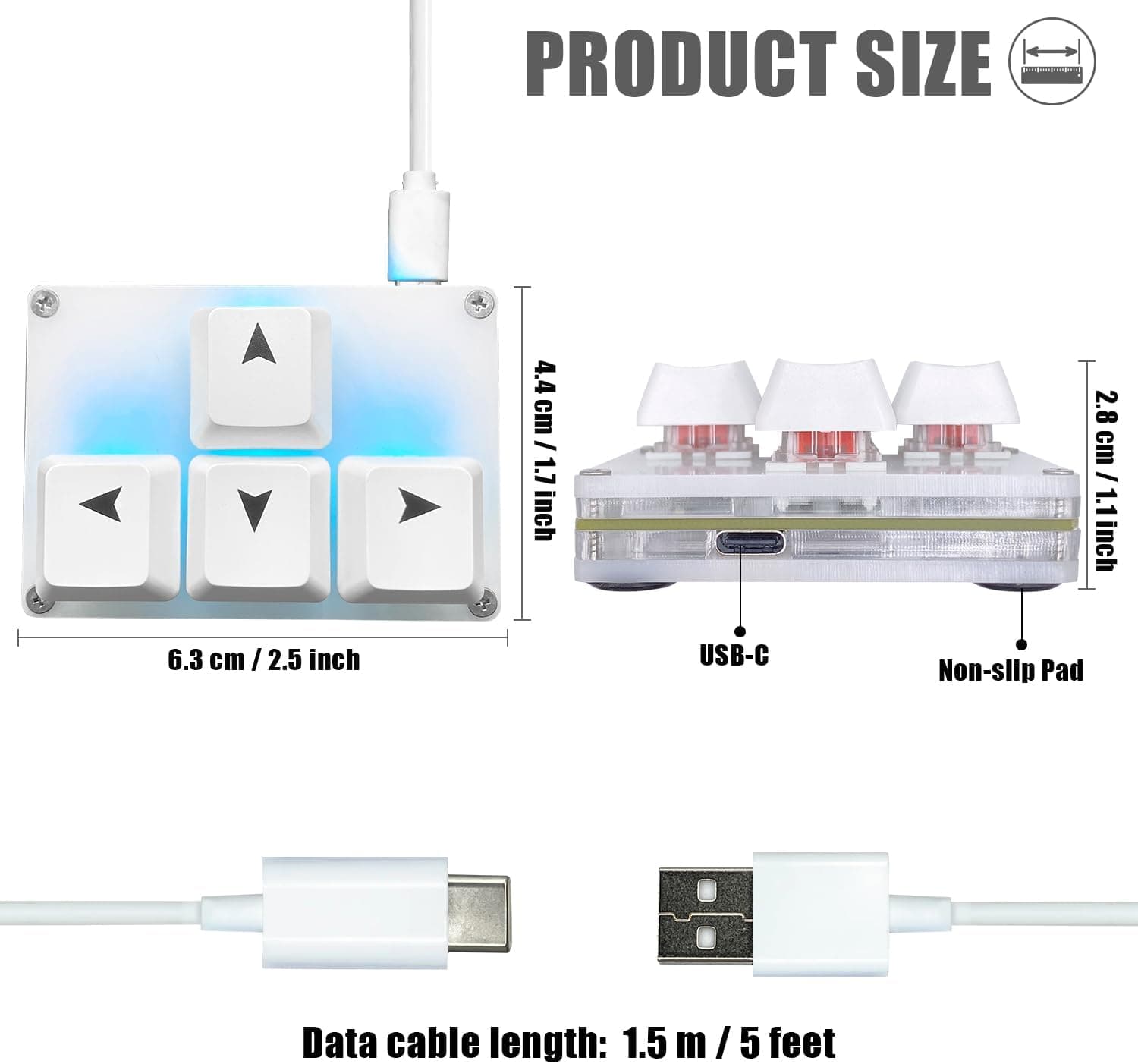
The SayoDevice Mini 4 キー WASD キーパッド 矢印キーキーキャップ メカニカルキーボード is a one-handed macro pad stripped down to just four keys. This article lays out what it actually solves and where four keys stop being enough.
Overview
The short version: this is for people who want to move arrow keys or a handful of shortcuts off their main keyboard and onto a separate device under the other hand. If you use a 60% or 65% layout where the arrow cluster lives on an Fn layer, this fixes exactly that one problem.
If you were hoping to pack a dozen macros onto one pad, four keys will not be enough.
The body measures 64 x 43 x 28 mm — smaller than a business card in footprint. The switches are mechanical and hot-swappable, so you can drop in your preferred linear or tactile switches without soldering.
Backlighting is single-color white: not flashy, but it never clashes with the rest of a desk. Out of the box the four keys register as up, down, left and right, so it works the moment you plug in the USB-C cable.
Configuration happens in a web-based tool, and the resulting layout is stored on the device itself. Move it to another machine and it behaves the same with no re-setup and no background software — which matters a lot on locked-down work machines where you cannot install drivers.
Compatibility Guide
The connection is USB-C with a detachable cable. Windows, macOS and Linux all see it as a standard keyboard, so no driver install is required.
Any desktop or laptop with one free USB port will run it. If your laptop only has USB-C ports, check that the bundled cable's PC-side connector matches; otherwise a USB-A to USB-C adapter or your own cable covers it.
Running it alongside a full-size keyboard causes no conflicts. The OS merges input from multiple keyboards, so keypad in one hand and main board under the other simply works.
Games see plain arrow-key input, so no special rebinding is normally needed.
The one real constraint is the configuration tool. Because it talks to the device from the browser, Chrome or Edge is recommended.
Safari and Firefox may fail to detect the device, so macOS users should keep a Chromium-based browser around. Once the layout is written to the device, the browser no longer matters.
USB hubs generally work, but cheap unpowered hubs can cause backlight flicker or dropped detection. If something misbehaves, plug directly into the PC first to isolate the cause.
Product Info
The published specifications are as follows.
| Item | Value |
|---|---|
| Keys | 4 |
| Switches | Mechanical, hot-swappable |
| Connection | USB-C (detachable cable) |
| Dimensions | 64 x 43 x 28 mm |
| Backlight | Single color (white) |
| Supported OS | Windows / macOS / Linux |
| Programming | Web browser (Chrome/Edge recommended) |
As captured on 7 September 2026, the price on Amazon.co.jp was ¥2,999.
Sales and stock swings move that figure, so check the product page for the current price before buying. At that level it costs about the same as a bulk pack of switches, which makes it an easy first purchase in this category.
Check the retailer's page for the latest user reviews. That is a healthy score, but 111 is a small sample, and small samples hide unit-to-unit variation.
Test all four keys on arrival and watch for chatter (one press producing two inputs) while you are still inside the return window.
Best Use Cases
Dropping this pad beside the board fixes that one thing for far less than replacing the keyboard.
FPS and action players who want movement split out. Making WASD physically separate frees that region of the main board for other bindings, and the fixed hand position makes it harder to lose your place.
Editors cutting down repetitive shortcuts. Cut, undo, and timeline scrubbing are hit hundreds of times a session.
If you can narrow the list to four, the payoff is large. If your list is ten items long, this is the wrong product.
Anyone sampling switches. Testing feel on four keys is a much cheaper mistake than building a full board around the wrong switch.
Things to Check Before Buying
The listing metadata does not line up. The product name carries the SayoDevice brand, while the manufacturer field on the Amazon listing shows a different name.
Mismatches like this often come from sloppy listing registration or third-party resale rather than counterfeiting, but if you are buying specifically for official SayoDevice firmware and configuration tooling, it is not a detail to ignore. This article deliberately does not state a manufacturer as fact.
Compare the product images, the markings on the unit, and the seller name before you commit.
Four keys is fewer than it sounds. You cannot have both an arrow cluster and a set of shortcuts.
Layer switching raises the effective count, but usually costs one key to host the toggle, leaving three in practice. Buy it for one job.
Check keycap compatibility. Small pads do not carry the row-profile stagger of a full keyboard, so borrowed keycaps can sit at an awkward angle under the fingers.
Arrow keycaps are included; verify the profile if you plan to swap in third-party caps.
It is light and it slides. Pads this small are easy to shove across the desk with a hard press.
If the underside grip feels weak, adhesive rubber feet or simply parking it on a mousepad solves it. Gamers who bottom out hard should do this on day one.
No wireless. Wired USB-C only. It will not satisfy anyone trying to cut desk cabling or drive it from a tablet or phone.
Warranty and release information are thin. No clear manufacturer warranty term is published, which effectively leaves you relying on the retailer's return policy.
Test it immediately.
How to Actually Set It Up
Leave it on the factory arrow-key mapping for the first week. Then assign, one at a time, only the actions you actually missed.
With four keys, deciding what not to assign is the whole skill.
Placement matters too. On the left side, leave roughly a fist's width from the edge of your main keyboard so your wrist does not twist.
On the right, sitting it beyond the mouse rather than in front of it tends to interfere less. Nudge it a few centimeters a day until it stops feeling like a reach.
FAQ
Q. Do I need to install a driver? A.
No. It registers as a standard keyboard on Windows, macOS and Linux.
You only open the web tool in Chrome or Edge when you want to change the mapping.
Q. Are settings stored on the device? A.
Yes. The mapping lives on the keypad, so it behaves identically on another PC — which is why it suits machines where you cannot install software.
Q. Can I change the switches myself? A.
Yes, it is hot-swappable, so no soldering. It assumes MX-style switches; check whether yours are 3-pin or 5-pin before ordering.
Q. Can I assign something other than arrow keys? A.
Yes — key inputs, macros and media controls can all be mapped from the web tool. With only four keys, though, you have to be selective.
Q. Can I use it with my main keyboard at the same time? A.
Yes. The OS accepts input from multiple keyboards simultaneously, so there is no conflict.
Q. Will games reject it as a separate device? A.
It sends ordinary keyboard input, so it is treated like any keyboard. For elaborate macros, follow each title's own rules.