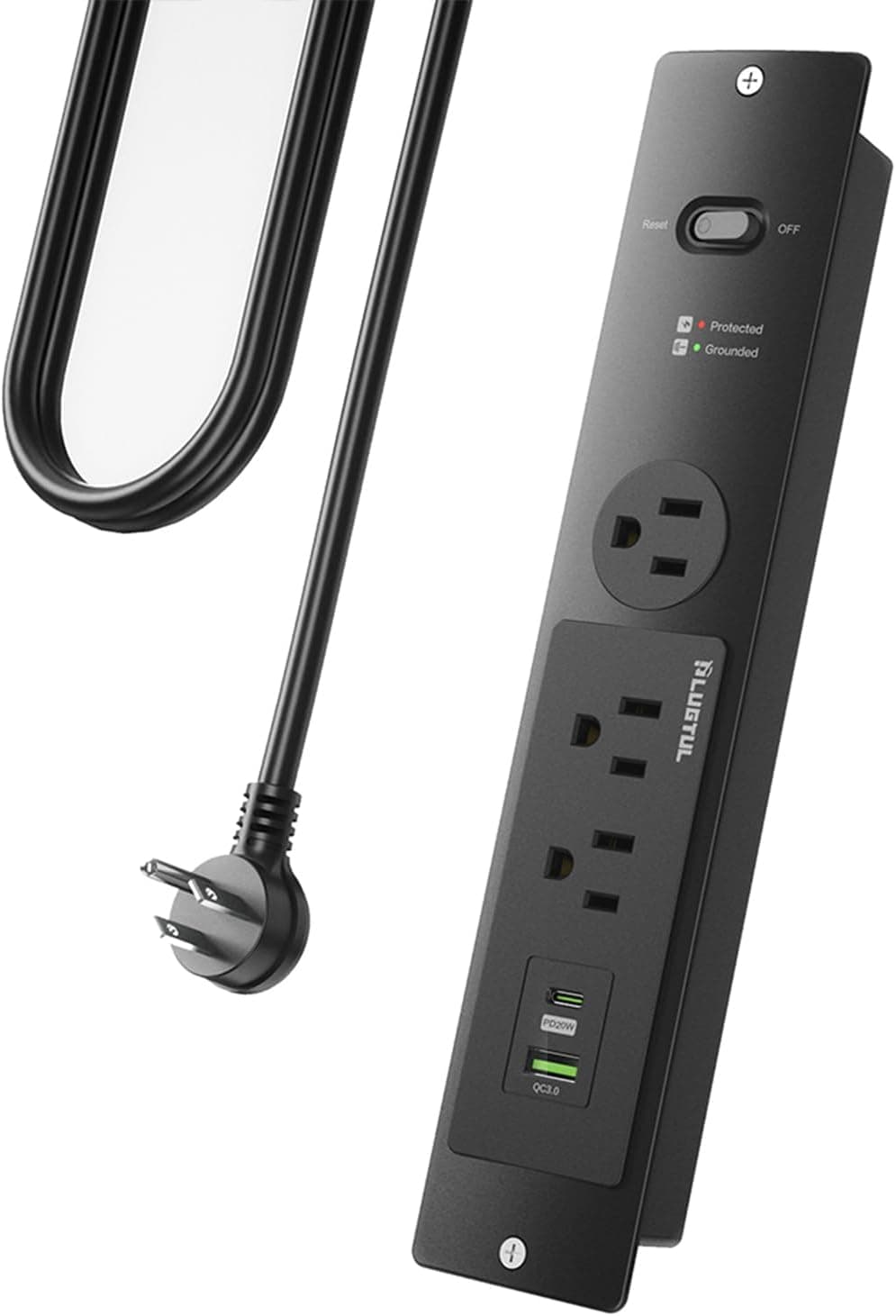
The PLUGTUL flush mount power strip is not really a power strip — it is an outlet unit designed to be recessed into a desktop or furniture panel. It offers three AC outlets plus one USB-C (20W PD) and one USB-A (5V/2.4A) port, and it expects you to cut a 23cm × 4cm opening in your surface.
This article covers cutout planning, power budgeting, and the checks worth doing before you commit to cutting.
Overview
The defining trait of this unit is the flush mount. A conventional strip sits on the floor or clips under a desk; this one drops into the panel so the top surface stays flat.
If you only want to velcro something under a desk, a cheaper no-cutting product is the more rational choice.
The spec highlights come down to three things. The AC side is rated 125V/15A (1875W max), the cable is 14AWG SJTW (approx.
2.08mm² cross section) with an ETL listing, and surge protection is rated 980J.
On the USB side, USB-C delivers 20W PD and USB-A delivers 5V/2.4A.
On Amazon.co.jp the unit holds 4.4 out of 5 stars across 22 reviews — a good score, but a small sample, so treat it as directional rather than statistically solid.
Pricing was ¥9,354 as captured on 2026-06-19 and ¥8,157 as captured on 2026-08-26. That is roughly a ¥1,200 swing in two months, so always check the listing for the current price.
Compatibility Guide
The plug is NEMA 5-15P — the North American grounded two-blade type. Surge protection fundamentally works by shunting overvoltage to ground, so the 980J rating only means what it claims when the unit is connected to a properly grounded outlet.
On an ungrounded two-prong receptacle, expect the protection to be meaningfully less effective.
On voltage, the 125V AC rating comfortably covers a 100V Japanese supply. However, the certification here is ETL, which is a North American safety listing.
If you are installing in Japan, check the listing for domestic PSE marking before you build the unit permanently into furniture.
The most common physical failure is the cutout. The specified mounting opening is 23cm × 4cm — a long, narrow slot that easily collides with cross braces, frame rails, or drawer slides underneath a desktop.
Before cutting, verify both the structural members below the surface and the depth clearance the body needs. No template is included, so you measure and mark it yourself.
Plywood and solid-core panels are workable; glass tops, metal tops, and thin honeycomb-core particle board are not good candidates.
Power budgeting is part of compatibility too. With 1875W total across the three AC outlets, a desktop PC, monitor, and peripherals leave plenty of headroom.
Kettles and space heaters are outside the intended use. The 20W USB-C port realistically covers phones, earbuds, controllers, and small tablets.
| Use case | Fit | Note |
|---|---|---|
| Desktop PC + monitor | Excellent | Well within the 1875W AC budget |
| USB-C laptop charging (65W+) | No | 20W PD is not enough; use the AC adapter |
| Phone / tablet fast charging | Good | 20W PD suits most current phones |
| Furniture or counter integration | Excellent | If you can cut a 23cm × 4cm opening |
| Use as a loose desktop strip | Marginal | Shape assumes recessed installation |
Product Info
The configuration is three AC outlets, one USB-C at 20W PD, and one USB-A at 5V/2.4A.
Surge protection is 980J, the cable is rated 15A/125V/1875W, the gauge is 14AWG SJTW at approximately 2.08mm², the unit is ETL listed, and the mounting cutout is 23cm × 4cm.
The finish is black.
The 14AWG cable is the quietly good part of this product. Thinner 16–18AWG cords on comparable units leave less thermal margin, which matters more than usual when the hardware is buried in furniture with poor airflow.
The flat cable profile is consistent with the same design intent — routing through narrow gaps behind panels.
As noted, pricing was ¥9,354 (captured 2026-06-19) and ¥8,157 (captured 2026-08-26) on Amazon.co.jp under ASIN B0CPDZB89D.
Read those as snapshots, not current values. The eBay side is a search link only, with no individual listing price captured.
Best Use Cases
DIY and custom furniture builders. This is the primary audience.
If you can cut into a desktop and want outlets built into a coffee table, kitchen counter, or bespoke desk, the design does exactly what it promises.
Remote workers reducing desktop clutter. Laptop adapter, monitor, and phone charger all converge on one point in the surface, and the built-in USB ports remove standalone chargers from the desk entirely.
Gaming desk cleanup. Route PC, monitor, and console power through the AC outlets while controllers and headsets charge over USB.
Meeting rooms and shared workspaces. The flush profile means objects placed on the table do not fight with the outlet housing.
Things to Consider
Before Buying
You have to cut a hole, and that decides everything. A clean 23cm × 4cm slot needs a jigsaw or router, and no template ships in the box.
Do not attempt this on rented built-in furniture or on an expensive top you might want to return. If you are not confident with the cut, choose a clamp-on or freestanding strip instead of this category entirely.
Do not read 20W PD as "charges laptops." Twenty watts is a phone-class output.
Laptops needing 65W or 100W will not charge at a usable rate from this port — the compatibility notes say as much. Plan on plugging the laptop's own AC adapter into one of the AC outlets.
980J is modest for surge protection. Dedicated surge protectors commonly advertise 2000J or more.
980J works as insurance against ordinary household spikes but is thin protection for expensive gear in a lightning-prone area. Surge components also degrade each time they absorb an event, and once the unit is recessed into furniture, inspecting or replacing it becomes awkward.
Pair it with upstream protection for critical equipment.
Settle the grounding question before installation. Because surge protection depends on a ground path, deciding where the ground goes after the unit is already embedded is a bad position to be in.
Verify the listing details yourself. Port count wording on the listing has varied — the Japanese and English titles for this product describe the port count differently.
Listing metadata errors are common in general, so compare the product photos, the title, and the spec table before ordering to confirm you are buying the unit you intend to.
Weigh the 22-review sample size. The 4.4-star average is solid, but with that few reviews there is limited signal on long-term durability or unit-to-unit variation.
Do not treat it with the same confidence you would give a strip with thousands of reviews.
How It Differs From Alternatives
Compared with conventional multi-outlet strips, this is a different category. Common domestic strips offer more outlets, individual switches, and dust shutters, often at a lower price — but they assume life under the desk and do nothing for a flat work surface.
Direct-plug surge protectors, meanwhile, are the better answer when you want protection right at the receptacle. The reason to pick this unit is one specific requirement: you want outlets built into the surface and you are willing to cut for it.
Without that requirement, another form factor gives better value.
FAQ
Q. Can I use it on a 100V Japanese outlet? A.
The 125V AC rating covers it electrically. But the plug is NEMA 5-15P and the certification is ETL, so check the listing for domestic PSE marking and plan the ground connection before installing.
Q. Can it charge a laptop over USB-C? A.
Not at a practical rate for anything needing 65W or more. Use the laptop's AC adapter in one of the AC outlets.
Low-power tablets and mobile devices are fine.
Q. What tools do I need to install it? A.
A jigsaw or router to cut the 23cm × 4cm opening. No template is included, so you measure and mark it yourself.
Q. How much load can the three AC outlets take? A.
1875W total (15A/125V). A PC, monitor, and peripherals leave headroom; heaters and kettles are outside the intended use.
Q. Is 980J enough surge protection? A.
It works for typical office equipment but is modest next to dedicated protectors rated above 2000J. Add upstream protection for expensive gear.
Q. What does it cost?
A. ¥9,354 as captured on 2026-06-19 and ¥8,157 as captured on 2026-08-26. Prices move, so check the listing.
Product Disclosure (Amazon)
- Manufacturer: PLUGTUL
- Seller: USPJEH
- Fulfilled by: USPJEH
- ASIN: B0CPDZB89D
- Note: This article covers a manufacturer-made product based on Amazon listing details.