Overview
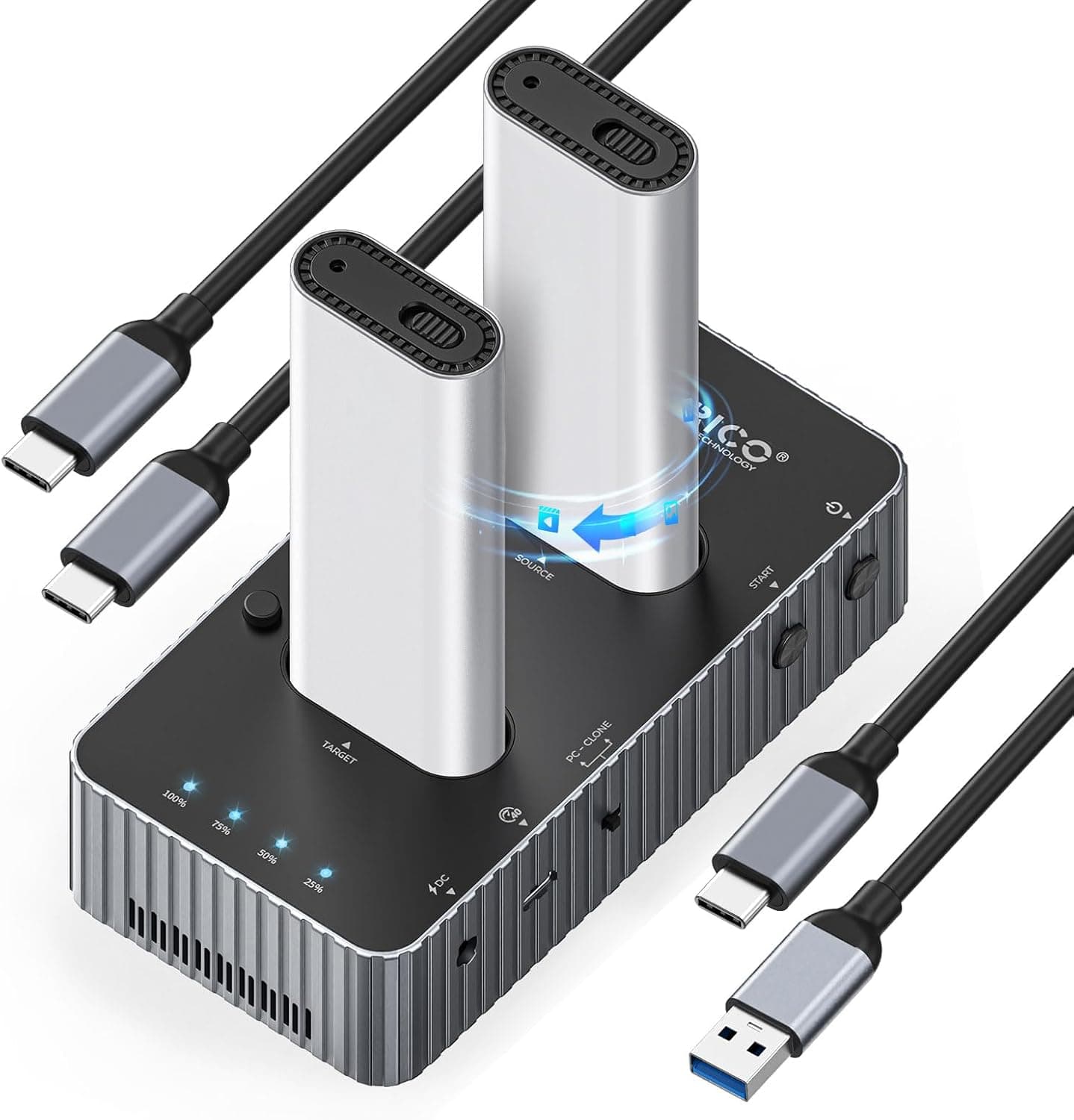
The ORICO IT28N-C — USB4 Dual-Bay M.2 NVMe SSD Cloning Dock holds two M.2 NVMe SSDs at once and works as both an external enclosure and a clone station.
It connects over USB4 (up to 40Gbps). On a Thunderbolt 4 host, it is listed at about 3,300MB/s read and 3,000MB/s write.
It can also copy one SSD to another without being connected to a computer.
In short, this dock suits people with a USB4 or Thunderbolt 4 port who swap or back up NVMe SSDs often. It is a poor fit if your computer only has USB-A or 10Gbps ports, or if you need to use SATA M.2 drives.
The sections below cover what it can do and where its performance falls short.
The chassis is aluminum alloy. Each SSD gets its own aluminum heatsink shell with silicone pads, and the dock also has a built-in fan.
Fast NVMe drives heat up quickly inside an enclosure and can slow down from thermal throttling. Including the cooling parts in the box is a real advantage for long clone jobs.
Compatibility Guide
It works only with M-Key NVMe M.2 SSDs.
It accepts 2230, 2242, 2260 and 2280 lengths, from the short 2230 drives used in handheld consoles and thin laptops to the 2280 drives common in desktops. Each slot recognizes drives up to 16TB.
| Item | Support |
|---|---|
| SSD protocol | NVMe only (M-Key) |
| Lengths | 2230 / 2242 / 2260 / 2280 |
| Max capacity | 16TB per slot |
| Connection | USB4 (40Gbps max), Thunderbolt 4 compatible |
| Cables included | USB-C to C, USB-A to C |
| OS | Windows, macOS, Linux, Android |
SATA M.2 drives are the most common mistake. They look almost the same, and many have B+M keying (two notches).
Drives pulled from older laptops are often SATA rather than NVMe. If you plan to reuse a drive you already own, check its model number first.
2.5-inch SSDs and HDDs are not supported either.
The second thing to check is the port on your computer. You only get 40Gbps from a USB4 or Thunderbolt 4 port using the USB-C to C cable.
USB-A tops out at 10Gbps (USB 3.2 Gen2), so with the included USB-A to C cable, expect a ceiling of roughly 1,000MB/s, which is typical for external SSDs.
Many USB-C ports are only USB 3.2 Gen2 inside, so confirm that your PC or motherboard specs actually say USB4 or Thunderbolt 4.
On USB 3.2 Gen2x2 (20Gbps) ports, the dock may not run at 20Gbps.
Many USB4 bridge chips do not support Gen2x2 and drop to 10Gbps instead. The supplied data does not say how this dock behaves, so check the product page if you are counting on 20Gbps.
On macOS, the Thunderbolt/USB4 ports on Apple silicon Macs are the easiest hosts to use. However, macOS cannot write to NTFS drives formatted in Windows out of the box.
If you move a drive between the two systems, exFAT is the safer choice. On Android, the dock connects over OTG, and some devices may not supply enough power.
Speed and Clone Time
The supplied specs list 3,300MB/s read and 3,000MB/s write on Thunderbolt 4. Some PCIe 4.0 SSDs reach around 7,000MB/s when installed inside a PC, but over USB4 the practical ceiling is in the low 3,000s.
A faster SSD will not reach its internal speed in this dock. That is a trade-off of any external enclosure.
Even so, that is roughly three times faster than a 10Gbps external SSD (about 1,000MB/s). If you regularly move files measured in tens of gigabytes, such as video footage or VM images, that speed difference directly cuts your waiting time.
Offline cloning takes about 20 minutes per 1TB. Offline clones usually copy the whole drive rather than just the used space, so the time depends on drive size, not on how much data is stored.
By simple math, expect about 40 minutes for 2TB and 80 minutes for 4TB. Actual times depend on the drives and their temperature.
The dock has two bays but only one USB4 link to the computer. When you read from or write to both drives at once, they share that bandwidth.
Each drive will not get its own 3,300MB/s.
Product Info
| Item | Detail |
|---|---|
| Interface | USB4 (40Gbps max) |
| SSD support | NVMe only (M-Key), 2230/2242/2260/2280 |
| Max capacity | 16TB per slot |
| Speed (reference) | 3,300MB/s read, 3,000MB/s write (Thunderbolt 4) |
| Clone time | About 20 minutes per 1TB |
| Cooling | Two aluminum alloy heat shells + built-in fan |
| Material | Aluminum alloy |
| Dimensions | 74 x 35 x 145 mm |
| Accessories | USB-A to C cable, USB-C to C cable, silicone thermal pads, two cooling cases |
The dock measures 74 x 35 x 145 mm and stands upright on a desk. It works better as a desk tool than as something to carry around like a portable SSD.
Check the retailer's page for the latest price.co.jp (July 17, 2026) and ¥23,198 at Shop Presidente on Rakuten (August 12, 2026)**. That is a gap of about ¥7,000 between sellers for the same product. Prices change with sales and stock levels, so check each store page for the current price before buying. SSDs are not included.
Check the retailer's page for the latest user reviews. That is too few reviews to judge its quality.
Product Disclosure (Amazon)
- Manufacturer: ORICO
- Seller: ORICO Power Official JP Store
- Fulfilled by: Amazon
- ASIN: B0G1MPZY69
- Note: This article covers a manufacturer-made product based on Amazon listing details.
Compared With Alternatives
Whether this dock makes sense becomes clearer when you compare it with a single-bay enclosure and a ready-made portable SSD.
| Option | Best for | Difference from the IT28N-C |
|---|---|---|
| Single-bay NVMe enclosure (10Gbps class) | Turning a spare SSD into an external drive | Cheaper and smaller, but about 1,000MB/s and no PC-free cloning |
| Ready-made portable SSD | Portability and convenience | Nothing to assemble and more rugged, but you cannot swap the drive |
| IT28N-C | Drive swaps, cloning, fast bulk transfers | Two bays and offline cloning; stays on a desk and needs cables and space |
If you just need one SSD as an external drive, a single-bay enclosure is enough. This dock's value comes from three things: two bays, PC-free cloning and USB4 speeds in the 3,000MB/s range.
If you won't use at least two of them, it is likely to be poor value.
Offline Cloning: How It Works and What to Watch
To run an offline clone, you put the source and target SSDs in their assigned slots and start the copy with the dock's button. Check the dock's markings and manual to see which slot is the source.
If you swap them, the drive you meant to keep gets overwritten. This is the most common mistake with standalone clone docks.
The target must also be the same size as the source or larger. With whole-drive cloning, you usually cannot copy a larger drive onto a smaller one.
If you clone a smaller drive to a larger one, such as 1TB to 2TB, the partition keeps its original size. In Windows, you can extend the volume in Disk Management to use the extra space.
The supplied data does not say how the dock gets power when it is not connected to a computer. No AC adapter appears in the accessory list, so check the product page to see how it is powered for offline cloning before you buy.
Recommended Users
- Upgrading a laptop or handheld console SSD: Because it takes 2230 through 2280 drives, you can clone a short 2230 drive straight onto a new SSD. Expect about 20 minutes per 1TB.
- People with a USB4 or Thunderbolt 4 PC who move large files often: Reads of around 3,300MB/s make transferring video footage or development images much faster.
- People who want regular full copies of a working drive: You can make a copy without booting the computer.
- PC builders and technicians: Two bays plus offline cloning help when you need to prepare several drives with the same setup.
Before You Buy
Without a USB4 or Thunderbolt 4 port, you lose most of this dock's advantages. On USB-A or 10Gbps ports, it runs at about the same speed as a basic external enclosure, so you only pay more.
Offline cloning alone can still justify it, but if you are buying it for speed, check your computer's specs first.
SATA M.2 drives and 2.5-inch SSDs or HDDs do not work. A typical failure is inserting a drive from an old PC and finding it is not detected.
You can check whether a drive is NVMe from its model number.
Offline cloning overwrites the entire target drive. Before you start, make sure the target holds nothing you need and that the source and target are in the correct slots.
The target also needs to be at least as large as the source.
Using both bays at once splits the bandwidth. Each drive will not run at full speed.
The dock has a fan, so it is not completely silent. It is built with cooling as the priority.
If you plan to keep it running in a quiet room, check reviews for comments on fan noise first.
**There are still very few reviews. There is not yet enough information to judge long-term durability or variation between units.
Prices vary a lot between sellers. At capture time, Amazon.co.jp and one Rakuten seller differed by about ¥7,000.
Some store listings also mention only 2230 in the product name, even though the dock supports 2230 through 2280. When you buy, use the product photos and the ORICO model number IT28N-C to make sure you are getting the right item.
FAQ
Q. Can I use a SATA M.2 SSD?
A. No. The dock supports NVMe (M-Key) drives only. 2.5-inch SSDs and HDDs are not supported either.
Q. Will it work on a USB-A port? A.
Yes, with the included USB-A to C cable. However, USB-A tops out at 10Gbps, so you will not get 40Gbps.
For full speed, use a USB4 or Thunderbolt 4 port with the USB-C to C cable.
Q. How long does a 2TB clone take?
A. Based on about 20 minutes per 1TB, expect around 40 minutes.
Q. What happens to the extra space when I clone to a larger SSD? A.
Right after cloning, the partition keeps its original size. In Windows, extend the volume in Disk Management to use the rest.
Cloning a larger drive onto a smaller one is generally not possible.
Q. Does it work on a Mac? A.
macOS is listed as supported. If you use the same drive on both Windows and Mac, exFAT is the safer format.