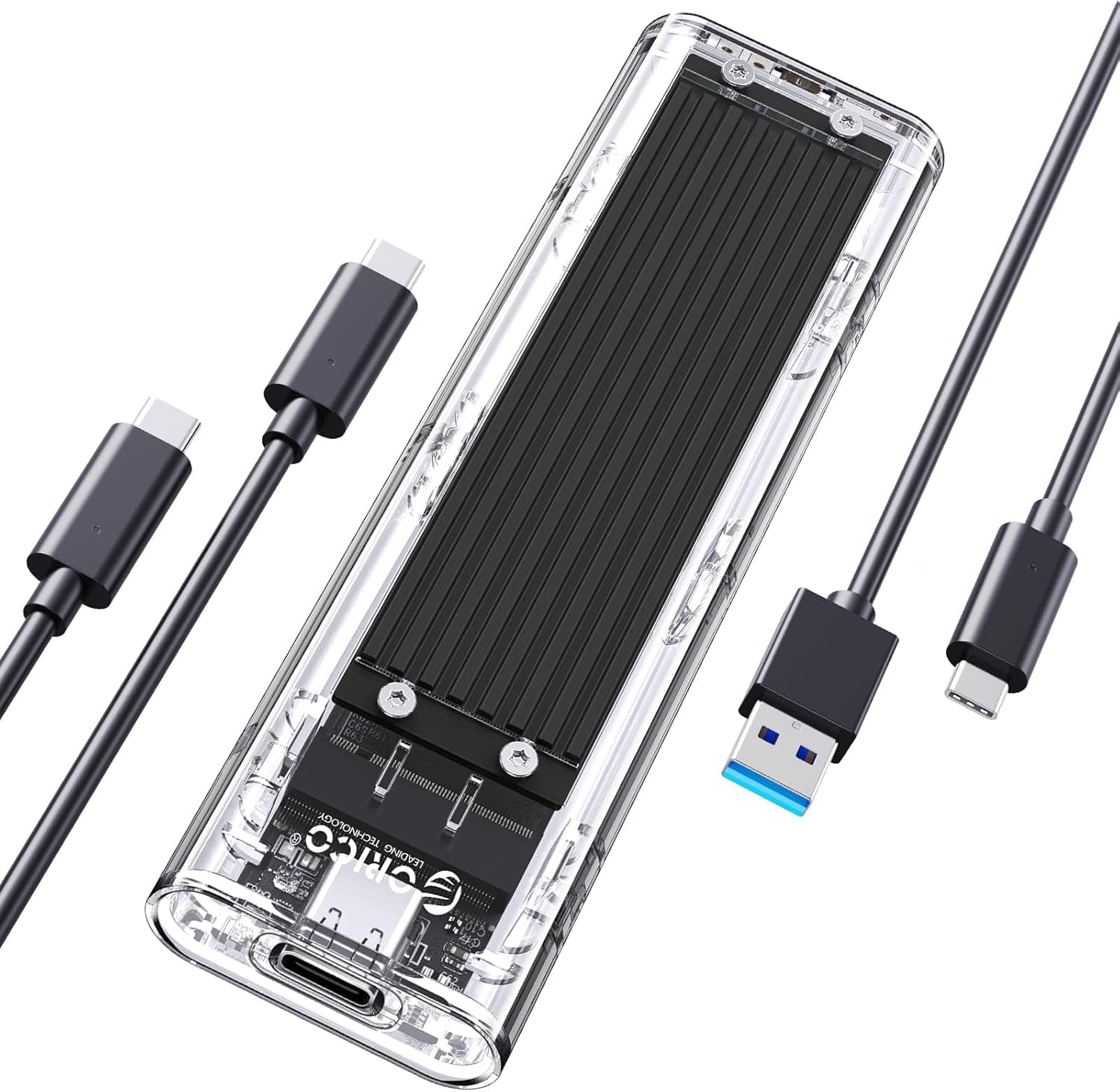
This article covers the ORICO AXM2 — Portable USB 3.2 Gen 2 NVMe SSD Enclosure, sold in Japan as ORICO M.2 NVMe SSD 外付けケース-AXM2.
It looks at compatibility, real-world speed, heat, and common setup mistakes.
Overview
The ORICO AXM2 is an external enclosure that turns an M.2 NVMe SSD into a portable USB Type-C drive.
It uses USB 3.2 Gen 2, rated at up to 10Gbps.
In short, it suits people who want to reuse a spare NVMe SSD cheaply or add storage to a laptop. It will not work for anyone whose drive is an M.2 SATA SSD.
The silver aluminum body is designed to shed heat through the metal case. It fits in the palm of your hand, and the SSD installs without tools.
Because it connects over USB Type-C, it works with recent laptops and desktops, OTG-capable phones and tablets, and game consoles.
On Amazon.co.Check the retailer's page for the latest user reviews.
If you are shopping for a low-cost NVMe enclosure, it belongs on your shortlist.
Compatibility Guide
The most common mistake with the AXM2 is a drive that fits but is not recognized. Before buying, check that your SSD and your host device match the table below.
| Item | AXM2 support |
|---|---|
| SSD protocol | NVMe PCIe only (M.2 SATA not supported) |
| SSD key | M Key / B&M Key |
| SSD length | 2230 / 2242 / 2260 / 2280 |
| Connector | USB Type-C (USB 3.2 Gen 2, up to 10Gbps) |
| Power | Bus-powered (no external adapter) |
| Platforms | Windows / macOS / Linux / ChromeOS, OTG-capable Android and iOS devices, PlayStation, Xbox |
Telling NVMe from SATA
M.2 SSDs come in two types that look almost identical: NVMe (PCIe) and SATA.
Drives with two notches (B&M Key) are usually SATA, and drives with one notch (M Key) are usually NVMe, but there are exceptions. The reliable check is to search the model number and confirm that the spec sheet says NVMe or PCIe.
A B&M-key SATA SSD will physically fit into the AXM2, so a drive that fits is not necessarily supported.
Your USB port sets the speed
You only get 10Gbps when the host port supports USB 3.2 Gen 2 (10Gbps) or higher.
A USB 3.2 Gen 1 (5Gbps) port roughly halves the ceiling, and a USB 2.0 port is far slower.
On Thunderbolt 3/4 or USB4 ports, the enclosure still runs at its own 10Gbps limit. Check the label next to the port, or your motherboard or laptop spec sheet, to see which ports support 10Gbps.
Using it with consoles
The enclosure works as USB extended storage on PlayStation 5 and Xbox Series X/S. On PS5, however, you can store PS5 titles on USB storage but cannot launch them from it.
The main use is running PS4 titles or keeping games in storage. On Xbox Series X/S, titles optimized for Series X|S normally cannot be played from external USB drives either.
It is a handy place to keep games, but it does not replace internal storage.
Real-World Speed and Heat
10Gbps works out to about 1,250MB/s in theory. Protocol overhead takes part of that, so USB 3.2 Gen 2 enclosures typically top out around 1,000MB/s for both reads and writes.
A PCIe 4.0 or 5.0 drive that does several thousand MB/s internally will still stop at that ceiling inside this enclosure.
That means you don't need an expensive latest-generation SSD for the AXM2. A PCIe 3.0 drive or a low-power PCIe 4.0 drive is actually a better fit.
High-end PCIe 4.0 drives run hot, and a small enclosure lets their temperature climb quickly.
The aluminum shell moves heat outward, but there is no fan. During sustained writes of tens of gigabytes, the case can get quite hot.
That is normal for metal enclosures. For long transfers, keep it somewhere with good airflow, such as on a desk, and not on fabric or inside a bag.
Setup Steps
Look up the model number and confirm the SSD is NVMe (PCIe).
Open the case, insert the SSD into the M.2 slot at an angle, press it down, and secure it with the included retainer.
Fix shorter 2230 or 2242 drives at the position that matches their length. 3.
Close the case and connect it with the included USB-C to C or USB-C to A cable. 4.
A brand-new SSD will not appear in File Explorer or Finder. On Windows, initialize it and create a partition in Disk Management.
On macOS, erase (format) it in Disk Utility. 5.
Format as exFAT to share the drive between Windows and Mac. For consoles, format it with the console's own setup tool.
Many people assume the drive is dead because they skipped step 4. If nothing appears, first check whether the drive shows up in your disk management tool.
Product Info
rmation
Key specifications of the ORICO AXM2:
| Item | Detail |
|---|---|
| Manufacturer | ORICO |
| Interface | USB 3.2 Gen 2 (USB Type-C), up to 10Gbps |
| Supported SSDs | M.2 2230 / 2242 / 2260 / 2280 NVMe PCIe (M Key / B&M Key) |
| Weight | 150 g |
| Color | Silver |
As of September 1, 2026, it was listed at ¥1,739 on Amazon.co.jp, which is very low for an NVMe enclosure.
Prices change with sales and stock, so check the product page for the current price before buying. The manufacturer's stated warranty is 18 months, but terms can vary by retailer, so confirm that on the product page as well.
The package is listed as including a USB-C to A cable, a USB-C to C cable, silicone grommets (retainers), screws, and a manual. With both cables in the box, you can use it right away with an older desktop that only has USB-A ports or with a USB-C laptop.
Contents can change between production batches, so check the listing if this matters to you.
It sits in the entry-level to mid-range tier. Its speed ceiling is below 20Gbps (USB 3.2 Gen 2x2) and USB4 enclosures, but it is fast enough for everyday backups and carrying data around.
Comparison with Alternatives
A common question is whether to buy an enclosure like the AXM2 and add your own SSD, or buy a finished portable SSD.
| Aspect | Enclosure + your SSD (e.g. AXM2) | Finished portable SSD |
|---|---|---|
| Upfront cost | Just the enclosure if you have a spare SSD | Price includes the SSD |
| Capacity | Any capacity you choose | Limited to the product lineup |
| Assembly | Required (a few minutes) | None |
| Warranty | Separate for enclosure and SSD | One warranty for the whole unit |
An enclosure makes sense if you already own an NVMe SSD or want to pick the capacity yourself. If you would need to buy an SSD anyway, want to skip assembly and initialization, or want one warranty covering everything, a finished portable SSD is the better choice.
Enclosures in the same price range perform similarly, so review count, rating, and bundled cables are the practical tiebreakers.
Recommended Users
- Laptop owners who need more storage: Even thin laptops whose internal SSD is hard to replace can gain capacity over USB. It is fast enough for data storage and as an install location for apps.
- Creators who move large files: It works well for photo and video backups and for carrying project files. On a 10Gbps port, even multi-gigabyte video files transfer quickly.
- Console players who want external storage: Connect it to a PS5 or Xbox Series X/S to run older-generation titles or store games.
- PC builders with a spare M.2 SSD: After upgrading your internal drive, you can reuse the old SSD as a portable or backup drive.
Before You Buy
M.2 SATA SSDs will not work. This is the most common mistake.
B&M-key SATA drives fit physically, so some people only learn they are unsupported when the drive is not recognized. Check your SSD's protocol before buying.
10Gbps is the ceiling only on a supporting port. Older USB 3.0 (5Gbps) or USB 2.0 ports cannot use the enclosure's full speed.
Real-world speed is also around 1,000MB/s, so expect less than an internal NVMe drive.
A faster SSD will not make it faster. A high-end PCIe 4.0/5.0 drive is still capped by USB and only adds heat.
If you are buying an SSD for this enclosure, a PCIe 3.0 or low-power drive is enough.
Watch for power limits on phones and tablets. The enclosure is bus-powered, so depending on how much power the host can supply, a power-hungry SSD may not be detected or may disconnect partway through a transfer.
A low-power SSD tends to be more stable on phones.
Always eject before unplugging. Pulling the cable during a write can corrupt data.
Use the eject option in Windows or macOS before you unplug.
Who should skip it: If you write tens of gigabytes of video every day and always want maximum speed, a higher-tier enclosure with a faster standard is a better fit. If you would also need to buy an SSD and want to avoid assembly, a finished portable SSD will likely satisfy you more overall.
FAQ
Q. Can I use an M.2 SATA SSD? A.
No. The AXM2 is NVMe (PCIe) only.
For a SATA drive, choose an enclosure that supports SATA or supports both NVMe and SATA.
Q. I installed the SSD, but my PC doesn't show it. A.
A new SSD needs to be initialized and formatted. Check whether the drive appears in Disk Management on Windows or Disk Utility on macOS.
If it doesn't appear there either, confirm the drive is not SATA and that it is fully seated in the slot.
Q. Does a 2230 SSD fit?
A. Yes. The spec lists 2230 / 2242 / 2260 / 2280.
Q. Does it work with PS5? A.
Yes, as USB extended storage. PS5 titles cannot be launched from USB storage, so it is mainly for running PS4 titles and storing games.
Q. Can I use it on both Mac and Windows?
A. Yes. Format it as exFAT to read and write on both.
Product Disclosure (Amazon)
- Manufacturer: ORICO
- ASIN: B0CXXKNZTC
- Note: This article covers a manufacturer-made product based on Amazon listing details.