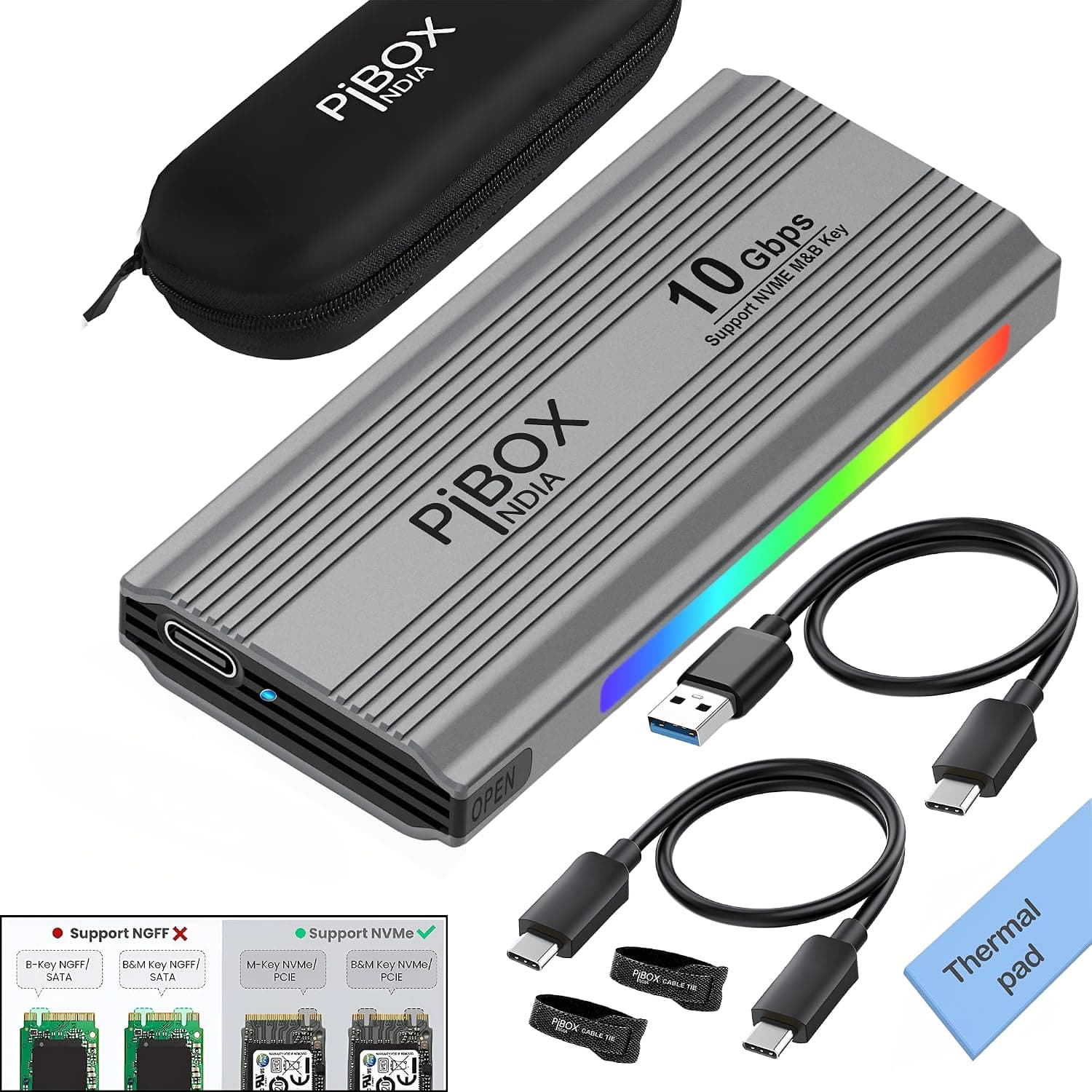
This article takes a close look at the PiBOX India — Tool-Free USB-C Enclosure for M.2 NVMe SSDs, listed on Amazon Japan as NVME M2 LEDエンクロージャ.
The focus is on two questions: will your SSD actually work in it, and where do you have to compromise?
Overview
The short answer: this is a solid entry-to-mid-range enclosure for people who want to turn a spare NVMe M.2 SSD into a USB 3.2 Gen 2 (10Gbps) external drive for little money.
It uses the Realtek RTL9210 bridge chip and has a theoretical limit of 10Gbps. With a compatible SSD and port, you can expect real-world speeds of around 900MB/s.
The aluminum alloy body works as a heatsink, an LED indicator shows drive status, and you can install the SSD without tools.
It also has two clear limits. SATA-based M.2 SSDs won't work, and it can't go faster than 10Gbps.
A PCIe 4.0 or 5.0 drive inside still tops out at the USB link speed.
So don't expect internal-SSD speed. Think of it as a portable drive that is dramatically faster than a USB stick or external hard drive.
Check the retailer's page for the latest user reviews.
Compatibility Guide
Most failed purchases come from overlooking either the SSD type or the host port. Check them in this order.
SSD type: NVMe only, no SATA M.2
Only PCIe NVMe M.2 SSDs are supported.
SATA-based M.2 SSDs and AHCI-mode SSDs will not be recognized, even though they have the same shape.
As a rule of thumb, most NVMe drives have a single notch in the connector (M key), while drives with two notches (B+M key) are usually SATA. There are exceptions, so the final check is whether the SSD's product page explicitly says NVMe or PCIe.
Size and capacity
| Item | Supported |
|---|---|
| Length | 2230 / 2242 / 2260 / 2280 |
| Max capacity | 4TB |
| Protocol | NVMe PCIe only |
| Power | USB bus-powered (no external adapter) |
The maximum length is 2280, so 22110 drives will not fit. SSDs with a heatsink attached, such as models sold for the PS5 or desktop builds, are too thick.
Choose a drive without a heatsink, or only use one whose heatsink can be removed. The rated maximum capacity is 4TB.
Host port
To get 10Gbps, the host port must also be USB 3.2 Gen 2 (10Gbps) or faster.
On a USB 3.2 Gen 1 port (5Gbps, formerly called USB 3.0), real-world speed tops out at roughly the 400MB/s range.
The same applies when you use the included USB-C to A cable with an older PC, because most USB-A ports run at 5Gbps. On a USB 2.0 port, speed drops to around 40MB/s, which leaves almost no reason to use a fast NVMe drive.
The enclosure also works on Thunderbolt 3/4 and USB4 ports. However, it is a USB 3.2 Gen 2 device, so it stays at 10Gbps.
A faster port does not make it faster.
Operating systems
The listed supported operating systems are Windows 10/8/7/XP/Vista, macOS, Linux, and Chrome OS. The enclosure appears as standard USB storage, so you usually don't need to install a driver.
Windows XP and Vista have limits on drives larger than 2TB and on exFAT, so check capacity and format first if you plan to use an older OS. Windows 11 isn't on the official list, but it normally treats the enclosure as standard USB storage.
If you're unsure, check the current product listing.
Product Info
| Item | Detail |
|---|---|
| Interface | USB 3.2 Gen 2 Type-C |
| Max transfer speed | 10 Gbps (theoretical) |
| Chipset | Realtek RTL9210 |
| Supported SSD sizes | 2230 / 2242 / 2260 / 2280 |
| Max capacity | 4TB |
| Material | Aluminum alloy |
| LED indicator | Yes |
| Hot-swap | Supported |
| Tool-free | Yes |
| Included cables | USB-C to C, USB-C to A |
Check the retailer's page for the latest price. Prices change with sales and stock levels, so check the product page for the current price before you buy.
That is an affordable price for a 10Gbps NVMe enclosure, and an easy first pick if you have never bought one before.
The box includes a USB-C to C cable, a USB-C to A cable, a thermal pad, and a rubber retention band. With two cable types included, you can connect it to a new USB-C-only laptop or an older USB-A-only desktop without buying anything else.
We could not confirm the warranty length from the data used for this article. Check the product page or the seller's information before buying.
If you buy on Amazon, its standard return policy is a reasonable guide.
Setup and First-Use Pitfalls
Thanks to the tool-free design, installation takes only a few minutes.
- Check the SSD's product page to confirm it is an NVMe drive 2.
Slide open the back cover of the enclosure 3. Peel the film off the included thermal pad and apply it to the label side of the SSD (the side with the chips) 4.
Insert the SSD into the connector at an angle, push it all the way in, lay it flat, and secure it with the rubber band 5. Close the cover and connect the cable to your computer
A common surprise is a brand-new SSD that doesn't show up at all. The drive isn't faulty.
A new SSD simply hasn't been initialized or formatted yet. On Windows, open Disk Management, initialize the disk (choose GPT for drives over 2TB), then create and format a new volume.
On macOS, erase (format) the drive in Disk Utility. If you need to read and write the drive on both Windows and Mac, exFAT is the safe choice.
How It Compares
Shoppers looking at this enclosure usually weigh it against two alternatives: a ready-made portable SSD and a Thunderbolt external SSD.
| Option | Best for | Trade-offs |
|---|---|---|
| This enclosure + your own SSD | Reusing a spare NVMe SSD, choosing your own capacity | No SATA M.2, 10Gbps limit, you install the drive yourself |
| Ready-made portable SSD | Skipping assembly, one warranty for the whole unit | You can't choose the internal SSD or reuse a spare one |
| Thunderbolt external SSD | Maximum speed on a Thunderbolt-equipped PC | Expensive; may run slower or not work at all without Thunderbolt |
If you already have a spare NVMe SSD, the price of this enclosure is all you pay for a fast external drive, which makes it cheaper than a ready-made unit. If you need to buy an SSD too, compare the combined cost with a ready-made portable SSD.
The finished product sometimes works out better once you count convenience and warranty. When comparing similar M.2 enclosures, the clearest differences are the bridge chip model, whether SATA M.2 is supported, and whether it installs without tools.
Best Use Cases
- People with a leftover NVMe SSD after a capacity upgrade: This gives the best value. An unused drive becomes a fast external disk.
- Laptop users who need more storage: Even if the laptop's SSD is soldered and can't be replaced, a single USB-C cable adds fast extra storage.
- Creators who move large files often: For video projects and RAW photo libraries, it cuts waiting time sharply compared with a USB 3.0 hard drive.
- PC gamers who want an external game library: You can install Steam or Epic Games titles on it and play from it. Load times are a little longer than on an internal NVMe drive but clearly faster than on a hard drive.
- People who switch between Windows, macOS, and Linux: It supports a wide range of operating systems, and with exFAT one drive can move between all of them.
It's not for people who want multi-GB/s internal-class speed from an external drive, or who want to reuse a SATA M.2 SSD.
The first group should look at Thunderbolt or USB4 products, and the second at an enclosure that also supports SATA.
Before You Buy
The most common mistake is installing a SATA M.2 SSD. It fits physically because the shape is the same, but it won't be recognized.
M.2 drives pulled from older laptops are often SATA, so always check the type.
An expensive SSD won't make it faster. The cap is 10Gbps, with roughly 900MB/s as a real-world guide, so most of a high-end PCIe 4.0 drive's performance goes unused.
If you're buying a drive just for this enclosure, an affordable PCIe 3.0 model will often reach the cap.
Spending the savings on more capacity is the smarter move.
Heat can reduce speed. The aluminum body helps dissipate heat, but during long writes of tens of gigabytes the enclosure gets warm, and the SSD or bridge chip may slow down to protect itself.
Always fit the included thermal pad, and don't leave the enclosure on fabric or in an enclosed space.
Unstable power can cause disconnects. The enclosure runs on USB bus power.
A power-hungry SSD on a weak USB port or a bus-powered hub can disconnect mid-transfer or fail to appear. If it's unstable, first try a port directly on the computer.
Hot-swap support doesn't mean you can skip ejecting. Pulling the cable during a write can corrupt your data.
Make a habit of using your OS's safe removal or eject function before unplugging.
The product listing has some inconsistencies. In the collected product data, the listing is on Amazon Japan (ASIN B0DBSRB8TS), yet the seller and shipper are shown as Amazon US.
The name NVME M2 LEDエンクロージャ is also generic, so similar products from other brands may appear with nearly the same name. When buying, check the product images, brand name, and ASIN to make sure it is this PiBOX India enclosure.
The brand name itself appears as both PiBOX India and pibox India.
Keep in mind that the warranty length could not be confirmed. Don't use this drive as the only copy of important data.
Keep another copy on a second drive or in the cloud.
FAQ
Q. Can I use a SATA M.2 SSD?
A. SATA-based or AHCI-mode drives will not be recognized.
Q. Will a heatsink-equipped PS5 SSD fit? A.
Not with the heatsink attached, because it is too thick. If the heatsink is removable, take it off and use the included thermal pad instead.
Q. Will a PCIe 4.0 SSD make it faster? A.
No. The cap is set by USB 3.2 Gen 2 at 10Gbps, with about 900MB/s as a real-world guide.
A PCIe 3.0 SSD often gets close to that limit.
Q. Does it work on a PC that only has USB-A ports? A.
Yes, with the included USB-C to A cable. However, if the USB-A port is limited to 5Gbps, expect roughly half the speed.
Q. Does it work with a Mac?
A. Yes, macOS is supported. Use APFS if you only use it on Macs, or exFAT if you share it with Windows.
Product Disclosure (Amazon)
- Manufacturer: pibox India
- Seller: Amazon US
- Fulfilled by: Amazon US
- ASIN: B0DBSRB8TS
- Note: This article covers a manufacturer-made product based on Amazon listing details.