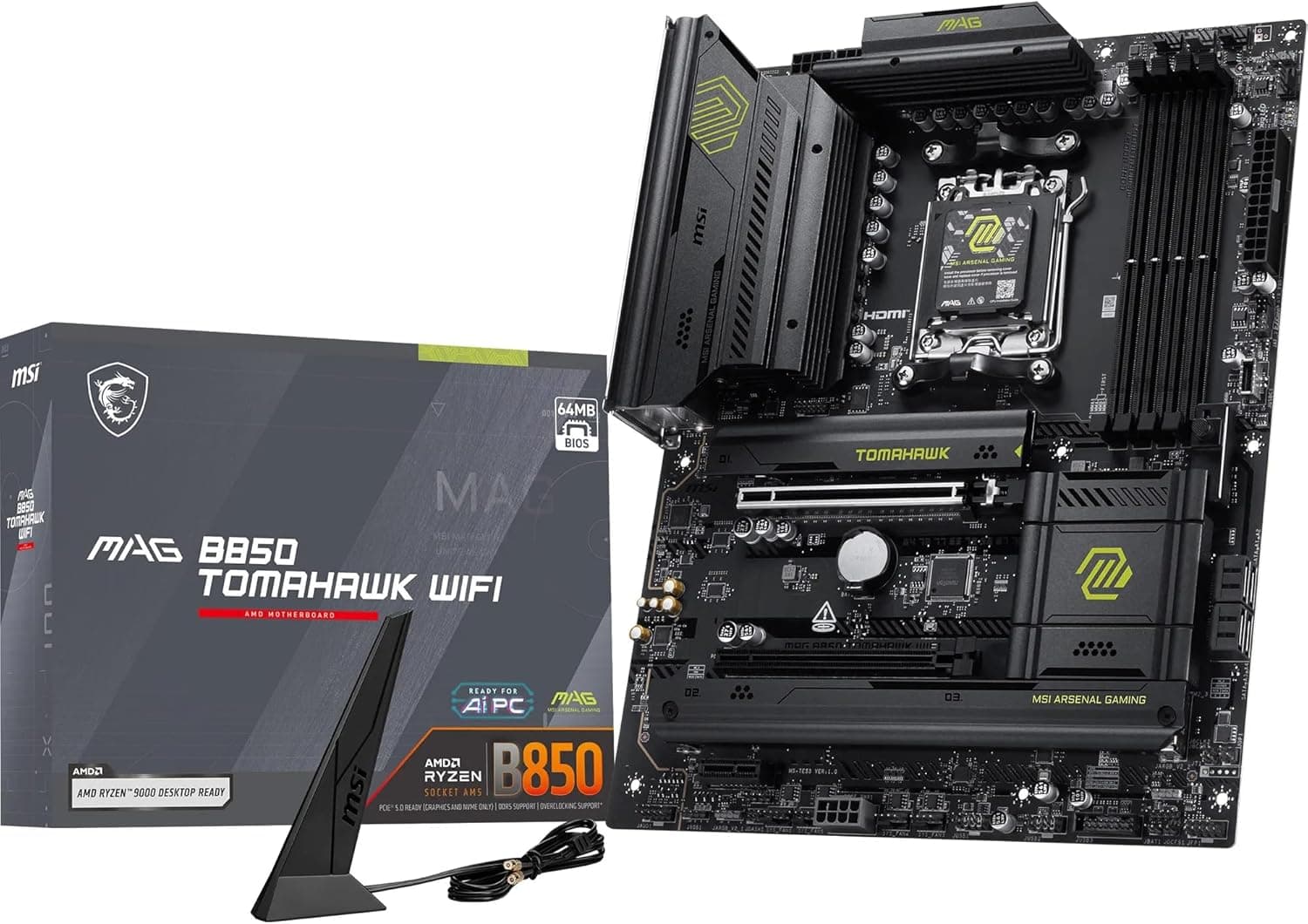
This article covers MSI MAG B850 TOMAHAWK WIFIマザーボード.
Overview
MSI's MAG B850 TOMAHAWK WIFI is an ATX motherboard built on the AMD B850 chipset, supporting Ryzen 9000, 8000, and 7000 series processors. Its standout feature is a 14-phase 80A SPS VRM that delivers stable power even under heavy loads, making it an excellent foundation for high-performance gaming or content creation. DDR5 memory support reaches up to 8200+ MT/s (OC), and the board comes with a PCIe 5.0 x16 slot plus a Gen5 M.2 slot, ensuring compatibility with the latest graphics cards and super-fast SSDs. For connectivity, you get Wi-Fi 7, Bluetooth 5.4, and a Realtek 5G LAN port, covering both wireless and wired high-speed networking. The rear I/O includes a USB 20Gbps Type-C port, and the onboard audio uses Audio Boost 5 with 7.1-channel output and S/PDIF. Overall, this board strikes a great balance between features and price for a mid-to-high-end AM5 build. Market positioning is upper-mid-range. While the B850 chipset is technically a tier below X870, the VRM, expansion, and networking on this board rival many X870 models. It's ideal for users who want high-end capabilities without paying a premium for features they may not need.
Compatibility Guide
CPU socket: AM5 (LGA 1718) – compatible with Ryzen 9000, 8000, and 7000 series. From Ryzen 5 7600 to Ryzen 9 9950X, all fit. Memory: 4x DDR5 DIMM slots, max 192GB (48GB per DIMM). Supports EXPO profiles for easy overclocking on Ryzen. Form factor: ATX (305mm x 244mm) – fits standard mid-tower cases. Check clearance for large CPU coolers and long GPUs. Expansion slots: 1x PCIe 5.0 x16 (Steel Armor II reinforced), 1x PCIe 3.0 x4, 1x PCIe 3.0 x1. Multi-GPU not supported. Storage: 1x M.2 Gen5 x4 (128Gbps), 2x M.2 Gen4 x4 (64Gbps), 4x SATA 6Gbps. Mix high-speed NVMe and HDDs freely. Power: CPU 8+4 pin EPS, main 24-pin ATX. Recommended PSU: 750W-850W for Ryzen 9 + high-end GPU.
Product Info
The MSI MAG B850 TOMAHAWK WIFI launched in late 2025. Street price is around ¥55,000–¥60,000 (approx. $380–$420 USD), which is reasonable given the VRM and feature set. It sits in the upper-mid-range segment: the B850 chipset keeps costs down, but the board packs 14-phase 80A SPS VRM, PCIe 5.0, Gen5 M.2, and Wi-Fi 7 — features often found on pricier X870 boards.
Best Use Cases
High-end gaming with Ryzen 9000: Pair with a Ryzen 7 9800X3D or Ryzen 9 9950X; the robust VRM handles peak loads without throttling. The PCIe 5.0 x16 slot is ready for RTX 50-series or next-gen GPUs. Fast storage enthusiasts: With one Gen5 and two Gen4 M.2 slots, you can run a blazing-fast OS drive and multiple game libraries without compromise. Wi-Fi 7 early adopters: Built-in Wi-Fi 7 module eliminates the need for a separate wireless card, delivering lag-free multiplayer and fast downloads. Who should skip this: If you need USB4 or Thunderbolt 4, step up to X870/X870E. Budget builders may prefer a cheaper B650 board.
Things to Consider
No USB4 (40Gbps) support – B850 chipset lacks this. If you rely on high-speed external storage or docking stations, consider X870. Single PCIe 5.0 x16 slot only – no multi-GPU support for NVLink or SLI. For virtualization with multiple GPUs, look at X670E/X870E. Only one M.2 Gen5 slot – the other two M.2 slots are Gen4. If you need two Gen5 SSDs simultaneously, an X870 board offers more lanes. DDR5 overclocking to 8200+ MT/s depends on CPU memory controller quality and the specific memory kit. For guaranteed stability, 6000–6400 MT/s kits are a safer bet. * The VRM heatsink is quite large; some oversized air coolers may have clearance issues. Check cooler dimensions before purchasing. ## FAQ
Q: Can I use a Ryzen 7 7800X3D with this board? A: Yes, it's fully compatible. The board supports all AM5 Ryzen 7000, 8000, and 9000 CPUs. If you need a BIOS update, the Flash BIOS Button lets you update without a CPU installed. Q: Does this motherboard support DDR4 memory? A: No, only DDR5 is supported. DDR4 modules physically cannot be inserted. Make sure you have DDR5 RAM before building. Q: What's the real difference between B850 and X870? A: The main difference is USB4 support (X870 has it, B850 doesn't). X870 also offers slightly more PCIe lanes, but for most gamers and creators, the B850 TOMAHAWK provides ample performance at a lower price. If you don't need USB4, this board is an excellent choice.
Product Disclosure (Amazon)
- Manufacturer: MSI
- Seller: Amazon US
- Fulfilled by: Amazon US
- ASIN: B0FXHHTDW3
- Note: This article covers a manufacturer-made product based on Amazon listing details.