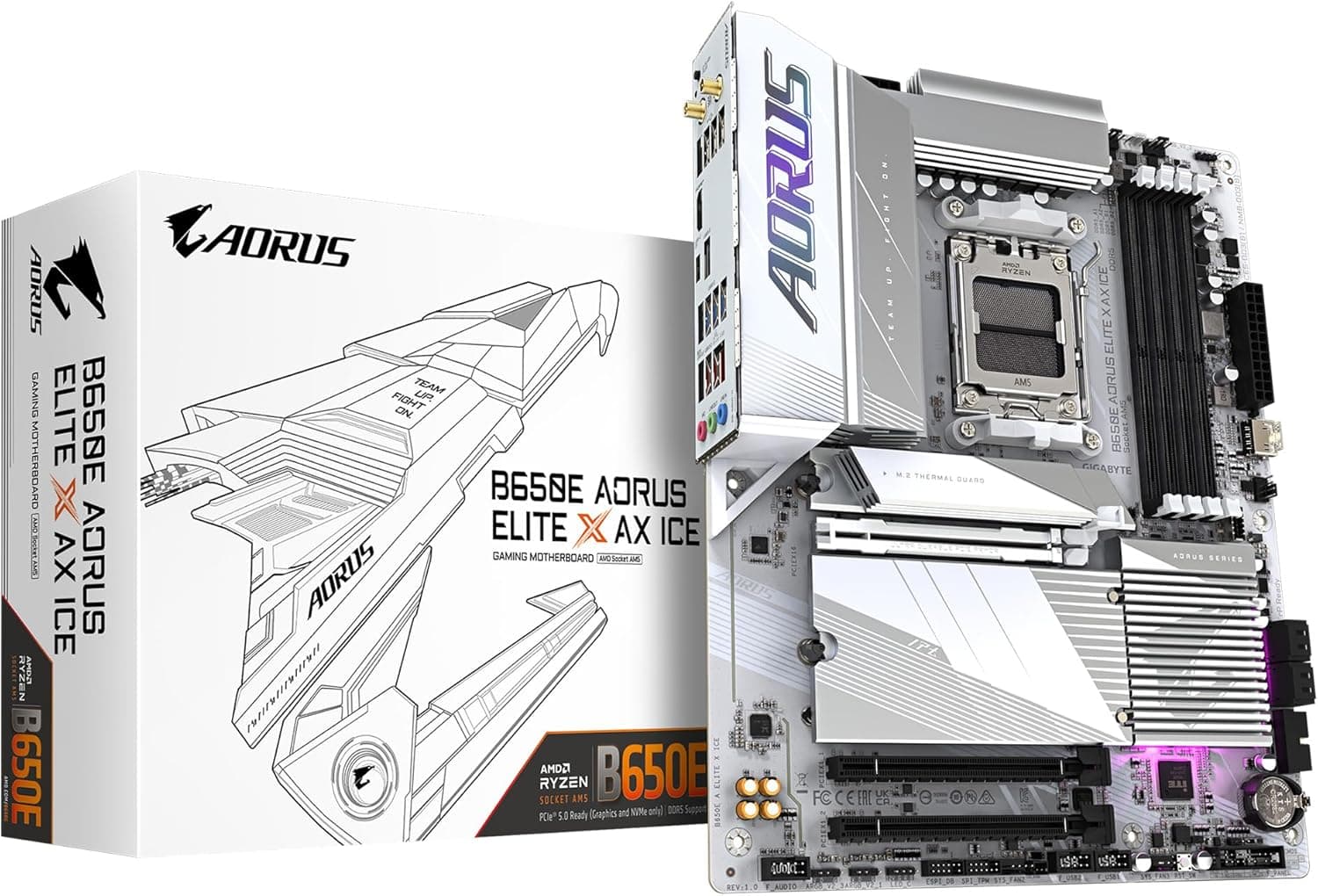
GIGABYTE B650E AORUS ELITE X AX ICE AMD Ryzen 8000 is a Socket AM5 ATX motherboard with a white-and-silver board and heatsinks. Using the numbers in the spec sheet, this article covers which features you get with which CPU and where buyers most often run into trouble.
Overview
The GIGABYTE B650E AORUS ELITE X AX ICE is an AM5 ATX motherboard for AMD Ryzen 8000 and 7000 series processors. It is a well-balanced mid-to-high-tier board for people who want a white Ryzen build. The catch is that whether PCIe 5.0 or USB4 is actually usable depends on your CPU generation, and you should understand that before buying.
The headline feature is the look. The PCB and heatsinks are both white and silver, so a dark board won't spoil a white case with a glass side panel.
The motherboard's PCB color is usually the hardest part of a white build to get right, so how much you value this board depends mostly on how much that matters to you.
On the feature side, the B650E chipset gives it one PCIe 5.0 x16 slot and one PCIe 5.0 M.2 slot.
It has four DDR5 slots supporting up to 192GB, a rear USB4 Type-C port rated for up to 40Gbps, 2.5GbE wired LAN, and Wi-Fi 6E.
The 12+2+2 phase VRM (60A Dr.MOS) is a generous power design for a B650E board in this price range.
Compatibility Guide
CPU: Ryzen 7000 and Ryzen 8000G unlock different features
The board only takes AM5 CPUs, so AM4 chips like the Ryzen 5000 series won't fit.
| Item | Ryzen 7000 series | Ryzen 8000G series |
|---|---|---|
| PCIe x16 slot (CPU) | Runs at PCIe 5.0 | Runs at PCIe 4.0 |
| PCIe 5.0 M.2 slot | Runs at PCIe 5.0 | Runs at PCIe 4.0 |
| Rear USB4 (40Gbps) | Not supported per compatibility note | Enabled (check per model) |
| Integrated graphics | Basic display output | Strong Radeon 700M-class iGPU |
Ryzen 8000G CPUs only support up to PCIe 4.0, so with one of them installed the board's PCIe 5.0 slots run at Gen4.
Meanwhile, the compatibility note in our data says USB4 only works with Ryzen 8000 series CPUs. In practice, **you need a Ryzen 7000 for PCIe 5.0 and a Ryzen 8000G for USB4.
Lower-end Ryzen 8000G models also have fewer PCIe lanes, which can change how the M.2 and x16 slots behave.
Whether you use one of those or a newer AM5 CPU such as the Ryzen 9000 series, check GIGABYTE's CPU support list for the required BIOS version and look up the lane-sharing table in the manual.
Memory: DDR5 only, and four sticks run slower
The board takes DDR5 only; DDR4 won't work. It has four slots and supports up to 192GB.
EXPO and XMP 3.0 profiles are supported, so overclocked memory can be set up by loading a profile in the BIOS.
The memory speed on the spec sheet is a ceiling, not what you should expect. Across the AM5 platform, running four DIMMs sharply lowers the speed you can run stably.
If you want fast memory, two sticks is the default choice. If you need 64GB or 96GB, two high-capacity modules will usually run faster than four smaller ones.
Expansion slots and storage
The board has three x16-sized slots. One is a CPU-connected PCIe 5.0 x16 slot.
The other two run through the chipset at PCIe 3.0 and are x16 in size only. They have far fewer electrical lanes, so they are not a good fit for a second graphics card or a bandwidth-heavy capture card.
Check the lane widths in the manual before deciding what goes where.
There are three M.2 slots: one PCIe 5.0 x4 and two PCIe 4.0 x4.
With four SATA 6Gbps ports as well, you can run three NVMe drives alongside SATA SSDs or HDDs. There is only one PCIe 5.0 M.2 slot, so if you plan to run two Gen5 SSDs, look elsewhere.
Power and case
Power connectors are 24-pin ATX plus one 8-pin and one 4-pin EPS for the CPU. Make sure your PSU has two CPU power cables.
The recommended PSU is 650W or more, but for a Ryzen 9 paired with a high-end graphics card, 750W to 850W is a safer target.
The board is standard ATX (305×244mm), so it fits most mid-tower or larger ATX cases. White builds often use pillarless or large showcase-style cases, though, and cable-routing holes or cable lengths may not line up.
To use the front USB 3.2 Gen2x2 Type-C port (20Gbps), your case also needs a matching front-panel connector.
Product Info
rmation
| Item | Detail |
|---|---|
| Chipset | AMD B650E |
| Socket | AM5 |
| Form factor | ATX |
| Memory | 4× DDR5 DIMM, up to 192GB |
| PCIe x16 slots | 1× PCIe 5.0 x16, 2× PCIe 3.0 x16 (shape) |
| M.2 | 3 (1× PCIe 5.0, 2× PCIe 4.0) |
| SATA | 4× 6Gbps |
| Rear USB | 1× USB4 Type-C (40Gbps), 2× USB 3.2 Gen2 Type-A, 5× USB 3.2 Gen1 |
| Networking | 2.5GbE LAN, Wi-Fi 6E |
| VRM | 12+2+2 phase (60A Dr.MOS) |
| BIOS update | Q-Flash Plus |
The board came out in early 2024, timed with the launch of the Ryzen 8000G series. On Amazon.co.jp it was ¥39,991 as of June 4, 2026.
Motherboard prices move a lot with sales and stock, so check the product page for the current price before you buy. There are also overseas marketplace listings, but prices and item condition vary widely by seller, so they don't compare directly with Japanese retail prices.
Amazon.co.Check the retailer's page for the latest user reviews.
Opinion on the board isn't sharply divided. Motherboard reviews do tend to be swayed by dead-on-arrival units and BIOS-update hassles, though, so don't judge by the star rating alone.
B650E sits above plain B650 and supports PCIe 5.0 for both the graphics slot and M.2 storage.
The main difference from X670E is how much extra expansion runs through the chipset. This board targets buyers who want PCIe 5.0 and a white look without needing X670E-level expansion.
Alternatives
When comparing AM5 boards in this price range, three points from the spec sheets make the differences clear:
- PCB color: Lots of boards have white heatsinks, but few have a white PCB. Some boards, such as the ASUS ROG STRIX B650-A GAMING WIFI, use light-colored heatsinks, so check product photos for the actual PCB color.
- PCIe 5.0 coverage: Plain B650 boards often limit M.2 to PCIe 4.0. If you're comparing against a black mainstream pick like the MSI MAG B650 TOMAHAWK WIFI, it comes down to whether you plan to use a Gen5 SSD.
- USB4: A rear USB4 port is useful for fast external SSDs and docks, but as noted above, whether it works depends on your CPU.
If looks don't matter to you and you won't use a Gen5 SSD or USB4, a cheaper AM5 B650 board is enough.
Who It's For
- White PC builders: The white PCB keeps the look consistent behind a glass side panel. This is the main reason to buy this board.
- Ryzen 7 / Ryzen 9 gaming builds: You get a 12+2+2 phase VRM and a CPU-connected PCIe 5.0 x16 slot. Paired with a Ryzen 7000, it leaves room for future graphics card upgrades.
- Ryzen 8000G builds using integrated graphics, such as compact gaming PCs or creator machines: This is the pairing that makes USB4 work, which suits external SSDs and USB4 docks.
- People who need both wired and wireless networking: 2.5GbE and Wi-Fi 6E come built in, so you don't need a separate network card.
Things to Check Before Buying
You can't get both PCIe 5.0 and USB4 at once. A Ryzen 7000 enables PCIe 5.0, but the compatibility note says USB4 isn't supported with it.
A Ryzen 8000G enables USB4, but its CPU limits PCIe to 4.0.
If you buy expecting both features because both are on the spec sheet, you'll be disappointed. Decide which one your build needs first.
You may need a BIOS update. The factory BIOS may not recognize newer CPUs.
The board supports Q-Flash Plus, which updates the BIOS from a USB drive with no CPU installed. It's still worth having the latest BIOS ready before you build.
On first boot, AM5 systems can take a while to show anything on screen while memory training runs, so don't assume the board is dead right away.
Watch where the graphics card sits over the M.2 slots. A large graphics card can cover the M.2 slot below it and make SSD swaps awkward.
Gen5 SSDs also run hot, so check that the board's M.2 heatsink won't collide with a heatsink already fitted to the SSD, and check the thickness of both.
Check the seller and warranty. When the data was collected, the Amazon listing was sold and shipped by a third-party retailer (ジュリア本店), not by the manufacturer.
Warranty contacts and periods differ by retailer and distributor, so confirm them before you buy. That way you won't be scrambling if the board turns out to be defective.
It isn't for everyone. If you want multiple Gen5 SSDs, two graphics cards, or a lot of chipset-connected expansion, an X670E board is a better fit.
And if a white look doesn't matter to you, black boards offer the same features for less. Some people worry that white PCBs yellow over time, but in a normal indoor environment that's unlikely to be a real problem.
FAQ
Q. Can I use a Ryzen 5000 (AM4) CPU? A.
No. The board only takes AM5 CPUs and DDR5 memory.
Moving from AM4 means replacing the CPU, motherboard, and memory together.
Q. Will a PCIe 5.0 SSD run at full speed with a Ryzen 8000G? A.
No. Ryzen 8000G CPUs only support up to PCIe 4.0, so a Gen5 SSD will run at Gen4 speeds.
For full Gen5 speed, pair the board with a CPU such as a Ryzen 7000.
Q. Does the rear USB4 port work with a Ryzen 7000? A.
The compatibility note says USB4 only works with Ryzen 8000 series CPUs. With a Ryzen 7000, plan on not having 40Gbps USB4, and check GIGABYTE's product page for the exact conditions.
Q. How big a power supply do I need? A.
650W or more is recommended. For a Ryzen 9 with a high-end graphics card, aim for 750W to 850W.
The CPU also needs both an 8-pin and a 4-pin power connector.
Q. How many memory sticks should I use? A.
For speed, two is the default. Four sticks tend to lower the speed you can run stably, so if you need a lot of memory, go with two high-capacity modules.
Product Disclosure (Amazon)
- Manufacturer: GIGABYTE
- Seller: ジュリア本店
- Fulfilled by: ジュリア本店
- ASIN: B0CTNXBRJV
- Note: This article covers a manufacturer-made product based on Amazon listing details.