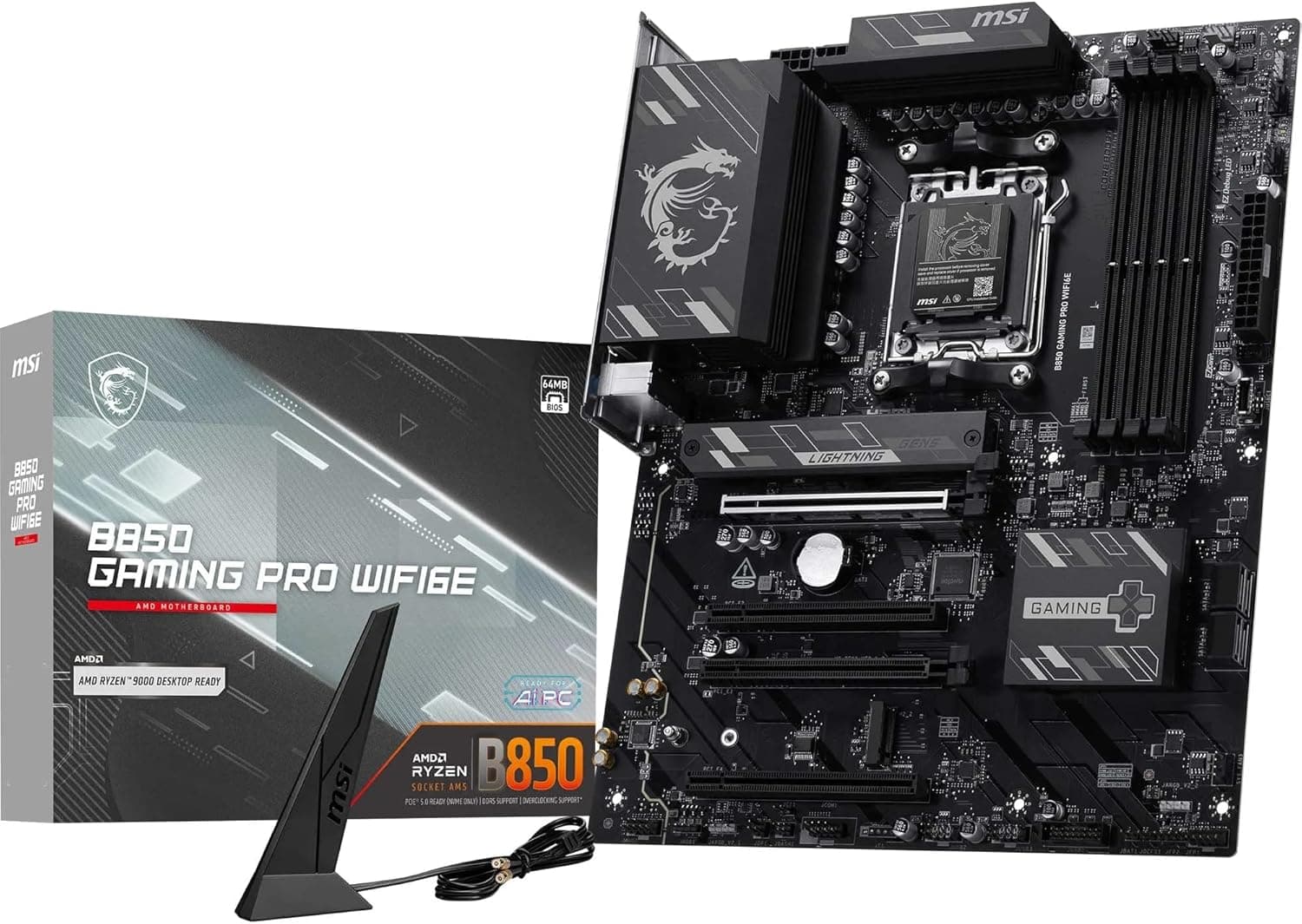
The MSI B850 Gaming PRO WIFI6E マザーボード is a Socket AM5, ATX motherboard built on the AMD B850 chipset. Rather than listing specifications, this article focuses on whether it fits your build and what you are choosing to give up.
Overview
The short version: this board is tuned for the most common build shape there is — one Ryzen 7 or Ryzen 9 CPU, one graphics card, two NVMe SSDs. It carries a 12+2+1 phase VRM with 55A DrMOS, four DDR5 slots (up to 192 GB, 8200+ MT/s when overclocked), one M.2 Gen5 x4 slot and one M.2 Gen4 x4 slot, plus 2.5GbE wired networking, Wi-Fi 6E and Bluetooth 5.3.
Almost nothing a mainstream gaming PC needs has been cut.
What it is not built for is equally clear. If you want two or more Gen5 SSDs, USB4 or Thunderbolt external storage, or two usable x16 slots, look at a higher-tier chipset instead.
B850 is not a board that raises your ceiling; it is a board that avoids removing what you actually use.
The Amazon.co.Check the retailer's page for the latest user reviews.
That is a perfect score, but nine reviews is far too small a sample to tell you anything about defect rates or long-term stability. Judge it by the fit with your parts list, not by the average.
At a Glance
| Intended build | Fit | Why |
|---|---|---|
| Ryzen 5 / 7 with a single GPU, gaming | Excellent | VRM headroom to spare, no missing features |
| Ryzen 9 for video editing / 3D | Good | Power delivery is sufficient; plan case airflow |
| Two or more Gen5 SSDs | No | Only one Gen5 M.2 slot |
| USB4 / Thunderbolt workflows | No | Not supported; rear Type-C tops out at 10Gbps |
| Four memory sticks at high clocks | Limited | Filling all four slots usually forces lower speeds |
"No" here does not mean slow, it means the feature is absent. Conversely, if you fall into the first two rows, a more expensive board is unlikely to feel different in daily use.
The money saved is better spent on the graphics card or on SSD capacity.
Compatibility Guide
CPU — AM5 only, supporting Ryzen 9000, 8000 and 7000 series desktop processors. AM4 chips (Ryzen 5000 and earlier) will not physically fit, so budget for CPU, memory and board together if you are coming from AM4.
Cooler mounting holes are shared between AM4 and AM5, so many existing coolers carry over as long as the vendor lists AM5 support.
Memory — DDR5 only; DDR4 will not fit the slots. Four slots, 192 GB maximum, and a quoted 8200+ MT/s ceiling when overclocked.
That figure assumes two sticks (one per channel) and a favourable memory controller. In practice a DDR5-6000 EXPO kit of two modules is the sane balance of stability, price and effort.
Choosing 32GB x2 up front avoids a later upgrade that would push you into a four-stick configuration.
Form factor — Standard ATX. It will not fit microATX or Mini-ITX cases, so confirm your case lists ATX support.
Power — A 24-pin main connector plus two 8-pin EPS CPU connectors, with 750W given as the recommended supply. This trips people up: budget and older power supplies often provide only one EPS 8-pin cable.
Many builds boot on a single connector, but if you plan sustained Ryzen 9 loads, pick a PSU that can populate both. Check the cable list before ordering.
Expansion — The supplied specification lists one x16 slot running at PCIe 4.0, alongside shorter x4 slots.
A three-slot-thick graphics card can physically block the lower slots, so check your layout first if you also plan to install a capture or sound card.
Storage — One M.2 Gen5 x4, one M.2 Gen4 x4 and four SATA III ports.
On AM5 boards it is common for populated M.2 slots to disable some SATA ports.
If you intend to run four SATA drives, read the lane-sharing table in the manual before buying drives.
Networking — 2.5GbE wired LAN (Realtek), Wi-Fi 6E and Bluetooth 5.3.
The 6GHz band does not travel well through walls, so place the bundled antenna somewhere with line of sight. Your router must also support 6GHz, otherwise you stay on 5GHz.
Product Info
Check the retailer's page for the latest price. Motherboard pricing moves with sales and exchange rates, so treat that number as a snapshot and check the product page for the current figure.
The same ASIN (B0FVQ8XDR1) also appears under an "Amazon US" label at the identical yen figure, which looks like a labelling quirk in the data rather than a second product. The eBay entry has no fixed price — it varies per listing.
| Item | Detail |
|---|---|
| Chipset | AMD B850 |
| Socket | AM5 |
| VRM | 12+2+1 phase (55A DrMOS) |
| Memory | DDR5, 4 slots, 192 GB max, 8200+ MT/s (OC) |
| x16 slot | 1 (PCIe 4.0) |
| M.2 | 1x Gen5 x4, 1x Gen4 x4 |
| SATA | 4 ports |
| LAN | 2.5GbE (Realtek) |
| Wireless | Wi-Fi 6E / Bluetooth 5.3 |
| Form factor | ATX |
The PCB is a six-layer design with two-ounce copper, and audio is 7.1-channel HD Audio with Audio Boost.
Thicker copper and more layers lower resistance in the power planes and spread heat, which matters for stability about as much as the phase count does. Rear I/O includes a 10Gbps USB Type-C port; the front-panel Type-C header is USB 3.2 Gen1 at 5Gbps.
Best Use Cases
Gamers — The natural fit is a Ryzen 5 or Ryzen 7 with a single graphics card aiming at high frame rates. The x16 slot runs at PCIe 4.0, which is not a practical bottleneck for current GPUs, and putting the OS and games on the Gen5 M.2 keeps load times short.
Content creators — Multi-threaded editing and rendering work well here. Four DDR5 slots and a 192 GB ceiling mean memory capacity rarely becomes the wall, and splitting the Gen5 slot for exports and the Gen4 slot for source footage is a clean arrangement.
Builders watching where the money goes — If you would rather put the difference into a GPU or more storage, this class of board keeps the features you use and drops the ones you do not: USB4, multiple Gen5 M.2 slots, and heavy PCIe lane splitting.
Things to Consider
Verify the x16 slot generation on the product page. The specification data behind this article records the x16 slot as PCIe 4.0.
Board models within the same chipset generation can differ here, so if you are buying specifically for a PCIe 5.0 graphics card, confirm the slot generation in the manufacturer's specification table before ordering.
Current GPUs see almost no real difference on 4.0 x16, but buying on a wrong assumption is worth avoiding.
There is only one Gen5 M.2 slot. Anyone planning two Gen5 drives should stop here.
Gen5 SSDs also run hot, and the bundled heatsink alone may not prevent thermal throttling — especially once a large graphics card blocks airflow over the slot. Plan case airflow early.
No USB4 or Thunderbolt. Rear Type-C is 10Gbps and the front header is 5Gbps.
If you rely on 20Gbps-plus external drives or a docking station with video output, this board will not meet the requirement. That is the trade-off at this price.
Do not plan around four memory sticks. The 8200+ MT/s figure assumes two sticks and overclocking.
Filling all four slots typically forces a substantial clock reduction for stability, so reach your target capacity with two modules.
Count your PSU's EPS cables. Two 8-pin CPU connectors are specified.
If you are reusing an existing power supply, check how many EPS leads it provides before you start the build.
Few reviews so far. Nine reviews at 5.0 as of 2026-08-29 is a perfect average over a sample too small to be meaningful.
Do not read it as evidence of low failure rates.
Listing details are sometimes wrong. Seller and currency fields on retail pages do not always match reality — in this product's own data one entry was labelled "Amazon US" while priced in yen.
Before ordering, confirm the page images and title match the exact product; if the model number, chipset and socket all line up, you have the right item.
Build Notes
On first boot, DDR5 systems can sit on a blank screen for anywhere from tens of seconds to a few minutes while memory training runs. That is normal — do not cut the power.
It takes longest right after enabling an EXPO profile or swapping modules.
With two modules, use the slot pair specified in the manual (typically the second and fourth from the CPU). Installing them side by side leaves you in single-channel mode and halves memory bandwidth — the most common reason a finished build benchmarks lower than expected.
When fitting an M.2 SSD, remember to peel the protective film off the heatsink's thermal pad.
Leaving it on insulates the drive instead of cooling it.
FAQ
Q: Is a Ryzen 5 7600 a sensible pairing? A: Yes.
Against a 65W-class CPU, a 12+2+1 phase 55A DrMOS VRM is clearly overspecified, with plenty of thermal headroom. Add a two-stick DDR5-6000 EXPO kit and you have a strong value gaming PC.
Q: Can it run a top-end chip like the Ryzen 9 9950X? A: Yes.
The VRM and dual 8-pin CPU power are designed with Ryzen 9 in mind. For sustained heavy loads, make sure the case has proper intake and exhaust so VRM temperatures stay in check.
Q: Can I install two Gen5 SSDs? A: No.
Only one M.2 slot is Gen5; the second is Gen4.
In real game and application load times the difference between Gen4 and Gen5 is small, so this rarely matters in practice.
Q: Can I reuse DDR4 memory? A: No.
The board is DDR5 only and DDR4 modules will not fit. Moving from AM4 means buying new memory as well.
Q: Is the Wi-Fi module replaceable? A: It is not intended as a user-serviceable part.
Wi-Fi 6E and Bluetooth 5.3 already cover current standards, and if you ever need something newer, a PCIe card or USB adapter is the practical route.
Q: Do I really need a 750W power supply? A: 750W is the stated recommendation.
Actual requirements depend mostly on the graphics card, and mid-range GPUs will run on less. Size the PSU for the whole system, following whichever recommendation is higher.
Product Disclosure (Amazon)
- Manufacturer: MSI
- Seller: Amazon US
- Fulfilled by: Amazon US
- ASIN: B0FVQ8XDR1
- Note: This article covers a manufacturer-made product based on Amazon listing details.