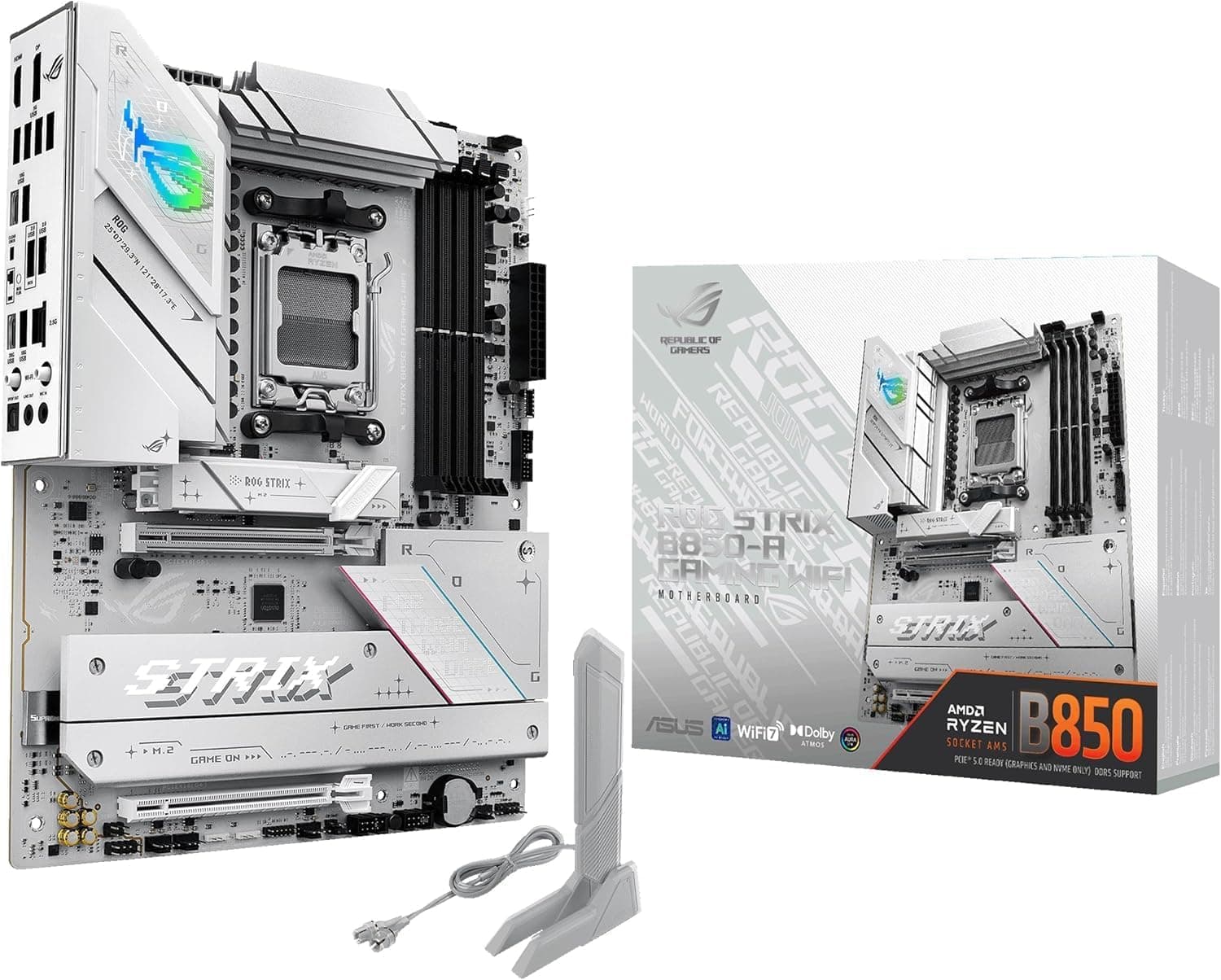
Overview
The ASUS ROG Strix B850-A Gaming WiFi is an ATX motherboard for the AMD AM5 platform, supporting Ryzen 9000, 8000 and 7000 series processors. It combines a 14+2+2 power stage design with large heatsinks, DDR5 memory, PCIe 5.0, WiFi 7 and 2.5Gb Ethernet on a single board.
The short version: if you are building a new high-refresh gaming PC around a Ryzen 7 or Ryzen 9, with one PCIe 5.0 graphics card and one Gen5 M.2 SSD, this board covers everything you need without obvious gaps.
It is equally clear who should look elsewhere: anyone hoping to reuse DDR4 memory, anyone building around a Ryzen 5 on a tight budget, and anyone targeting a small mATX or Mini-ITX case. The reasons are spelled out later.
| What you want to know | Answer |
|---|---|
| Supported CPUs | Ryzen 9000 / 8000 / 7000 (AM5) |
| Memory | DDR5 only, up to 192GB (no DDR4) |
| Graphics slot | PCIe 5.0 x16 |
| M.2 slots | 4 (1x PCIe 5.0, 3x PCIe 4.0) |
| Networking | WiFi 7 + 2.5GbE (Intel) |
| CPU power | Dual 8-pin ProCool |
| Recommended PSU | 750W or higher |
| Form factor | ATX |
Three rows matter most during the actual build: DDR5 only, just one of the four M.2 slots is Gen5, and the 750W recommendation.
The silver-white PCB pairs cleanly with light-coloured cases, and Aura Sync ties the lighting together.
Compatibility Guide
CPU. The socket is AMD AM5, covering Ryzen 7000, 8000 and 9000 desktop parts.
Pins sit in the socket rather than on the chip, so handle the socket carefully during installation. Pairing a newer CPU generation with an early board stock may require a BIOS update first, so check the retailer's BIOS status if you have no spare CPU to boot with.
Memory. DDR5 only; DDR4 modules will not physically fit.
Maximum capacity is 192GB across four slots. In practice two sticks hold high clocks most reliably, while four sticks often need a speed reduction to stay stable.
AMD EXPO and ASUS AEMP make profile tuning a one-click affair, but if you plan a four-module build, check the ASUS QVL first.
CPU cooler. AM5 keeps the same mounting hole spacing as AM4, so many AM4 coolers carry over.
Confirm with your cooler manufacturer's compatibility list before assuming a reused cooler will fit.
Case. ATX means a mid-tower or larger.
Verify that every standoff is present before mounting; a missing one lets the board flex when a heavy GPU is installed. Wide ATX boards also eat into cable-routing space behind the tray, so check case width if you care about tidy wiring.
Power. CPU power uses dual 8-pin ProCool connectors.
A PSU offering only a single 8-pin leaves no headroom with a Ryzen 9 under sustained load. The recommended supply is 750W or more, assuming a Ryzen 9 and a high-end GPU; follow your GPU vendor's own requirement for auxiliary connectors.
Storage. Four M.2 slots, but only the CPU-attached M.2_1 runs at PCIe 5.0 x4; the other three are PCIe 4.0 x4 through the chipset.
Gen5 drives run hot, so always fit the supplied heatsink. As on most boards, populating certain M.2 slots can disable SATA ports or limit lower PCIe slots - read the lane-sharing table in the manual before planning a multi-drive setup.
Networking and USB. WiFi 7 and Intel 2.5GbE are built in.
WiFi 7 needs a matching router plus current OS and driver support to deliver its full rate, and 2.5GbE drops back to 1GbE if your switch does not support it.
USB Type-C tops out at 20Gbps and 10Gbps - this is not USB4 or Thunderbolt 40Gbps. Check the front-panel header speed in the manual if your case has a Type-C port.
Product Info
Launched in early 2025, the ROG Strix B850-A Gaming WiFi sits in the upper mid-range. The listed price was JPY 69,687 on Amazon.co.jp, captured 31 August 2026 - treat that as a point-in-time figure, since motherboard pricing moves with exchange rates and sales.
Note that the entry recorded as "Amazon US" points at the same Japanese listing and the same yen figure, so it is not usable for international price comparison. The eBay entry returns a search listing rather than a price.
Check the retailer's page for the latest user reviews. With a few hundred ratings, the average is not easily skewed by outliers, though it does blend launch-period units with current stock - time-specific issues such as early-BIOS memory quirks get buried in the average.
Reading a handful of the newest reviews is worth the minute it takes.
The 14+2+2 DrMOS VRM leaves ample headroom even for a Ryzen 9. Feature-wise you get ASUS AI Advisor for guided tuning, AI Networking II for traffic prioritisation, and AEMP for simplified DDR5 profiles.
Warranty is the standard three years from ASUS, though the service path can differ by purchase channel - confirm at checkout.
How It Compares
Versus B650 boards. A budget B650 will run the same Ryzen 9000 CPU.
The difference lies in how far PCIe 5.0 reaches and how current the networking is.
Here the x16 slot is Gen5, one M.2 is Gen5, and WiFi 7 plus 2.5GbE are onboard.
Many B650 boards stop at PCIe 4.0 for graphics and WiFi 6E.
You are paying for headroom that pays off at your next GPU or SSD upgrade, not today.
Versus X870 boards. Step up mainly for extra PCIe lanes and 40Gbps-class USB.
Since this board's Type-C ports are 20Gbps and 10Gbps, heavy users of external high-speed storage or USB4 devices should look higher. Everyone else is better off putting that difference into memory or an SSD.
Versus Intel platforms. Against LGA 1700 (Z790) or LGA 1851 (B860) boards, the deciding factor is upgrade longevity: AM5 spans multiple CPU generations on one socket, which favours builders who plan to swap only the CPU later.
Best Use Cases
A new Ryzen 9000 gaming build. PCIe 5.0 for both GPU and one SSD, with a VRM that stays composed under long loads.
Builders who want fast wired and wireless networking. WiFi 7 and 2.5GbE are included, so no add-in card is needed and an expansion slot stays free - useful now that GPUs occupy so much space.
White-themed builds. The silver-white PCB and Aura Sync support suit light-coloured cases, and white boards are a genuinely limited field.
Anyone planning a CPU-only upgrade later. That is the core argument for AM5 in the first place.
Less suitable for: DDR4 reusers, Ryzen 5 budget builds, small-form-factor cases, and anyone who needs more than one full-speed Gen5 SSD.
Things to Consider
Only one M.2 slot is Gen5. This is the most common misunderstanding.
Four M.2 slots exist, but only the CPU-attached M.2_1 runs PCIe 5.0 x4; the rest are PCIe 4.0 via the chipset.
If you want two or more Gen5 drives at full speed, this board cannot deliver it. One Gen5 plus several Gen4 drives, on the other hand, is well covered.
DDR5 only means buying new memory. Anyone moving from DDR4 replaces board, CPU and memory together.
Budget for all three, not just the board.
The VRM is overkill for many buyers. With a Ryzen 5 or a mid-range Ryzen 7, that 14+2+2 headroom mostly goes unused, and a cheaper B650 board would feel the same in games.
A stronger VRM does not make frames faster.
Expect a blank screen on first boot. AM5 systems run memory training on first power-up or after a memory change, which can leave you with no video for tens of seconds to a few minutes.
Cutting power at that point restarts the process. Wait it out before reseating anything.
Cable work and aesthetics. Full-width ATX boards tighten rear cable routing, and a white PCB makes black cables stand out - factor white sleeved cables into the budget if looks matter.
The WiFi antenna mounts at the rear, so if the case lives under a desk, keep a wired connection as backup.
Verify the listing yourself. For this product the Amazon listing shows ASUS as manufacturer with a matching ASIN, but the seller and shipper are a marketplace storefront (EFI Global Store JP).
Marketplace purchases can differ in whether the unit is domestic retail stock and where warranty service is handled. Listing metadata - manufacturer, model number, compatibility notes - is also wrong often enough to be worth checking.
Match the product images and the model string (ROG STRIX B850-A GAMING WIFI) before ordering.
FAQ
Q: Can I use a Ryzen 5 8600G with this board? A: Yes.
It supports all AM5 processors including the 8000G series. With the integrated GPU, video output comes from the board's HDMI/DisplayPort.
Q: How many M.2 slots are PCIe 5.0? A: Only the CPU-attached M.2_1 slot runs PCIe 5.0 x4.
The other three are PCIe 4.0 x4 through the chipset.
Q: What is the maximum memory capacity? A: Up to 192GB in DDR5 (48GB modules in four slots).
Four-module configurations often clock lower, so consult the QVL or consider a two-stick setup.
Q: Will DDR4 memory work?
A: No. The board is DDR5 only and the notch position prevents DDR4 modules from seating.
Q: What size PSU do I need? A: 750W or more is recommended for a Ryzen 9 with a high-end GPU.
Actual demand is driven mostly by the graphics card, so cross-check its vendor recommendation.
Q: Can I reuse an AM4 cooler?
A: Usually yes - AM5 keeps AM4's mounting hole spacing - but confirm with the cooler manufacturer's compatibility list.
Product Disclosure (Amazon)
- Manufacturer: ASUS
- Seller: EFI Global Store JP
- ASIN: B0DP5FBV4P
- Note: This article covers a manufacturer-made product based on Amazon listing details.