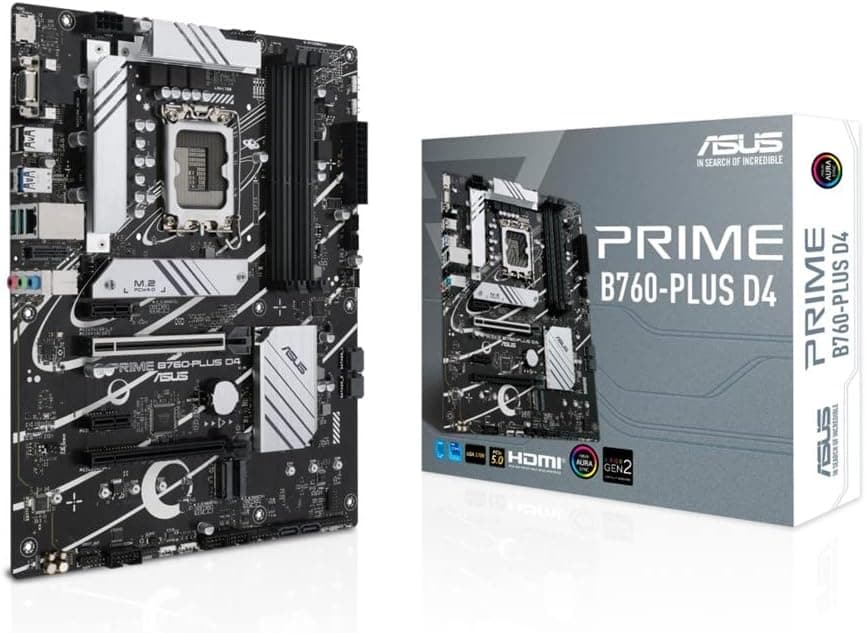
This article covers ASUS Prime B660-Plus D4 Intel LGA 1700 ATX DDR4 マザーボード.
Overview
The ASUS Prime B660-Plus D4 is an LGA1700 ATX motherboard built for 12th Gen Intel Core processors (Alder Lake) and also supports 13th Gen (Raptor Lake) with a BIOS update. It features the Intel B660 chipset and four DDR4 DIMM slots, supporting up to 128GB and memory speeds up to 5000MT/s when overclocked. Expansion includes one PCIe 4.0 x16 slot and three M.2 slots (one PCIe 4.0, two PCIe 3.0).
Connectivity is well covered: a USB 3.2 Gen 2x2 Type-C port on the rear I/O (20 Gbps), Thunderbolt 4 header support, Realtek 2.5Gb Ethernet, and multiple USB 3.2/2.0 ports. The board also includes robust cooling options: VRM heatsinks, an M.2 heatsink, and the PCH heatsink, plus hybrid fan headers and Fan Xpert 2+ software.
The Prime B660-Plus D4 sits in the mid-range segment, offering a strong balance of modern features and affordability by sticking with DDR4 memory while keeping PCIe 4.0 support. It's a solid foundation for a budget-conscious build that doesn't want to sacrifice too much on features.
Compatibility Guide
Socket: LGA1700, compatible with 12th Gen (Alder Lake) and 13th Gen (Raptor Lake) Intel Core processors. A BIOS update is required for 13th Gen CPUs; note that this board lacks BIOS Flashback, so you'll need an existing 12th Gen CPU to update.
Memory: DDR4 DIMMs only, four slots, max 128 GB, overclocked speeds up to 5000 MT/s. No DDR5 support.
Form factor: ATX, 244mm x 305mm. Fits most standard ATX cases. Power connectors: 24-pin ATX + 8-pin EPS12V.
PCIe: One PCIe 4.0 x16 slot (CPU), one PCIe 3.0 x16 (chipset), two PCIe 3.0 x1. Multi-GPU is not officially supported in x8/x8 mode. M.2: One PCIe 4.0 x4 (CPU), two PCIe 3.0 x4 (chipset). All three support both NVMe and SATA SSDs.
Storage interfaces: 4 x SATA 6 Gbps. Rear USB: 1x USB 3.2 Gen 2x2 Type-C, 2x USB 3.2 Gen 2 Type-A, 4x USB 3.2 Gen 1 Type-A, 2x USB 2.0. Front USB headers support additional ports.
Product Info
The ASUS Prime B660-Plus D4 launched in early 2022. Market position: mid-range. It uses the Intel B660 chipset, supports DDR4 memory for cost savings, yet includes PCIe 4.0 and Thunderbolt 4 header support, making it a versatile choice for mainstream builds.
Warranty: Standard 3-year manufacturer warranty (for Japanese market units). Available through major retailers, online retailers, and PC component shops.
Best Use Cases
Budget Gaming PC Builder
If you're aiming for a gaming rig with a 12th/13th Gen i5 processor, this board offers excellent value. DDR4 memory is significantly cheaper than DDR5, and you still get PCIe 4.0 for fast SSDs and modern GPUs. Pair it with an i5-12400F or i5-13400F for a balanced, cost-effective system.
Office / Productivity PC
For a reliable work machine, this board provides ample USB ports, a fast Ethernet connection, and Thunderbolt 4 expandability. It supports up to 128GB RAM for heavy multitasking. The robust power delivery is more than enough for non-gaming workloads.
Upgrader with Existing DDR4 Memory
If you already have quality DDR4 RAM, this board lets you reuse it while moving to a modern platform. This saves money and avoids the need to buy new DDR5 sticks. Just be aware of the BIOS update requirement for 13th Gen CPUs.
Things to Consider
DDR4-only limitation: As DDR5 becomes more common, choosing a DDR4 board locks you out of future memory upgrades. If you plan to keep the system for many years and want the latest memory standard, look for a DDR5 B660/B760 board.
No PCIe 5.0: The board lacks PCIe 5.0 support for both GPU and storage. Current gen GPUs still run fine on PCIe 4.0, but future PCIe 5.0 SSDs will be limited to PCIe 4.0 speeds. Only an issue if you need cutting-edge storage bandwidth.
BIOS update requirement: Updating to support 13th Gen CPUs requires a 12th Gen CPU in hand. If you buy a 13th Gen CPU from the start and don't have an older chip, you may be stuck. Some retailers offer BIOS update services; check before purchase.
VRM capability: While the VRMs are adequate for i5 and some i7 chips, running a high-power i7-13700K or i9-13900K long-term could stress the power delivery. This board is best suited for i5-class CPUs.
FAQ
Q: Can I use a 13th Gen Core i7-13700K with this board?
A: Technically yes, with a BIOS update. However, the VRM design is not optimized for high power draw over long periods. For sustained workloads, you may experience thermal throttling. An i5-13600K is a safer choice.
Q: Does this motherboard support Thunderbolt 4 out of the box?
A: It has a Thunderbolt 4 header, but you need to install an add-in card (like the ASUS Thunderbolt EX4) to use Thunderbolt 4. The rear USB-C port is USB 3.2 Gen 2x2 only, not Thunderbolt.
Q: Can I run dual GPUs?
A: The board has two PCIe x16 slots, but the second slot runs at PCIe 3.0 x4 (via chipset). For dual GPU gaming or compute, that bandwidth is insufficient. This board is intended for single GPU setups.
Product Disclosure (Amazon)
- Manufacturer: ASUS
- Seller: gmj4
- Fulfilled by: gmj4
- ASIN: B09P3TTXPT
- Note: This article covers a manufacturer-made product based on Amazon listing details.