This article takes a close look at the Keychron K1 Version5 — Slim wireless mechanical keyboard without numpad. Based on the spec data and the Amazon listing, it focuses on whether it will work in your setup, where the trade-offs are, and the problems buyers tend to discover after purchase.
Overview
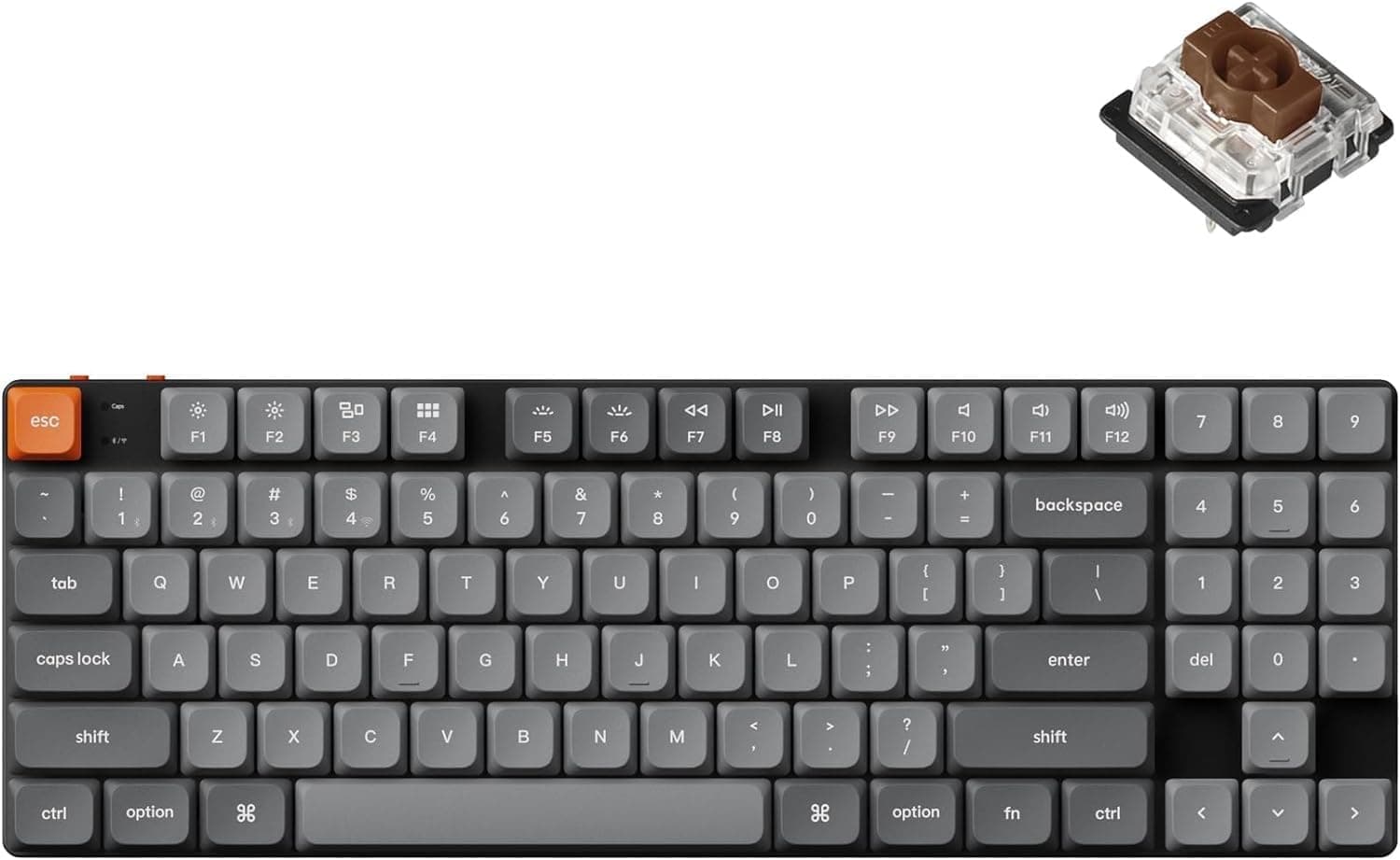
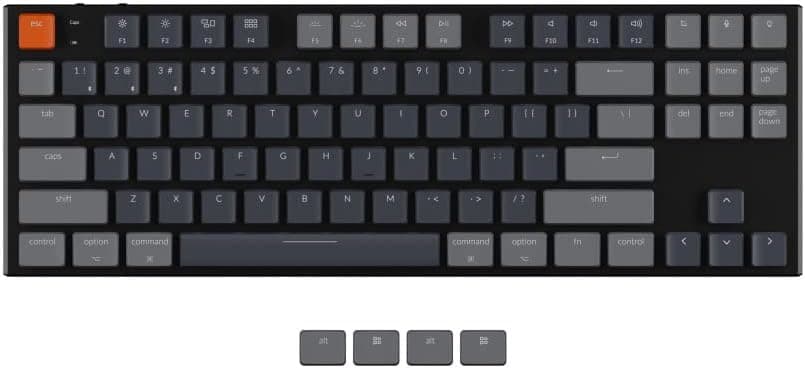
The short answer: the Keychron K1 Version5 is for people who want a thin, portable mechanical keyboard that works natively with a Mac and can switch between several devices. It is 17mm thick, weighs about 510g, and uses low-profile Gateron mechanical switches (tactile brown) in a tenkeyless, 87-key layout.
It also has clear limits for some uses: the layout is US ANSI, and wireless mode is capped at 6-key rollover.
It connects over wired USB-C or Bluetooth, and Bluetooth can store up to three devices. A slider on the side switches between Mac and Windows key mappings, and the keyboard also works with iOS and Android tablets and phones.
It shows its strengths best when one keyboard covers a Windows PC at work, a Mac at home, and an iPad.
The switches are rated for 50 million keystrokes. Low-profile switches have shorter travel and lower keycaps than standard mechanical switches, so your fingers move less.
The trade-off is a shallower feel, and that is where opinions on this keyboard split.
How It Differs from Standard Mechanical Keyboards
| Item | Keychron K1 Version5 | Typical full-height mechanical |
|---|---|---|
| Thickness | 17mm | Taller, often used with a palm rest |
| Key travel | Short (low-profile) | Longer |
| Keycaps | Mostly low-profile specific | Wide choice of MX-compatible sets |
| Portability | About 510g, fits in a bag | Mostly desk-bound |
| Layout | Tenkeyless, 87 keys, US | Varies (JIS available on some) |
The K1 Version5 keeps a mechanical feel while cutting height and weight. The low body keeps your wrists at a gentler angle even without a palm rest, which is a real benefit of slim keyboards.
It gives up customization in exchange. If you like swapping keycaps for looks, your options shrink considerably.
How you rate this keyboard depends largely on whether you want a mechanical keyboard as a hobby or just a slim mechanical keyboard as a work tool.
Compatibility Guide
Keyboards don't raise socket or power-supply compatibility questions, but many buyers run into problems with layout, connection type, and OS. Here are the key points.
| Check | K1 Version5 spec | Common pitfall |
|---|---|---|
| Supported OS | macOS / Windows / iOS / Android | Linux is not officially listed |
| Connection | USB-C wired / Bluetooth (listed as 3.0) | Wireless is Bluetooth only; the PC needs Bluetooth |
| Rollover | N-key wired, 6-key wireless | Use wired for games with many simultaneous keys |
| Layout | US (ANSI), 87 keys | Symbol positions differ from JIS |
| Dimensions | 335 × 120 × 17 mm | Narrower than full-size, leaving more mouse room |
Bluetooth and your PC. The spec data lists Bluetooth as the only wireless option, with no 2.4GHz receiver.
A desktop without built-in Bluetooth needs a USB Bluetooth adapter. Bluetooth keyboards generally don't work until the OS loads, so use the USB-C cable for BIOS/UEFI screens and boot menus.
Mac and Windows modes. On a Mac, the F1-F12 row closely follows Apple's standard layout, so brightness and volume controls work as expected.
That is a real advantage, because Mac-layout mechanical keyboards are uncommon. On Windows, set the slider to Windows and swap in the included Windows keycaps so the Windows and Alt legends match what the keys do.
US layout. If you are coming from JIS or another regional layout, expect some adjustment.
The US layout has no dedicated IME keys, so Japanese users need an OS shortcut to switch input modes. On Windows, set the OS keyboard layout to English, or the symbols typed won't match the legends.
Rollover and gaming. Wired mode offers N-key rollover, while wireless is limited to 6 keys.
That never matters for normal typing, but for games that hold several keys at once, plan on using the cable.
Product Info
On Amazon.co.jp the price was ¥16,940 as of August 2026 (the same figure was recorded in June 2026).
Prices change with sales and stock, so check the product page for the current price. The Amazon listing shows SUPERKOPEK as both seller and shipper.
As of June 2026, the Amazon rating was 3.6 out of 5 from 9 reviews.
That sample is too small to lean on. With so few reviews, a couple of ratings can move the average a lot, so it's more useful to read what the complaints are about: layout, connection stability, or typing feel.
Key specs:
- Brand: Keychron
- Switch: Gateron mechanical (tactile brown), low-profile
- Layout: Tenkeyless (87 keys), US ANSI
- Connection: USB-C wired / Bluetooth 3.0 (as listed)
- Backlight: 18 RGB modes
- Switch durability: 50 million keystrokes
- Dimensions: 335 × 120 × 17 mm
- Weight: About 510g
- Rollover: N-key wired / 6-key wireless
- Included: USB-C cable, partial set of Windows keycaps, user manual
It sits in the entry-to-mid range of low-profile mechanical keyboards. Slim wireless models from gaming brands usually promote fast proprietary wireless.
The K1 Version5 instead focuses on Bluetooth multi-device use and Mac support, which makes it a work-oriented keyboard.
Who Should Buy
- Mac users who want a mechanical keyboard: The function row matches the Mac layout, and the slim body looks natural next to a MacBook. Few mechanical keyboards are designed around the Mac, so this one stands out.
- Multi-device users: Up to three Bluetooth devices, so one keyboard can cover a work PC, a personal tablet, and a phone.
- Long-session typists: Short key travel means less finger movement, which suits writers and programmers.
- Mobile workers: At 17mm and about 510g, it fits in a laptop bag for cafés and co-working spaces.
- People already used to US layout: You get all the benefits without any layout adjustment.
Before You Buy
It is not a JIS layout. The listed layout is US ANSI.
The words for official domestic product in the Japanese title refer to authorized distribution in Japan, not a Japanese layout. Buyers who assume otherwise are a common source of disappointment.
Brown switches are not silent. Brown switches signal actuation with a small tactile bump partway down.
They don't make the click of blue switches, but bottom-out and return sounds are still louder than on a membrane keyboard. For quiet offices or shared rooms at night, expect the sound to be noticeable.
If silence is your priority, look for switches marketed as silent.
It is not built for wireless gaming. Wireless mode is Bluetooth only with 6-key rollover.
That is a different design goal from gaming keyboards that emphasize response speed. For competitive play, use the cable or consider a gaming model.
Keycap swaps may be limited. Keycaps for low-profile switches often differ from standard MX-compatible keycaps, so off-the-shelf sets may not fit.
If you want to customize, check that compatible keycaps are available first.
Battery life depends on the backlight. It charges over USB-C, and the original listing gives battery life as about 34 hours.
Heavier backlight use shortens that, so check the conditions behind the rated figure on the product page if you plan to keep the lights on.
Confirm the Bluetooth version. The spec data lists Bluetooth 3.0.
Specs can change between production runs under the same product name, so check the current listing if connection stability or power efficiency matters to you.
Check the variant and the listing. Keychron keyboards commonly come in several versions under one name, such as brown or red switches and different backlights.
Before ordering, make sure the selected option is tactile brown, tenkeyless, and RGB. Some overseas marketplace listings are priced far from the domestic price, so confirm that you are comparing the same model by its images and title.
Few reviews. With only 9 reviews as of June 2026, treat the average rating as a rough guide at best.
FAQ
Q. How do I switch input languages? A.
The US layout has no dedicated IME keys, so use an OS shortcut. On Windows, set the keyboard layout to English so the symbols match the legends.
Q. Is it good for gaming? A.
Wired mode offers N-key rollover, which is fine for casual play. Wireless is Bluetooth only with 6-key rollover, so it is not suited to competitive games.
Q. Does it work with an iPad or phone?
A. Yes. iOS and Android are supported, and you can pair up to three devices.
Q. Does it work on Linux?
A. Linux is not on the official list. It may work as a standard USB keyboard, but that is not guaranteed.
Q. Are the brown switches loud? A.
They are quieter than clicky blue switches but louder than membrane keys. If you type in a quiet place, compare it with silent-switch models.
Summary
For people who need all three of slimness, Mac support, and multi-device switching, the Keychron K1 Version5 has few direct alternatives. If you can't compromise on a JIS layout, a numpad, serious wireless gaming, or quiet typing, you will likely be happier starting with a different keyboard.
Product Disclosure (Amazon)
- Manufacturer: Keychron
- Seller: SUPERKOPEK
- Fulfilled by: SUPERKOPEK
- ASIN: B0B7DGC78L
- Note: This article covers a manufacturer-made product based on Amazon listing details.