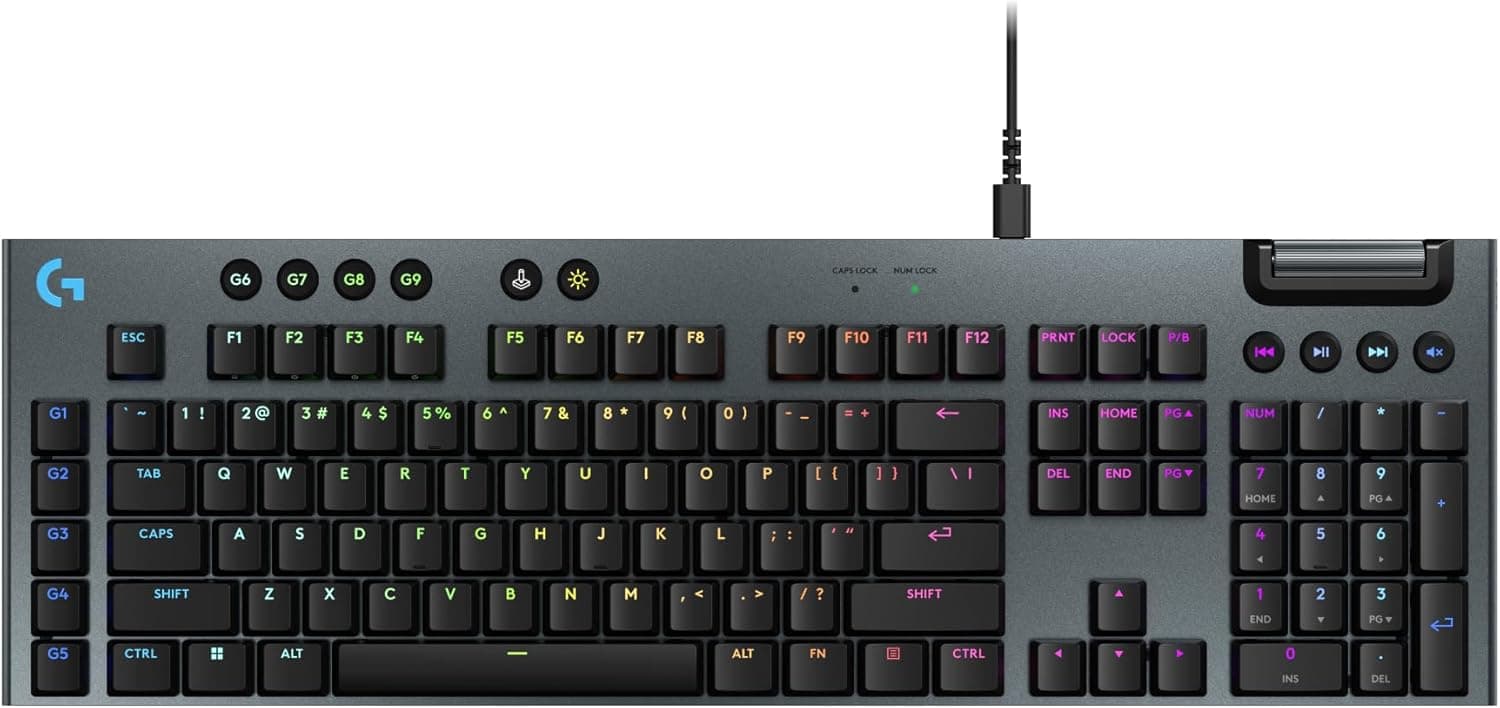
This article covers the product listed on Amazon Japan as 【限定】 Logicool G ゲーミングキーボード G915 X LIGHTSPEED 薄型ワイヤレス G915WLX-LNBK リニア赤軸静かなタイピング日本語配列 Bluetooth 接続対応 LIGHTSYNC RGB ゲーミングキーボードメカニカルキーボード PC mac ブラック国内正規品 ※限定 壁紙ダウンロード付き. Because the name is long, the rest of this article calls it the G915 X LIGHTSPEED, or uses its model number, G915WLX-LNBK.
Overview
Here is the short answer. The G915 X LIGHTSPEED is a premium wireless keyboard for people who want a full-size Japanese (JIS) layout that is thin, quiet, and cable-free.
It is a poor fit if you want to save desk width, change keycaps freely, or keep costs down. This article uses the numbers to show where that line falls.
The G915WLX-LNBK is the black, JIS-layout model with Logicool G's low-profile GL Linear (red) mechanical switches. Its actuation point, the depth at which a key press registers, is 1.3mm.
That is shallower than the 1.5mm of the linear switches in the earlier G915.
The body measures 475mm wide, 150mm deep, and 23mm tall, and weighs about 1,025g. The keycaps are PBT, a plastic that resists the shiny wear marks that build up over time.
You can connect it in three ways: LIGHTSPEED (a 2.4GHz USB receiver), Bluetooth 5.1, or a wired USB-C cable.
Logitech rates the battery at up to 36 hours with RGB on and up to 1,000 hours with RGB off. The backlight offers 16.8 million colors, set key by key.
The listing's 限定 (limited) label appears to mean the edition sold with a wallpaper download, since the full title ends with ※限定 壁紙ダウンロード付き (limited, with wallpaper download). Our data does not show any hardware difference from the regular model.
Check the product page, and if the hardware is identical, buy whichever version is cheaper.
How to Read the Key Specs
| Item | Value | What it means |
|---|---|---|
| Switch | GL Linear (red), low-profile | Smooth press with no bump and no click |
| Actuation | 1.3mm | Registers early; a light touch can trigger a key |
| Size | 475 x 150 x 23mm | Wide, because it includes a number pad |
| Weight | about 1,025g | Stays put on the desk, but not made to carry around |
| Connection | LIGHTSPEED / Bluetooth 5.1 / USB-C wired | LIGHTSPEED for games, Bluetooth for other devices |
| Battery | 36h with RGB / 1,000h without | Charging needs depend heavily on lighting |
| Layout | Japanese full-size (109 keys) | JIS layout with a number pad |
| Keycaps | PBT | Resists shiny wear |
| Warranty | 2 years | Sold as an official Japanese-market product |
Some context the table cannot give: a 1.3mm actuation point on a 23mm-tall body means short finger travel, which makes fast repeated presses easy.
It also makes it easier to trigger a key just by resting a finger on it. At about 1,025g, it is heavy for a low-profile board, which keeps it from sliding while you type.
Compatibility Guide
Supported OS and Connections
Supported systems are Windows 10 or later, macOS 10.14 or later, Chrome OS, and Android.
iOS and iPadOS are not on that list, so if you plan to use it with a tablet, check the product support page before you buy. Most Bluetooth devices can pair with it, but official support covers only the systems above.
LIGHTSPEED Needs a USB-A Port
This is the detail buyers miss most often. The LIGHTSPEED receiver has a USB-A plug, so laptops or mini PCs with only USB-C ports need an adapter or a hub.
You could use Bluetooth or a USB-C cable instead, but for low-latency wireless gaming, an adapter is the practical choice. A receiver plugged into the back of a PC may get a weaker signal.
Moving it closer to the keyboard, for example with an extension cable, usually makes the connection more stable.
Using It With a Mac
The listing mentions Mac, and macOS 10.14 or later is supported.
However, JIS gaming keyboards usually follow the Windows key arrangement. The Eisu, Kana, and Command keys may not sit where they do on Apple's JIS keyboards.
If you mainly use a Mac, plan on remapping keys in G HUB or macOS settings.
Desk and Mouse Space
A width of 475mm is typical for a full-size board, but in shooters with wide mouse swipes, it pushes your mouse farther to the right. On a desk about 100cm wide, measure where the keyboard, mouse pad, and monitor stand will go before you buy.
The 150mm depth and 23mm height are real advantages: the board fits keyboard trays and shallow desks, and it keeps your wrists at a flatter angle.
Software
Macros and detailed RGB settings require Logitech's free G HUB software. Its KEYCONTROL feature lets you assign several actions to a single key.
On a work PC where you cannot install software, expect to go without these features.
Keycap Compatibility
GL switches use their own low-profile design, so standard Cherry MX-compatible keycaps will not fit. If you like swapping keycaps to change the look, you will have very few options.
Battery Life by Usage
The table below uses the rated figures to estimate how often you would charge. Real results depend on brightness and usage.
| Daily use | RGB on (up to 36h) | RGB off (up to 1,000h) |
|---|---|---|
| 3 hours | about 12 days | about 330 days |
| 5 hours | about 7 days | about 200 days |
| 8 hours | about 4 to 5 days | about 125 days |
If you use it for long hours every day with the lights on, expect to charge it once or twice a week. It keeps working over a USB-C cable, so keeping a cable nearby prevents a dead battery from stopping a game.
If charging feels like a chore, turning off RGB or lowering the brightness makes the biggest difference.
Product Info
rmation
When we collected the data on September 25, 2026, the price on Amazon.co.jp was 32,700 yen.
That puts it in the high-end range for wireless gaming keyboards. Prices change often with sales and stock, so check the product page for the current price before you buy.
As of September 2026, the Amazon.co.jp listing had 27 reviews with an average of 3.5 out of 5 stars (70 on a 100-point scale).
With so few reviews, a handful of new ratings can shift the average a lot. Instead of relying on the star average, read what the low-rated reviews complain about, such as the connection, key feel, or software.
Then decide whether those problems would matter to you.
The G915 X was released in 2024 and has a 2-year warranty. It is sold as an official Japanese-market product, so keep your proof of purchase in case you need warranty service.
Check the product page for the full list of what is in the box.
Recommended Users
- Gamers who want low-latency wireless. LIGHTSPEED removes the cable, and the 1.3mm actuation point allows fast input.
- People who game and work on one keyboard. Use LIGHTSPEED for games and Bluetooth for a laptop or tablet. The full-size layout also includes a number pad for entering figures.
- People who want quieter typing. Linear switches have no click, so the board is easier to use in a shared room or late at night.
- People who want a clean-looking desk. The 23mm-thin body and per-key RGB make it easy to tidy up how your desk looks.
Before You Buy
Picking the Wrong Switch or Layout
The G915 X is sold in several versions with different switches and layouts. The G915WLX-LNBK covered here has linear (red) switches and a Japanese layout.
If you want tactile switches with a bump, clicky switches that make noise, or an English layout, check the model number before ordering.
Quiet Is Not Silent
Linear switches are quieter because they have no click, but you will still hear keys hitting the bottom. Do not expect the near-silence of dedicated silent switches.
If keyboard noise on voice chat bothers you, pair the keyboard with noise suppression on your microphone.
Shallow Actuation Takes Getting Used To
The 1.3mm actuation point helps in games, but it causes accidental presses if you rest your fingers heavily on the keys.
Coming from a standard-height keyboard, you may make more typos for the first few days.
It Is Not Tenkeyless
This is a 475mm-wide full-size board. If you mostly play games with wide mouse swipes, a model without a number pad may suit you better.
Limited Customization
Only GL-specific keycaps fit, and our data says nothing about hot-swap support, meaning switches you can pull out and replace. If you enjoy modifying keyboards, an MX-compatible, hot-swappable board will likely satisfy you more.
How to Read the Price and Reviews
The 32,700 yen price at the time of collection would buy several entry-level wired mechanical keyboards. An average of 3.5 stars from 27 reviews suggests that owners are split between satisfied and unhappy.
If thinness, wireless, and quiet typing are not all worth paying for to you, cheaper options deserve a look.
Check the Product Listing
In the data we collected, the overseas price also came from the same Amazon.co.jp page, so this article cannot tell you what it costs outside Japan.
Limited and regular editions may also be sold on separate pages. Check the images, model number, and whether the bonus is included to make sure you are buying the model you want.
FAQ
Q. How is it different from the original G915? A.
One major change is actuation: on the low-profile linear version, it drops from 1.5mm to 1.3mm.
This model has PBT keycaps. Compare the official product pages for smaller differences.
Q. Does it work with a Mac? A.
Yes, with macOS 10.14 or later.
Some keys on the JIS layout sit in different places than on Apple keyboards, so plan on remapping them.
Q. Can I use it while it charges?
A. Yes. Connect a USB-C cable to use it wired, and it keeps working even when the battery is low.
Q. Is Bluetooth fine for gaming? A.
Bluetooth usually has more latency than a dedicated 2.4GHz connection.
Use LIGHTSPEED for competitive games and Bluetooth for typing-focused work.
Q. Is there a version without a number pad?
A. Yes, the G915 X TKL LIGHTSPEED. If your desk is narrow, compare it as well.
Product Disclosure (Amazon)
- Manufacturer: Logicool G(ロジクール G)
- Seller: Amazon.co.jp
- Fulfilled by: Amazon.co.jp
- ASIN: B0DB3RCJXQ
- Note: This article covers a manufacturer-made product based on Amazon listing details.