Overview
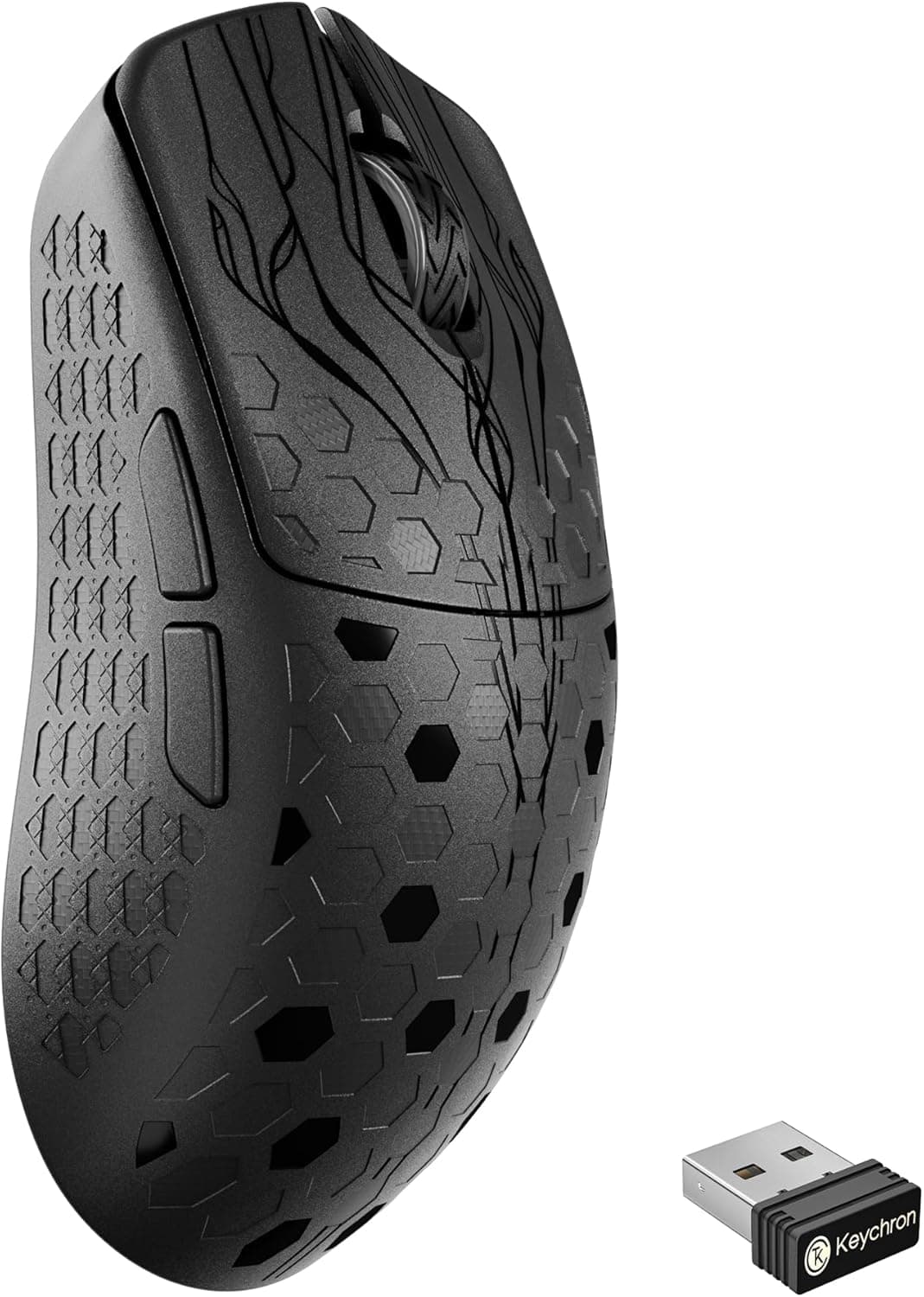
This review covers the Keychron G5 8K — Ultra-light 43g honeycomb wireless gaming mouse. It pairs a 43g body with a PixArt PAW3950 optical sensor (up to 30,000 DPI) and polling rates up to 8,000 Hz, and it is built for competitive play.
In short, it suits FPS players who care most about low weight and high polling rates, and whose PC has headroom to spare. If you prefer a heavier mouse for stability, or you mostly do office work, much of its performance will go unused.
The shell is made from a carbon-fiber composite, and its honeycomb-textured surface aims to balance grip and airflow. It connects three ways: 2.4 GHz wireless, Bluetooth 5.3, and wired USB-C.
It works on Windows, macOS, and Linux. Battery life is rated at up to 162 hours on 2.4 GHz.
It sits in the upper mid-range, with a focus on low weight and polling rate.
You change settings in a browser-based Web Launcher: button mapping, DPI, polling rate, and lift-off distance (LOD). Settings are saved as five profiles in onboard memory, so they come with the mouse when you plug it into another PC.
Key Specs at a Glance
| Item | Value |
|---|---|
| Weight | 43g |
| Sensor | PixArt PAW3950 (optical) |
| Max DPI | 30,000 |
| Polling rate | Up to 8,000 Hz |
| Connection modes | 2.4 GHz wireless / Bluetooth 5.3 / USB-C wired |
| Battery life | Up to 162 hours (2.4 GHz) |
| Programmable buttons | 5 |
| Supported OS | Windows, macOS, Linux |
| Dimensions | 125 x 64 x 39 mm (estimated) |
The dimensions are an estimate, not a confirmed manufacturer figure. Treat them as a rough guide for hand fit, and check the official measurements on the product page before you buy.
Five buttons is typical for an FPS-focused mouse, which makes this a different kind of product from MMO mice with large side-button grids.
What 8,000 Hz Polling Actually Changes
Polling rate is how many times per second the mouse reports its position to the PC. A typical 1,000 Hz mouse reports every 1 ms, while 8,000 Hz reports every 0.125 ms, about one-eighth the interval in theory.
Cursor movement is sampled more finely, so fast flicks and small corrections can feel smoother on a high-refresh monitor.
What gets shorter is the reporting interval. Your aim does not improve by itself.
On a 60 Hz or 75 Hz monitor the difference is hard to notice. Realistically, this feature starts to matter at 144 Hz and above, ideally 240 Hz or more.
More reports per second also means more CPU work, and depending on your hardware and the game, that can cause frame-rate swings or stutter.
The Keychron G5 8K lets you set the polling rate anywhere from 125 to 8,000 Hz in the Web Launcher. You can start at 8,000 Hz and step down to 4,000, 2,000, or 1,000 Hz if things become unstable, which matters for any mouse with this feature.
Compatibility Guide
The G5 8K works on Windows, macOS, and Linux. For 2.4 GHz wireless, the included dongle plugs into a USB-A port.
Wired mode uses a USB-C cable. The mouse reportedly works without drivers, and the Web Launcher is only needed for detailed settings.
Common pitfalls:
| Check | What to confirm |
|---|---|
| USB-A port | The dongle is USB-A. USB-C-only laptops and tablets need an adapter |
| 8,000 Hz use | A 2.4 GHz dongle feature. Don't expect the same rate over Bluetooth |
| USB hubs and front ports | At 8,000 Hz, hubs tend to cause instability. Plug straight into a rear motherboard port |
| CPU load | Older or low-power CPUs may show noticeable load at 8,000 Hz |
| Settings tool | The Web Launcher runs in a browser. Check the product page for supported browsers |
Bluetooth 5.3 is handy when you don't want a dongle in your laptop or tablet, or for office work.
In general, though, Bluetooth has lower polling rates and more latency than a 2.4 GHz dongle.
For gaming, use the dongle or a cable.
The distance between the dongle and the mouse matters too. A dongle in the back of a PC under the desk can be blocked by the case or desktop, causing dropouts or cursor jumps.
An extension cable that brings the dongle up onto the desk, close to the mouse, usually helps, especially at 8,000 Hz. Use a plain extension cable rather than a USB hub.
On Linux, basic mouse input works fine. Whether the Web Launcher can change settings depends on your browser.
Because settings live in the mouse's onboard memory, you can set it up once on Windows or macOS and then use it on Linux.
Product Info
The Keychron G5 8K is a lightweight wireless gaming mouse from Keychron. On Amazon Japan, the manufacturer is listed as Keychron, and both seller and shipper are an import retailer (輸入品専門店|Hawaii Store).
It is sold by an import seller, not an official domestic distributor.
The price has varied a lot by capture date. On Amazon Japan it was ¥36,313 as of June 15, 2026, and ¥27,313 as of August 27, 2026.
That is a drop of about ¥9,000 in two and a half months, which shows how much import prices move with exchange rates and stock. Prices also change with sales and seller turnover, so check the current price on the product page before buying.
There are listings on overseas marketplaces too. However, the price we captured there was far out of line with the Amazon Japan price, and we could not confirm it was the same product in the same condition, so we have left that figure out.
If you import one, compare shipping, duties, and warranty terms as well.
Amazon Japan showed 5 reviews averaging 5.0 out of 5 as of June 17, 2026.
The score is perfect, but the sample is small. Long-term durability, battery aging, and unit-to-unit variation are still unknown.
According to the listing, the box includes the 2.4 GHz dongle, a USB-C cable, and spare mouse feet.
The dongle reportedly stores inside the mouse, so it is harder to lose when traveling. Keychron's standard warranty is one year, but for imported units the support contact and terms may differ from domestic retail units.
Comparison with Rivals
Here is how it compares with other lightweight mice we cover, based on what each product title states.
| Product | Weight | Polling / DPI |
|---|---|---|
| Keychron G5 8K | 43g | Up to 8,000 Hz / 30,000 DPI |
| Keychron G3 | 44g | 8,000 Hz |
| Redragon M916AK | 42g | 26K DPI |
| ATTACK SHARK V5 8K | Ultra-light (check product page for spec) | 8K polling |
All of them weigh in the low 40s, so weight alone doesn't separate them. Keychron's own G3 has a similar setup (carbon fiber, 8,000 Hz, tri-mode), so compare shape and detailed specs on the product pages to choose between the two.
Redragon and ATTACK SHARK are worth a look if you want to spend less, but sensors and software vary by brand.
Best Use Cases
Competitive FPS players: In theory, 8,000 Hz polling cuts the reporting interval to about one-eighth of a 1,000 Hz mouse. It helps most with fast flicks and fine aim adjustments on a 144 Hz+ monitor.
Running at 8K uses CPU resources, though, so low-end PCs may struggle.
Lightweight-mouse fans: At 43g, it is among the lightest wireless gaming mice. The carbon-fiber composite aims to keep it rigid, so the design balances low weight with strength.
Low-sensitivity players who move the whole arm will notice the handling benefit most.
Multi-device users: With 2.4 GHz, Bluetooth 5.3, and wired modes, you can move between a desktop, a laptop, and a tablet.
Keep the gaming PC on the dongle and the work laptop on Bluetooth.
Tinkerers: The Web Launcher lets you adjust button mapping, DPI (100 to 30,000), polling rate (125 to 8,000 Hz), and LOD. Five onboard profiles store per-game setups, so no software needs to run in the background.
Before You Buy
It may feel too light: If you rely on a heavier mouse to steady your aim, or you play at high sensitivity with fingertip control, 43g can feel twitchy. If you are coming from a mouse over 80g, expect some time to adjust.
8,000 Hz only pays off in the right setup: Without a high-refresh monitor, a capable CPU, and a direct motherboard USB connection, you will see little benefit and may get unstable frame rates. Some games handle high polling rates poorly.
If something feels off, drop to 1,000 or 2,000 Hz and compare.
Check the battery rating conditions: The 162-hour figure is for 2.4 GHz.
Higher polling rates generally use more power, so running at 8,000 Hz full time will shorten it. Check which polling rate the figure assumes, and plan charging with some margin.
Surface care: The honeycomb texture helps airflow and grip, but depending on the shape, grooves can collect skin oil and dust. If your hands sweat, plan to wipe it with a dry cloth or soft brush regularly.
It's an import listing: The current Amazon Japan listing comes from an import retailer, so warranty handling and defect returns may differ from domestic retail units. The price has also moved a lot, from ¥36,313 to ¥27,313 across capture dates.
Check the seller's return and warranty terms, and compare with official domestic stock if it is available.
Dimensions are estimated: The listed 125 x 64 x 39 mm is an estimate. Fit depends on whether you use a claw, fingertip, or palm grip, so confirm against official measurements.
Few reviews so far: The rating is 5.0, but from only 5 reviews (as of June 2026). That is not enough to judge long-term durability.
FAQ
Q. What do I need for 8,000 Hz? A.
The 2.4 GHz dongle.
Beyond that, a direct motherboard USB port (no hub), a reasonably capable CPU, and a 144 Hz+ monitor make the difference easier to feel.
Q. Does it work on a Mac? A.
Yes. macOS is supported over 2.4 GHz, Bluetooth, or cable.
The dongle is USB-A, so USB-C-only Macs need an adapter.
Q. Do I need to install software? A.
Settings are made in a browser-based Web Launcher. Up to five profiles are saved to onboard memory, so nothing has to run in the background.
Q. How long does the battery last? A.
It is rated at up to 162 hours on 2.4 GHz.
Higher polling rates usually shorten this, so charge more often if you stay at 8,000 Hz. Wired mode removes battery concerns entirely.
Q. Can I game over Bluetooth?
A. Casual games are fine. For FPS and other reaction-heavy games, use the 2.4 GHz dongle or a cable.
Product Disclosure (Amazon)
- Manufacturer: Keychron
- Seller: 輸入品専門店|Hawaii Store
- Fulfilled by: 輸入品専門店|Hawaii Store
- ASIN: B0GQH1ZD1S
- Note: This article covers a manufacturer-made product based on Amazon listing details.