Overview
The product covered here, listed as 'SteelSeries ゲーミングマウス有線軽量低遅延 1.35ms 高耐久 8,500DPI' on Amazon Japan, is the SteelSeries Rival 3 Gen 2 wired gaming mouse.
The short verdict: it suits people who want the parts that are hard to fix later (sensor, switches, feet) done right on a budget of about ¥6,000. If you want wireless or a 40g-class ultralight shell, you will be happier looking elsewhere from the start.
It uses a True Move Core optical sensor rated up to 8,500 DPI with claimed 1:1 tracking. Click response is rated at 1.35ms, and the mechanical switches are rated for 60 million clicks.
A lightweight design paired with an ultra-flexible paracord cable aims for low cable drag and a near-wireless feel.
On Amazon.co.jp, as of October 2, 2026, the mouse held 4.5 out of 5 stars across 368 reviews.
With only a few hundred reviews you can't read fine-grained defect trends from them, but the score is strong for this price range.
How to Read the Specs
| Item | Value | What it means in practice |
|---|---|---|
| Sensor | True Move Core (optical) | Works on typical cloth and hard mouse pads |
| Max DPI | 8,500 | Far beyond the 400 to 1,600 DPI range many FPS players use |
| Click response | 1.35ms | Manufacturer figure; how much you notice depends on you and your setup |
| Switch lifespan | 60 million clicks | Years of heavy daily use |
| Cable | Paracord (ultra-flexible) | Holds fewer kinks and drags less than rubber cables |
| Feet | 100% PTFE | Light initial glide and good wear resistance |
| RGB | 3-zone prism RGB | Colors and effects set in SteelSeries GG |
| Connection | USB-A wired | No charging and no wireless latency, but you manage a cable |
What shapes the experience most is how cleanly the sensor tracks, plus the feet and cable, not the DPI ceiling. Even players who run high sensitivity on high-resolution monitors rarely come close to 8,500 DPI.
A bigger DPI number does not make a better mouse.
The 1.35ms click response is a rated figure for the time from press to signal.
Competitive players may care about small delays adding up, but in many situations your monitor's refresh rate and your network matter more. Think of it as 'the mouse won't be your bottleneck' rather than a dramatic upgrade.
Compatibility Guide
You need a USB-A port. The mouse connects only over wired USB-A, so recent thin laptops with only USB-C ports will need a USB-C to USB-A adapter or hub.
Check that you have a free USB-A port before buying.
Treat OS support and software support separately. Basic mouse functions are plug-and-play on Windows, macOS and Chrome OS.
SteelSeries GG, which handles detailed DPI and RGB settings, supports Windows and macOS. On a Chromebook, assume you can't adjust anything in software.
Whether settings are saved to the mouse and carry over to other PCs is something to check on the product page or in SteelSeries' documentation.
Works with desktops and laptops. Both form factors are supported.
If tracking is unstable on a desktop, plugging into a rear port directly instead of a front-panel port or a cheap hub can help.
Bungees and mouse pads. The paracord cable is soft and threads easily through a mouse bungee.
The 100% PTFE feet glide smoothly on cloth pads, but tend to wear faster on hard-surface pads. Spare feet aren't included, so a cloth pad is the safer pairing for long-term use.
Product Info
As of October 2, 2026, Amazon.co.jp listed it at ¥6,036. Prices change with sales and stock, so check the current price on the product page before buying.
eBay only has a search page, and no specific price was captured from it.
The release is reported as late 2025. The warranty is listed as one year from the manufacturer, but terms can vary by retailer and purchase channel, so check the listing.
The box reportedly contains only the mouse itself, with no extra weights or replacement feet.
At around ¥6,000 this sits between entry level and the bottom of the mid-range. Its main appeal is offering light weight, low-latency clicks and durability together at a low price.
Comparison with Alternatives
| Alternative | Connection | Character | Why pick this one instead |
|---|---|---|---|
| 1,000 DPI-class wired office mouse | Wired | Simple, around 3 buttons | You need sensor accuracy and switch durability for gaming |
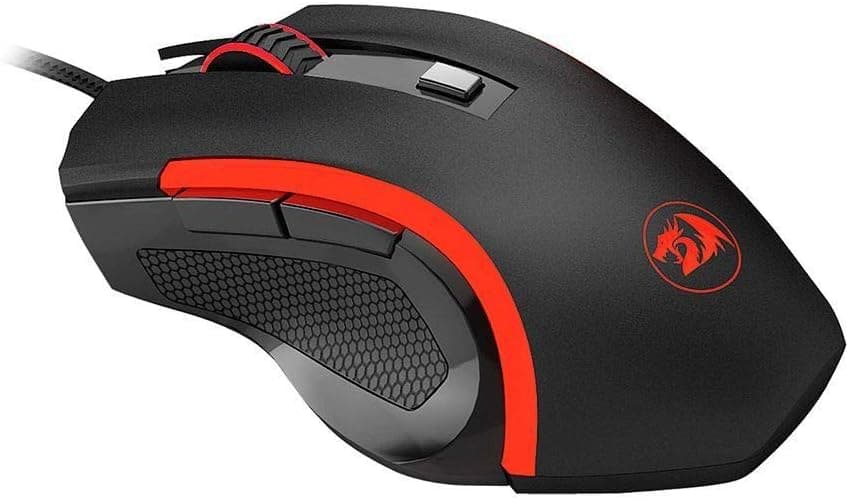
| Redragon M988Storm Elite (85g, honeycomb) | Wired | Lightened with a perforated shell | You want a solid shell that keeps out dust and sweat |
| Keychron G3 (44g, 8000Hz, tri-mode) | Wireless/wired | Ultralight, high polling rate | You want no charging and a lower budget |
Compared with cheap office mice, the difference is sensor tracking and switch durability. Budget sensors can lose track or skip during fast flicks, and avoiding that is what you pay for here.
Against ultralight wireless mice like the Keychron G3, this is the 'safe, wired, well-rounded' option. If weight and wireless freedom come first, look at that class instead.
Best Use Cases
- FPS players buying their first gaming mouse: Low click latency and a well-behaved sensor mean the hardware won't hold back your aim or reactions. The light body helps reduce fatigue over long sessions.
- Budget-conscious gamers: For about ¥6,000 you get the key parts right: sensor, switch lifespan and PTFE feet. RGB and software settings are included as well.
- People who don't want to charge or swap batteries: Wired means no dead battery and no wireless latency worries. On a fixed desktop it is simpler than wireless.
- Mixed work and gaming use: The wide DPI range works well on multi-monitor setups and for design work. Note that the clicks are fairly loud if you need quiet.
Before You Buy
Be sure a wired mouse suits you. The paracord reduces drag, but a cable is still a cable.
If you carry a laptop around or want a clean desk, consider a bungee or a wireless model.
Check the weight on the product page. It is marketed as lightweight, but it is not in the same class as 40g-range ultralights.
Preferences for weight and size vary a lot, so check the exact weight and dimensions on the listing.
The clicks are not quiet. The mechanical switches can be noticeable in libraries or shared rooms at night. This is not a silent mouse.
Detailed tuning needs SteelSeries GG. Custom DPI steps and RGB require the software, which runs on Windows and macOS.
On locked-down work PCs or Chromebooks, expect to use the default settings.
No spare feet in the box. PTFE is durable but still wears out.
If you plan to keep the mouse for years, check whether compatible replacement feet are available.
The listing title doesn't show the model name clearly. The Amazon title is mostly descriptive text and the model number is easy to miss.
To avoid mixing it up with the similarly named original Rival 3 or another color, confirm from the images, the ASIN (B0F5Q7L49D) and the description that you are buying the Rival 3 Gen 2.
Who should skip it: anyone who needs wireless, puts minimum weight above everything, needs silent clicks, or has only USB-C devices and doesn't want an adapter.
FAQ
Q. Do I need 8,500 DPI? A.
Almost nobody uses the maximum. Many FPS players use 400 to 1,600 DPI, so treat the ceiling as headroom.
Accurate tracking at your chosen setting is what matters.
Q. Does it work on a Mac? A.
Yes. Basic functions are plug-and-play, and SteelSeries GG supports macOS.
Macs without USB-A ports need an adapter.
Q. Can I use it with a USB-C-only laptop?
A. Yes, with a USB-C to USB-A adapter or hub. The mouse itself is wired USB-A only.
Q. Can the feet be replaced? A.
No replacement feet are included. When they wear down you will need compatible third-party feet, so check availability in advance.
Q. Is it good for office work? A.
Yes. The wide DPI range makes it easy to move across multiple monitors.
The clicks are fairly loud, though, so a silent model is safer in a quiet office.
Product Disclosure (Amazon)
- Manufacturer: SteelSeries
- Seller: Amazon.co.jp
- Fulfilled by: Amazon.co.jp
- ASIN: B0F5Q7L49D
- Note: This article covers a manufacturer-made product based on Amazon listing details.