Overview
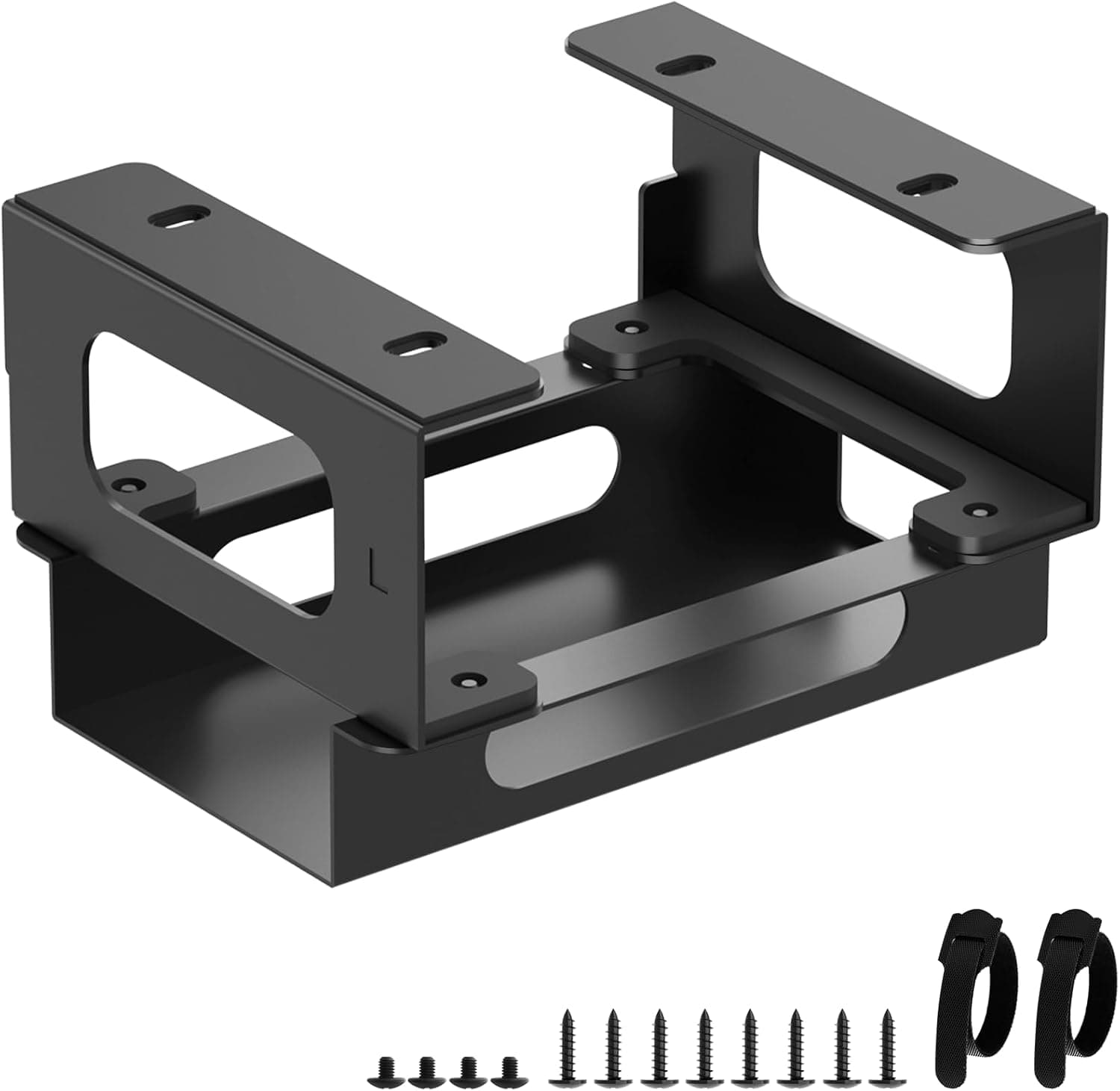
The Bedycoon Under-Desk Mount for CalDigit TS4, TS3 Plus, and TS5 is a steel bracket built for exactly one job: getting a Thunderbolt dock off your desktop and onto the underside of your desk.Check the retailer's page for the latest price.
If you carry your dock between locations, or your desk has a glass top, skip it — the reasons are below.
The bracket is high-strength steel with a corrosion-resistant coating, finished in black. The package contains 3 items and includes 2 cable ties.
The dock and its power brick can be mounted together or separately, which matters because separating them keeps the dock's side vents clear. Amazon.co.Check the retailer's page for the latest user reviews.
Compatibility Guide
Only three docks fit: CalDigit TS4, TS3 Plus, and TS5. The compatibility notes state plainly that the TS5 Plus and TS5+ are not supported.
CalDigit chassis differ in size and shell profile between generations, so a similar name does not mean a similar fit. Check the model number printed on the base or rear of your dock before ordering — assuming "it's a TS5 family unit, so it'll work" is the single most common mistake here.
The mount has no ports, no circuitry, and no cables. It is purely mechanical, so it has zero effect on Thunderbolt bandwidth or power delivery.
Installation means driving the supplied screws into the desk underside, using the adhesive positioning strips to hold alignment before you drill.
| Desk top type | Verdict |
|---|---|
| Solid or laminated wood, 20mm+ | Best case. Drill pilot holes first |
| Particle board with veneer | Works, but pilot holes are mandatory; don't over-torque |
| Metal top or steel frame | Works; may need tapping or rivet nuts |
| Thin tops under 15mm | Not advised — screws may punch through |
| Glass | Not possible |
| Electric sit-stand desks | Possible, but check for control boxes and cable trays first |
As the table shows, the deciding factor is usually the desk, not the dock. Sit-stand desks in particular hide control boxes and cable ducts under the top, so measure the flat free area first and confirm you have the dock's footprint plus a few centimetres of clearance.
Product Info
Both figures are point-in-time snapshots; check the product page for the current price.
Published specs are limited to material (high-strength steel with anti-rust coating), colour (black), compatible docks (TS4 / TS3 Plus / TS5), 2 cable ties, and 3 items in the package. Screw length and supported desk thickness are not published, so if your top is thin, inspect the product images to see what hardware is included.
Warranty terms vary by seller.
Alternatives Compared
- This dedicated bracket — the most secure and least visible option, because the shape matches the dock. Costs you screw holes in the desk.
- Generic under-desk tray — works with any dock and survives hardware upgrades, but takes more space and lets the dock shift around.
- Hook-and-loop or heavy-duty tape — no drilling, but the dock's weight plus stiff Thunderbolt cable tension makes summer drop-offs a real risk.
- Leaving it on the desk — best for heat and for frequent cable swaps. If you have the surface area, there's no obligation to hide it.
Choose the dedicated bracket if you expect to keep the same dock for years; choose a generic tray if your gear rotates often.
Best Use Cases
- Owners of a TS4 / TS3 Plus / TS5 in a fixed setup who want their desktop back. A TS4-class dock plus its power brick eats a real slice of surface area; moving both underneath transforms the look of a monitor-arm setup.
- People doing a one-time cable cleanup. The two included ties bundle the dock's power cable so it stops tangling around your feet.
- Anyone who values easy cleaning. Fewer objects on the top means wiping the desk takes seconds.
- Stationary workers who never take the dock anywhere. This product is optimised for mount-once-and-forget.
Before You Buy
The model number is the biggest trap. Only the TS4, TS3 Plus, and TS5 fit; the TS5 Plus and TS5+ do not.
One extra word in the name is all that separates a working purchase from a return.
You are drilling into your desk. Rented or built-in desks, or a single-slab top you don't want to mark, rule this out.
Tops under 15mm risk screws punching through, and glass is simply impossible. Skipping pilot holes on particle board crumbles the core and leaves the screws with nothing to bite.
Have a drill and a fine bit ready.
Access gets worse. If you regularly carry the dock elsewhere, this is the wrong product — every disconnect means crouching under the desk.
Plugging in USB sticks or SD cards also becomes a blind reach, so check the images beforehand to see which way the front ports will face once mounted.
Heat is manageable, but don't box it in. The open frame ventilates well, yet cramming the dock into a tight cavity traps heat.
Leave a few centimetres of clearance and avoid covering the vents when bundling cables.
Listing data itself can be wrong. The collected data for this product included an unrelated high-end price.
Product pages sometimes carry mismatched registration details or related-item prices. Before ordering, confirm from the images and title that you are buying the bracket only — the dock is not included.
Mistaking this for a dock bundle is the most expensive error available here.
** The 4.8-star average (captured 17 Jun 2026) is encouraging, but with that sample size there is no signal yet on coating wear or thread durability. Inspect the unit on arrival rather than trusting the rating alone.
FAQ
Q. Will it fit the CalDigit TS5 Plus? A.
No. Only the TS4, TS3 Plus, and TS5 are supported; the TS5 Plus and TS5+ are explicitly excluded.
Q. Can I install it without drilling?
A. The adhesive strips are for positioning, not for load bearing. Screws are required.
Q. Can the power brick be mounted too? A.
Yes — together with the dock or separately. Mounting them apart is the safer choice for airflow.
Q. Will the dock overheat under the desk?
A. The open design ventilates well, so normal use is fine. Just keep clearance on all sides.
Q. How many cables can I bundle?
A. Two ties are included. Busy setups will want a few extra hook-and-loop straps.
Q. What does it cost? A.
¥4,122 as captured on 27 Aug 2026, and ¥4,186 as captured on 14 Jun 2026. Both are snapshots — check the product page for current pricing.
Product Disclosure (Amazon)
- Manufacturer: Bedycoon
- Seller: Amazon US
- Fulfilled by: Amazon US
- ASIN: B0FG27DZFC
- Note: This article covers a manufacturer-made product based on Amazon listing details.