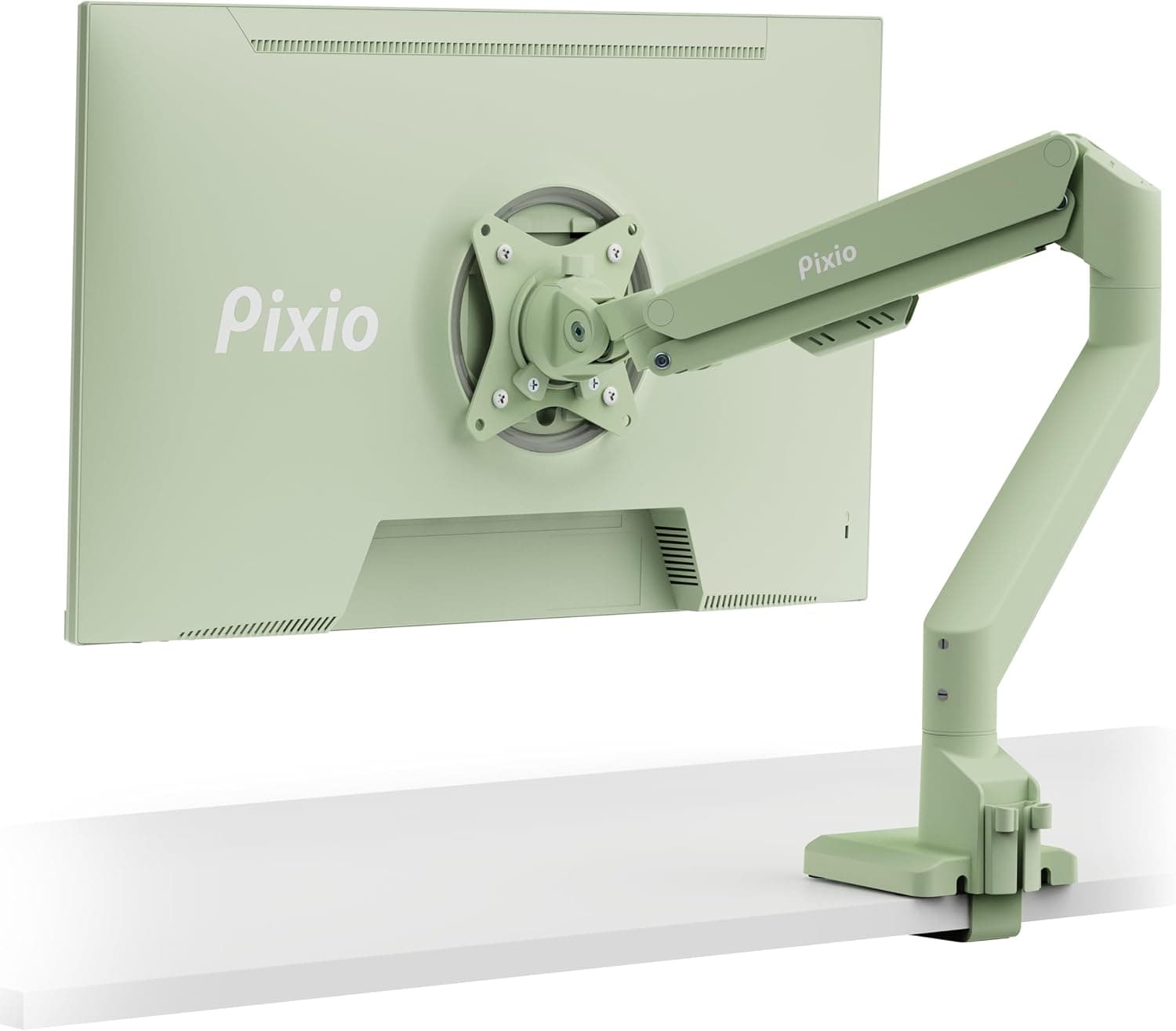
The Pixio PS1S ウェーブミントグリーンシングルモニターアームスタンドデスクマウント (Pixio PS1S Wave Mint Green Single Monitor Arm) is an articulating single-monitor arm rated for displays up to 32 inches and 20 lbs (about 9 kg). This article focuses on what the spec sheet does not tell you: whether it will actually work with your monitor and your desk, and where you will have to compromise.
Overview
The Pixio PS1S positions a single monitor at an ergonomically correct height and angle. It supports VESA 75x75mm and 100x100mm, tilts up to 45 degrees, mounts via C-clamp or grommet, and ships with a plastic cable management tray.
The body is metal, and the color is mint green — which is the product's real differentiator in a category where nearly every option is black, white, or silver.
The short verdict: this arm suits people running a single 24–27 inch monitor who care how their desk looks. It does not suit people planning to mount a heavy 32-inch panel, a curved ultrawide, or a future dual-monitor setup.
The compatibility and caveats sections explain why in concrete terms.
As captured on 2026-09-10, the Amazon.co.jp listing shows 438 reviews at 4.7 out of 5 stars (94% positive).
For a monitor arm, 400-plus reviews at that average suggests most buyers assembled it and it simply worked. What that number cannot tell you is whether it fits your desk thickness or holds your monitor's weight comfortably.
Compatibility Guide
Checking the VESA pattern
Supported patterns are VESA 75x75mm and 100x100mm — the two most common formats on 20–27 inch displays, so most monitors bolt straight on. Problems arise in three cases:
- Curved or sloped rear housings where the VESA plate cannot sit flush. Some monitors need the manufacturer's own spacers.
- Monitors with no VESA holes at all, using an integrated proprietary stand. No arm fits these without a separate VESA adapter.
- Larger patterns such as 200x100mm, common on 32-inch and commercial displays. This arm does not support them.
Measure the center-to-center distance of the rear screw holes before buying. A 75mm or 100mm square is fine.
Weight is the real limit
The 20 lb (≈9 kg) capacity is the number that matters most. Buying a 32-inch monitor just because the arm says "up to 32 inches" is the classic mistake — screen size and weight are separate constraints and you must satisfy both.
| Monitor type | Typical panel-only weight | Fits under 20 lb / 9 kg? |
|---|---|---|
| 24-inch IPS | 3–4 kg | Comfortable margin |
| 27-inch IPS / VA | 4–6 kg | Almost always fine |
| 27-inch high-refresh / HDR | 5–7 kg | Fits, less margin |
| 32-inch 4K / VA | 6–9 kg | At the limit — measure it |
| 34-inch+ curved ultrawide | Often over 9 kg | Likely exceeds capacity |
Running near the ceiling also degrades behavior. An articulating arm balances weight with internal spring tension, so at the top of its range the adjustment window narrows and you get the familiar symptoms: the screen will not stay up, or it slowly sinks after you let go.
In practice, aim for 70–80% of rated capacity — roughly 6–7 kg — for smooth motion.
Mounting to the desk
You get a C-clamp (default) and a grommet option. How to choose:
- A C-clamp needs a free desk edge. Desks pushed flush to a wall, or with a rear modesty panel, may not offer one.
- Desk thickness matters. Typical arms clamp onto 1–9 cm tops; confirm this arm's exact range on the product page. Clamp extenders exist for thick tops.
- Hollow-core tops — the flush-construction particleboard used in many budget desks — can dent or crack under clamp pressure. Add a backing plate of thick plywood or metal.
- Glass tops are not recommended. They crack.
Grommet mounting requires drilling but spreads the load better than a point clamp, which helps with heavier monitors.
Cable management
The included plastic tray routes cables along the arm. A tray is easy to add a cable to later, but it hides less than a fully enclosed channel.
Thick, stiff DisplayPort cables may not all fit — plan on swapping to slimmer cables if you want a clean result.
Product Info
| Spec | Value |
|---|---|
| Max monitor size | 32 inches |
| Max weight capacity | 20 lbs (≈9 kg) |
| VESA patterns | 75x75mm / 100x100mm |
| Max tilt angle | 45 degrees |
| Material | Metal |
| Color | Mint green |
| Mounting type | Tabletop (C-clamp / grommet) |
| Movement type | Articulating |
| Cable management | Plastic tray included |
Price was ¥20,104 on Amazon.co.jp as captured on 2026-09-10.
Sales and point promotions move this figure, so check the listing for the current price. That sits squarely between sub-¥10,000 no-name arms and the ¥30,000 Ergotron LX class.
The 45-degree tilt range is generous enough to follow you between seated and standing postures. The metal construction is a genuine edge over same-price arms that lean on plastic, since it flexes less when loaded near the limit.
Reviews stood at 438 with a 4.7-star average (94% positive) as of 2026-09-10.
At that sample size, a high defect rate would have dragged the score down, so unit-to-unit quality appears consistent.
Product Disclosure (Amazon)
- Manufacturer: Pixio
- Seller: Allure+
- Fulfilled by: Allure+
- ASIN: B0DKH847LJ
- Note: This article covers a manufacturer-made product based on Amazon listing details.
How It Compares
Monitor arms separate cleanly by price tier.
| Tier | Character | vs. Pixio PS1S |
|---|---|---|
| ¥5,000–10,000 | No-name gas-spring arms; big capacity claims, sloppy adjustment, sag over time | PS1S is metal, stiffer, and offered in color |
| ¥15,000–25,000 | Mid-range; rigidity-per-yen | PS1S sits here, differentiated by color |
| ¥30,000+ | Ergotron LX and peers; higher capacity, longer warranty | PS1S trades capacity and warranty for ~2/3 the price |
Practical rule: if your monitor is under 6 kg, this tier is enough. Above 7 kg, spend up.
Capacity is not pass/fail — more headroom means lighter, more precise motion.
Mint green also has almost no competition. If a black arm would clash with a light wood or white desktop, this may be your only real option.
If color is irrelevant to you, the only reasons left are price and rigidity.
Installation Mistakes to Avoid
Weigh the monitor first — panel only, stand removed, not the boxed catalog figure.
Check VESA screw length. Recessed rear housings need longer screws; forcing an over-long screw damages internals.
Simulate the arm's reach before tightening the clamp. Mounted against a wall, the arm cannot swing behind itself and pulls forward less than you expect.
Tension the arm with the monitor attached. Adjusting it empty accomplishes nothing.
Use the included hex key until the screen holds where you release it. 5.
Route cables last, at full extension, so you know the length is sufficient across the whole range of motion.
Best Use Cases
- Remote workers with one 24–27 inch monitor. The weight margin is largest here, and you get the actual ergonomic payoff plus reclaimed desk depth.
- People matching desk aesthetics. Mint green blends with white or pale wood tops far better than black, and it helps if your desk appears on camera.
- Anyone who repositions their monitor often. The articulating design pulls the screen close for gaming and pushes it back for desk work.
- First-time arm buyers. At around ¥20,000, the downside risk is tolerable while avoiding the sag-and-flex problems of budget arms.
Before You Buy
The 20 lb (≈9 kg) limit is stricter than it sounds. If "supports 32 inches" led you toward a 32-inch 4K panel, verify that panel's stand-free weight first.
Most land between 6 and 9 kg — at or over the ceiling. Over the limit, the arm sags; right at it, the adjustment range shrinks and the screen won't hold your preferred height.
Judge by weight, not by size.
Curved ultrawides are a poor match. Beyond the weight issue, a wide panel puts more leverage on the mount, so pressing near an edge produces visible wobble.
For 34 inches and up, buy an arm with real capacity headroom.
Check the desk before the monitor. Hollow-core tops, glass tops, rear modesty panels, and wall-flush placement all break clamp mounting.
Prepare a backing plate for thin or hollow tops, and consider a clamp extender for thick ones. Skipping this check leads to the worst outcome: discovering at unboxing that it cannot be installed.
This is a single arm — you cannot expand it to dual. Adding a screen means buying a second unit or replacing it with a dual arm.
If dual is likely within a year, budget for it now.
Color photographs inconsistently. Low-saturation mid-tones like mint green shift with white balance and room lighting.
Expect some difference from the listing images.
Listing metadata is occasionally wrong. The seller and fulfiller are Allure+, not Pixio directly.
ASIN B0DKH847LJ is the product covered here, but Amazon listings can carry incorrect model, color, or size fields. Confirm from the images and title that you are ordering the Pixio PS1S Wave Mint Green before checkout, and note the ¥20,104 figure was captured on 2026-09-10 and may have changed.
FAQ
Q. Will a 32-inch monitor really work? A.
Only if it weighs 20 lbs (9 kg) or less without its stand. Many 32-inch 4K panels are 6–9 kg, at or past the limit.
Check the panel-only figure; near 9 kg, choose a higher-capacity arm.
Q. Can I use a monitor with no VESA holes? A.
Not directly. A third-party VESA adapter that clamps the existing stand mount can work, but the adapter's own weight counts against the 9 kg budget.
Q. C-clamp or grommet? A.
C-clamp if you rent or don't want to drill. Grommet if your top is thin or hollow, or the monitor is on the heavier side.
Drilling is irreversible, so decide before you commit.
Q. The monitor drifts downward — is it broken? A.
Almost always insufficient tension. With the monitor attached, tighten using the supplied hex key.
If it still sinks at maximum tension, the monitor likely exceeds the rated capacity.
Q. How high can it raise the screen? A.
That depends on the post height combined with arm angle; check the dimension chart on the product page. As a rule, the top of the screen should sit at or slightly below eye level when seated.
Q. What about warranty? A.
Per manufacturer policy. Confirm the term and whether Allure+ or Pixio handles claims at purchase time — it saves effort later.