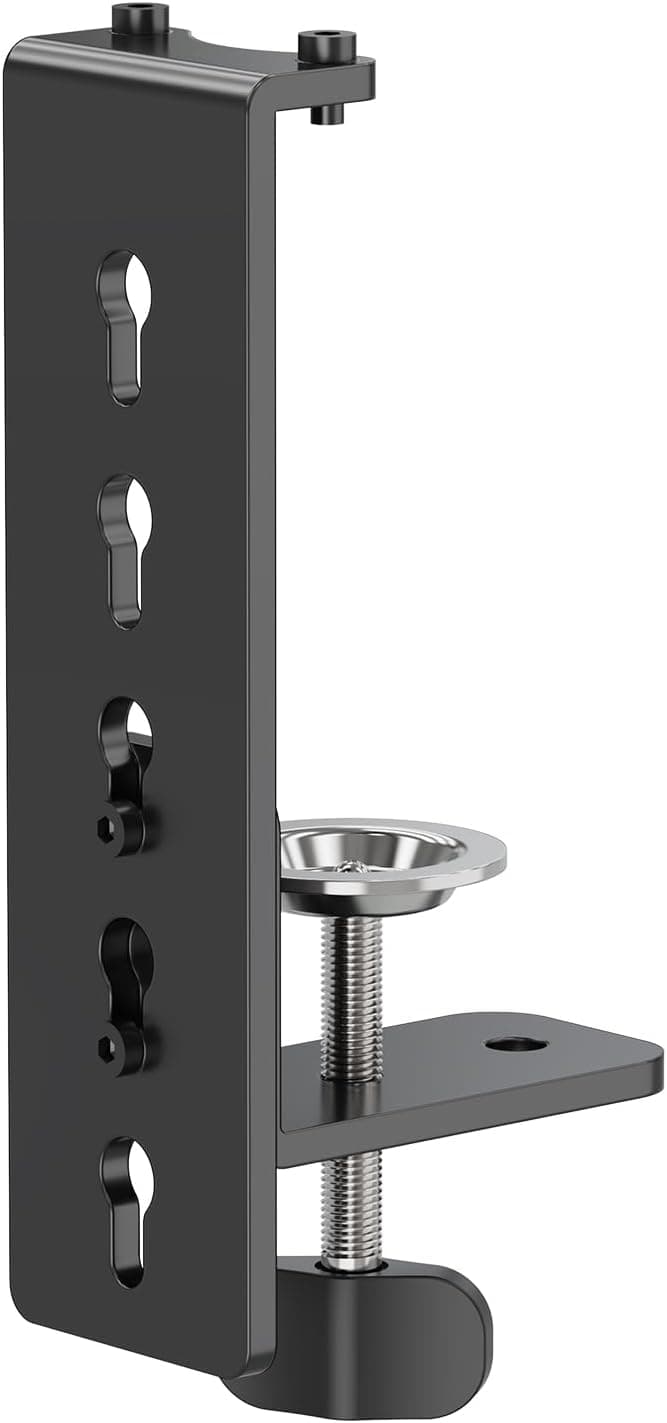
The MOUNTUP Desk C-Clamp Extension is not a monitor arm. It is an add-on clamp part whose only job is to let a MOUNTUP arm you already own grip a desk that is too thick for the stock clamp.
This article covers what the supported thickness range really means, what to measure before you order, and the cases this part will not fix.
Overview
Straight to the point: this product makes sense only if you own (or are buying) a MOUNTUP monitor arm and your desktop is thicker than the stock clamp can handle. It does not extend reach, does not raise load capacity, and does not add any adjustment.
It converts "cannot mount" into "can mount," and nothing else.
The stated range is about 10-152 mm. The body is alloy steel, maximum tilt angle is 90 degrees, and soft pads sit on the surfaces that touch your desk.
On Amazon.co.Check the retailer's page for the latest user reviews.
| Your situation | Verdict |
|---|---|
| MOUNTUP arm + desk too thick for stock clamp | The intended use case. Buy it |
| MOUNTUP arm + stock clamp already fits | Unnecessary. Nothing changes |
| Arm from another brand (Ergotron etc.) | Not compatible. Look for that brand's part |
| Desk over 152 mm | Out of range. Use a freestanding stand |
| No usable clamping lip on the desk | Thickness isn't the problem. Consider grommet mounting |
As the table shows, the deciding factor is not only thickness but whether your desk has an edge a C-clamp can bite into.
Connectivity & Compatibility
The manufacturer states: MOUNTUP monitor arms only, desk thickness 10-152 mm. Three things matter here.
1. It is brand-locked. This is a purpose-built accessory for MOUNTUP arms.
Clamp geometry and post diameters differ between brands, and parts that look similar rarely match dimensionally. Even within MOUNTUP, there is no guarantee every model is covered - note your arm's model number and check the compatibility list on the product page before ordering.
Skipping that check is the single most common failure with accessories like this.
2. Measure the edge shape before the thickness. A C-clamp squeezes the desk edge from above and below, so you need a flat, obstruction-free strip of desk running inward from the edge.
Desks with a support rail immediately behind the edge, beveled desks that thin toward the front, and rounded-edge desks can all be unstable even when the thickness number is in range. Measure three things: thickness at the mounting spot, the flat run behind the edge, and rear clearance between desk and wall for the lower clamp arm.
3. Desk material strength is not part of the spec. Within the supported range, a cheap particleboard or MDF desk can still dent or sag where the clamp concentrates force.
Alloy steel clamps down hard, and weak tops give way. The soft pads prevent scratches and scuffing; do not expect them to prevent compression marks.
A wide backing plate spreads the load if you are worried.
The 90-degree maximum tilt figure suggests tolerance for angled or non-horizontal surfaces, but the spec sheet alone does not define which mounting orientations are actually approved. Check the product page diagrams if you plan an unusual installation.
Product Info
| Item | Value |
|---|---|
| Material | Alloy steel |
| Desk thickness support | about 10-152 mm |
| Max tilt angle | 90 degrees |
| Mounting type | C-clamp |
| Unit count | 1 |
| Desk protection | Soft pads included |
| Color | Black |
The alloy steel choice tells you what this part is for. Extending a clamp also lengthens a lever arm, and plastic or aluminum would flex there.
The weight penalty buys rigidity, which is the right trade-off when the goal is a monitor that does not wobble.
Check the retailer's page for the latest price.co.jp as captured on 12 June 2026**. Two caveats. First, that is on the high side for what is essentially a clamp extension part; prices in this category swing with sales and seller, so check the current figure on the product page before deciding. Second, the record labeled "Amazon US" carries the same yen figure and the same Japanese listing link, so it does not represent an overseas retail price - check regional stores directly if you want to compare.
Unit count is 1. If your arm design clamps at two points, or you run a dual setup with two clamps, you may need two.
Confirm how many clamp points your arm uses before ordering.
Alternatives Worth Comparing
- Official clamp extension (this product) - keeps your existing arm, matches visually, lowest added cost. Brand-locked, and hard-capped at 152 mm.
- Switching to grommet mounting - a bolt through a hole in the desk. Immune to edge shape and very tolerant of thickness, but requires drilling, which rules it out for rented offices or expensive solid-wood tops.
- Freestanding monitor stand - no clamping or drilling at all. Thickness stops being a concern, but it eats desk area and offers less range of motion than an arm.
- VESA adapter brackets - if the problem is on the monitor side (no VESA holes or a non-standard pattern), this extension does not help. That needs a dedicated bracket.
If your conditions match, the official extension is the cheapest and fastest fix. If you expect to switch arm brands later, money spent on a brand-locked accessory is money you cannot carry over.
Installation and Where People Get Stuck
Choose the position first. Moving a clamp later is tedious, so settle monitor placement and cable routing before you commit.
Measure thickness, the flat run behind the edge, and rear clearance. Skipping this is how you end up with a part that will not fit.
Dry-fit before loading. Check the clamp sits square against the desk with no monitor attached.
Tighten gradually. Work up evenly rather than going straight to maximum torque, watching for the desk compressing.
Re-tighten after a few days. Desk material settles, and a clamp that felt solid on day one often needs a nudge within the first week.
Ignore this and the monitor slowly tilts.
Tool-free removal is a genuine advantage if you rearrange often. The flip side is that hand-tight is the working limit, so make checking the clamp a habit with heavier monitors.
Best Use Cases
- Owners of thick desks whose MOUNTUP arm would not fit - the intended buyer, and the best value case since you keep the arm you already bought.
- Solid-wood, DIY, or butcher-block desk users - thickness on these is unpredictable, so budgeting for an extension up front avoids a second order.
- Anyone about to buy a MOUNTUP arm for a thick desk - buying together saves shipping and waiting. Worth considering above roughly 40mm.
- People who rearrange their setup often - tool-free install and removal suits a workspace that changes.
If your stock clamp already fits, if your arm is another brand, or if your desk exceeds 152 mm, this is not for you.
Things to Check Before Buying
Brand lock-in is the big one. This is not a universal monitor arm accessory.
If your arm is from another maker, do not force it on because the dimensions look close - a clamp holding a monitor for years is not the place to improvise.
Six inches is a ceiling, not a recommendation. Near the upper limit the clamp arm is fully extended and leverage amplifies any wobble.
If you plan to hang a large, heavy monitor from a very thick desk, grommet mounting or a freestanding stand will end up more stable than pushing a clamp to its limit.
Judge the price yourself. ¥9,913 was the figure captured in June 2026, which is steep for a clamp extension.
At that level it is worth weighing against replacing the arm or switching mounting methods entirely. Prices move a lot here, so confirm the current one on the listing.
Twenty reviews is a small sample. A 4.5-star average is encouraging, but with that few ratings, unit variation and environment-specific problems get averaged away.
Long-term data on loosening or finish wear is not there yet.
Read the listing details critically. Amazon product metadata is registered automatically and can disagree with the actual item - manufacturer names, model numbers, and compatibility tables included.
Confirm from the product photos, title, and dimension diagrams that this is the part you want. That matters especially here, because this listing is a clamp component only, and buyers sometimes assume an arm is included.
FAQ
Q. Will it work with a non-MOUNTUP arm? A.
Not by design. It is a MOUNTUP-specific accessory.
For other brands, look for that manufacturer's own extension part, or replace the arm.
**Q. My desk is thicker than 152 mm. A. Not with this part. Grommet mounting through the desk, a freestanding stand, or wall/pole mounting are the alternatives. A freestanding stand is easiest if you want no modification.
Q. Do I need tools? A.
Clamping and unclamping is described as tool-free. The included hardware kit may still call for a hex key, so check what ships in the box.
Q. Will it mark my desk? A.
Soft pads on the contact surfaces reduce scratching and scuffing. On a soft top, heavy tightening can still leave a compression mark - add a wide backing plate to spread the load if that concerns you.
Q. Can I use it with a dual monitor arm? A.
If the arm is compatible, yes, but this listing is a single unit. Arms that clamp at two points may need two.
Count your clamp points before ordering.
Q. The monitor started tilting after installation. A.
Early loosening as the desk settles is normal. Re-tighten a few days to a week after install; if that does not fix it, the desk surface itself may be compressing.
Product Disclosure (Amazon)
- ASIN: B0DT39R73F
- Note: This article covers a manufacturer-made product based on Amazon listing details.