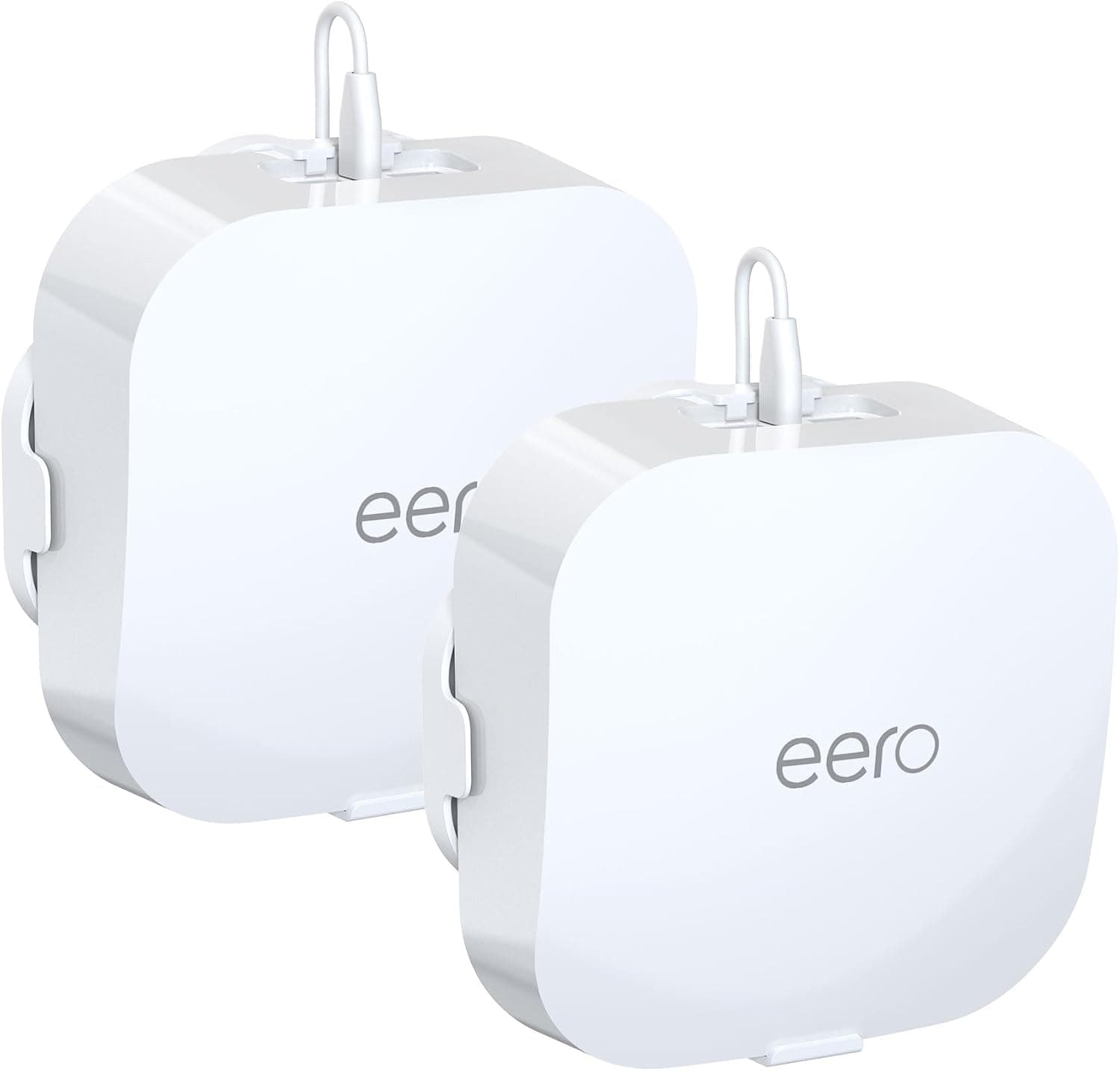
This is a bracket built for one job: getting an eero Pro 6 or eero Pro 6E off the shelf and onto the wall. It is a custom-fit part rather than a universal cradle, and the fact that it ships as a 2-pack tells you it assumes mesh use.
Below: how installation actually goes, what it does and doesn't do to your signal, and who should not buy it.
Overview
The HomeMount ST74-WH-2P is a wall mount for the eero Pro 6 and eero Pro 6E. It's white ABS plastic, two brackets per pack — exactly the unit a two-node mesh household needs.
It fixes with screws rather than adhesive or suction, so there's no slow failure mode where the mount lets go months later.
Think of it as buying placement freedom, not performance. The eero Pro 6 family is designed to sit on a table or shelf, but in real homes shelves are full and floor-level units end up shadowed by furniture.
This bracket removes that constraint.
On Amazon.co.Check the retailer's page for the latest user reviews.
That's a solid sample for an accessory. Worth noting: when products like this get poor ratings, the cause is usually the buyer's wall (drywall with no stud, or a rental that forbids drilling) rather than the bracket.
Check your mounting surface before you check the reviews.
Compatibility Guide
Compatibility is limited to two devices: eero Pro 6 and eero Pro 6E. It does not fit eero 6, eero 6+, eero Max 7, or eero Beacon.
eero changes chassis size and base geometry between models, so "it's an eero, it'll fit" is not a safe assumption. If you're unsure which unit you own, check the model marking on the underside or the device info in the eero app before ordering.
Installation means screws into the wall, and that's the decisive point. Driving screws straight into plasterboard concentrates the weight of the router plus the pull of its power cable on a single point, and it can eventually tear out.
Hit a stud, or use drywall anchors. Brackets, screws and instructions are the typical package contents; whether anchors are included varies, so if your wall isn't timber-backed, buy anchors up front.
On signal: the bracket is ABS plastic, not metal, so it barely attenuates Wi-Fi. The variable that matters is the wall itself.
Mount a node flush against reinforced concrete or a metal-framed wall and coverage on the far side will drop noticeably. Put the node on the wall face that points into the room you actually want covered.
Ports and buttons stay accessible once mounted, so you can plug in Ethernet or hit reset without removing the unit. The power cable routes behind the bracket, keeping visible cabling short.
What you can't move is the outlet — decide your mounting height around the cable reaching comfortably. Drilling first and discovering you need an extension cord is the single most common mistake here.
Product Info
| Item | Detail |
|---|---|
| Material | ABS plastic |
| Colour | White |
| Pack quantity | 2 |
| Compatible models | eero Pro 6 / eero Pro 6E |
| Model number | ST74-WH-2P |
| ASIN | B0D6XVKLD8 |
As captured on 8 September 2026, the Amazon.co.Check the retailer's page for the latest price.
Prices move with sales and marketplace stock, so confirm the current figure on the product page. Overseas marketplace listings exist, but shipping and lead time usually make the domestic listing the simpler choice.
Whether that's good value depends on your comparison. Generic small wall shelves start well below this, and if all you want is "router, but higher", they do the job for less.
What the purpose-built part buys you is a tight fit with almost no visible bracket from the front, and no fiddling with positioning. That's the trade at around ¥4,700 for two.
Release was around 2024, and a one-year seller warranty is typical, though terms vary by seller — the listing takes precedence.
Best Use Cases
- Running two or more eero Pro 6/6E nodes. The 2-pack maps directly onto this. Raising nodes to chest or eye level can clear the furniture shadows that hurt floor-level placement.
- Reclaiming shelf and desk space. In studio apartments or small offices where horizontal surfaces are scarce, the router and its cable disappear from view.
- Homes with small children or pets. Fixed out of reach, the unit can't be knocked down or have its cable yanked.
- Anyone who cares how the cabling looks. Routing the power lead behind the bracket keeps exposed cable to a minimum.
If you run a single node and it already sits high on a shelf, this product buys you almost nothing.
Things to Check Before Buying
Renters should generally skip this. Screw fixing means holes.
That's likely a restoration issue at move-out, and there's no peel-and-remove option as there would be with an adhesive mount. If you want height without drilling, look at tension-pole shelving or a speaker stand instead.
Don't leave the wall survey until install day. Bare screws in plasterboard pull out.
The router is light, but cable tension puts leverage on a single anchor point. Find a stud with a detector, or fit anchors first.
Skipping this step is why these mounts "fall off after a few months".
Don't block heat dissipation. The eero Pro 6 family is passively cooled and sheds heat through the whole chassis.
Mounted flush to a wall, make sure there's open space above it. Avoid dead-air spots — behind curtains, wedged into a bookshelf gap.
Trapped heat is a plausible cause of long-term instability.
"Any eero fits" is false. Pro 6 and Pro 6E only.
If you plan to replace your router soon, expect this bracket to become useless at that point; budget it alongside your hardware cycle.
Cross-check the Amazon listing against the photos and title. Accessory listings in this category sometimes carry compatibility or manufacturer fields that don't match the physical item.
Watch for confusable naming like "eero Pro 6" versus "eero 6 Pro", and listings that bundle several models into one entry. Also note that even where the site category reads "router", this is a mounting accessory, not networking hardware.
What Actually Matters in Daily Use
The real gain from wall mounting is path, not looks. A floor-level router is ringed by sofas, beds and metal-legged tables, all of which block horizontal propagation.
Lifting it above waist height can change what you feel from the same hardware. Be precise about the mechanism, though: the placement improves things, the bracket doesn't add signal.
Since you get two, mount both at similar heights. Nodes that can "see" each other keep a shorter backhaul path.
Mixing one floor-level node with one wall-mounted node is the arrangement to avoid.
FAQ
Q. Will it fit an eero 6 or eero Max 7? A.
No. eero Pro 6 and Pro 6E only.
The chassis shapes differ and forcing it risks damaging the router.
Q. Does it weaken my Wi-Fi? A.
The ABS bracket itself has almost no effect. The wall does.
Concrete or metal-framed walls will cut coverage on the far side.
Q. Can I mount it on plasterboard?
A. With anchors, yes. Don't use bare screws. Hitting a stud is the most reliable option.
Q. Can I still reset it or swap Ethernet cables once mounted? A.
Yes — ports and buttons remain accessible, so no removal is needed for normal operation.
Q. Can I buy just one?
A. It's sold as a 2-pack. For single-node setups, price it against a generic mount before committing.
Q. What does it cost?
A. ¥4,697 for the 2-pack on Amazon.co.jp as of September 2026, but pricing changes often — check the listing.
Product Disclosure (Amazon)
- Manufacturer: HomeMount
- Seller: Amazon US
- Fulfilled by: Amazon US
- ASIN: B0D6XVKLD8
- Note: This article covers a manufacturer-made product based on Amazon listing details.